 CompassDocs
School facilities work orders, maintenance and event setups
A broken heater in room 12, chairs for Thursday’s board meeting, the monthly fire extinguisher check, the band concert in the gym. CompassDocs turns school maintenance requests into tracked work orders, puts event setups on a calendar, opens routine checks on schedule, and holds the procedures custodians follow, for districts and charter schools.
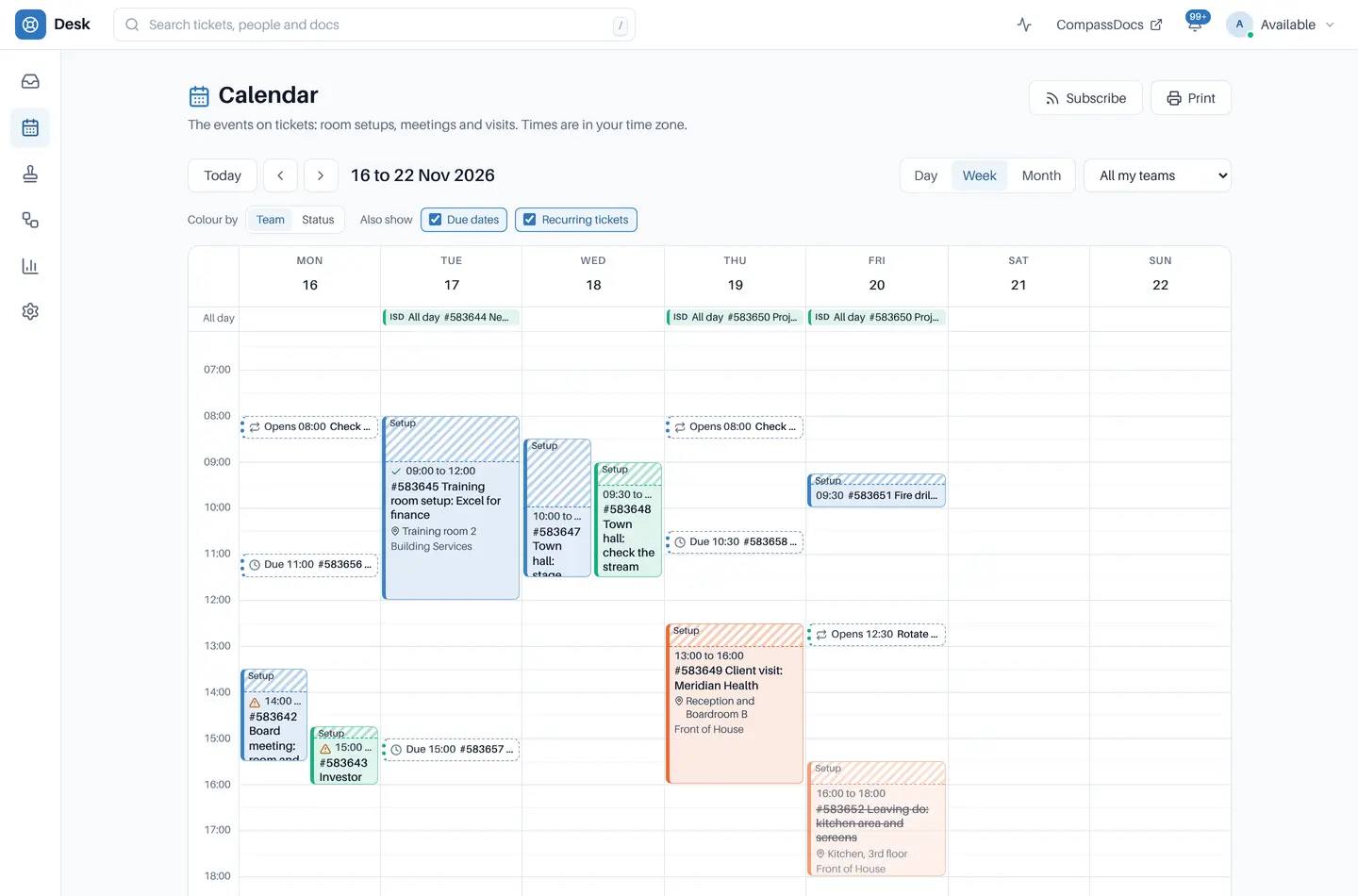
The desk’s calendar: setups with their setup time before each event, due dates and recurring tickets.
School work orders still travel by paper and hallway
Facilities teams cover many buildings with few people, and much of the work is tied to a room and a time.
× A teacher tells the head custodian in the hallway, and the request is gone by lunch.
× The gym was booked for the concert and the basketball game, and nobody knew until 4 p.m.
× Filter changes and extinguisher checks live in one person’s calendar and slip over winter break.
× The water shut-off procedure for each building is in the head of the person who retired.
→ Every request becomes a work order with the campus, the room and the time on it, and the procedure is one search away.
Work orders across campuses
Facilities uses the same helpdesk as IT and HR, with its own team, queue, office hours and request types.
- Request types for repairs, event setups, custodial requests and grounds, each with a short form that says what happens next
- Categories and sub-categories such as Plumbing › Leak or HVAC › No heat, kept in one managed list
- Assignment rules route by the requester’s campus from the directory, by category or by words, and can assign by skill: electrical, plumbing, HVAC
- The desk installs as an app on phones, with push notifications for the maintenance staff who work tickets
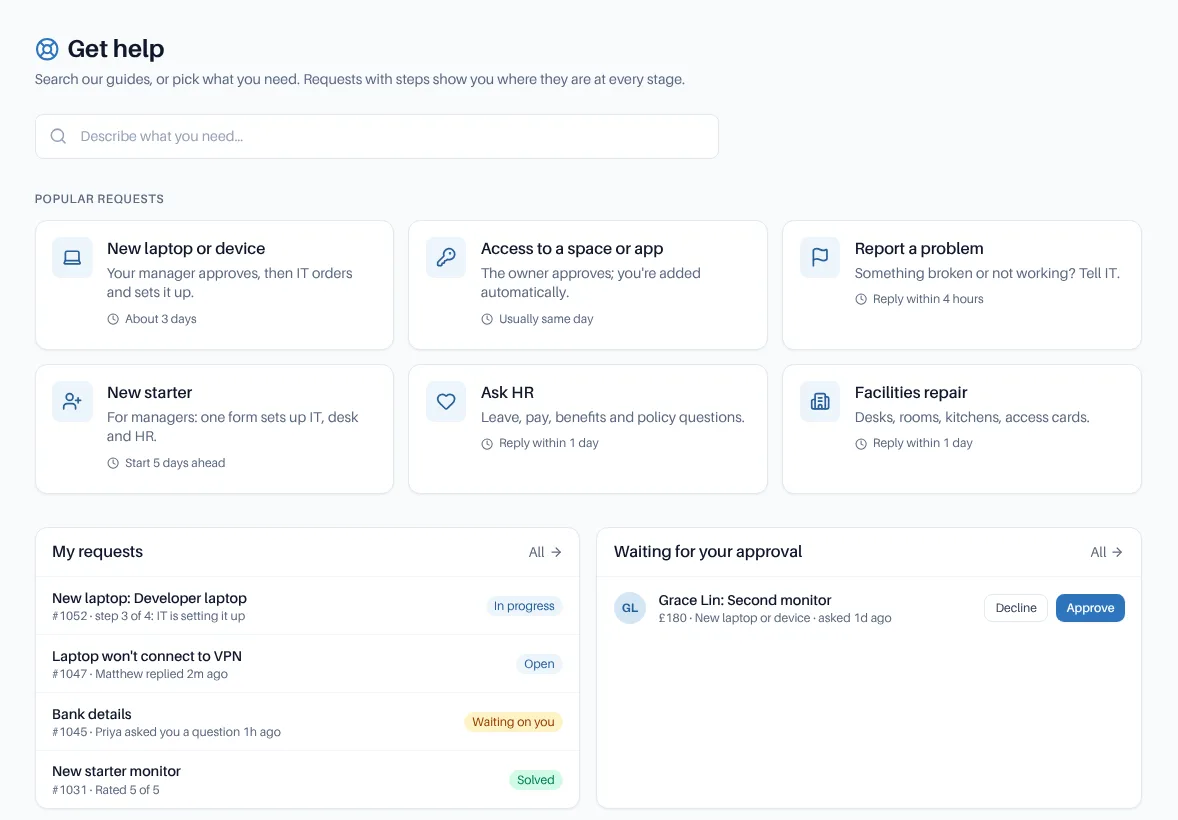
Facilities repairs sits beside IT and HR request types in Get help.
Event setups that happen before the event
Board meetings, open house, testing rooms, concerts, graduation. The event calendar keeps each setup on its ticket instead of a spreadsheet.
- A request type with a Date and time question puts the request on the calendar, with a place (gym, cafeteria, auditorium) and setup time before the start
- Reminders a day and an hour before setup is due; the ticket can’t be solved until setup is marked complete
- A warning when two events share a place and overlap; it never blocks
- A printable day sheet with tick boxes for the evening custodial crew, plus week and month views by team
- Private feed links for Outlook, Google Calendar and Apple Calendar
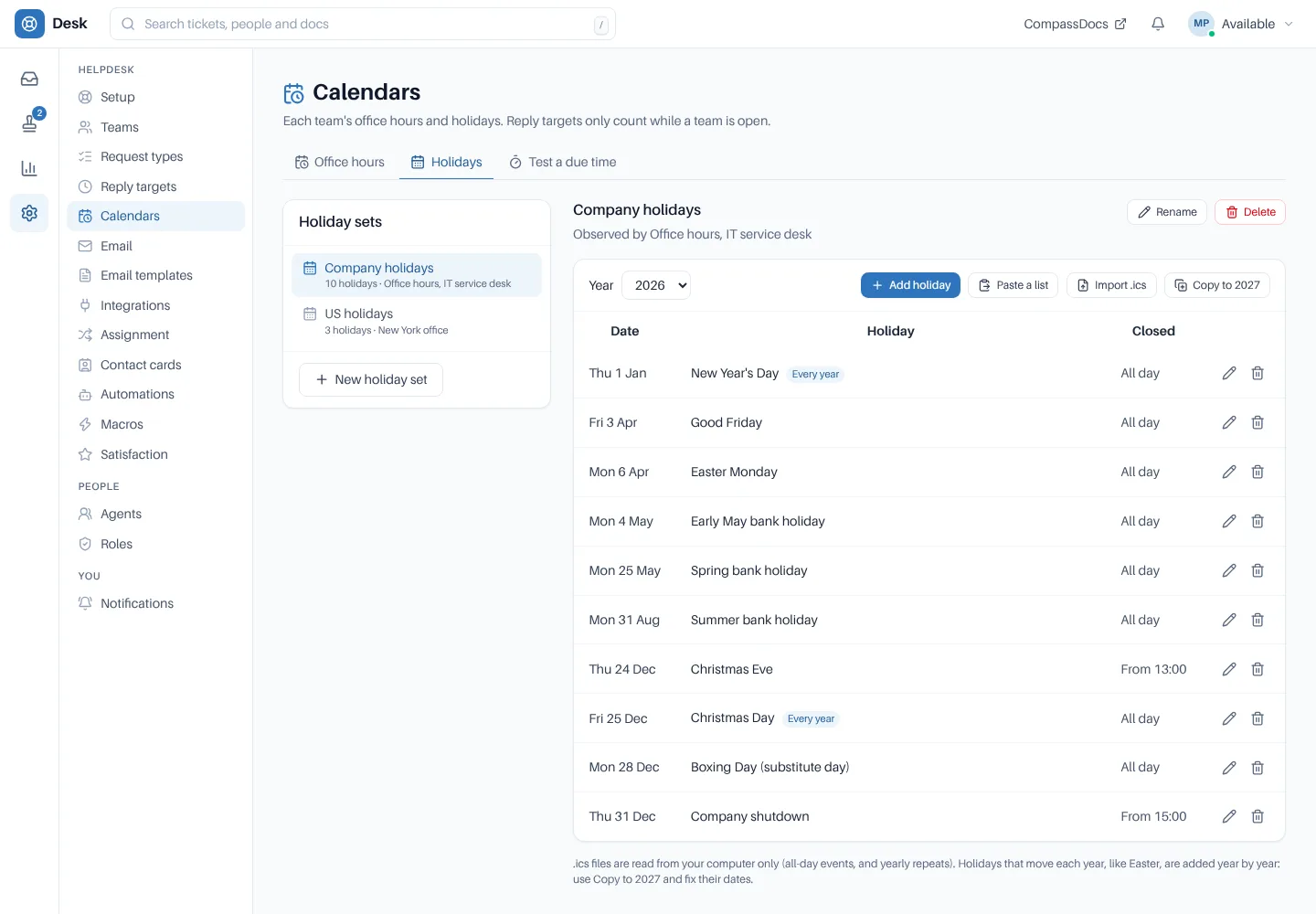
Holiday sets: paste the school year’s breaks or import them from .ics, so targets and recurring tickets follow the calendar.
Recurring maintenance that doesn’t slip over break
- Daily, weekly, on the nth weekday, on a day of the month, in chosen months, or every N days or weeks, at a set time in the team’s time zone
- A holiday moves a run to the next working day, skips it, or is ignored; the editor previews the next three dates
- Give each campus its own schedule; recurring tickets go through the team’s assignment rules and automations, so they land with the right person
- Pair each check with a checklist of required steps, so it can’t be solved half-done
Typical schedules
Extinguisher checks on the first weekday of each month; HVAC filters in September, January and April; a playground walk every Monday.
A record when someone asks
Each run is a ticket with who solved it, when, and which checklist items were ticked, so you can show when a check was done.
SOPs and safety procedures in the knowledge base
The knowledge base is in every edition, including the free Community edition.
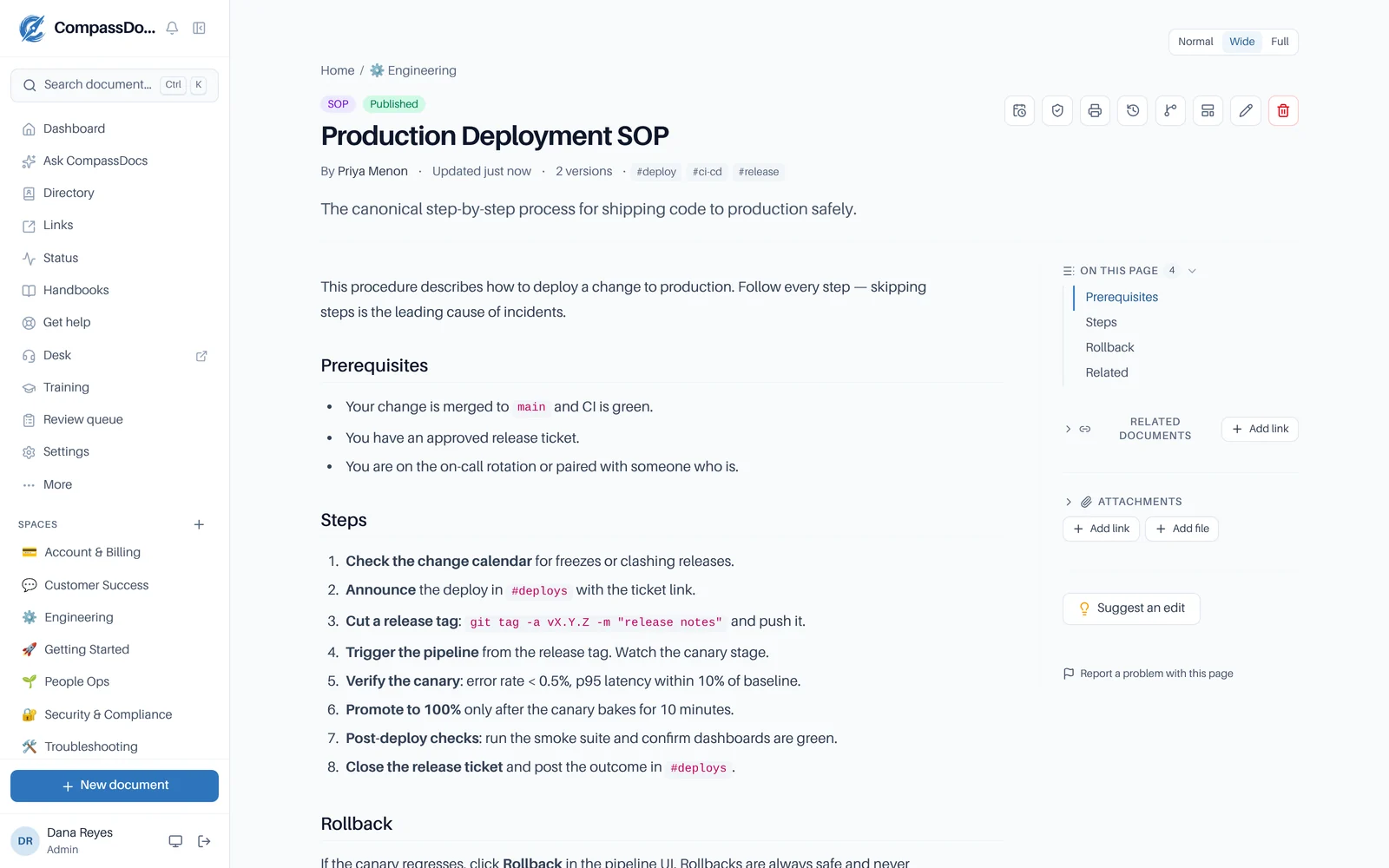
- A Facilities space with an SOP per job: floor care, chemical handling, opening and closing a building, shut-offs per campus
- Start from the built-in SOP template, add checklists and photos, and keep every version
- Give safety procedures a review cadence so they come due before the school year starts
- Gather them into a custodial handbook to read as one and print with an acknowledgement page
- Enterprise read confirmations and training decks with quiz questions record which version each person confirmed
- Staff ask “where is the water shut-off at Lincoln Elementary?” and get an answer from your documents with the source cited (optional AI, your own Anthropic API key)
How facilities uses CompassDocs
The jobs a school facilities, maintenance and custodial team does, the feature for each, and how it works in a school.
| Job | Feature | How it works in a school |
|---|---|---|
| Take work orders from every building | Get help | Staff pick Repair, Event setup or Custodial request and follow it |
| Get the room and the problem the first time | Request types & forms | A form asks for the room and what’s wrong |
| Send work to the right campus and trade | Assignment rules | Match the requester’s campus; assign plumbing to the agent with that skill |
| Approve after-hours setups | Workflows & approvals | The principal approves, then tasks go to custodial and to IT for sound and projection |
| Set up the gym, cafeteria and board room | Event calendar | Place, start and setup time on the ticket, with reminders |
| Keep preventive maintenance on schedule | Recurring tickets | Monthly extinguisher checks, each with a checklist |
| Make sure jobs are finished properly | Checklists & Before you solve | Required steps ticked and time logged before a work order can be solved |
| Cover nights and weekends | On-call rotas | A facilities rota shows who is on call now, with one-off cover |
| Take requests by email and chat | Email and Teams & Slack | A facilities mailbox; emailed invites fill in the event |
| Write SOPs and safety procedures | Spaces and version history | One SOP per job, every version kept |
| Show where the time goes | Reports & export | Work orders and time logged by campus, as CSV |
A school year in facilities
The first week of August: buildings ready
A recurring pre-opening walkthrough ticket opens for each building, with a required checklist. Teachers raise room-move requests in Get help.
Thursday’s board meeting
The superintendent’s office raises an event setup for the board room, with setup two hours before. Custodial gets reminders; IT gets a microphone task.
Concert and graduation week
The gym has a concert, a game and a graduation rehearsal. The desk warns about the overlap, and the evening crew works from a printed day sheet.
A leak on a Saturday
The on-call rota shows who is covering. A message to the app in Teams opens the ticket, and the shut-off SOP for that building is one search away.
Every month, all year
Extinguisher checks, filters and playground walks open themselves per campus, skip or move around breaks, and can’t be solved until each step is ticked.
A charter opens a second campus
Add the new campus to the directory and the routing rules, start its building SOPs from the network’s SOP template, and its work orders land with its own operations lead.
Public districts and charter schools
Same desk, different shapes. What changes is who works the tickets and who owns the building.
Public school districts
A maintenance department with trades, a grounds crew and head custodians at each campus. Give trades and campuses their own desk teams, route by campus and skill, and let the director see every team. More in K-12 school districts.
Single-site charter schools
Facilities is often the operations manager, and the building may be leased. Use request types to separate what you fix from what goes to the landlord, and keep the lease contacts and procedures in the knowledge base.
Charter networks and CMOs
A network operations team supports several schools. Each school gets a campus value for routing, shared network SOPs, and its own pages where buildings differ. See charter schools.
What it costs
The knowledge base is free in the Community edition, open source under AGPL-3.0, with unlimited users. The helpdesk, with the event calendar and recurring tickets, is part of Enterprise: $499.99 a year per install with unlimited users and 3 agents included, shared across IT, facilities and HR on the same desk. Each extra agent is $125 a year. Staff who only raise requests never count; a head custodian who works tickets does. Ten facilities agents beside three IT agents: $499.99 plus ten extra agents, $1,749.99 a year at list price. Education discounts are available: ask us.
Keeping records, not promising compliance
CompassDocs keeps records that help when an inspector or insurer asks: when a check was done and by whom, which version of a safety procedure was in force, and, with read confirmations, who confirmed it. Self-hosting keeps them in a PostgreSQL database on infrastructure you control. It is a documentation and work order tool, not a compliance program or an emergency notification system, and we don’t claim it meets any fire, safety or building code. Meeting those obligations remains your district’s or school’s responsibility.
When another tool fits better
If you need a CMMS with an equipment register, parts inventory or labor costing, use one: CompassDocs has work orders and schedules, not those. If community groups rent your gym and pay online, a facility rental system fits better; the event calendar warns about overlaps but never blocks a booking. Purchase orders belong in your finance system (see the school business office page). And CompassDocs Cloud isn’t open yet, so today you self-host.
Set up faster with Claude
CompassDocs is built for MCP, so Claude can do the first draft of your rollout while your team reviews and publishes. When you start, we walk you through it.
Bring your content in
Paste or attach the procedures and policies you already have, and Claude redrafts each one in your templates, screenshots included.
Draft the handbook and training
Claude assembles a draft handbook from your policies and, with Enterprise, turns procedures into training decks with quiz questions.
Configure the helpdesk as drafts
Request types, forms, workflows, macros and recurring tickets are drafted for an admin to review and publish. Nothing goes live on its own.
See everything Claude can do through MCP and the step-by-step rollout.
Frequently asked
Can teachers and office staff submit work orders without a paid seat?
Yes. Both editions have unlimited users, and anyone can raise a request in Get help, by email or from Teams or Slack. Only the active people on the desk’s Agents list count: Enterprise includes 3 agents, and each extra agent is $125 a year.
Can event setups for the gym, cafeteria or board room go on a calendar?
Yes. A request type with a Date and time question puts the request on the desk’s calendar with its place and setup time. Reminders go out before setup is due, the desk warns when two events overlap in one place, and the ticket can’t be solved until setup is marked complete.
Can we schedule preventive maintenance and routine checks?
Yes, as recurring tickets: daily, weekly, on the nth weekday, on a day of the month, in chosen months or every N days or weeks, in the team’s time zone. A holiday can move a run, skip it or be ignored, and each run can carry a checklist of required steps.
Can work orders go to the right campus or trade?
Yes. Assignment rules match on the requester’s office from the directory, request type, category or words, and can assign to someone with the right skills. Workflows can route a task by office with a fallback team.
Is CompassDocs a CMMS or a facility rental system?
No. It has work orders, recurring tickets, an event calendar and a knowledge base for procedures, but no parts inventory, equipment register, labor costing or public booking and payments. If you need those, a dedicated CMMS or rental tool fits better.
Is there an education discount?
Yes. Nonprofit and education discounts on Enterprise are available on request, and they apply to extra helpdesk agents too. The Community edition is free for any school, with unlimited users.
Related: K-12 school districts · Charter schools · School IT helpdesk · School HR · School business office · Curriculum & instruction · Education · Facilities requests · SOPs
A school facilities desk on your own servers
Self-host the open-source knowledge base free with one Docker command. Enterprise adds the helpdesk, the event calendar and recurring tickets for $499.99/year with unlimited users and 3 agents included, with education discounts on request.
Self-host free See pricingBuying for a district? Get a formal quote to print for approval, or order by invoice with your PO number.