 CompassDocs
MSP documentation software for client runbooks and SOPs
Managed service providers live and die by documentation. CompassDocs gives your technicians a private space per client for runbooks, network notes and SOPs, keeps every change versioned and reviewed, and runs on infrastructure you control. One licence per install covers unlimited users, so adding technicians never raises the bill, and the Enterprise helpdesk can take client requests next to the documents that answer them.
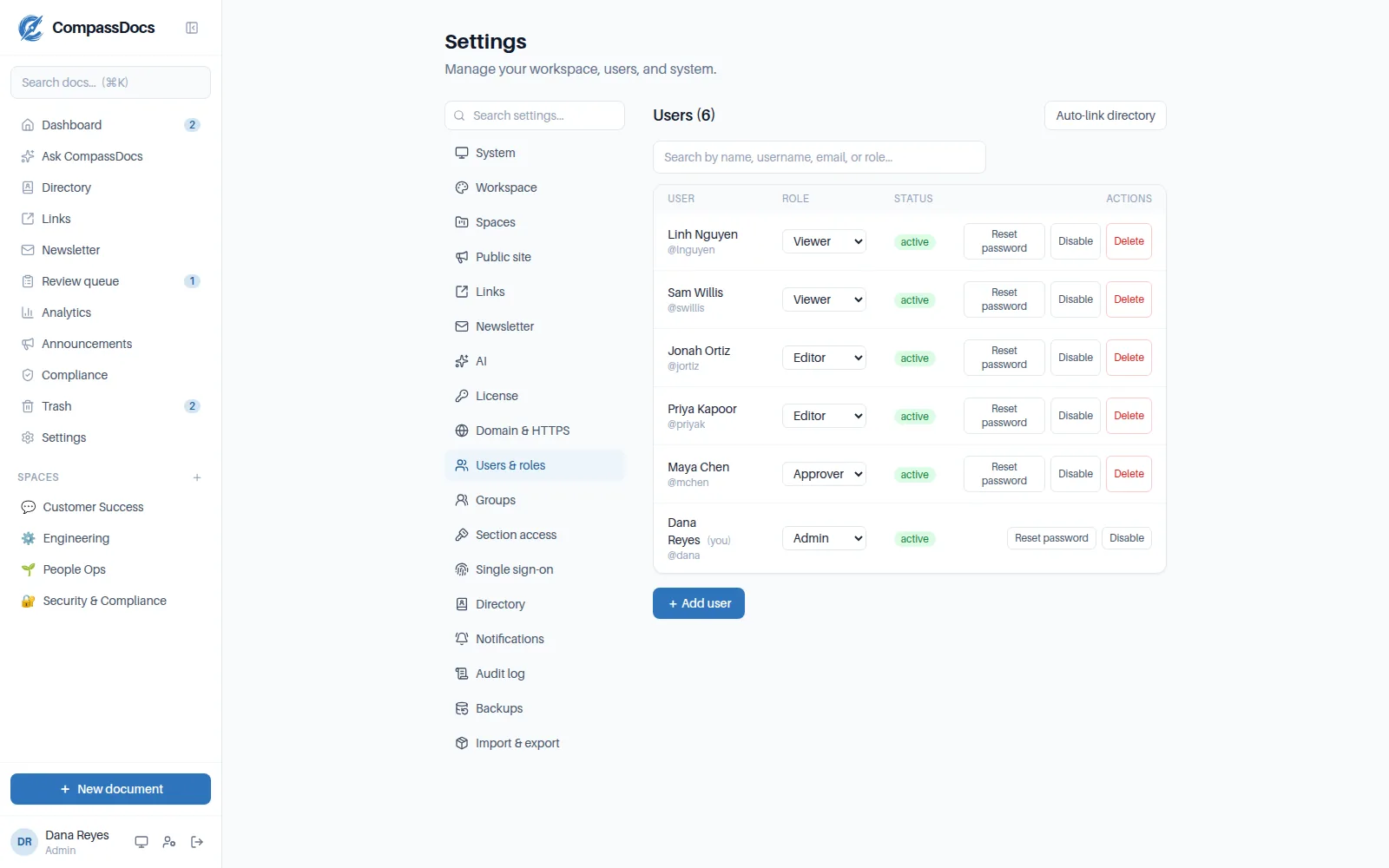
Users and roles: Viewer, Editor, Approver and Admin presets, with per-space rights and groups layered on top.
Client documentation gets messy fast
Every new client adds a network, a line-of-business app, a set of procedures and a few exceptions nobody wrote down. By client thirty, the documentation is spread across tickets, a shared drive and the memory of whoever onboarded them.
× Client notes live in ticket comments, a shared drive and one senior tech’s head.
× Every technician can see every client’s documents, whether they work that account or not.
× A procedure changes, and nobody can tell what it used to say or who changed it.
× The on-call tech can’t find the right runbook for a client they touch twice a year.
× A new hire spends a month learning which client does what differently.
× Client documentation sits in a third-party SaaS tool you can’t point to on a security questionnaire.
→ A private space per client, with reviewed, versioned procedures and search that respects the boundaries.
Per-client documentation with clear boundaries
Spaces, private spaces, groups, roles, approvals and version history are in the free Community edition.
A private space per client
Restrict each client’s space to chosen people or groups, such as the technicians on that account. Search, AI answers and comments never cross the boundary.
Documents & spaces →Roles scoped to a space
Build custom roles from 200+ permissions and scope them to one space, so a tech can author for their clients and only read elsewhere.
Roles & approvals →Explain access
Pick anyone and see every permission they hold, and which role and group granted it, before a client asks who can read their notes.
Permissions →Runbooks and network docs
Mermaid and PlantUML diagrams, checklists, decision-tree guides and code blocks, from a runbook template every client space can share.
IT runbooks →Reviewed and versioned
Strict mode sends edits to approvers first, and every version keeps its author and change note. Draft branches let you rewrite a live runbook without breaking it.
Version history →Share one document
An unguessable, read-only link with optional expiry and one-click revoke, to hand a client a single document. Admin-enabled, off by default.
Sharing →One workspace for your MSP, a space for each client
CompassDocs is one install per organization, not a multi-tenant platform. For an MSP that usually means one workspace for your own staff, laid out like this:
- A private space per client: site and network notes, the escalation contacts, line-of-business app procedures, backup and restore steps, onboarding and offboarding steps for that client’s users
- A shared runbooks space: your standard procedures for things every client has, such as Microsoft 365 tenant tasks, firewall changes or a new-user setup, written once and linked from each client space
- An internal operations space: your own SOPs, the on-call handbook, escalation rules, and the onboarding pack for new technicians
- A group per account team: the group grants access to that client’s space, so a tech who joins the team gets the right spaces, and one who leaves it loses them
Admins and anyone you give workspace-wide rights still see every space, so keep that circle small. Your clients are not users of the workspace unless you invite them, and the directory, internal spaces and settings are shared by everyone who is.
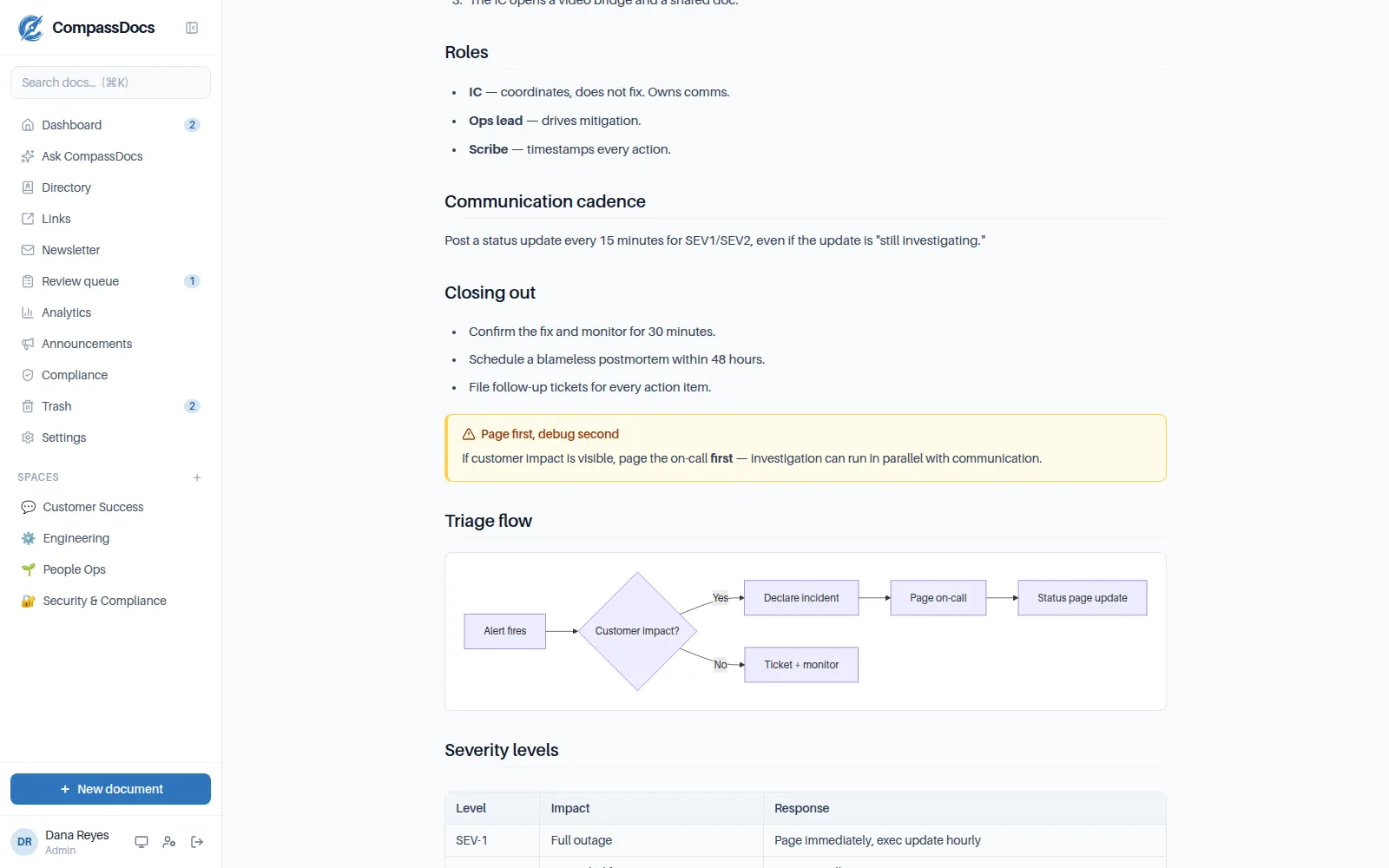
A runbook with a severity table and a decision-tree triage diagram, ready for whoever is on call.
From the service desk to the back office
The same workspace does a different job for each part of an MSP.
| Job | Service desk | Projects | NOC | Account management | Internal ops |
|---|---|---|---|---|---|
| Client spaces | Look up the client’s quirks before replying | Hand over as-built notes at go-live | Find the site’s topology and contacts | Keep the client’s key contacts and agreed scope notes | Grant and remove access by group |
| Runbooks & SOPs | Password resets, new users, printer fixes | Migration and cut-over checklists | Alert response and failover steps | The client onboarding runbook | On-call rules and escalation |
| Approvals & versions | Suggest a fix to a stale article | Rewrite a runbook on a draft branch | Approve changes to failover steps | Show the client what changed and when | Approve changes to company SOPs |
| Helpdesk (Enterprise) | Work the client’s team queue to reply targets | Track project tasks as workflow steps | Alerts open and solve their own tickets | Review volume and satisfaction per team | Recurring tickets for internal checks |
| Search & AI answers | Ask how this client does VPN | Find the last similar migration | Find the runbook from an alert name | Check what was documented at handover | Ask who owns a procedure, from the directory |
| Training & sign-off (Enterprise) | New-tech onboarding program | Change-management procedure sign-off | On-call readiness deck with a quiz | Client-confidentiality policy confirmation | Annual acceptable-use re-confirmation |
Three days in an MSP, worked through
Concrete examples of how the pieces fit, using only what CompassDocs does today.
Onboarding a new client
Account management creates a private space for the client from your onboarding runbook, adds the account team’s group, and starts with the network diagram as a Mermaid block, the escalation contacts and the backup schedule. With the Enterprise helpdesk, a help address for the client starts its tickets in that client’s team, with its own office hours and reply targets. By go-live, the project team’s cut-over checklist has become the client’s first runbook.
A 2 a.m. alert
A disk alert from Prometheus Alertmanager, Grafana or Datadog opens a ticket in the NOC team; repeats become notes rather than new tickets. The on-call tech types the server name into the ⌘K command palette, lands on the client’s runbook, follows its decision tree, and the resolved alert solves the ticket, unless someone has replied on it. In the morning, the tech adds a step the runbook was missing, with a change note an approver reviews.
A technician leaves
With SCIM from Microsoft Entra, the account is deactivated and its sessions revoked at once, and group membership drops their client spaces with it. Their knowledge stays: everything they wrote is versioned under their name. Their replacement gets the onboarding program, the client spaces for their accounts, and a desk role of Newbie, so their first public replies wait for a team lead.
Add the helpdesk when you’re ready
- Several help addresses, each with its own From name and the team its new tickets start in, so mail to a client’s support address lands in that client’s queue
- Office hours, holidays, reply targets and on-call rotas per team, in each team’s time zone
- Agents and team leads work only the queues of the teams they belong to
- A customer portal lets people outside your organization raise and follow requests, signing in with a one-time link sent to their email, limited to approved domains if you like
- A help centre lets them search the articles you choose without signing in
- Monitoring tools such as Prometheus Alertmanager, Grafana and Datadog open and solve their own tickets
- Recurring tickets open routine maintenance and checks on schedule, with a checklist
- A timer and Log time on each ticket feed time-tracking reports, with a CSV export
- 3 agents included; each extra agent is $125 a year
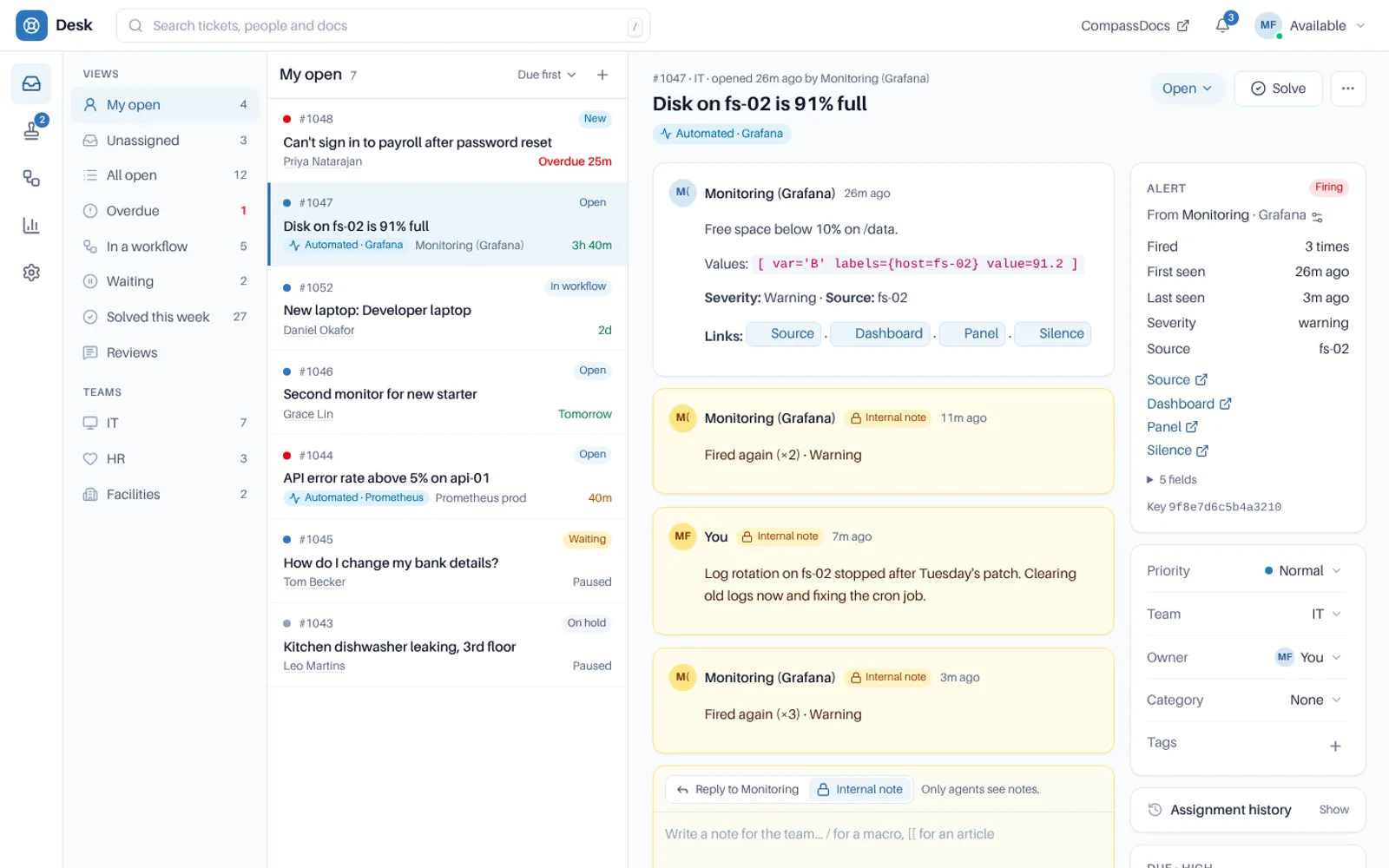
A monitoring alert as a ticket: repeats are filed as notes, and a resolved alert solves it.
On your infrastructure, at a predictable price
Clients increasingly ask where their documentation lives. With CompassDocs, the answer is your servers.
Self-hosted
One PostgreSQL database on servers you control, with scheduled backups mirrored off-site to S3, R2, MinIO or Azure.
Hardened by default
Credentials and backups encrypted at rest, hashed session tokens, login throttling and two-factor authentication.
Single sign-on
Enterprise: SAML 2.0 or OIDC, SCIM from Microsoft Entra, and an optional Duo approval after sign-in or only when someone opens the desk.
Unlimited users
Community is free. Enterprise is $499.99 a year per install with unlimited users; only helpdesk agents beyond the 3 included cost extra.
No lock-in
Everything exports to front-matter Markdown and imports back, including Confluence pages exported to Markdown.
An audit log
Sign-ins, role changes, publishes and approvals with actor, IP and time. Enterprise exports it as CSV or JSON.
Your first client space in an afternoon
Run one command
The installer starts CompassDocs and PostgreSQL with Docker, and a setup wizard creates your admin account in the browser.
Set up groups and spaces
Create a group per account team and a private space per client, plus a shared runbooks space and an internal space for your own SOPs.
Bring in what you have
Import existing notes as front-matter Markdown, or start from the free IT runbook template and SOP template.
Turn on what you need
Switch on strict mode for the spaces that need review, add AI answers with your own Anthropic API key, or add Enterprise for the helpdesk, SSO and SCIM.
When another tool fits better
CompassDocs holds procedures and knowledge, and the Enterprise helpdesk handles requests. It is not a PSA or an RMM, and it is not multi-tenant. Be clear about the edges:
- Billing, contracts and invoicing belong in your PSA. CompassDocs tracks time on tickets and exports it as CSV, but it doesn’t bill agreements or raise invoices.
- Agents, patching, scripting and per-client device inventory belong in your RMM. The helpdesk’s asset lookup reads your own Snipe-IT or Intune, not each client’s tenant.
- Passwords and secrets belong in a password manager built for them, not in a document.
- A structured configuration database that links every client’s devices, licences and credentials is the job of dedicated IT documentation platforms. CompassDocs keeps written procedures, diagrams and notes.
- A fully separate workspace per client, with its own sign-in, directory and branding, means a separate install, each with its own licence. Talk to us at contact if you plan to run several.
Link out to those tools from quick links, so they’re one click from the dashboard.
Set up faster with Claude
CompassDocs is built for MCP, so Claude can do the first draft of your rollout while your team reviews and publishes. When you start, we walk you through it.
Bring your content in
Paste or attach the procedures and policies you already have, and Claude redrafts each one in your templates, screenshots included.
Draft the handbook and training
Claude assembles a draft handbook from your policies and, with Enterprise, turns procedures into training decks with quiz questions.
Configure the helpdesk as drafts
Request types, forms, workflows, macros and recurring tickets are drafted for an admin to review and publish. Nothing goes live on its own.
See everything Claude can do through MCP and the step-by-step rollout.
Frequently asked
Can I keep each client’s documentation separate?
Yes. Give every client a private space restricted to specific people or groups. Documents, search results, AI answers and comments all respect those boundaries. Admins and anyone with workspace-wide rights can still see every space, so keep that group small.
Is CompassDocs multi-tenant?
No. One install is one workspace, with one directory, one set of admins and one sign-in setup. Clients are separated by private spaces and, in the helpdesk, by teams. If a client needs a fully separate workspace, that is a separate install with its own licence.
Is it self-hosted so client data stays with us?
Yes. Install it with one Docker command on your own infrastructure; documents live in one PostgreSQL database you control. Optional features that talk to other services, such as AI answers or Microsoft 365, need outbound access to them.
Can clients raise requests?
With the Enterprise helpdesk, yes. A customer portal lets people outside your organization raise and follow requests, signing in with a one-time link sent to their email, and a help centre lets them search the articles you choose. Customers see only their own requests and the public conversation.
Can each client have its own support address and SLA?
Yes, with the Enterprise helpdesk. Each help address has its own From name and the team its new tickets start in, and each team has its own office hours, holidays, reply targets and on-call rota.
Does it handle runbooks and network diagrams?
Yes. Mermaid and PlantUML diagrams render inline, and runbooks support checklists, code blocks and decision-tree guides.
Does it replace our PSA or RMM?
No. CompassDocs is for documentation, and with Enterprise a helpdesk. Keep billing, contracts and invoicing in your PSA, and agents, patching and device inventory in your RMM.
How does pricing scale as we add technicians?
Users are unlimited in both editions. Community is free; Enterprise is $499.99 a year per install with unlimited users and 3 helpdesk agents included. Only helpdesk agents beyond those 3 cost extra, at $125 a year each.
Related: MSSPs & security operations · IT runbooks · IT helpdesk software · SOPs · Professional services · Spaces & permissions · Roles & approvals · Customer portal · Self-hosting
Client documentation on your own servers
One Docker command installs CompassDocs with unlimited users and documents. Enterprise adds the helpdesk, SSO and SCIM for $499.99/year.
Self-host free See pricingBuying for a team? Get a formal quote to print for approval, or order by invoice with your PO number.