 CompassDocs
Built for MCP, so Claude can set up and run CompassDocs with you
CompassDocs was designed around the Model Context Protocol from the start. Its built-in MCP server gives Claude nearly 50 tools that reach almost every part of the product: your knowledge base, policy handbooks, training and every role in the helpdesk. Claude does the reading and the drafting; your people keep every decision. And when you start, we walk you through using it to stand up your workspace fast.
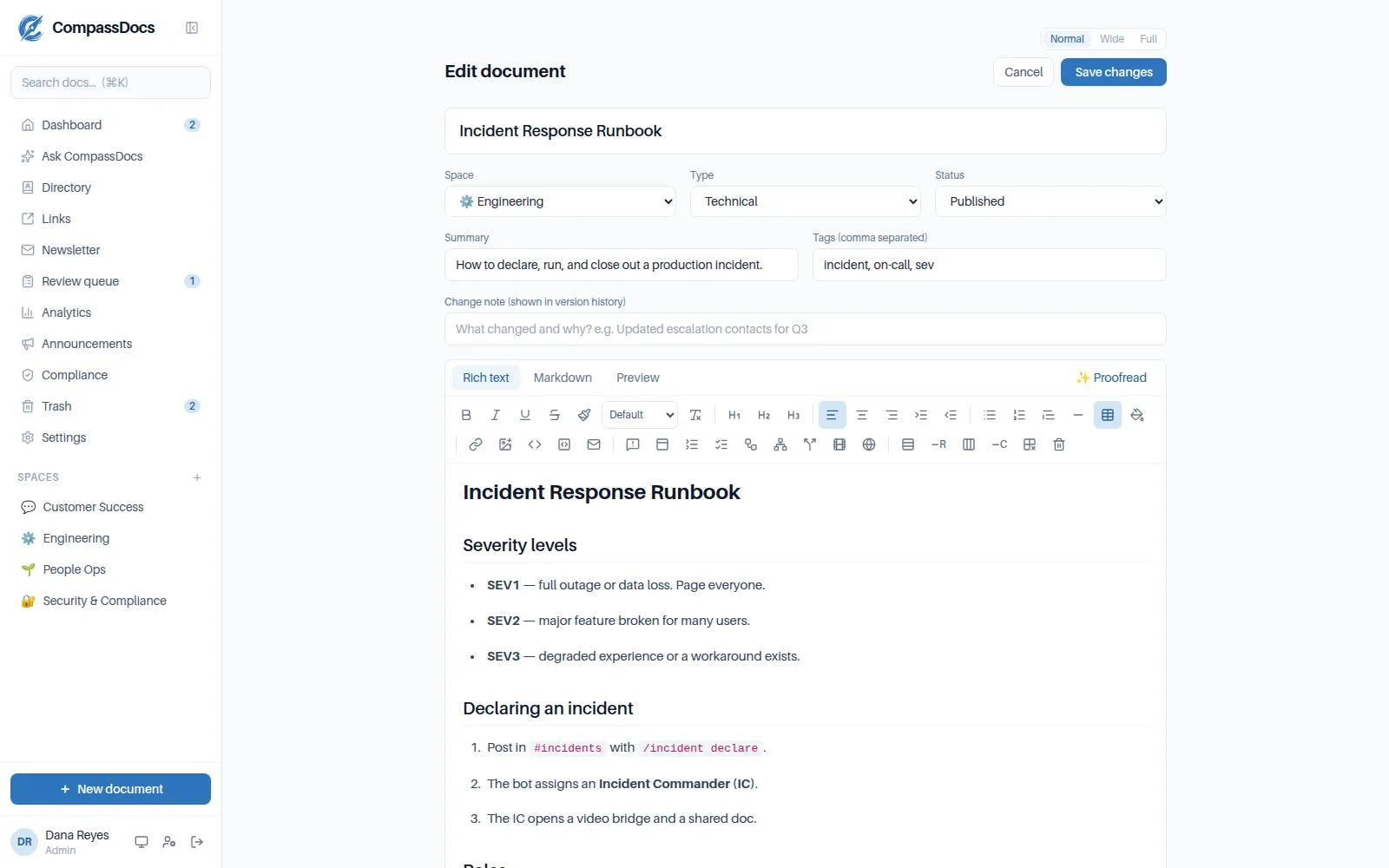
Claude drafts with the same rich blocks your editors use: callouts, diagrams, tabs and tables.
What built for MCP means here
Not a chatbot bolted onto the side. The connector is part of the product, in every edition, and it follows the same rules as the web app.
Almost every function
Documents, images, handbooks, training and the helpdesk for requesters, agents and admins all have MCP tools. If you do it in CompassDocs, you can most likely ask Claude to do it.
One-click connect
Connect the Claude desktop app to your workspace address with the built-in OAuth sign-in. Other MCP clients can connect too.
Works as you
Claude acts as the signed-in person, with their role, their space access and, in the helpdesk, their desk role and teams. Private spaces stay private.
Drafts, not surprises
Approvals still apply. Claude never publishes a handbook, confirms a policy, sends a reply or publishes helpdesk settings: a person does.
In every edition
The connector is part of Community, Enterprise and Cloud, and runs on each person’s own Claude subscription.
Visible and audited
Changes made through Claude in the helpdesk say via Claude on the ticket’s timeline and are in the audit log.
What Claude can do through MCP
Everything below works through the connector, always within what the person using it is allowed to do.
| Area | Through MCP, Claude can | Edition |
|---|---|---|
| Knowledge base | Search and read everything you can see; draft new documents in your own templates; revise, retitle, retag, move and publish documents (approvals still apply); follow your workspace’s writing guide and use rich blocks: callouts, tabs, diagrams, decision trees, tables | Every edition |
| Images and screenshots | Place an image from a URL, reuse one already in the workspace, or hand you a one-time drop link for a screenshot in your chat, then put it in the document | Every edition |
| Policy handbooks | List and read handbooks, tell each person where they stand, build draft handbooks and change a handbook’s contents. Publishing a handbook and confirming a policy stay with a person | Every edition (read confirmations: Enterprise) |
| Training and onboarding | Turn a document into a training deck, assign it to people or groups, and report who hasn’t finished | Enterprise |
| Helpdesk: everyone | Find articles that answer the question first, raise a request of the right type, follow your own requests, reply to them, and see approvals waiting for you (with a link to decide in the app) | Enterprise |
| Helpdesk: agents | Read the queue and tickets, summarise a ticket, add internal notes, save reply drafts (from scratch or a canned response), apply macros as drafts, tick checklist items, look up assets, and run reports | Enterprise |
| Helpdesk: admins | Draft request types and forms, categories, workflows, macros, checklists, automation rules and recurring tickets, and list what already exists | Enterprise |
| Custom fields | Read and set ticket custom fields, the same as through the REST API and webhooks | Enterprise |
What stays in the app, on purpose: sending replies to requesters, approving and declining, publishing helpdesk settings and handbooks, confirming policies, and the workspace’s own settings (sign-in and SSO, users and roles, licences). Details: the Claude connector and Claude in the helpdesk.
Set up CompassDocs with Claude, step by step
The slow part of any knowledge base or helpdesk rollout is the content and the configuration. MCP lets Claude do the first draft of both, while your team reviews and publishes. This is the path we walk new customers through.
Day one: connect Claude
An admin connects the Claude desktop app to your workspace address in one click (built-in OAuth sign-in), then each person connects their own. Claude now works as each of them, with their role and space access.
“Connect to our CompassDocs workspace and list the spaces and templates I can use.”
Move your existing know-how in
Paste or attach the procedures you already have (Word documents, PDFs, wiki exports, email threads) and ask Claude to redraft each one in your templates. Screenshots go where they belong.
“Here are our five onboarding procedures. Redraft each as a How-to in the Operations space using our SOP template, keep the steps, and add a callout for anything safety-related.”
Turn policies into a handbook
Once the policies are in, Claude assembles a draft handbook in the order you want. A person reviews it and publishes it in the app.
“Build a draft Staff Handbook from every policy tagged handbook, grouped by Conduct, Leave, IT and Safety.”
Build the onboarding training
With Enterprise, Claude turns a procedure into a training deck with quiz questions and assigns it, so the first new hire gets the program automatically.
“Make a training deck from the Acceptable Use policy with five quiz questions, and assign it to the New starters group.”
Set up the helpdesk as drafts
Claude drafts request types and their forms, categories, workflows with approvals, macros, checklists, automation rules and recurring tickets. Each waits as a draft until an admin publishes it.
“Draft request types for New laptop, Access request and Broken equipment, each with the form fields you’d expect, and a workflow that sends access requests to the requester’s manager first.”
Go live and keep track
Staff ask Claude for help and it searches your guides before raising a request. Managers ask who hasn’t confirmed the new policy or finished training.
“Who in Facilities hasn’t confirmed the updated Lockout procedure or finished its training yet?”
We walk you through it
When you start with CompassDocs, we show your admins how to connect Claude and use MCP for each step above with your own content: which prompts to use, what to review, and what to publish. You end up with your procedures in, a handbook drafted, onboarding training ready and the helpdesk configured as drafts, far sooner than doing it all by hand.
Where teams start with MCP
IT
Redraft runbooks into your template, draft request types and a new-starter workflow, and ask what assets a requester has. IT helpdesk
HR
Assemble the staff handbook from policies, build onboarding training, and check who hasn’t confirmed. HR helpdesk
Facilities
Draft work-order request types, recurring inspections with checklists, and the safety SOPs crews read. Facilities requests
Operations
Turn tribal knowledge and email threads into SOPs with approvals and owners. SOP software
Compliance
Draft policies in your template, route them for approval, and ask who is behind on sign-off. Policy management
Schools
Stand up the staff handbook, back-to-school training and a district helpdesk before August. K-12 districts
Frequently asked
What does “built for MCP” mean?
MCP, the Model Context Protocol, is the open standard Claude uses to work with other software. CompassDocs has its own MCP server built in, and nearly every part of the product has tools behind it: the knowledge base, images, handbooks, training and every role in the helpdesk. So most of what you do in CompassDocs, you can ask Claude to do.
Which AI apps can use it?
The Claude desktop app connects in one click with the built-in OAuth sign-in. Because the connector speaks the Model Context Protocol, other MCP clients can work with it too.
Does it cost extra?
No. The Claude connector is part of every edition, Community included. It runs on each person’s own Claude subscription. Training and the helpdesk tools need Enterprise, because those features do.
Can Claude publish, send or approve things on its own?
No. It works as the person using it, with their permissions, and approvals still apply to documents. It never publishes a handbook or confirms a policy for anyone. In the helpdesk there is no tool to send a reply, approve or decline, or publish a workflow, request type, macro, checklist or rule: those are drafts until a person publishes them.
What stays in the app?
Publishing and approving, as above, plus the workspace’s own settings: sign-in and SSO, users and roles, licences and the admin console. Those are deliberate: they’re the controls that keep the AI inside its lane.
How does onboarding with MCP work?
When you start, we walk your admins through connecting Claude and using it for each step above with your own content: moving existing procedures in, building the handbook and onboarding training, and drafting the helpdesk setup for you to review. Ask us when you’re ready.
Start free, connect Claude on day one.
The Claude connector is in the free Community edition. Add Enterprise for $499.99 a year when you want training and the helpdesk, and we’ll walk you through the MCP rollout.