 CompassDocs
A Claude MCP server for your knowledge base
The Claude connector is CompassDocs’ built-in MCP server. Connect the Claude desktop app with one click and Claude can search your knowledge base, draft and revise documents in your own templates, place screenshots where they belong, and build draft handbooks and training decks. It always works as you, with your permissions, and with approvals still applying. It’s in every edition, Community included.
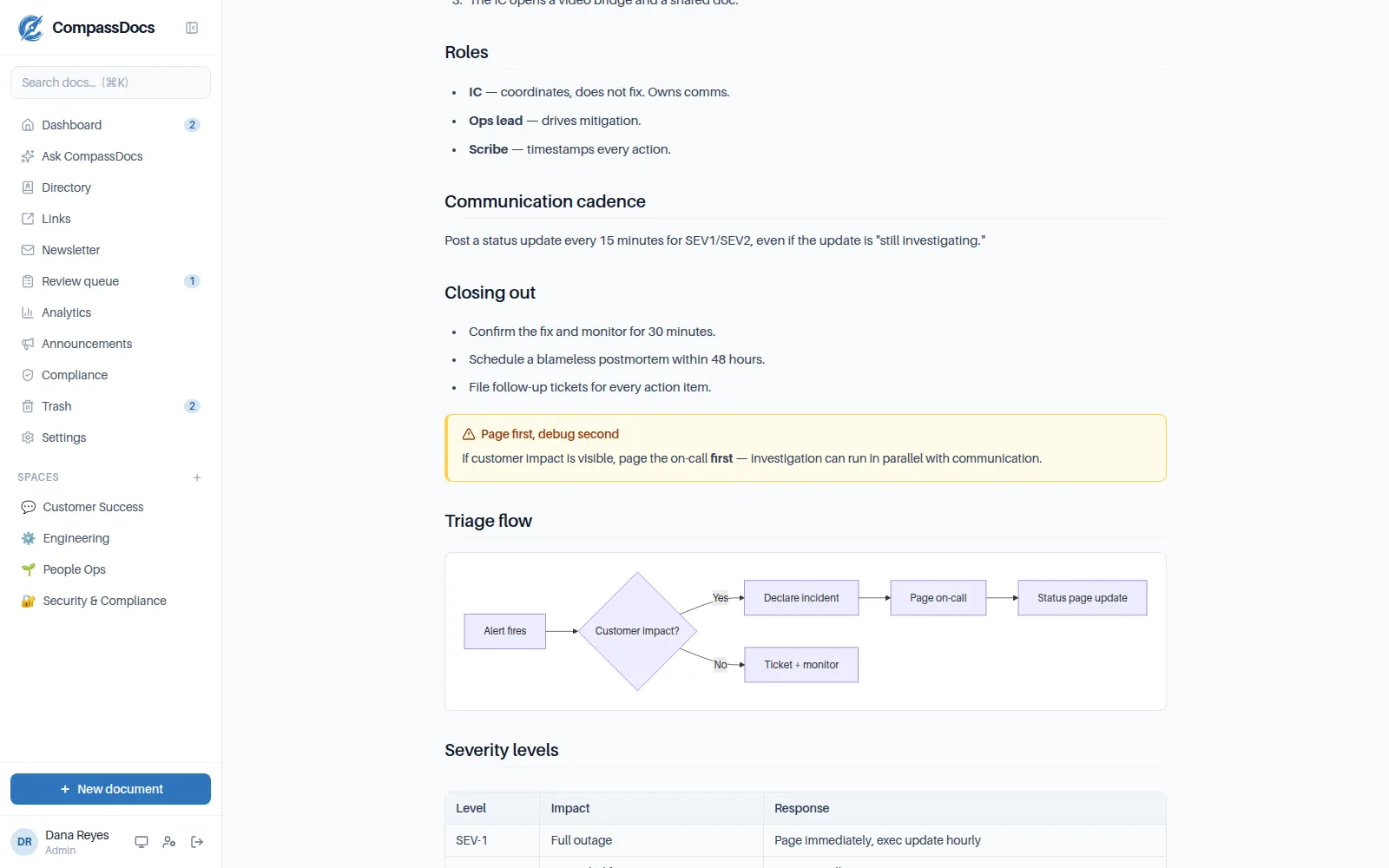
Callouts, diagrams and tables: Claude drafts with the same rich blocks your editors use.
What Claude can do with your docs
The connector speaks the Model Context Protocol, so Claude, and other MCP clients, can work with your documentation directly:
- Search and read your knowledge base, so answers in Claude are grounded in your runbooks, policies and guides without exporting them
- Draft new documents from your templates: “draft a runbook for X” lands in your team’s standard shape
- Revise, publish and reorganize documents, with approvals still applying
- Use the full rich-block toolbox: diagrams, tabs, callouts and decision trees, not just plain text
- Place images: Claude fetches one from a URL, reuses one already in your workspace, or hands you a one-time drop link for the screenshot in your chat, then puts it in the document
One-click connect
Connect the Claude desktop app to your workspace address in one click, using the built-in OAuth sign-in.
Your permissions, nothing more
Claude works as the signed-in person, governed by the same roles and space permissions as the web app. Private spaces stay private.
In every edition
The Claude connector (MCP) is part of Community, Enterprise and Cloud. It runs on each person’s own Claude subscription.
Handbooks, training and the helpdesk from Claude
Beyond documents, the connector reaches the rest of CompassDocs, always within what the person using it is allowed to do.
Policy handbooks
Claude lists and reads the handbooks you can read, tells you where you stand, and builds draft handbooks. It never publishes a handbook or confirms a policy for you.
Training decks
With Enterprise training, Claude can build a deck from a document, assign it, and tell you who hasn’t finished. Decks it drafts are for a person to review.
Requesters
With the Enterprise helpdesk, people raise and follow their own requests from Claude.
Agents
Agents read the queue, add notes and save reply drafts. Claude ticks checklist items and applies macros, and a macro’s reply is saved as a draft, never sent.
Admins
Admins draft workflows, request types, macros, automation rules and recurring tickets. Drafts wait for a person to publish them.
Custom fields
Ticket custom fields can be read and set through the connector, the same as through the REST API and webhooks.
An MCP server for documentation, with guardrails
Letting an AI assistant write to your knowledge base only works if it can’t overstep. The connector is built so it can’t:
- Claude acts as the person using it, with their role, their space access and, in the helpdesk, their desk role and teams
- Approvals still apply to documents, and Claude never publishes a handbook or confirms a policy
- In the helpdesk there is no tool to send a reply, approve or decline, or publish a workflow, request type, macro, checklist or rule
- Claude changes a ticket only when the workspace allows Also update tickets, within the person’s desk role, and never solves past required checklist items
- The connector works only for people who connect it, within the level an admin sets
- Changes made through Claude say via Claude on the ticket’s timeline and are recorded in the audit log
Drafts in, decisions out
Claude does the reading and the drafting. A person sends every reply and publishes every rule, handbook and workflow.
Grounded in your docs
Claude works from the documents you can see in your own knowledge base, so its drafts start from your real procedures.
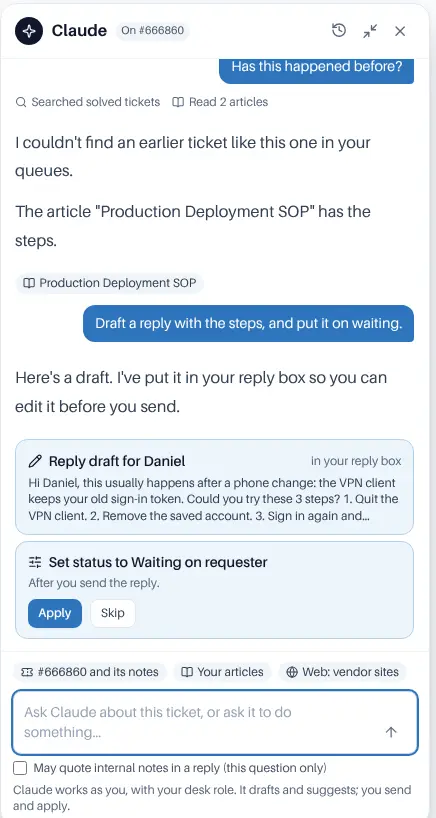
Claude connector, Claude in the desk, or Ask CompassDocs?
- The Claude connector works from the Claude apps on each person’s own Claude subscription. It’s for drafting, searching and working with CompassDocs from Claude.
- Claude in the desk is a panel beside the open ticket in the Enterprise helpdesk. It uses the workspace’s Anthropic API key, billed per use with monthly limits, and is off until an admin turns it on.
- Ask CompassDocs is AI search inside the app: answers grounded in your docs with cited sources, on your workspace’s Anthropic API key. Keyword search works without a key.
- You can use all three. Each respects the same permissions.
Connect Claude in a few minutes
The connector is built in. There is nothing extra to install on the server.
Run CompassDocs
Self-host it with one Docker command. On CompassDocs Cloud, when it opens, the connector works out of the box.
Connect Claude
In the Claude desktop app, add your workspace address as a connector and sign in with one click through the built-in OAuth.
Ask for something real
“Draft a runbook for rotating the VPN certificate”, “which policies am I due to confirm?”, or “who hasn’t finished the security training?”
Review in CompassDocs
Drafts and changes follow your approval workflow. Read, edit and publish them in the app.
Frequently asked
What is the CompassDocs Claude connector?
It is a built-in MCP (Model Context Protocol) server. Once connected, Claude can search, draft, update and publish documents, place images, read handbooks and build drafts, always with the same permissions the signed-in person has.
Which edition includes the Claude connector?
Every edition: Community, Enterprise and Cloud. The tools for training decks and the helpdesk need those Enterprise features to be licensed.
Can Claude see documents I can’t?
No. The connector acts as you, governed by the same roles and space permissions as the web app, so private spaces you can’t open stay out of reach.
Can Claude publish or approve on its own?
Approvals still apply to documents. Claude never publishes a handbook or confirms a policy, and in the helpdesk it never sends a reply, approves or declines, or publishes a workflow or rule. A person does.
Do we need an Anthropic API key for the connector?
No. The connector works from the Claude apps on each person’s own Claude subscription. Ask CompassDocs and Claude in the desk are separate features that use your workspace’s own Anthropic API key.
Does it work with other MCP clients?
The connector is an MCP server, and CompassDocs describes it as working with Claude and other MCP clients. One-click setup is built for the Claude desktop app.
Related: Built for MCP: set up with Claude · AI search & answers · Claude in the helpdesk · Policy handbooks · Training & onboarding · Engineering teams · All integrations
Connect Claude to your own knowledge base
Self-host CompassDocs with one Docker command; the Claude connector is included free. Enterprise adds the helpdesk, training, SSO and read confirmations from $499.99/year.
Get started in 2 minutes See pricingBuying for a team? Get a formal quote to print for approval, or order by invoice with your PO number.