 CompassDocs
Knowledge management software for law firms, on your own servers
A firm’s know-how is spread across precedent folders, practice notes, the office manual and the heads of a few senior people. CompassDocs is self-hosted knowledge management software for law firms: one searchable home for precedents, procedures and practice notes, with confidential spaces for each practice group, a record of every change, and, on Enterprise, policy sign-off, training and an internal helpdesk on the same sign-in.
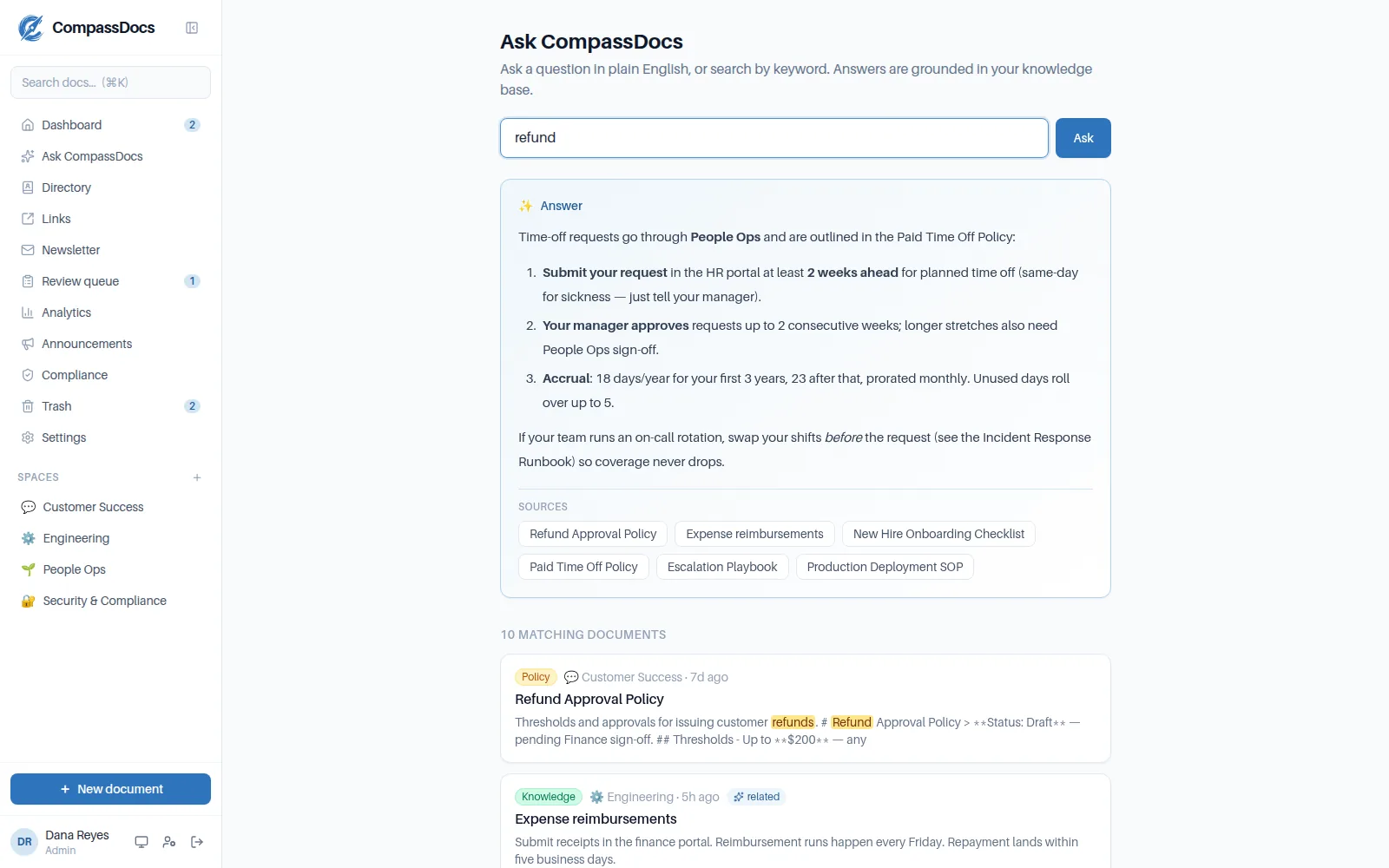
Ask a question in plain English and get an answer drawn only from documents you can see, with the sources cited.
The firm knows the answer. Finding it is the hard part.
Most firms have a document management system for matter files and nothing much for the know-how around them.
× The current form of a share purchase agreement lives in one partner’s precedent folder, and three older versions are still in circulation.
× A practice note was updated after a change in the law, but nobody can say which associates saw the new version.
× The office manual is a Word file from three managing partners ago, and new joiners learn time recording and file closure by asking whoever sits nearby.
× Confidential practice material sits on a shared drive with permissions nobody has reviewed since the last office move.
→ One searchable knowledge base, private where it needs to be, with every change attributed and every sign-off recorded.
What a law firm knowledge base holds
- Precedent notes and model clauses, with drafting guidance, tagged by practice area; the source files can be attached to the page
- Practice notes and know-how for each practice group, kept current by the people who own them
- Firm procedures: matter opening, conflict checks, engagement letters, file closure and client onboarding steps
- The office manual: time recording, billing procedures, IT and facilities
- Risk and compliance policies: confidentiality, information security, anti-money-laundering procedures
- Onboarding for trainees, new associates, lateral partners and new business-services staff
Linked, not duplicated
Link a policy to its procedures, or mark an old precedent note as superseded by the new one. Typed links show on both documents.
Search like a researcher
Ranked full-text search with type:, tag:, space: and author: operators, plus semantic search, once you connect an embeddings provider, that finds the right note without the exact words.
Templates for know-how
Six built-in document templates plus your own, so every practice note follows the same shape. Admins can turn any document into a template.
Confidential spaces and who can see what
Not everything belongs to everyone. CompassDocs keeps each practice group’s material where it belongs, and every search and answer follows the same rules.
Private spaces
Restrict a space to chosen people or groups. Search, AI answers and comments all respect that boundary, and on Enterprise, membership can follow your Microsoft Entra groups.
Who may author
Per-space edit rights decide who writes in each space, so only the know-how team edits the precedent bank while everyone else reads it.
Roles that fit the firm
Build custom roles from 200+ permissions, scoped to the workspace or one space, and use Explain access to see every permission someone holds and where it came from.
Every change attributed
Each save is a version with its author, time and a change note. Compare two versions with word-level highlights and restore in a click.
Review before it’s live
In strict mode, edits to a published note become change requests an approver reviews. Big rewrites can happen on a private draft branch and merge back through review.
An append-only audit log
Sign-ins, role changes, publishes and approvals are recorded with the actor, IP and time. Enterprise exports the log as CSV or JSON.
The office manual and firm policies, with sign-off on the record
Risk teams usually chase policy acknowledgments with an email and a spreadsheet. CompassDocs puts the request, reminders and record on the policy itself.
- Gather the confidentiality, information security, AML and acceptable-use policies into one handbook, read online or printed with an acknowledgement page
- Read confirmations ask fee earners and staff to confirm the exact version, with due dates, reminders and escalation to the policy owner
- Policy sets bundle the joiner pack or the annual cycle, and annual re-confirmation keeps each year’s record
- An editorial fix doesn’t reset anyone; a material change asks again, and readers see what changed since the version they confirmed
- The compliance portal shows who is outstanding by policy or by person, and can be delegated to the risk team without making them admins
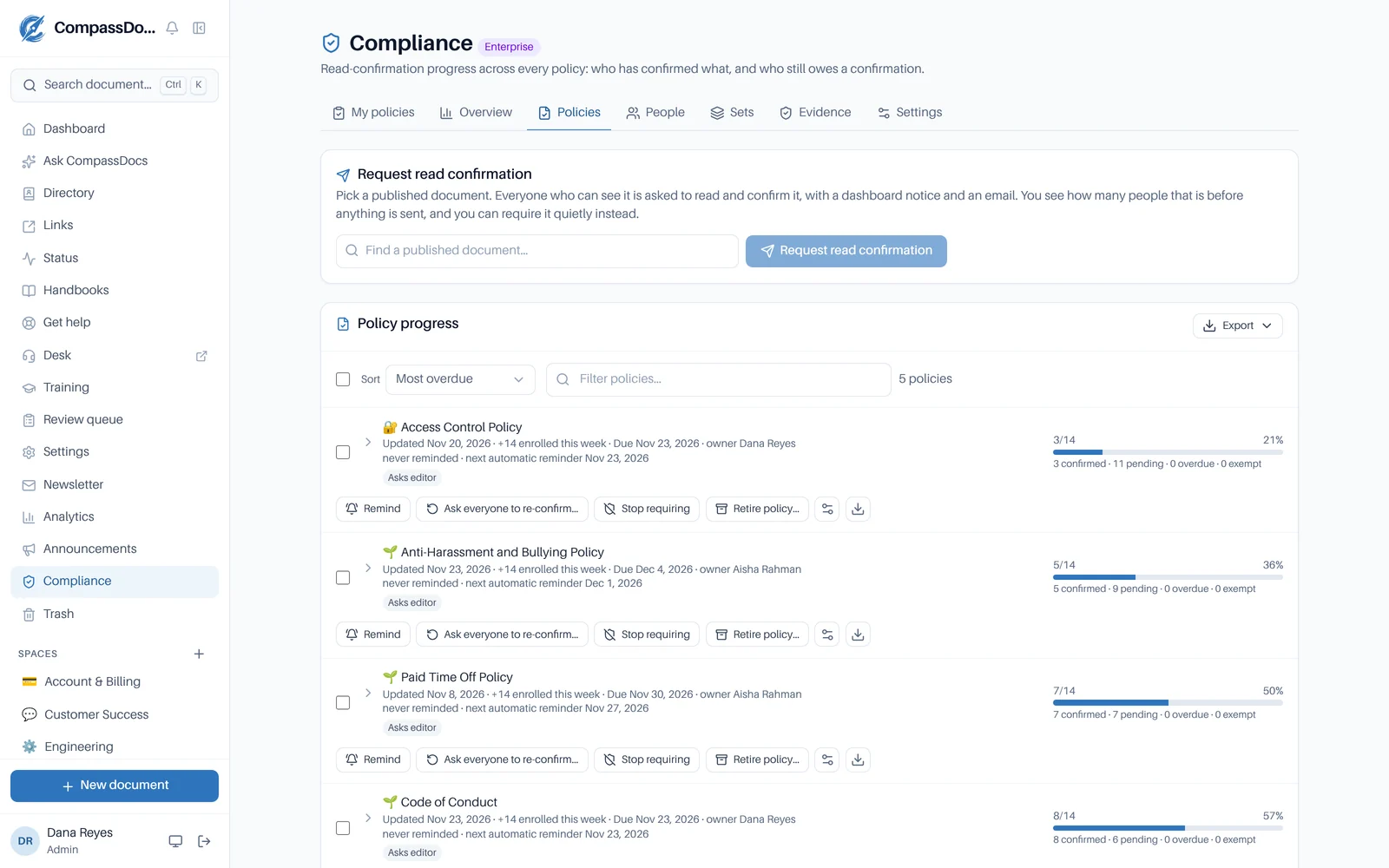
The compliance portal: each policy’s due date, owner and confirmation progress (Enterprise).
Self-hosted, because client confidentiality comes first
- Documents, versions and attachments stay in one PostgreSQL database on servers you control, under your own backups
- AI answers are optional: they use your own Anthropic API key, stay off until an admin adds one, and only draw on documents the person asking can see
- Semantic search can run on a local engine such as Ollama, so document text never leaves your network
- Enterprise single sign-on over SAML 2.0 or OpenID Connect, SCIM from Microsoft Entra, and an optional Duo approval after sign-in
- Credentials and backups encrypted at rest, and an offline, signed license that never calls home
- Open source under AGPL-3.0, with the whole knowledge base exportable as front-matter Markdown
One firm, one install
Enterprise is $499.99 a year per install with unlimited users, so every fee earner and member of staff can have an account.
Nothing hidden in a draft
Draft branches never appear in spaces, search, dashboards, AI answers or exports. The only way one goes live is a merge.
The directory, Outlook and an internal helpdesk
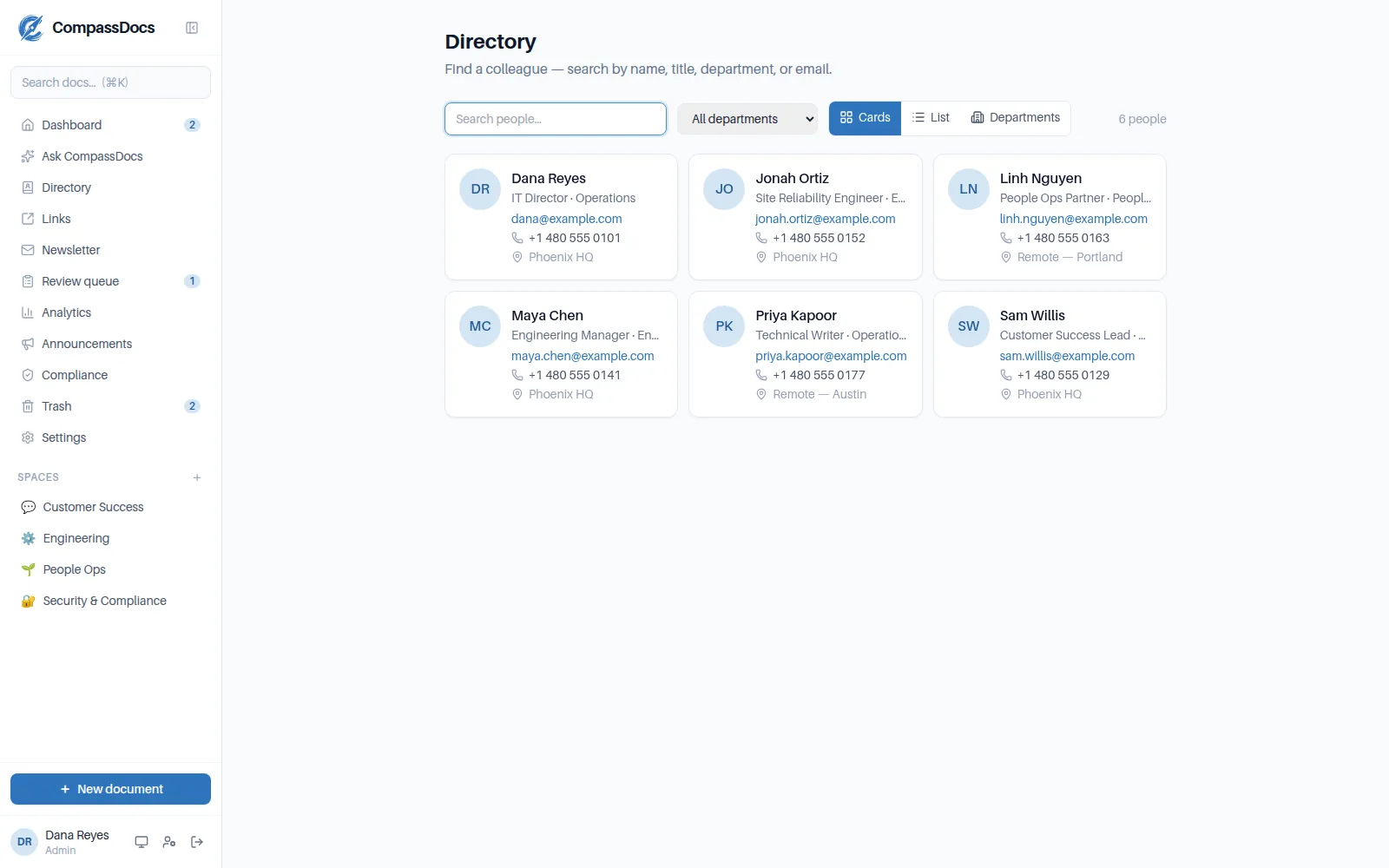
- A people directory grouped in the order you choose: attorneys before assistants, the main office before the satellite
- Choice fields with aliases, so Partner and Of Counsel can both file under Attorney
- Link assistants to as many people as they support, shown from both ends, and export a branded who’s-who as PDF
- On Enterprise, the directory syncs from Microsoft 365 or Google Workspace and shows Teams presence live
- The Outlook add-in searches CompassDocs and inserts a document link while you write an email
- With the Enterprise helpdesk, IT, HR and Facilities work requests in one desk, each team seeing only its own queue, and a ticket can carry an event, such as a room setup for a client visit
How each team uses CompassDocs
One concrete use per job. Spaces, versioning, approvals, handbooks and AI search are in the free Community edition; read confirmations, training and the helpdesk rows are Enterprise.
| Feature | Practice groups | Knowledge management & PSLs | IT | HR | Finance & billing | Records |
|---|---|---|---|---|---|---|
| Spaces | A private space per practice group | The firm-wide precedent bank | Staff IT guides | Private HR space | Billing procedures | Retention and file-closure rules |
| Versioning | What a practice note said last year | Model clause history with change notes | Runbook changes | Leave policy as amended | Rate and write-off rules over time | Retention schedule revisions |
| Approvals | Partner signs off a new precedent | Strict mode on the precedent bank | Change review on security policies | HR director approves policy edits | CFO approves billing guidance | Records manager approves the schedule |
| AI search | “Which form for a minority investment?” | Content gaps show what nobody could find | “How do I file an email to a matter?” | “How many days of leave carry over?” | “How do I correct a time entry?” | “When can a closed file be destroyed?” |
| Read confirmations | Group-specific practice alerts | Confirmation of a material precedent change | Acceptable use each year | Office manual on joining | Expenses and disbursements policy | Confidentiality and data handling |
| Training | Trainee seat induction | Using the precedent bank, with a quiz | Phishing awareness, yearly | Onboarding program for joiners | Time recording walkthrough | File closure deck |
| Request types | Ask the practice support team | Request a new precedent | New laptop or DMS access | Ask HR, privately | Billing query | Retrieve a file from storage |
| Workflows | Practice space access, owner approves | Draft, partner review, publish | New joiner across IT, HR, facilities | Leaver: accounts, kit, exit steps | Billing partner approves write-offs | Records manager approves destruction |
| Recurring tickets | Quarterly practice space access review | Annual precedent bank review | Monthly backup restore test | Annual policy cycle kick-off | Month-end billing checklist | Quarterly offsite storage reconciliation |
Updating a model clause after a change in the law
The corporate group’s PSL needs to revise the limitation of liability clause in the firm’s standard terms without leaving fee earners on the old wording mid-matter.
Rewrite on a draft branch
The PSL opens a draft branch on the precedent note. The published version keeps serving the group while the rewrite happens, and the branch appears nowhere else.
Partner review
The precedent bank runs in strict mode, so merging the branch becomes a change request. The supervising partner reviews the word-level diff and the change note, then approves.
Mark the old note superseded
The note on the previous drafting approach is linked as superseded, so anyone who lands on it is pointed to the current one.
Tell the group
An announcement emails the corporate group and posts to its Teams channel. With Enterprise, the PSL marks the change material and asks the group to confirm they have read the new version.
A lateral partner joins on the first of the month
A partner and two associates move across from another firm, and HR, IT and facilities all have work to do first.
One New joiner request
HR raises a New joiner request in Get help. The workflow asks the practice group head to approve, then opens tasks for IT (laptop, DMS and billing system accounts), facilities (office, building pass) and HR at the same time.
Ready by the start date
A wait holds the final steps until a few business days before the start date in the form, counted on the team’s calendar.
Access follows the directory
Their accounts arrive by SCIM from Microsoft Entra, and the Entra group for the practice opens its private space. No one copies permissions by hand.
Onboarding assigns itself
An onboarding program enrols each new account in the confidentiality, information security and time recording decks, and the office manual waits in My policies with a grace period for new joiners.
The September trainee intake
Twelve trainees start on the same day, each heading into a different seat.
A trainee handbook
Graduate recruitment gathers the published matter opening, conflicts, time recording and file closure procedures into one handbook. Nothing is copied, so it stays current.
Decks with a quiz
The time recording and file closure procedures become training decks with multiple-choice questions and a pass mark, graded on the server.
Supervisors see their trainees
The training principal is a group lead, and gets one weekly email showing which trainees are behind on training and policies.
Keeping records, not promising compliance
CompassDocs keeps the records a firm’s risk team, an insurer’s questionnaire or a client’s security review tend to ask for: which version of a policy was in force, who approved it, who confirmed it and when, who finished which training, and who could see a given space. It is a documentation tool, not a compliance program: we don’t claim it satisfies any regulator’s rules, data protection law or client guideline, and meeting your professional obligations remains the firm’s responsibility.
When another tool is the better fit
CompassDocs is a knowledge base and internal helpdesk. It doesn’t replace the systems a firm runs its matters on:
Matter files and client documents
Your document management system remains the home for matter files, client correspondence and version-controlled Word documents. CompassDocs holds the know-how around them.
Time, billing and matters
Practice-management and billing systems handle matters, time entries and invoices. CompassDocs documents how your people use them.
Legal research
Case law and legislation research belongs in dedicated research services. Use CompassDocs for your firm’s own analysis and guidance.
Conflicts and ethical walls
Conflict searches and matter-level information barriers belong in your conflicts and document management systems. CompassDocs documents the procedure, and its private spaces separate know-how, not matters.
Set up faster with Claude
CompassDocs is built for MCP, so Claude can do the first draft of your rollout while your team reviews and publishes. When you start, we walk you through it.
Bring your content in
Paste or attach the procedures and policies you already have, and Claude redrafts each one in your templates, screenshots included.
Draft the handbook and training
Claude assembles a draft handbook from your policies and, with Enterprise, turns procedures into training decks with quiz questions.
Configure the helpdesk as drafts
Request types, forms, workflows, macros and recurring tickets are drafted for an admin to review and publish. Nothing goes live on its own.
See everything Claude can do through MCP and the step-by-step rollout.
Frequently asked
Can we restrict a practice group’s material to that group?
Yes. Put it in a private space and grant it to chosen people or groups. Search, AI answers and comments respect the boundary, and per-space edit rights decide who can author there.
Does CompassDocs replace our document management system?
No. It is a knowledge base, not a matter-centric document management system. Keep matter files in your DMS and use CompassDocs for precedent notes, practice notes, procedures and the office manual.
Can AI answers draw on documents someone can’t see?
No. Search results and AI answers only include documents the signed-in person has access to. AI answers are optional, use your own Anthropic API key, and are off until an admin turns them on.
Can we see who changed a precedent note and when?
Yes. Every save is a version with its author, time and change note, and publishes, approvals, restores and merges are written to the append-only audit log.
Can we record that every fee earner has read the firm’s policies?
Yes, with Enterprise read confirmations. Each confirmation records the statement, the policy version and the time, with an optional typed signature, and annual re-confirmation keeps each year’s record. The compliance portal shows who is outstanding, and you can export per-policy and per-person records.
Can we run one knowledge base for several offices?
Yes. One install serves the whole firm with unlimited users. Group the directory by office, give an office its own space where it needs one, and route helpdesk tasks by the requester’s office.
How is it priced for a firm?
The Community edition is free and open source with unlimited users. Enterprise, which adds single sign-on, directory sync, read confirmations, training and the helpdesk, is $499.99 a year per install with unlimited users and 3 helpdesk agents included. Extra agents are $125 a year each.
Related: Private spaces · Roles & approvals · People directory · Knowledge management software · Policy management · IT helpdesk software · Accounting firms · Professional services · Financial services
Your firm’s know-how, on your own servers
Self-host the open-source Community edition with one Docker command. Enterprise adds SSO, Microsoft 365 sync, read confirmations, training and the helpdesk for $499.99/year with unlimited users.
Self-host free See pricingBuying for a firm? Get a formal quote to print for approval, or order by invoice with your PO number.