 CompassDocs
HR helpdesk software that answers from your own policies
Most questions HR gets are already answered somewhere: the handbook, the leave policy, the benefits page. CompassDocs is HR helpdesk software that puts those documents in front of people first, then turns what’s left into tracked Ask HR requests and new starter workflows, on servers you control.
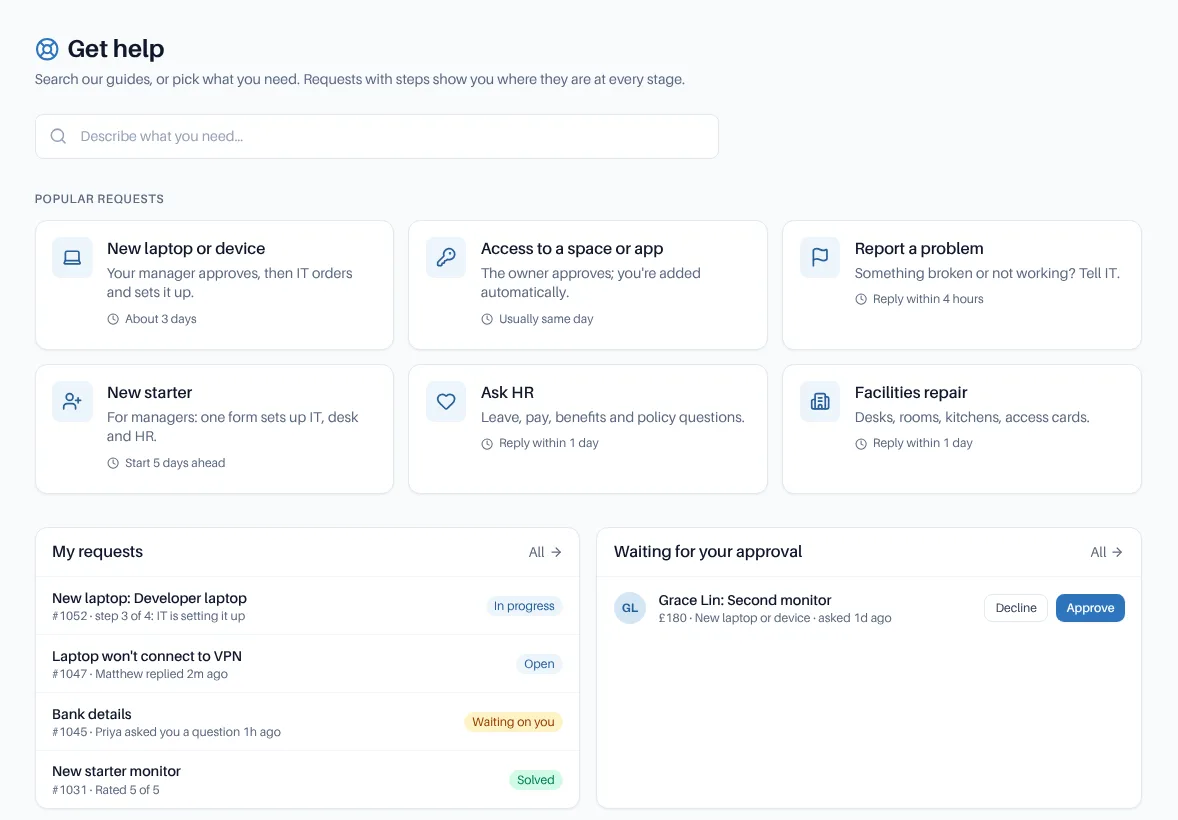
Get help: a search box over your guides, then request types such as Ask HR and New starter.
HR service delivery shouldn’t run on personal inboxes
HR teams answer the same questions every week, juggle onboarding across three departments, and handle requests that shouldn’t be visible to everyone.
× Questions go to whichever HR person someone knows, and disappear with that person’s holiday.
× The answer was in the handbook all along, but nobody found it.
× A new starter needs IT, Facilities and HR, and someone chases all three by email.
× HR requests sit in a tool where every agent can browse every team’s tickets.
× Nobody can say which policies a new joiner has actually read.
→ An HR helpdesk that answers from your documents first, and tracks every request to the end.
How CompassDocs works as HR helpdesk software
The HR helpdesk is one part of CompassDocs. The handbook, policies and directory it answers from are the rest.
Ask HR in Get help
Colleagues see suggestions from your own documents before they ask, then pick a request type. Forms prefill answers from the directory and name the approver.
Get help →New starter workflows
One request starts tasks for IT, Facilities and HR in parallel, waits until the start date, and routes by the requester’s office.
Workflows & approvals →Queues scoped to teams
Agents work the queues of the teams they belong to, with five adjustable desk roles from Newbie to Admin.
Roles & permissions →Policy handbooks
Bring policies and SOPs together in numbered sections, for people to read as one and print with an acknowledgement page.
Policy handbooks →Read confirmations
Ask people to confirm a policy against the exact version they read, with due dates, reminders and a compliance portal (Enterprise).
Read confirmations →Onboarding training
Turn documents into training decks and bundle them into onboarding programs that every new account gets automatically (Enterprise).
Training & onboarding →People directory
Find colleagues by name, title or department, with an org chart and sync from Microsoft 365 or Google Workspace on Enterprise.
People directory →Privacy for the tickets you keep
Retention, legal hold, a recycle bin and personal data exports, with every helpdesk change in the audit log.
Security & privacy →Answers in plain English
Ask “How do I request time off?” and get an answer from your own documents, with the sources cited.
AI search →Keep HR requests with HR
HR tickets often hold personal details. CompassDocs gives you a few ways to keep them where they belong.
- Agents work the queues of the teams they belong to, so an IT agent working IT’s queue isn’t browsing HR’s
- Managers and Admins see every team out of the box; every capability can be adjusted per role in Desk settings
- Custom fields can be marked Agent only, so requesters never see them
- HR documents can live in a private space, restricted to chosen people or groups; search, AI answers and comments respect that boundary
- Directory fields can be set to admins only, stripped on the server before they reach a page or a contact card
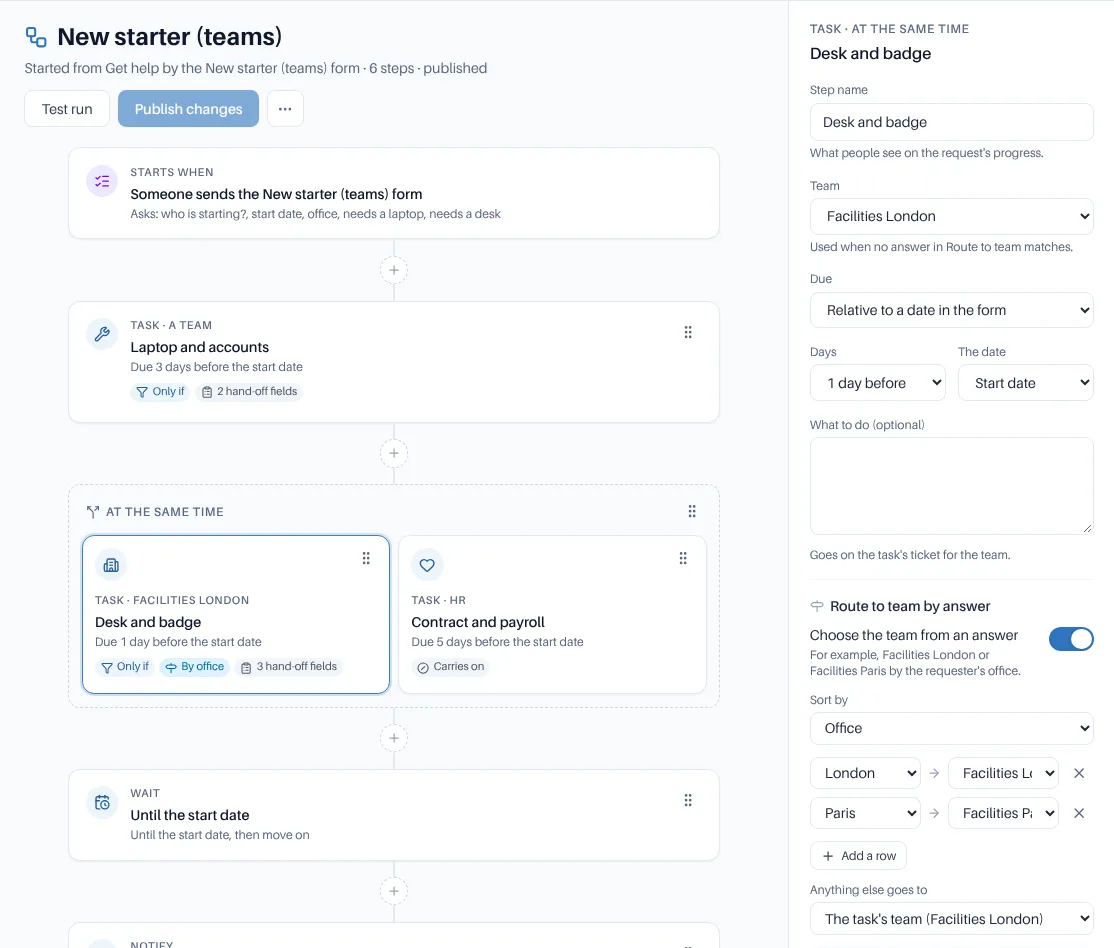
A New starter workflow: IT, Facilities and HR tasks in parallel, then a wait until the start date.
From first day to leaving day
An HR helpdesk covers the whole employee lifecycle, not just questions.
New starters
New accounts, whether created locally, by single sign-on or by SCIM, join the policy audiences and onboarding programs that cover them, with due dates from day one.
Everyday requests
Ask HR, leave questions and letters as request types with their own forms, approvers and reply targets in HR’s office hours.
Leavers
Removing an account anonymises that person’s tickets in the same step, except tickets on legal hold. Their data can be exported as a JSON file first.
Setting up an HR helpdesk
Start with the free knowledge base for your handbook and policies, then add an Enterprise license to turn on the helpdesk, read confirmations and training.
Run one command
The installer starts CompassDocs and PostgreSQL with Docker, and a setup wizard creates your admin account in the browser.
Publish your handbook
Put policies and guides in an HR space, private if you need it, and gather them into a policy handbook.
Turn on the helpdesk
Add an Enterprise license, load the starter set with IT, HR and Facilities teams, and write request types such as Ask HR and New starter.
Invite HR agents
Give them the Helpdesk agent role, add them to the HR team with a desk role, and set HR’s office hours and reply targets.
$ curl -fsSL https://raw.githubusercontent.com/Felix-AZ-Solutions-LLC/CompassDocs/main/install.sh | bash
  ✓ Fetched docker-compose.yml
  ✓ Generated .env with fresh secrets
  ▲ CompassDocs running at http://localhost:3000
  → open the URL to create your admin account
Requirements, platforms and the Node.js install path are on the self-hosting page →
Set up faster with Claude
CompassDocs is built for MCP, so Claude can do the first draft of your rollout while your team reviews and publishes. When you start, we walk you through it.
Bring your content in
Paste or attach the procedures and policies you already have, and Claude redrafts each one in your templates, screenshots included.
Draft the handbook and training
Claude assembles a draft handbook from your policies and, with Enterprise, turns procedures into training decks with quiz questions.
Configure the helpdesk as drafts
Request types, forms, workflows, macros and recurring tickets are drafted for an admin to review and publish. Nothing goes live on its own.
See everything Claude can do through MCP and the step-by-step rollout.
Frequently asked
Can HR keep its tickets away from other agents?
Agents work the queues of the teams they belong to, so HR agents work HR’s queue and IT agents work IT’s. Managers and Admins see every team out of the box, and every capability can be adjusted per role. HR documents can also sit in a private space restricted to chosen people or groups.
Can employees find answers before raising a request?
Yes. Get help suggests documents from your own knowledge base, within each person’s space access, before a request is written. AI answers are optional and cite the documents they used.
How are new starters handled?
A New starter request type can start a workflow with tasks for IT, Facilities and HR in parallel and a wait until the start date. With Enterprise, new accounts are also enrolled in onboarding training programs and the policy audiences that cover them.
What happens to someone’s tickets when they leave?
Removing an account anonymises that person’s tickets in the same step, except tickets on legal hold. A person’s data can be exported as a JSON file first.
How is the HR helpdesk priced?
The knowledge base, handbooks and private spaces are free in Community. The helpdesk, read confirmations and training are part of Enterprise: $499.99 a year per install with unlimited users and 3 agents included; each extra agent is $125 a year.
Related: For HR teams · Employee handbook · IT helpdesk software · Helpdesk overview · Pricing
An HR helpdesk next to your handbook
Self-host the open-source knowledge base with one Docker command. An Enterprise license adds the helpdesk, read confirmations, training and SSO for $499.99/year with unlimited users and 3 agents included.
Self-host it free Get a quoteWant to try it with your HR team first? Request a trial license · See pricing