 CompassDocs
Knowledge base and helpdesk software for K-12 school districts
Board policy in one place, administrative regulations in another, a staff handbook as a PDF from three summers ago, and IT, HR and facilities requests arriving by email to whoever someone knows. CompassDocs is self-hosted knowledge management for school districts: every department’s procedures in one searchable place, staff handbooks people confirm against the exact version, and one helpdesk for central office, on the sign-in staff already use.
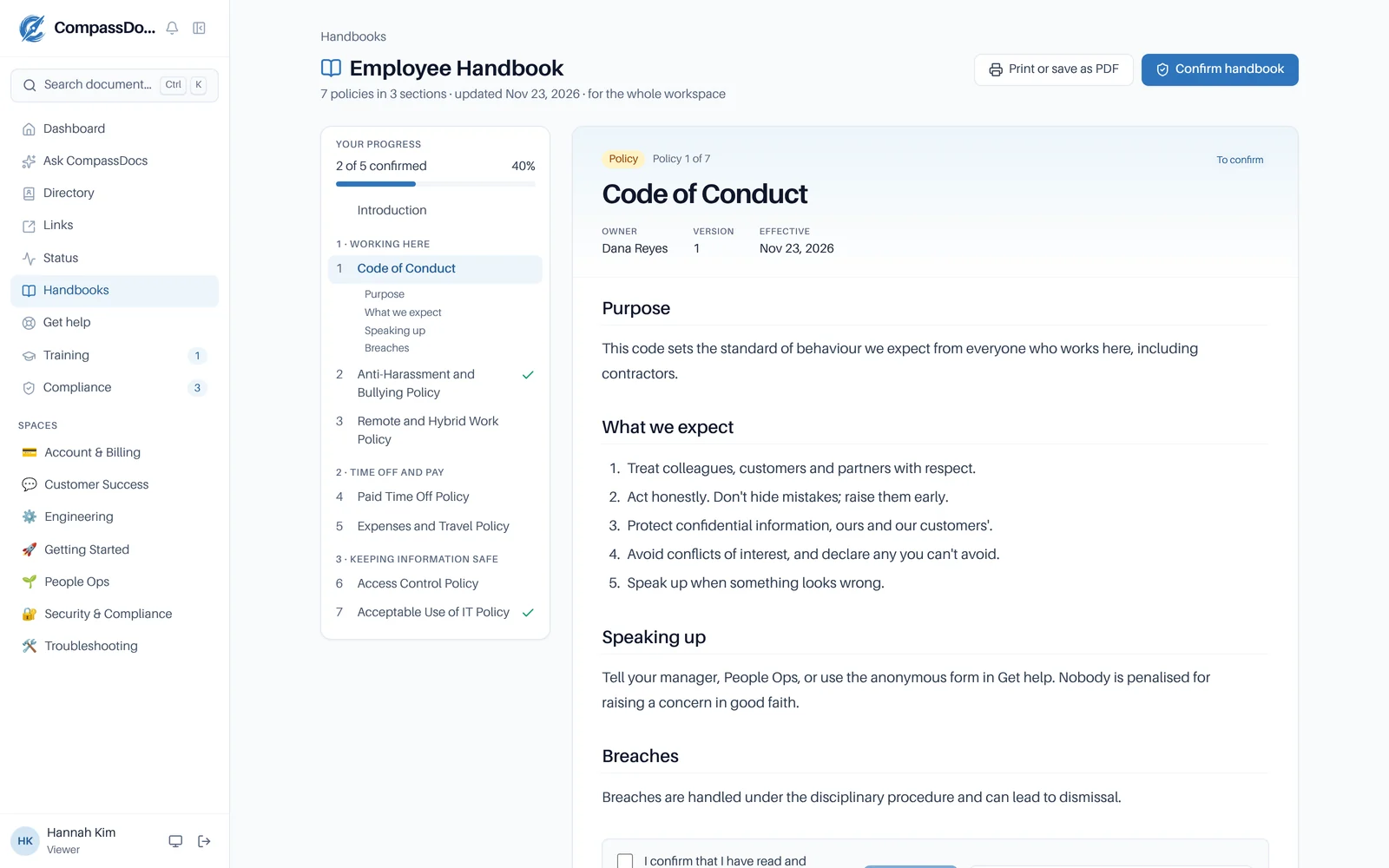
A staff handbook built from live, published policies, each with its owner, version and effective date.
A district’s know-how is spread across every building
Central office writes the procedures, campuses keep their own copies, and every August the same questions arrive again.
× Each campus has its own version of the fire drill procedure, and nobody is sure which one is current.
× Back-to-school handbook sign-off runs on a paper form or a survey link, and HR rebuilds the list of who is missing by hand.
× A substitute on day one can’t find the attendance procedure, the bell schedule or the number for the front office.
× The technology department, HR and facilities each run a different inbox, form or spreadsheet for requests.
× When someone asks what the leave policy said last school year, the answer is in an email attachment.
→ One place for the district’s procedures and policies, with a record of who read what, and one front door for help.
School district knowledge management, department by department
Give each department and campus its own space, gather policies into staff handbooks, and put a helpdesk in front of the people who answer questions all day.
A space per department and campus
Technology, HR, facilities, the business office and curriculum each own a space; every campus gets one for its own procedures. Private spaces keep personnel material to the people who need it.
Documents & spaces →Staff handbooks that stay current
A handbook points at published policies, so the certified and classified staff handbooks update the moment a policy does. Print it with an acknowledgement page for staff who want paper.
Policy handbooks →Back-to-school sign-off
Ask every employee to confirm the handbook by a due date, with reminders, escalation to policy owners and group leads such as principals, and annual re-confirmation (Enterprise).
Read confirmations →Annual trainings and onboarding
Turn a published procedure into a training deck with a quiz, and give every new hire the same onboarding program automatically (Enterprise).
Training & onboarding →One front door for help
Get help searches your guides first, then offers request types: a broken Chromebook cart, a work order, a leave question, a purchase request (Enterprise).
Get help →Approvals that follow the org chart
Route a request to the requester’s principal or budget manager from the directory, then on to the department that does the work, counted in business days (Enterprise).
Workflows & approvals →District sign-in
Staff sign in with Google Workspace over SAML 2.0 or Microsoft Entra ID over OpenID Connect; SCIM from Entra deactivates leavers at once (Enterprise).
Single sign-on →Every teacher, sub and para gets an account
Per-seat pricing is why districts end up with a wiki for central office only. Both CompassDocs editions have unlimited users, so a district with 900 teachers, 250 paraprofessionals, and 300 substitutes on the call list pays the same as a district of 80.
- Community: free and open source (AGPL-3.0), self-hosted, unlimited users and documents, with handbooks, approvals, versioning, private spaces and AI search
- Enterprise: $499.99 a year per install, still unlimited users, adding SSO, SCIM, directory sync, read confirmations and the compliance portal, training and onboarding, audit-log export and the helpdesk
- Helpdesk agents are the only thing counted: 3 are included and each extra agent is $125 a year. Staff who only ask for help never count
- A worked example: five technology techs, two HR specialists and two facilities dispatchers is nine agents, so $499.99 plus six extra agents at $125, or $1,249.99 a year before any education discount
Education discounts are available: ask us. Optional dedicated support is $3,000 a year, and your first Enterprise purchase has a 30-day money-back guarantee.
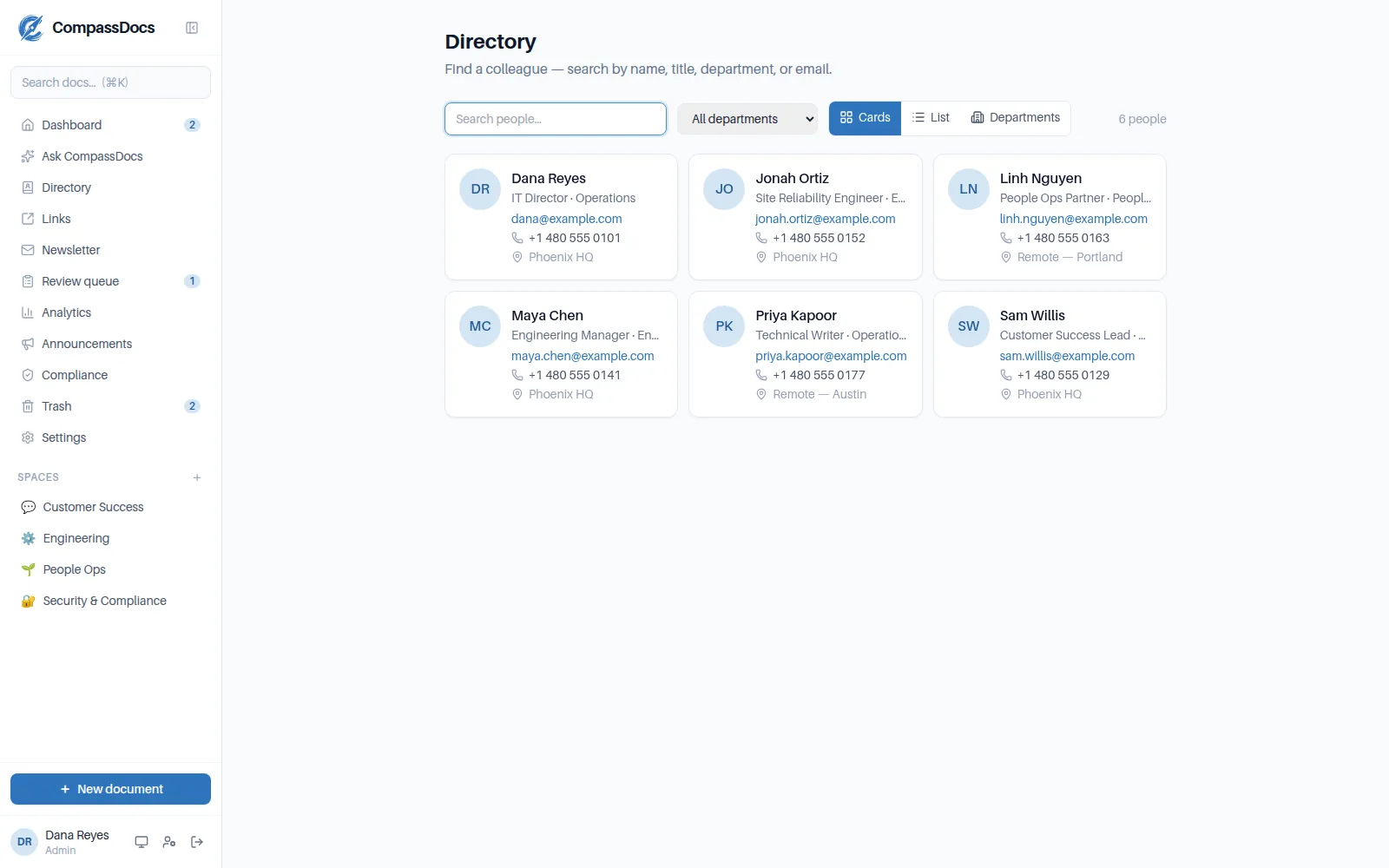
The directory: titles, departments and locations, with a campus field you define.
Department by department
Each department uses the same platform for different jobs. The detailed pages walk through each one.
Human resources
Certified and classified handbooks, back-to-school sign-off, new-hire onboarding for the August rush, and an Ask HR queue only HR can see.
School HR →Technology department
A K-12 IT helpdesk for staff: Chromebook and 1:1 device tickets, new accounts, outages at one campus handled as one incident, and guides that answer first.
School IT helpdesk →Facilities and operations
Work orders by campus, recurring maintenance checks, and event setups for gyms, cafeterias and board rooms on one calendar.
School facilities →Business office
Purchasing and travel procedures, purchase requests approved by budget managers, and the fiscal year close checklist in one place.
School business office →Curriculum & instruction
Curriculum maps, pacing guides and scope and sequence, versioned by school year, with PD modules that record who completed them.
Curriculum & instruction →Principals and the board
Principals approve requests from their campus and see their staff’s sign-off on the dashboard. Board policy and administrative regulations keep every adopted version.
The feature matrix: who uses what
One concrete use per department. The rows from read confirmations down are Enterprise; spaces, handbooks, versioning and approvals are in the free Community edition.
| Feature | HR | Technology | Facilities | Business office | Curriculum & instruction | Principals & campus |
|---|---|---|---|---|---|---|
| Spaces | Private space for leave, benefits and contracts | Staff tech guides and runbooks | Emergency procedures and building info | Purchasing and travel SOPs | Curriculum maps and pacing guides | Campus procedures and bell schedules |
| Handbooks | Certified and classified staff handbooks | Acceptable use and device handbook | Custodial SOP handbook | Business office procedures manual | Instructional handbook | A campus section in the staff handbook |
| Versioning & approvals | What the leave policy said last year | Acceptable use changes reviewed first | Emergency plan edits approved | Approval thresholds over time | Scope and sequence revisions | Board policy as adopted |
| Read confirmations | Handbook sign-off in August | Acceptable use each school year | Site emergency procedures | Purchasing card rules for cardholders | Grading and assessment guidelines | Team compliance on the dashboard |
| Training | New-hire onboarding program | Data privacy and phishing deck | Chemical safety for custodians | Requisition walkthrough for secretaries | PD module with a quiz | Weekly digest of who is behind |
| Request types | Ask HR, verification letters | Broken device, new account | Work order, room setup | Purchase request, reimbursement | Materials request, PD sign-up | Raise and follow for their campus |
| Workflows | New hire: HR, IT and facilities in parallel | Device collection at separation | Event setup after principal approval | Budget manager, then business office | Materials order after coach review | Approve as the requester’s manager |
| Recurring tickets & calendar | Monthly substitute onboarding check | Summer device reimaging by campus | Monthly fire extinguisher checks | Fiscal year close tasks in June | PD day room setups | Back-to-school night on the calendar |
The two weeks before students return
The busiest stretch of the year for every central office department, and where one shared system earns its keep.
Cabinet approves the updated handbook
Over the summer, HR edits three policies in strict mode. Each edit is a change request with a note, the assistant superintendent approves the diff, and the handbook shows the new versions.
New hires arrive with accounts ready
Forty new teachers start on the first PD day. Their accounts come from single sign-on or SCIM, and each one is enrolled in the onboarding program and the handbook’s audience automatically, with a due date from the new-joiner grace period.
Returning staff re-confirm
Annual re-confirmation reopens the handbook for everyone. One statement confirms every policy still waiting, against its current version. Principals, as group leads, get one weekly email showing who on their campus is behind.
Requests come through one door
A missing projector cable, desks to move, a badge that won’t open the side door: each is a request type routed to the right team, after the guides have answered what they can.
Back-to-school night goes on the calendar
Facilities receives gym and cafeteria setups as tickets with an event. Reminders go out a day and an hour before setup is due, and a ticket can’t be closed until setup is marked complete.
Board policy, administrative regulations and the version in force
Board policy is adopted by the board; administrative regulations and procedures are written by the superintendent’s cabinet to carry it out. CompassDocs keeps both as published documents with an owner, a type and a review cadence, linked to each other as related documents.
- Strict mode turns edits to a published policy into change requests an approver reviews, word by word, before they go live
- Every version is kept with its author and change note; compare any two side by side and show what a regulation said on a given date
- Review reminders put overdue policies in an editor’s queue, so the annual policy review isn’t a spreadsheet
- Mark a space public and its published documents become an anonymous, searchable website on your own domain, for the policies you choose to publish to families and the community
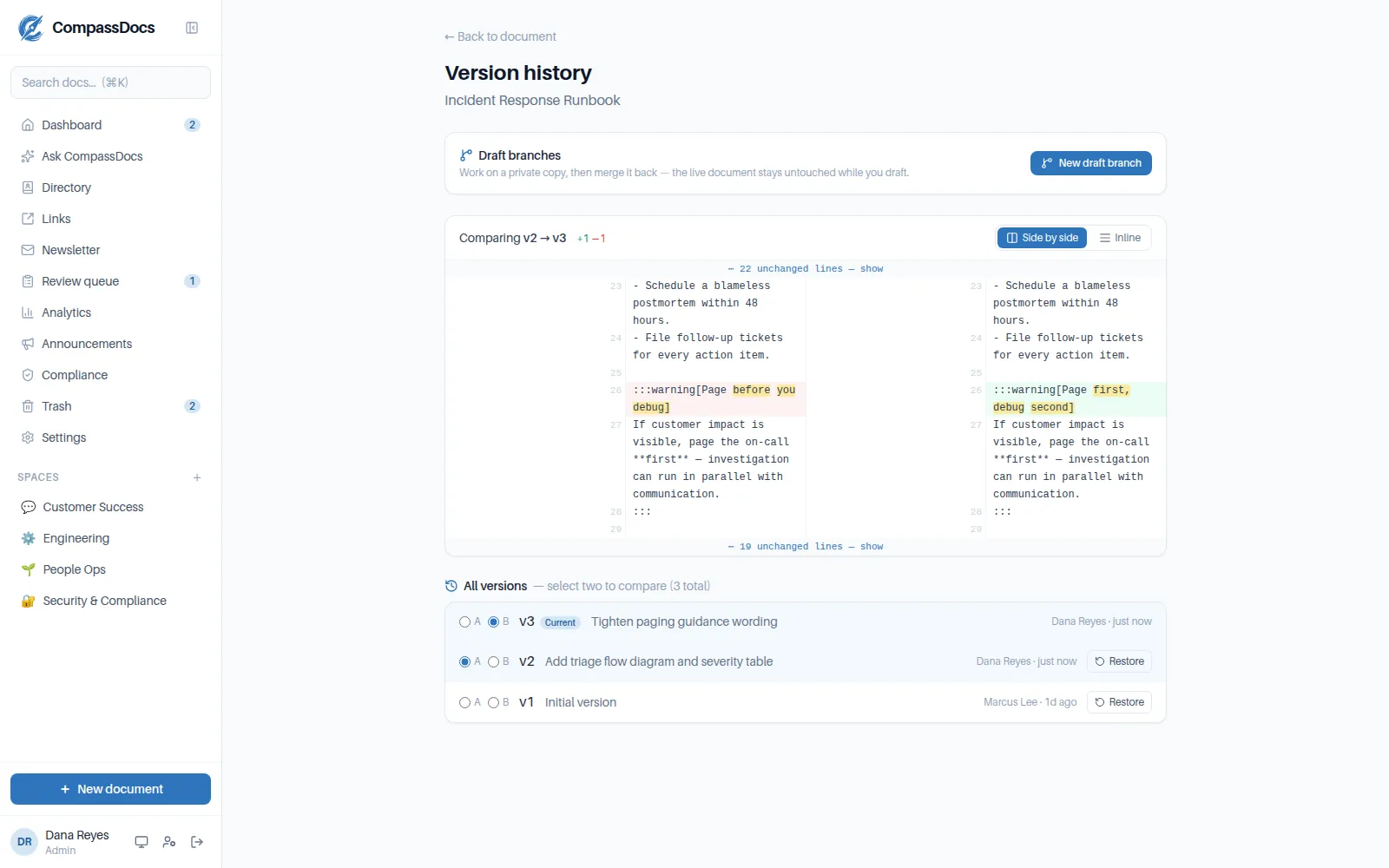
Version history with word-level highlights and the change note for each version.
Help for every campus, worked by the right team
- Technology, HR, facilities and the business office each work their own queue; agents see the teams they belong to, so an IT tech isn’t browsing HR’s tickets
- Each team keeps its own office hours and holiday set, imported from an .ics file, so reply targets pause over winter break and summer closure days
- Workflows route by any directory field, such as the requester’s campus, with a fallback team
- When the Wi-Fi goes down at the high school, a major incident gathers the duplicate tickets, posts one update to everyone affected and shows a banner with a Me too button
- Staff raise and follow requests from Microsoft Teams or Slack as well as by email, and principals approve from a card
- Connect Snipe-IT or Microsoft Intune and agents see the requester’s devices and warranty on the ticket; the desk isn’t an asset register, so the inventory stays there
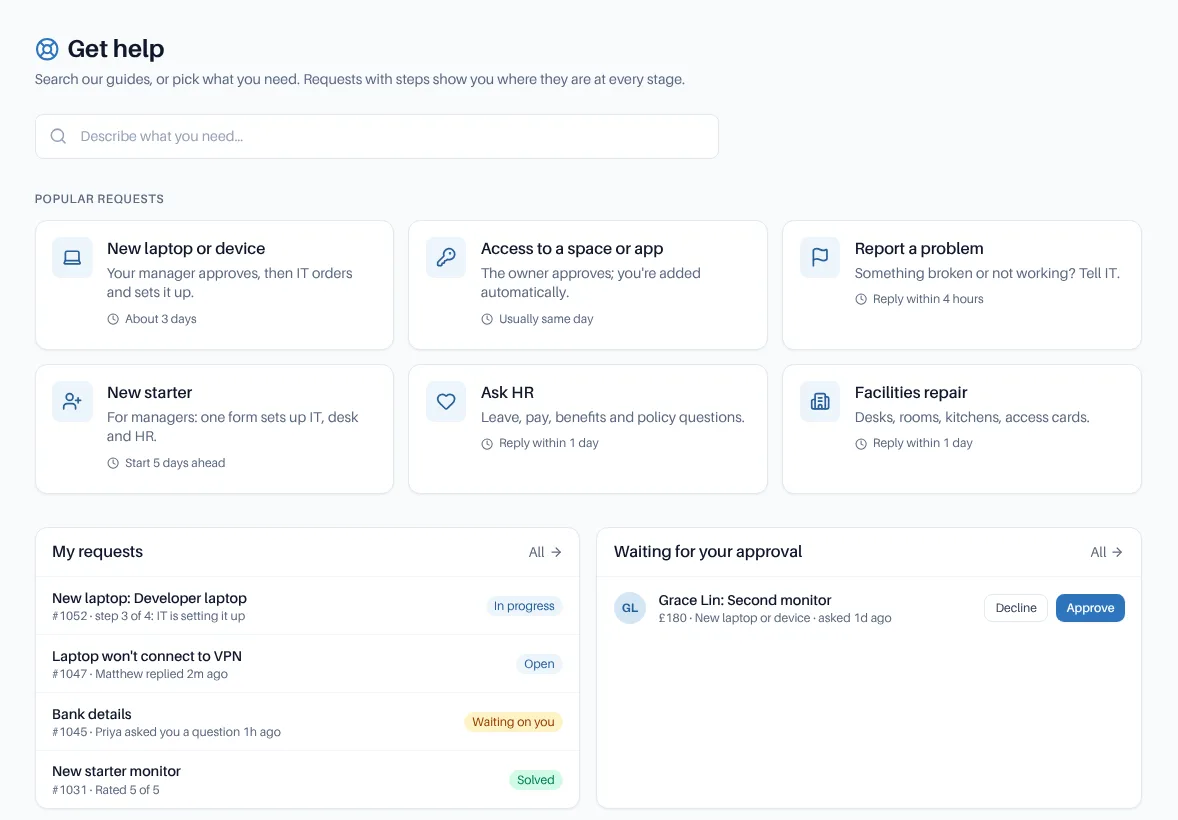
Get help: search the guides first, then pick a request type.
Why districts self-host it
- Staff documents, tickets and attachments live in one PostgreSQL database on infrastructure the district controls, backed up on your schedule, with off-site copies to S3, R2, MinIO or Azure
- Installs with one Docker command on a Linux server, or runs as Node.js with your own PostgreSQL
- AI answers are optional and stay off until an admin adds the district’s own Anthropic API key; semantic search can use a local embeddings engine such as Ollama
- The Enterprise license is signed and offline: it never calls home
Requirements and the install command are on the self-hosting page.
Built for staff, beside your other systems
CompassDocs is for staff documentation and staff requests. It is not a student information system, an LMS or an ERP, and it doesn’t hold grades, attendance or payroll. It sits beside them and documents how staff use them.
Quick links to everything else
Put the SIS, the LMS, the finance system and the sub-calling system on every dashboard as quick links, restricted by group where a link isn’t for everyone.
Keeping records, not promising compliance
Districts are asked to show things: that staff received the acceptable use policy, which version of a procedure was in force when an incident happened, who finished the annual training. CompassDocs keeps those records as you work. Each read confirmation stores the statement, the policy version and the time, with an optional typed signature; training completions record the document version and quiz score; and you can export per-policy and per-person records, an audit package with a hash manifest, or CSVs.
It is a documentation tool, not a compliance program. We don’t claim CompassDocs is FERPA, COPPA or CIPA compliant or certified under any state student-privacy law: those obligations depend on what you store and how you run it, and meeting them remains the district’s responsibility. Keep student records in the systems built for them.
When another tool is the better fit
CompassDocs is a staff knowledge base and internal helpdesk. Some district jobs belong elsewhere:
Students, grades and courses
Your student information system and LMS hold enrollment, attendance, grades and coursework. CompassDocs holds the staff procedures for using them.
Finance and payroll
Purchase orders, budgets and payroll run in your finance system. The business office keeps its procedures and request intake here.
Emergency notification to families
Announcements reach staff dashboards, email and chat. Mass calls and texts to families need a dedicated notification service.
Set up faster with Claude
CompassDocs is built for MCP, so Claude can do the first draft of your rollout while your team reviews and publishes. When you start, we walk you through it.
Bring your content in
Paste or attach the procedures and policies you already have, and Claude redrafts each one in your templates, screenshots included.
Draft the handbook and training
Claude assembles a draft handbook from your policies and, with Enterprise, turns procedures into training decks with quiz questions.
Configure the helpdesk as drafts
Request types, forms, workflows, macros and recurring tickets are drafted for an admin to review and publish. Nothing goes live on its own.
See everything Claude can do through MCP and the step-by-step rollout.
Frequently asked
Does every teacher, substitute and paraprofessional need a paid seat?
No. Both editions have unlimited users. Enterprise is $499.99 a year per install, and the only thing counted is helpdesk agents: 3 are included and each extra agent is $125 a year. Staff who only ask for help never count as agents.
Can staff sign in with their Google Workspace or Microsoft 365 district account?
Yes, with Enterprise single sign-on: SAML 2.0 for Google Workspace, or OpenID Connect for Microsoft Entra ID with one-click setup. New staff get an account on first sign-in, and with SCIM from Entra, leavers are deactivated and their sessions revoked at once.
Can we track which staff have signed the handbook this school year?
Yes, with Enterprise read confirmations. Staff confirm the whole handbook in one step against the current version of each policy, reminders and escalation go out on their own, and annual re-confirmation reopens it each year. The compliance portal shows who is done and who is overdue.
Can each campus have its own procedures?
Yes. Give each campus its own space, private if needed, and add a campus section to the district handbook. Principals can be group leads who see their own staff’s progress.
Is CompassDocs FERPA compliant?
We don’t claim FERPA, COPPA, CIPA or state privacy-law compliance or certification. CompassDocs is built for staff documentation, not student records, and self-hosting keeps your data on infrastructure the district controls. Meeting your legal obligations remains the district’s responsibility.
Does it replace our student information system or LMS?
No. It is not a student information system, LMS or finance system. It sits beside them as the staff knowledge base and helpdesk, and quick links put those systems on every dashboard.
Is there an education discount?
Yes. Education and nonprofit discounts on Enterprise are available on request; contact us. The Community edition is free for any district, with unlimited users.
Where is our data stored?
On your own server, in a PostgreSQL database the district controls. CompassDocs Cloud is coming soon but not on sale yet, so today CompassDocs means self-hosting it with Docker or with Node.js and your own PostgreSQL.
Related: Charter schools · Schools, colleges & universities · School HR · School IT helpdesk · School facilities · School business office · Curriculum & instruction · Government
Free for every district to self-host
One Docker command installs CompassDocs with unlimited users and documents. Enterprise adds read confirmations, training, the helpdesk and SSO for $499.99/year per install, with education discounts on request.
Self-host free See pricingBuying for a district? Get a formal quote to print for approval, or order by invoice with your PO number.