 CompassDocs
Charter school operations software for policies, handbooks and help
A charter school runs a district’s worth of operations with a fraction of the central office. The operations manager is also the HR contact, the dean also runs the help desk, and every renewal cycle someone rebuilds years of evidence from email. CompassDocs gives a single-site charter or a charter management organization one self-hosted place for its policies and staff handbook, a record of who confirmed what, and a helpdesk the same few people can run.
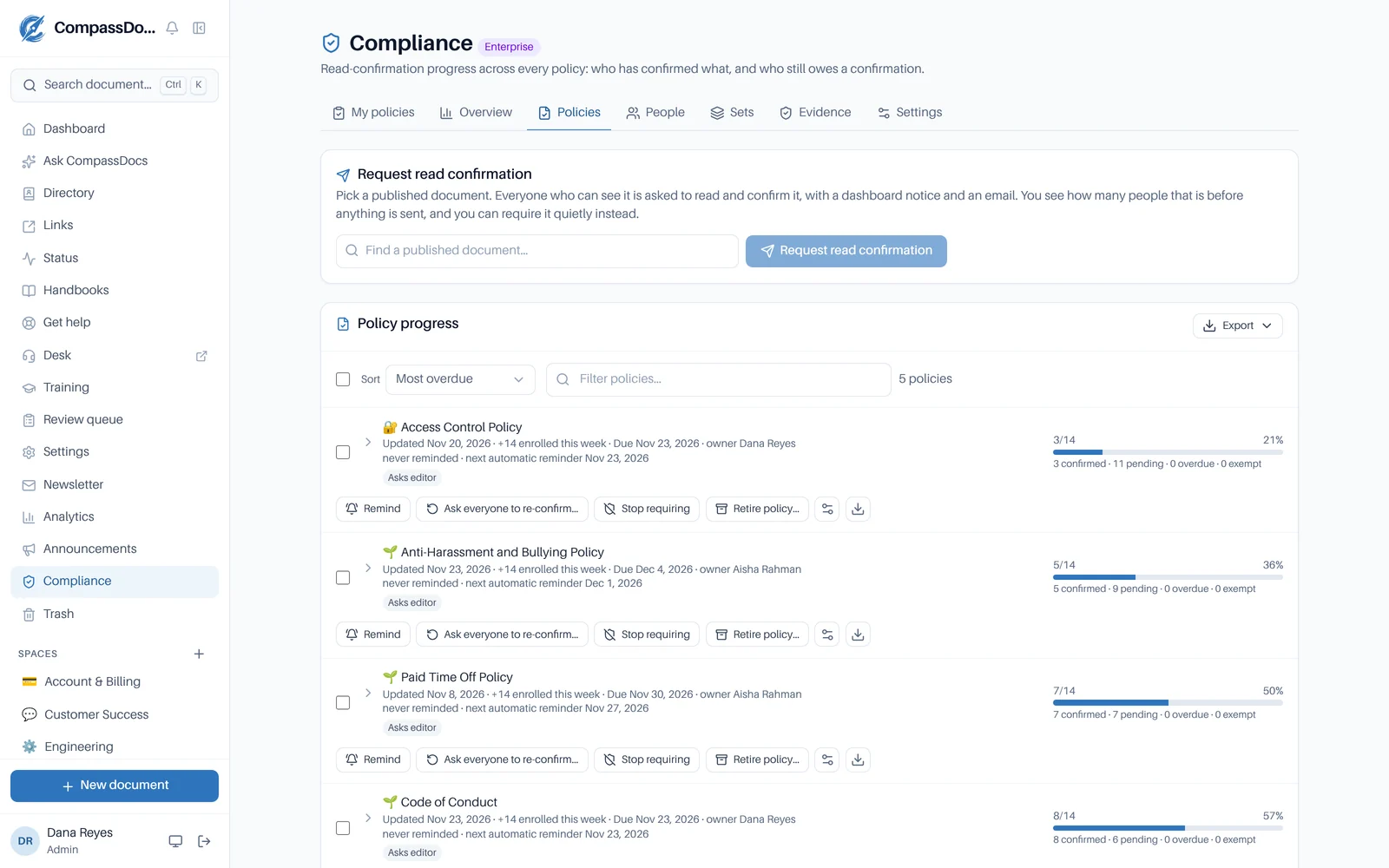
The compliance portal: every policy’s due date, owner and how many staff have confirmed it (Enterprise).
A lean central office, and an authorizer who will ask
Charters answer to an authorizer and a board, usually with no policy office, no HR department of ten and no dedicated help desk.
× The founding policies were written fast for the charter application and now live in an appendix PDF nobody updates.
× The board amended the discipline and grievance policies, but the staff handbook still shows last year’s wording.
× Renewal is due, and proving every staff member received the handbook each year means digging through signed PDFs.
× Three people answer every operations, HR and technology question, from personal inboxes and hallway conversations.
× The second campus copied the first campus’s shared drive, and the two have drifted apart ever since.
→ Policies with a version history, sign-off with a record, and one front door for staff questions.
One school or a network: two shapes, one setup
CompassDocs is licensed per install, not per campus, so the same install grows from a founding school to a network.
A single-site charter
One workspace with a few spaces: Operations, HR (private), Technology, Facilities and Academics. One staff handbook gathers the board-adopted policies, and the school leader, operations manager and office manager share the helpdesk.
A CMO or network
Network spaces for the policies every school follows, a space per campus for its own procedures, and groups per campus that drive access. A network handbook for everyone, and a handbook owned by each campus space for its staff.
Network office and campus staff
The network’s HR, technology and finance staff work shared helpdesk queues, while workflows route each request by the requester’s campus. Campus leaders see their own staff’s sign-off and training.
Policies and a staff handbook, in weeks rather than a school year
A new charter or a newly approved campus needs its policies in place before the first staff PD day. Start from structure instead of a blank page.
Templates to start from
Six built-in templates, including SOP and policy, and your own. Any document can become a template, so the second campus starts from the first one’s structure.
Documents & spaces →Drafts from Claude, published by you
The Claude connector can draft documents in your templates and build draft handbooks. It never publishes and never confirms: a person reviews and publishes in the app.
Claude connector →One handbook from many policies
Gather published policies and SOPs into numbered sections with an introduction. Print it with a cover, contents and an acknowledgement page to sign.
Policy handbooks →Strict mode once the board adopts
Open mode while you draft. Switch on strict mode and edits to published policies become change requests an approver reviews before they go live.
Roles & approvals →Publish what families should read
Mark a space public and its published documents become an anonymous, searchable site on your own domain, from the same source as the staff copy.
Public site →Free templates
Start the staff handbook, an onboarding checklist or an SOP from our free templates, then bring them into CompassDocs.
Free templates →From charter approval to the first day of school
A new single-site charter, with a school leader, an operations manager and 28 founding staff starting PD in late July.
Install and create the spaces
The installer starts CompassDocs and PostgreSQL with one Docker command. The operations manager creates Operations, HR (private), Technology and Academics spaces.
Write the policies the board will adopt
Enrollment, attendance, discipline, grievance, acceptable use, and leave and benefits, each from the policy template with an owner and a review cadence. The board chair is an approver.
Build the staff handbook
A draft handbook gathers the adopted policies in sections, with an introduction from the school leader. It publishes to everyone once the board votes.
Onboard 28 people at once
With Enterprise, an onboarding program assigns the handbook walkthrough, the safety procedures deck and the technology guide to every new account automatically, each with a due date.
Open the help desk
Request types for a broken device, a facilities repair and Ask HR, worked by the three people who answer them anyway, now with a record of every request.
Renewal evidence, kept as you go
Authorizers ask different questions, and we don’t know what yours will ask for. What CompassDocs does is keep the records that charter staff usually end up reconstructing before a site visit or a renewal application:
- Which policy was in force: every version kept with its author, approver and change note, and effective dates on each policy
- Who confirmed it: each read confirmation records the statement, the version and the time, with an optional typed signature (Enterprise)
- Every year, not just this one: annual re-confirmation keeps each prior confirmation, and monthly snapshots carry a SHA-256 hash you can recompute
- Who finished which training: completions record the document version and quiz score, with printable certificates and CSV export (Enterprise)
- One package to hand over: per-policy and per-person records, or an audit package ZIP with a hash manifest
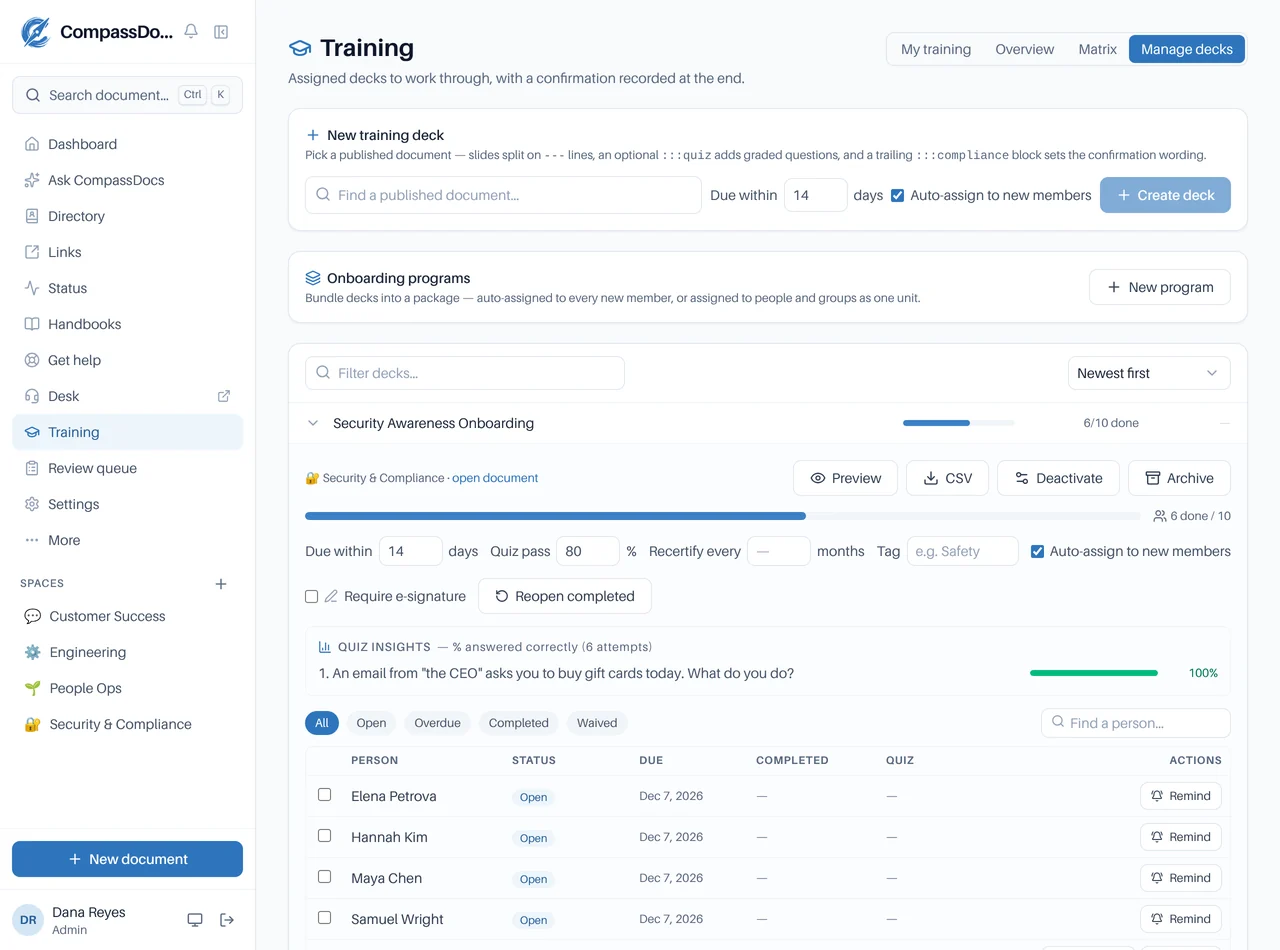
A training deck auto-assigned to new staff, with completion progress and CSV export.
Built for staff who do three jobs
In a charter, the person who answers the HR question also orders the Chromebooks and books the gym. CompassDocs is set up around people, not departments of one.
- One agent can belong to several helpdesk teams, such as Operations, HR and Technology, and work all three queues from one desk
- Enterprise includes 3 helpdesk agents, often the whole operations team at a single site; each extra agent is $125 a year
- Get help answers from your guides before a request is sent, so the same question doesn’t reach the operations manager twenty times in August
- A contracted IT technician or a back-office provider can be given an account and a desk role scoped to the team they serve
- Recurring tickets put the monthly fire drill log, the emergency go-bag check and the summer device inventory on a schedule, so they don’t live in one person’s head
- Delegate the compliance portal or the training program to the HR lead through section access, without making them a workspace admin
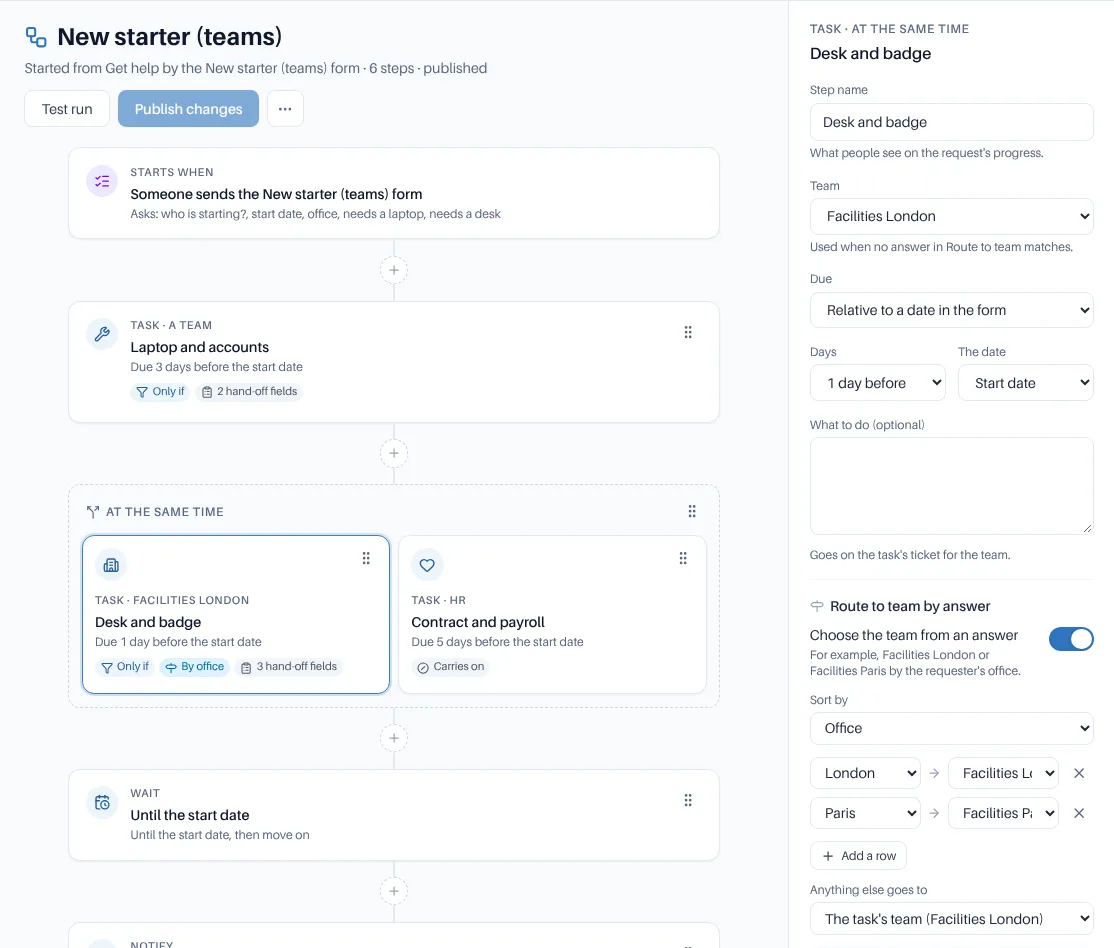
A New starter workflow: tasks for several teams at once, then a wait until the start date.
Opening the next campus
Growth is where a network’s documentation usually splits in two. Adding a campus in CompassDocs is configuration, not a copy.
A space and a group
Create the campus space and a campus group; the network spaces and network handbook already apply to the new staff.
A campus handbook section
Add the campus’s bell schedule, arrival and dismissal and emergency procedures as a handbook owned by its space, without touching network policy.
Routing by campus
Workflows route tasks by a directory field such as campus, with a fallback team, so the new site’s work orders reach its own facilities lead.
Onboarding on day one
Onboarding programs enrol every new account, created locally, by single sign-on or by SCIM, so the new campus’s staff get the same training as the first.
One policy, every campus
Amend a network policy once and every campus handbook that includes it shows the new version. Staff see what changed since the version they confirmed.
The same license
Enterprise is $499.99 a year per install with unlimited users, however many campuses share it. Only extra helpdesk agents add cost.
Department by department
At a charter the “department” may be one person, or a network office serving every campus. The detailed pages cover each job.
HR
The staff handbook, leave and benefits questions in a private queue, and onboarding for new hires and mid-year replacements.
School HR →Technology
Chromebook and laptop tickets, accounts for new staff, and how-to guides that answer the common questions first.
School IT helpdesk →Facilities
Repairs in a leased building, recurring safety checks, and event setups for family nights and board meetings.
School facilities →Business office
Purchasing procedures, purchase requests approved by the school leader, and the steps for fiscal year close and the annual audit.
School business office →Curriculum & instruction
The school model written down: curriculum maps, pacing guides and coaching cycles, with PD completion on the record.
Curriculum & instruction →School leader and the board
Board-adopted policies with a version history, approvals in strict mode, and the compliance portal for renewal season.
The feature matrix for a charter
One concrete use per job. Read confirmations, training and the helpdesk rows are Enterprise; spaces, handbooks, versioning and the public site are in the free Community edition.
| Feature | School leader & operations | HR | Technology | Facilities | Business office | Curriculum & instruction |
|---|---|---|---|---|---|---|
| Spaces | Network policies, then a space per campus | Private HR space | Staff tech guides | Building and lease contacts | Purchasing SOPs | The school model and curriculum maps |
| Handbooks | Network handbook plus campus handbooks | Staff handbook for new hires | Device and acceptable use guide | Emergency procedures handbook | Fiscal procedures manual | Instructional handbook |
| Versioning | What a policy said in a given year | Leave policy as amended | Acceptable use changes | Safety plan revisions | Approval limits over time | Pacing guide by school year |
| Public site | Board-adopted policies for families | Open roles and benefits summary | Family device guide | Visitor and arrival procedures | Public financial policies | Curriculum overview |
| Read confirmations | Renewal records by year | Handbook sign-off on hire | Acceptable use each year | Emergency roles by campus | Purchasing card rules | Grading policy |
| Training | Campus leader digest of who is behind | Onboarding program | Data privacy deck | Safety deck for custodial staff | Requisition walkthrough | Model PD with a quiz |
| Request types | General operations question | Ask HR | Broken device | Repair or room setup | Purchase request | Materials request |
| Workflows | Approve as campus leader | New hire across HR, IT, facilities | Device return at separation | Route by campus | Leader, then business office | Coach review, then order |
Keeping records, not promising compliance
CompassDocs helps a charter keep the evidence an authorizer, an auditor or its own board tends to ask for: which version of a policy was in force, who approved it, who confirmed it and when, and who finished which training. It is a documentation tool, not a compliance program, and it doesn’t know your charter contract or your state’s rules.
We don’t claim CompassDocs is FERPA, COPPA or CIPA compliant or certified under any state law. It is built for staff documentation and staff requests, not student records, and self-hosting keeps your documents on infrastructure the school or network controls. Meeting your legal, charter and authorizer obligations remains your responsibility.
When another tool is the better fit
CompassDocs is the staff knowledge base and helpdesk. These jobs belong elsewhere:
Students and families
Enrollment, the lottery, attendance, grades and family communication run in your student information system and family tools.
Accounting and payroll
The general ledger and payroll stay with your finance system or back-office provider. CompassDocs holds the procedures around them.
Submitting to the authorizer
Renewal applications go in through whatever process your authorizer uses. CompassDocs is where the records you attach come from.
Set up faster with Claude
CompassDocs is built for MCP, so Claude can do the first draft of your rollout while your team reviews and publishes. When you start, we walk you through it.
Bring your content in
Paste or attach the procedures and policies you already have, and Claude redrafts each one in your templates, screenshots included.
Draft the handbook and training
Claude assembles a draft handbook from your policies and, with Enterprise, turns procedures into training decks with quiz questions.
Configure the helpdesk as drafts
Request types, forms, workflows, macros and recurring tickets are drafted for an admin to review and publish. Nothing goes live on its own.
See everything Claude can do through MCP and the step-by-step rollout.
Frequently asked
Can a CMO run every campus from one install?
Yes. Enterprise is licensed per install, not per campus: $499.99 a year with unlimited users. Give each campus its own space and group, keep network policies in shared spaces, and route helpdesk requests by campus.
Can we show our authorizer that staff received the handbook each year?
With Enterprise read confirmations, each confirmation records the statement, the policy version and the time, with an optional typed signature, and annual re-confirmation keeps every year’s record. You can export per-policy and per-person records or an audit package. We don’t know what your authorizer requires, so check what they ask for.
How quickly can a new charter get its policies and handbook in place?
The install is one Docker command. From there, policies start from built-in templates, the Claude connector can draft documents and handbooks for a person to review and publish, and a handbook gathers the published policies into numbered sections.
Our operations team is three people. Is the helpdesk worth it?
Enterprise includes 3 helpdesk agents, and one agent can work several teams’ queues. Get help answers from your guides before a request is sent, and every request that does arrive is tracked to the end.
Can our outsourced IT provider work tickets?
Yes. Give the technician an account and a desk role on the Technology team. Each person who works the desk counts as a helpdesk agent; 3 are included and each extra agent is $125 a year.
Is there a discount for charter schools?
Education and nonprofit discounts on Enterprise are available on request; contact us. The Community edition is free for any school, with unlimited users.
Where is our data stored?
On your own server, in a PostgreSQL database you control. CompassDocs Cloud is coming soon but not on sale yet, so today CompassDocs means self-hosting it with Docker or with Node.js and your own PostgreSQL.
Related: K-12 school districts · Schools, colleges & universities · School HR · School IT helpdesk · School facilities · School business office · Curriculum & instruction · Nonprofits
Free for every charter to self-host
One Docker command installs CompassDocs with unlimited users and documents. Enterprise adds read confirmations, training, the helpdesk and SSO for $499.99/year per install, however many campuses you run.
Self-host free See pricingBuying for a network? Get a formal quote to print for your board, or order by invoice with your PO number.