 CompassDocs
Curriculum documentation, pacing guides and PD tracking for schools
Curriculum maps, pacing guides, scope and sequence documents and the instructional handbook usually live in dozens of copied files, and teachers can’t tell which one is current. CompassDocs gives a curriculum and instruction team one place to write, review and publish them, revise next year’s version without disturbing this year’s, and turn professional development into tracked training. It is for staff, beside your LMS, not instead of it.
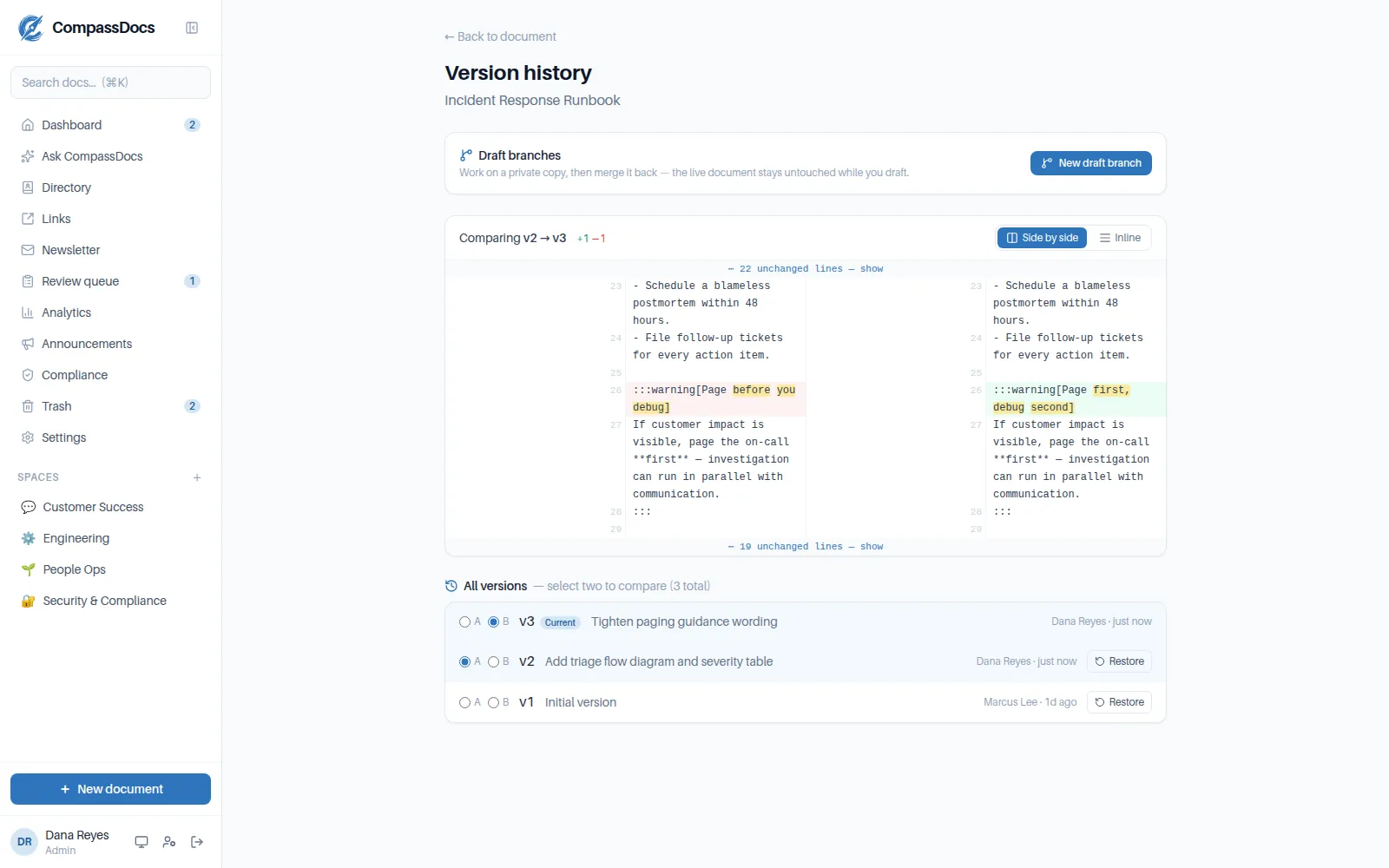
Version history: compare this year’s pacing guide with last year’s, word by word, with a change note on every version.
Which pacing guide is the real one?
Curriculum documents change every summer and get copied all year. By October, every campus has its own version.
× Grade 7 math has four copies of the pacing guide, and two teachers are a unit apart.
× The summer revision overwrote the live document in July, so summer school followed the draft.
× Nobody can say what changed between last year’s curriculum map and this year’s.
× PD day attendance is a paper sign-in sheet, and the teachers who missed it are never followed up.
× A new teacher in January can’t find the unit plans or the grading guidelines.
→ One published version, reviewed changes, and training you can track.
How curriculum and instruction teams use CompassDocs
Each curriculum job, the feature that does it, and how it works for coaches, content leads and teachers.
| Job | Feature | How it works |
|---|---|---|
| Organise curriculum maps and pacing guides | Documents & spaces | A space per content area, categories per course or grade, and tags such as grade-7 or unit-3. Each space has six views, including table, tree and timeline. |
| Structure scope and sequence | Rich editor | A course document with tables, callouts and tabs, nested pages for units, attachments for resources, and “Linked from” backlinks. |
| Revise next year’s curriculum | Draft branches | Rewrite a published pacing guide on a private branch while teachers keep reading the current one, then merge it back before the first day. |
| Get committee sign-off | Roles & approvals | Strict mode turns edits to published documents into change requests; a custom role lets the ELA lead approve in the ELA space only. |
| Collect teacher feedback | Comments & @mentions | Teachers ask under the unit and @mention the coach; even Viewers can submit a suggested edit for an approver to review. |
| Publish the instructional handbook | Policy handbooks | Grading, homework and assessment policies and testing-window SOPs in one numbered handbook, read online or printed. |
| Deliver and track PD | Training (Enterprise) | A PD session’s materials become a deck with quiz questions and a confirmation at the end, assigned to a group with a due date. |
| Induct new teachers | Onboarding programs (Enterprise) | Every new account gets the instructional model, the grading policy and the curriculum tour decks automatically. |
| Keep documents current | Review reminders | Give each curriculum map an annual review cadence; editors see it come due on their dashboard. |
| Help teachers find things | AI search | Keyword search with operators such as tag: and space:, and optional AI answers that cite the curriculum documents they used. |
| See what teachers use | Analytics | Most- and least-viewed documents, and searches that found nothing: the questions your curriculum docs don’t answer yet. |
| Share overviews with families | Public site | Mark a space of course overviews public, and its published documents get an anonymous, searchable site on your own domain. |
Curriculum documentation with a review step
A curriculum map is a document teachers rely on every day, so changes to it should be deliberate. CompassDocs gives you the controls to make them so, in every edition.
- Per-space edit rights: only the math team writes in the Math space
- Strict mode: an edit to a published pacing guide becomes a change request with a “what changed and why” note
- Approvers see the change word by word and approve or reject, with chat and email alerts so it doesn’t sit
- Approved versions keep the submitter’s note and record the approver, and restores never rewrite history
- Mermaid diagrams show a unit sequence or a referral process as text that stays editable
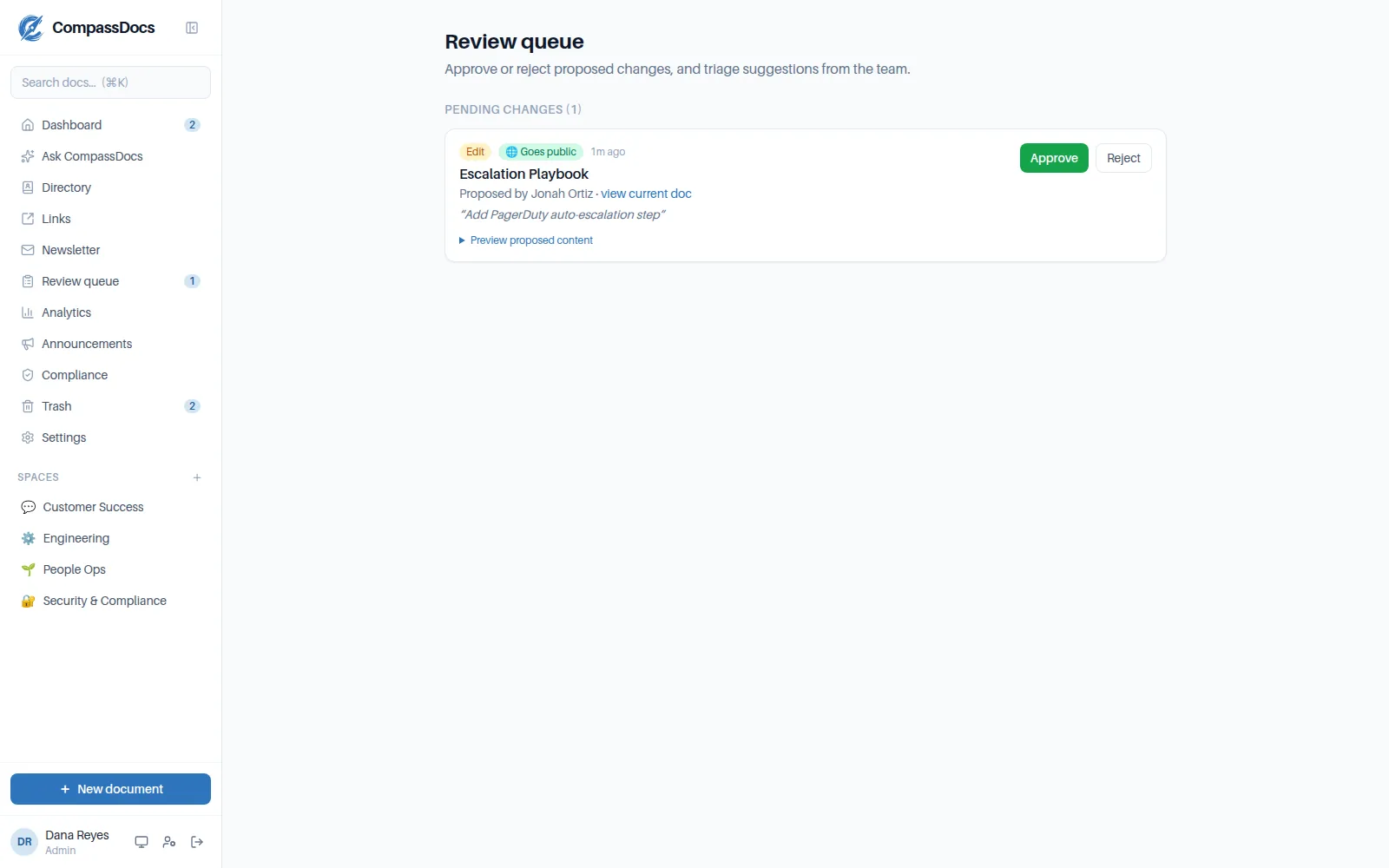
The review queue: a proposed edit, its change note, and Approve or Reject.
June to August: revising the grade 6 math pacing guide
A district adopts new grade 6 math materials. Summer school still runs on the old pacing guide.
Branch in June
The math coordinator opens a draft branch of the published pacing guide. Summer school teachers keep reading the current version; the branch never appears in spaces, search or AI answers.
Write over the summer
The writing team rebuilds the units on the branch, with a change note on each save, and links each unit to its scope and sequence document.
Review in early August
The coordinator submits the merge. The math approver compares it with the live version word by word and approves.
Publish before in-service
The merge goes live, recorded in the audit log. Teachers open the same address they bookmarked, and version history shows exactly what changed from last year.
Train on it
With Enterprise, the coordinator turns the “What’s new in grade 6 math” document into a deck with three quiz questions and assigns it to the grade 6 math group, due the first Friday of school.
Teacher professional development tracking, from the same documents
The training is the document: update it and the deck updates with it, and every completion records the version each teacher confirmed.
- Multiple-choice quiz questions graded on the server, with a pass mark that unlocks the confirmation
- Assign to people, groups or everyone, with due and overdue reminders
- Recertification: a deck reopens every N months for annual refreshers
- Waive a deck for teachers who already did that training before you started using CompassDocs; the record says waived, not completed
- Per-deck and per-person progress, quiz scores, printable certificates and CSV export
- Group leads, such as principals or department chairs, get one weekly digest of their team’s training
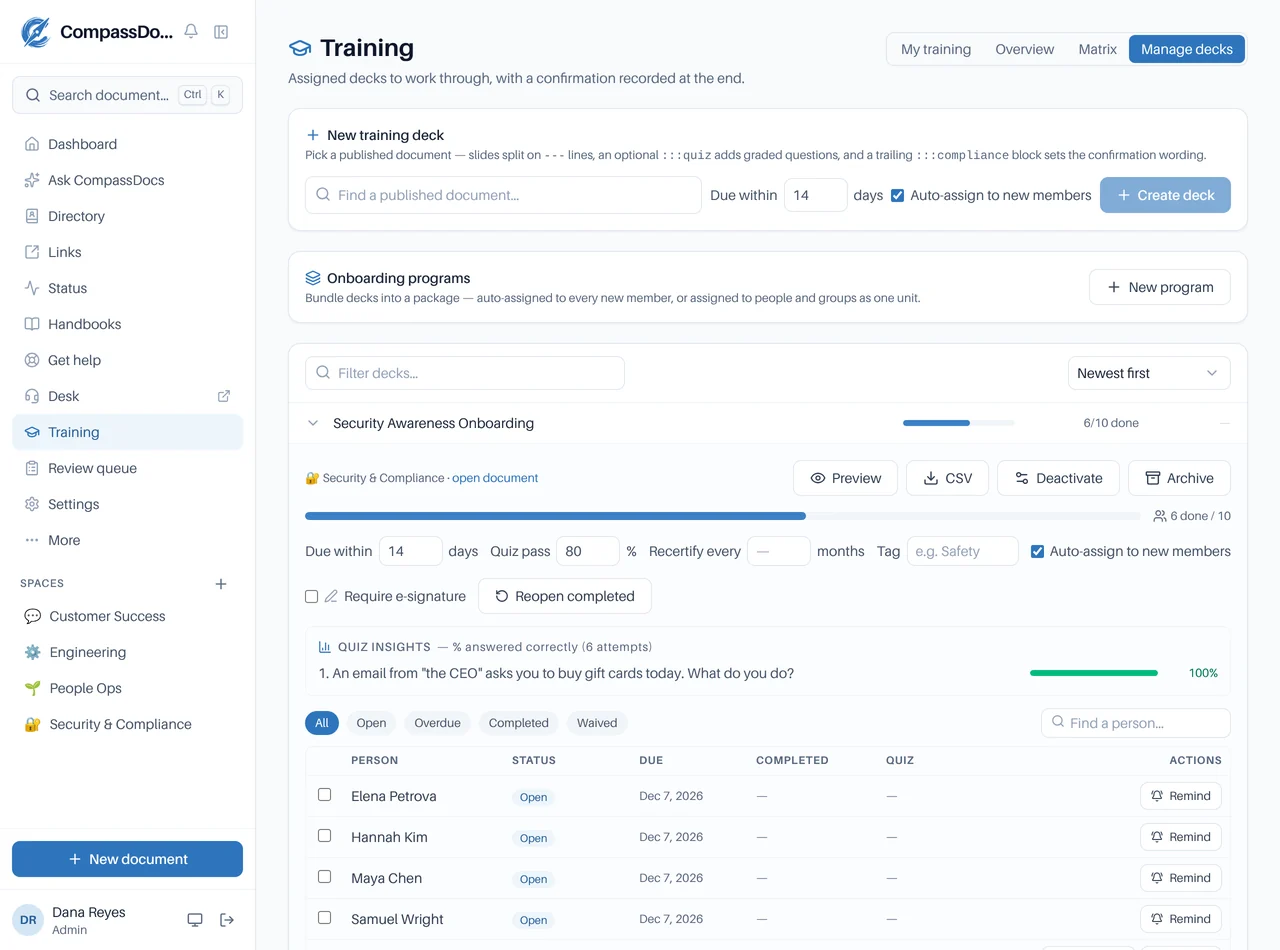
Managing a deck: due period, auto-assign to new members, completion progress and CSV export.
Two more weeks curriculum teams will recognise
An October PD day
Three sessions, 300 teachers. Each session’s slides live in a document that becomes a deck. Teachers who were absent take the deck, and principals see who is still behind in their weekly digest.
A new teacher in January
Their onboarding program assigns the instructional model and grading policy decks. Quick links and search take them to their course’s curriculum map on the first day.
The spring content review
Analytics lists the least-viewed documents to merge or retire, and the searches that found nothing become next summer’s writing list.
Public districts and charter schools
For the wider picture, see K-12 school districts and charter schools.
| Area | Public school district | Charter school or CMO |
|---|---|---|
| Who sets the curriculum | The board adopts instructional materials; the curriculum office writes maps and pacing guides for every campus | The academic model in the charter; a CMO’s academic team sets network curriculum that schools may adapt |
| The consistency problem | Many campuses teaching the same course from the same pacing guide | A network keeping a shared model while each school adds its own notes |
| Space setup | A space per content area, with an approver role scoped to each | A network curriculum space, plus a space per school for site-specific additions |
| PD | District PD days, instructional coaches by content area, new teacher induction | Network-wide PD calendars and a strong focus on onboarding teachers new to the model |
| When someone asks for evidence | The board or a curriculum review asks what was taught and what changed | An authorizer review or charter renewal asks how the academic program is documented and what PD staff received |
Keeping records, not promising compliance
CompassDocs records which version of a curriculum document was published when, who approved each change, and who completed which training with which score. It doesn’t count PD hours or credits toward licensure or report to a state system; export completions as CSV to wherever you track those. It is for staff documents, not student records, and we make no compliance or certification claims for it.
When another tool fits better
CompassDocs is not a learning management system: it doesn’t deliver assignments to students, keep a gradebook or run assessments. It is not a standards-alignment database or a lesson planner for each teacher either. If you need those, use the tools built for them. CompassDocs is where the staff-facing curriculum lives, the version everyone agrees is current, and the PD that goes with it.
Set up faster with Claude
CompassDocs is built for MCP, so Claude can do the first draft of your rollout while your team reviews and publishes. When you start, we walk you through it.
Bring your content in
Paste or attach the procedures and policies you already have, and Claude redrafts each one in your templates, screenshots included.
Draft the handbook and training
Claude assembles a draft handbook from your policies and, with Enterprise, turns procedures into training decks with quiz questions.
Configure the helpdesk as drafts
Request types, forms, workflows, macros and recurring tickets are drafted for an admin to review and publish. Nothing goes live on its own.
See everything Claude can do through MCP and the step-by-step rollout.
Frequently asked
Is CompassDocs a learning management system?
No. CompassDocs is for staff: curriculum maps, pacing guides, the instructional handbook and teacher training. It doesn’t deliver work to students, keep grades or run assessments, so it sits beside your LMS and student information system.
Can teachers keep using the current pacing guide while we revise it?
Yes. Draft branches give you a private working copy of a published document. Teachers keep reading the published version, the branch never appears in spaces, search or AI answers, and it goes live only when it is merged, through review if strict mode is on.
Can a curriculum committee approve changes before teachers see them?
Yes. In strict mode, edits to a published document become change requests that an approver reviews word by word. A custom role can let an approver review in one content area’s space without rights anywhere else.
Can we track teacher professional development?
Yes, with Enterprise training. Turn PD materials into decks with quizzes and a confirmation, assign them with due dates, and see per-person progress, quiz scores and certificates, with CSV export. It records completions; it doesn’t count PD hours or credits toward licensure.
Can families see our curriculum overviews?
Yes. Mark a space public and its published documents appear on an anonymous public site, on your own domain, with search and print. Drafts and every other space stay behind sign-in.
Do we need AI to search our curriculum documents?
No. Keyword search with operators such as tag: and space: works without any AI key. AI answers are optional and, when self-hosted, use your own Anthropic API key; they cite the documents they used and only draw from documents the teacher can see.
What does it cost for a curriculum team?
The Community edition is free with unlimited users and includes spaces, version history, draft branches, approvals, handbooks, analytics and the public site. Training is part of Enterprise, $499.99 a year per install with unlimited users. Education discounts are available on request.
Related: K-12 school districts · Charter schools · School HR · School IT helpdesk · School facilities · Business office · Education · Training & onboarding
One current curriculum, and the PD that goes with it
Self-host CompassDocs free with one Docker command and unlimited users. Enterprise adds training, read confirmations, the helpdesk and SSO for $499.99/year, with education discounts on request.
Self-host free See pricingBuying for a district or network? Get a formal quote to print for approval, or order by invoice with your PO number.