 CompassDocs
Work instruction and SOP software for manufacturing plants
Standard work only works if everyone follows the same, current revision. CompassDocs is self-hosted work instruction and SOP software for manufacturing: illustrated procedures that go through review before they change, operators who pull up the current revision from a browser on the floor, and, with Enterprise, a record of who read and trained on each one. Production, quality, EHS, maintenance and HR share one install on your own servers.
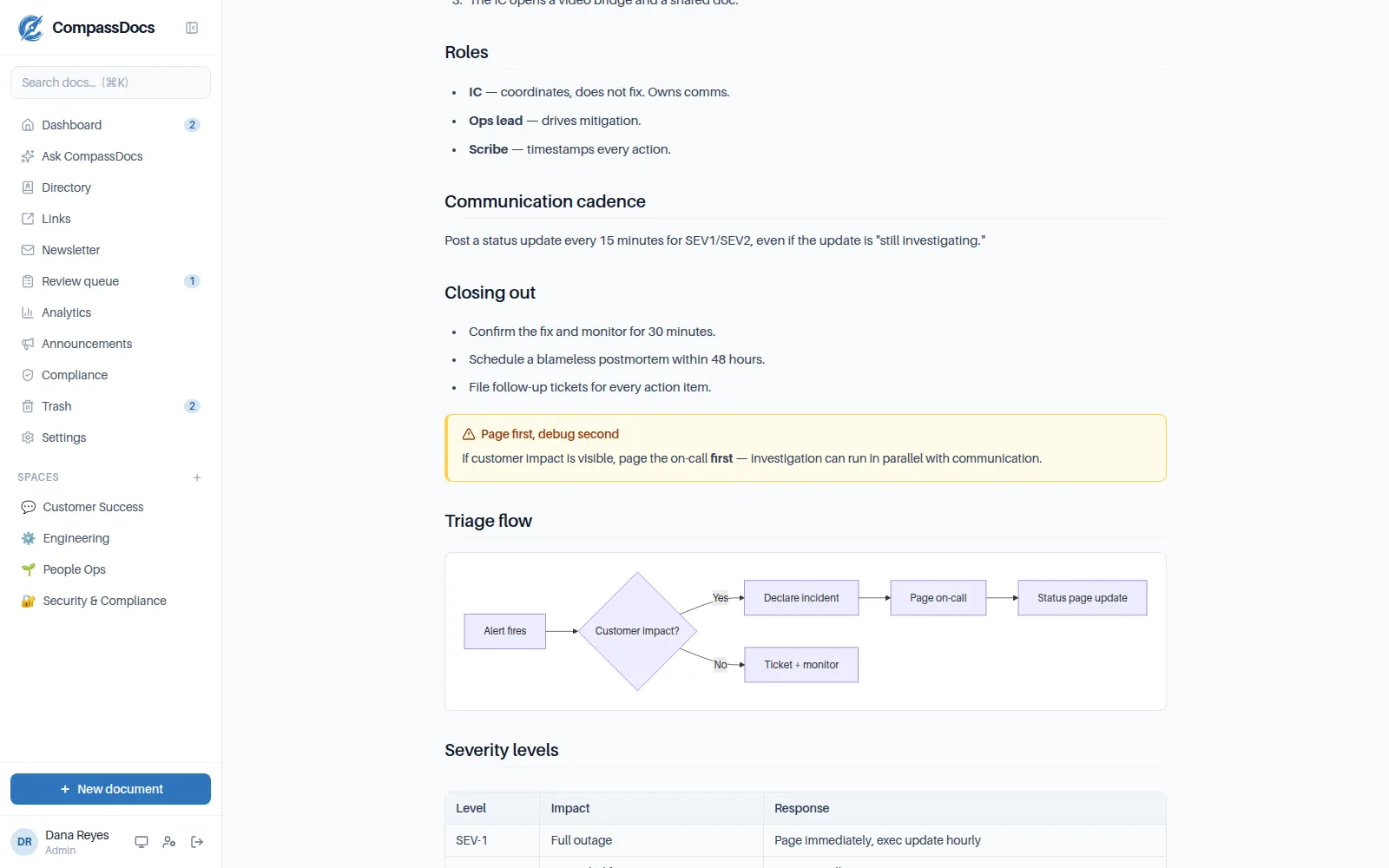
A published procedure: a warning callout, a table, a decision-tree diagram and numbered steps.
Why standard work drifts
Procedures change on the floor faster than they change on paper, and every department keeps its own copy.
× A binder at the line holds a revision that was replaced months ago.
× An engineer edits the procedure, and nobody reviews the change.
× Photos and diagrams live in a separate folder from the steps.
× Operators are trained once, and nobody records which revision.
× Second shift never hears about the change first shift was told about at the huddle.
→ One current, approved revision of every procedure, findable in seconds, with a record of who trained on it.
What a plant keeps in CompassDocs
Most plants start with the documents operators and leads reach for every shift. A typical workspace has a space per department:
- Work instructions and standard work for each cell or line, with photos at every step
- Setup and changeover sheets as click-to-tick checklists, with settings and torque values in tables
- Quality procedures: first article inspection, in-process checks, hold-tag and quarantine steps, gauge calibration
- EHS programs: lockout/tagout, confined space entry, PPE by area, chemical handling and spill response
- Maintenance procedures: preventive maintenance tasks and fault-finding guides for each machine
- The employee handbook, attendance and shift rules, and new-hire onboarding
Templates for consistency
Start every instruction from the built-in SOP template, or make your own work instruction template, so every line’s procedures follow the same shape.
A handbook per area
Gather a line’s SOPs into one numbered handbook, and print it when paper is needed. Every printed page says “uncontrolled when printed”, with who printed it and when.
Illustrated work instructions
- Numbered steps with photos pasted right where they belong, sized with a drag, side by side and zoomable
- Callouts for safety warnings and quality checks
- Tables for torque values, settings and tolerances, and filterable tables for longer lists
- Click-to-tick checklists for setup, changeover and start-up
- Decision-tree guides for troubleshooting a fault
- Diagrams in Mermaid or PlantUML, plus video embeds and file attachments
See the editor and diagrams, or start from the free SOP template.
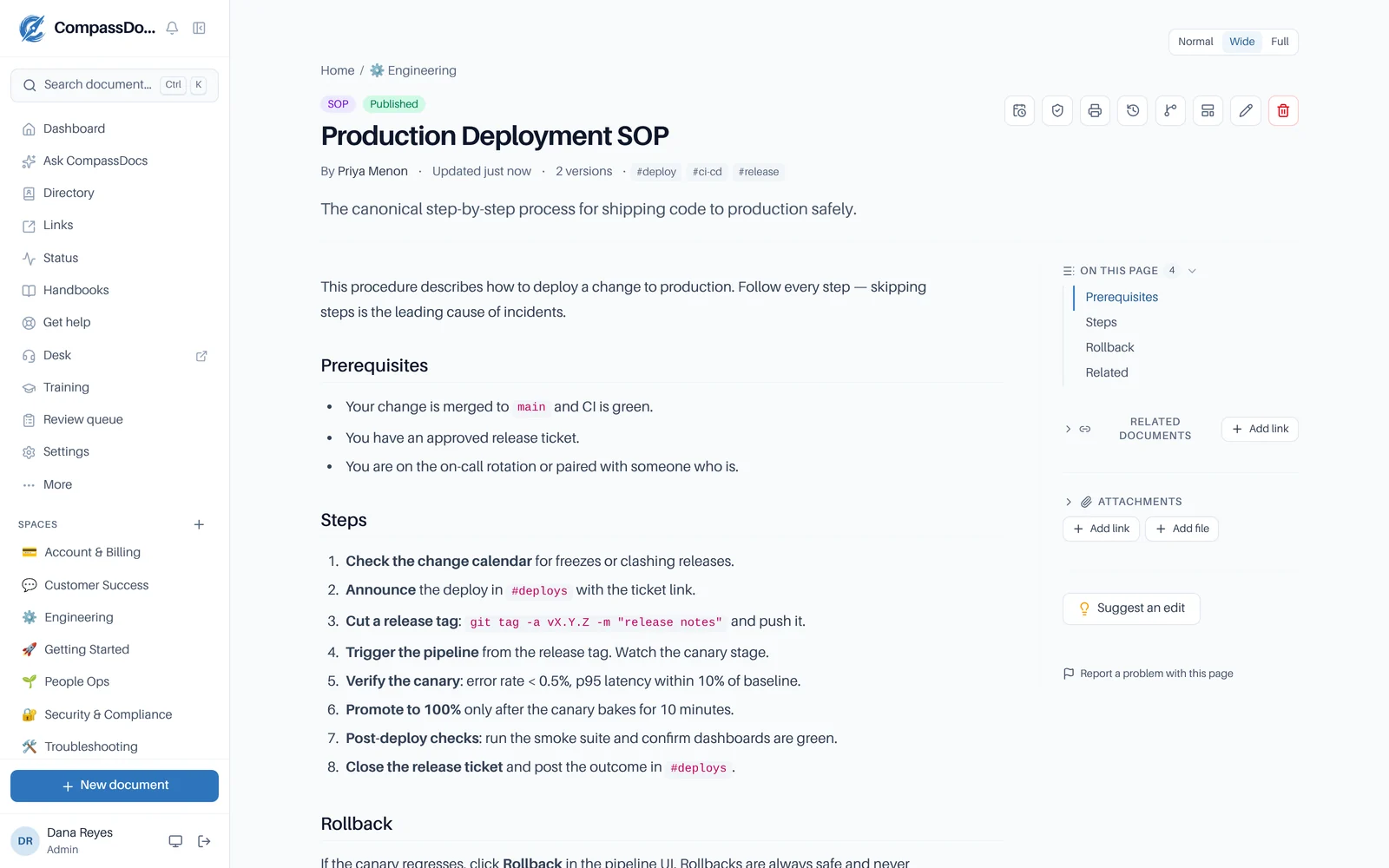
An SOP with its owner, version count, prerequisites and numbered steps.
Controlled revisions
- Strict mode: edits to a published instruction become change requests an approver reviews before they apply
- Every revision keeps its author, time and change note; approved changes record the approver
- Compare two revisions with word-level highlights, and restore without rewriting history
- Link an instruction to the policy it carries out, or mark an old one as superseded
- Review reminders put overdue procedures on editors’ dashboards; editing resets the clock
- An append-only audit log records publishes and approvals
More on version history and roles and approvals.
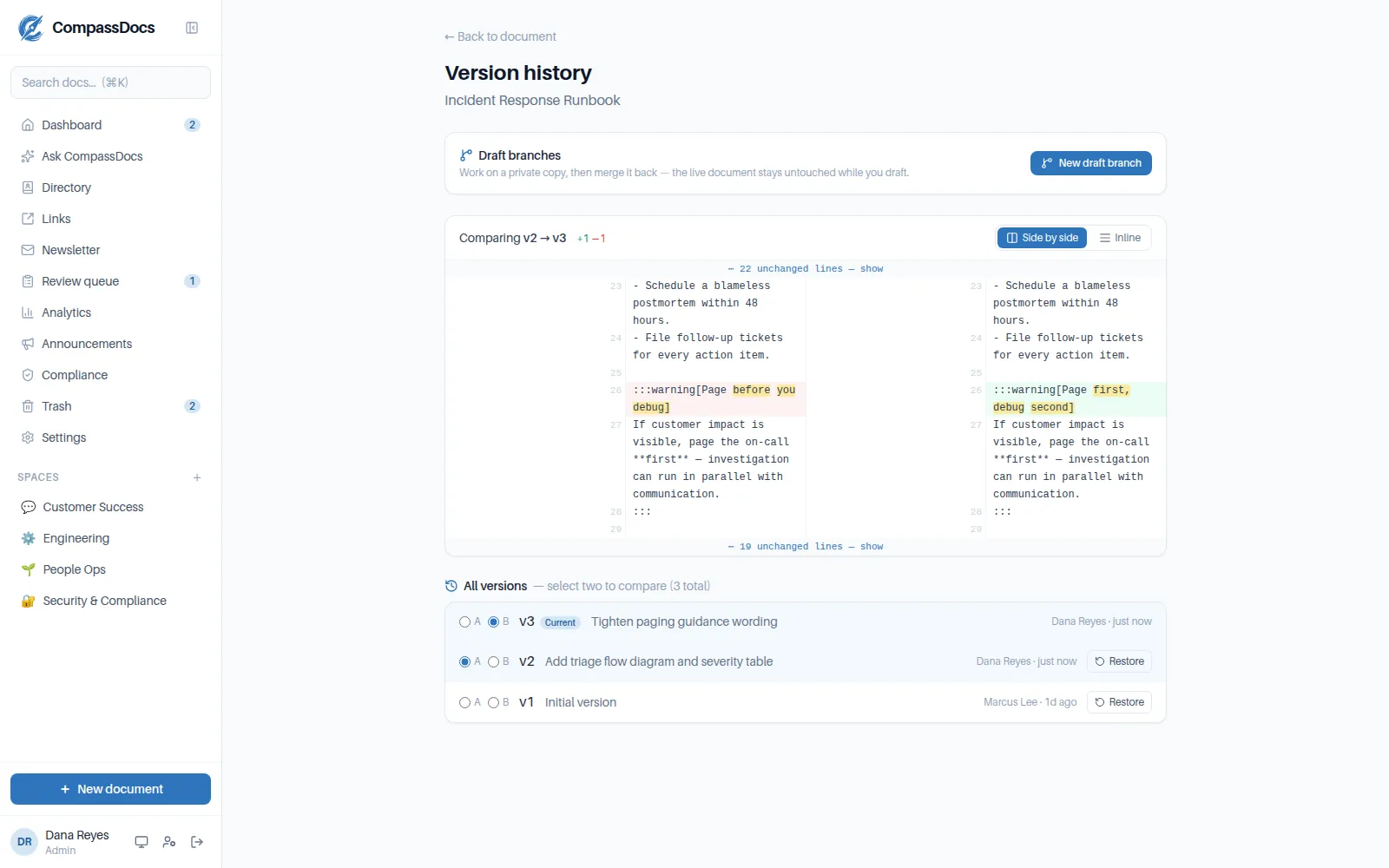
Version history: compare two revisions with word-level highlights and change notes.
Training and sign-off on the current revision
Read confirmations and training are part of Enterprise. Spaces, handbooks, approvals, versions and the audit log are in every edition.
Training decks
Turn a published procedure into a slide deck with an optional graded quiz and a confirmation gate.
Training →Records by revision
Each completion records the document version confirmed, so a later revision is visible in the record.
Confirm a changed procedure
Ask the people on a line to confirm a procedure. You decide whether an edit is editorial or material; a material change asks them again and shows what changed.
Read confirmations →Recertification
Decks reopen every N months, keeping every earlier completion. Experienced hires can be waived, recorded as waived rather than completed.
Leads see their team
Group leads, such as a shift supervisor, get one weekly email covering their team’s training and policies.
Export the evidence
Per-person progress with quiz scores, printable certificates, CSV export and an audit package for policy confirmations.
A plant helpdesk next to the procedures
The same sign-in gives the plant one place to ask for help. Get help searches your procedures before anyone sends a request, then offers request types your teams define.
- Request types such as an equipment problem, a facilities repair, a laptop or account, or Ask HR, each with a short form and its own team queue
- Recurring tickets for weekly and monthly checks, on any schedule, with holidays moved, skipped or ignored as you choose
- Checklists and Before you solve rules, so a routine job can’t be closed half-done
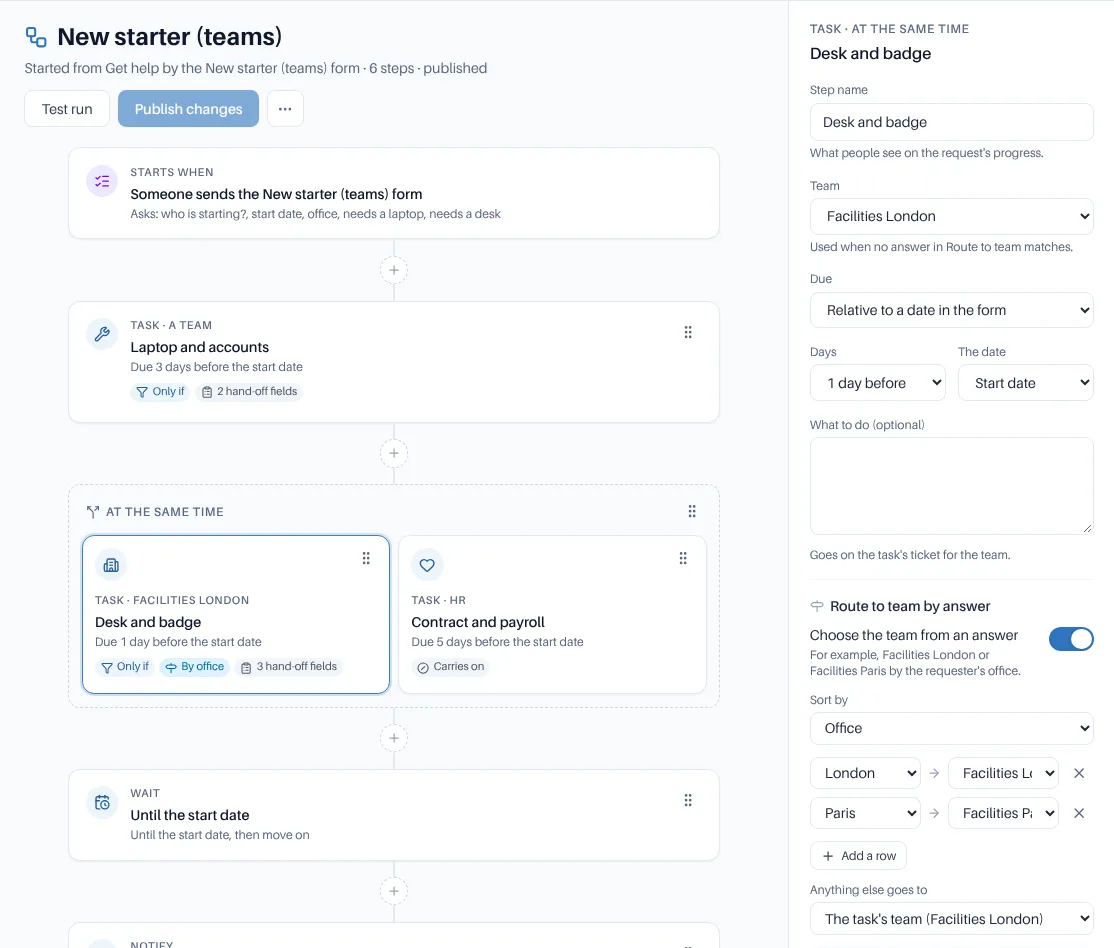
- Workflows that run approvals and tasks for several teams, such as a new hire’s IT, facilities and HR steps in parallel
- An event calendar for room setups, visitor arrivals and training sessions, with reminders before setup is due
- Part of Enterprise, with 3 agents included and extra agents at $125 a year each
See facilities requests, IT helpdesk software and the HR helpdesk.
How each team uses CompassDocs
One concrete use per job. Read confirmations, training and the helpdesk rows are Enterprise; spaces, handbooks, versioning and approvals are in the free Community edition.
| Feature | Production | Quality | EHS | Maintenance | HR & training |
|---|---|---|---|---|---|
| Spaces | Work instructions by line or cell | Inspection and calibration procedures | Safety programs by area | PM tasks and fault guides by machine | Private HR space |
| Handbooks | A line’s SOPs, numbered | Quality procedures manual | Site safety handbook | Machine manual sections | Employee handbook |
| Approvals | Engineer drafts, supervisor approves | Quality signs off every revision | EHS approves energy-control steps | Lead approves PM changes | HR approves policy edits |
| Versioning | Which revision ran last month | Revision a lot was built to | What the procedure said on a date | Settings before a rebuild | Attendance policy as amended |
| Read confirmations | A changed torque spec, per shift | Hold-tag process | Lockout/tagout each year | Revised start-up checks | Handbook on hire |
| Training | Operator deck with a quiz | Inspector recertification | Annual safety refreshers | New machine walkthrough | Onboarding program |
| Request types | Report an equipment problem | Request a gauge check | Report a near miss | Repair or PM request | Ask HR |
| Recurring tickets | Weekly 5S audit | Monthly gauge check | Monthly eyewash and extinguisher checks | Weekly lubrication round | Annual handbook refresh |
A torque spec changes on Tuesday, and Wednesday night shift knows
A process engineer finds a fastener on line 3 needs a higher torque value after a customer return.
Propose the change
In strict mode, the engineer edits the published work instruction. The edit becomes a change request with a note on what changed and why; the live revision keeps running.
Quality reviews the diff
The quality engineer, an approver on the Production space, sees the old and new torque values highlighted word by word and approves. The revision records both names.
Mark it material
Because this is a material change, everyone in the Line 3 group is asked to confirm again by a due date, and they see exactly what changed since the revision they last confirmed (Enterprise).
Catch the other shifts
Reminders go out on their own. The night shift supervisor, a group lead, sees who is outstanding and gets the weekly digest; the paper copy at the station shows it is uncontrolled.
Answer the auditor
Months later, version history shows which revision was in force on any date, and the confirmation record shows who confirmed it, when and against which version.
A new operator’s first two weeks
Twelve temporary operators start on Monday for a seasonal ramp-up, and two experienced transfers join from another plant.
Accounts on day one
HR creates the accounts, or SCIM from Microsoft Entra ID does it. There is no per-seat cost: both editions have unlimited users.
Onboarding assigns itself
An onboarding program (Enterprise) assigns the site safety deck, the lockout/tagout awareness deck, the line 3 work instruction deck and the handbook to every new account, with one notification and a due date.
Waive what was done elsewhere
The two transfers already trained on lockout/tagout. Their decks are waived, and the record says waived, not completed.
The cross-team steps
A New starter request starts a workflow: IT sets up a floor terminal sign-in, facilities issues a locker and PPE, and HR checks the paperwork, all at once.
Check before they run the line
The supervisor sees per-person progress and quiz scores, and prints a certificate for the personnel file.
Preventive maintenance and a line-down call
A two-person maintenance team supports four presses and a paint line.
Schedule the routine
Recurring tickets open the weekly lubrication round and the monthly press inspection on schedule, each with a checklist of required steps. A run that falls on a plant holiday moves to the next working day.
Finish it properly
Before you solve requires every required checklist item ticked, so a PM ticket can’t be closed half-done.
Report a fault
An operator opens Get help, sees the press fault-finding guide first, and only then raises an equipment problem. It lands in the Maintenance queue with the press and line on the form.
Fix the procedure too
If the fix reveals a missing step, the technician proposes an edit to the PM procedure, and it goes through the same review as any other revision.
One install for every plant
- Give each plant its own spaces and groups, and keep company-wide policies and EHS standards in shared spaces
- Private spaces limit HR or engineering documents to chosen people or groups; search and AI answers respect that boundary
- Single sign-on over SAML 2.0 or OpenID Connect for Microsoft Entra ID, plus SCIM so a leaver’s sessions are revoked at once (Enterprise)
- Documents, training records and tickets stay in one PostgreSQL database on infrastructure you control, under your own backups
- Open source under AGPL-3.0, with an offline, signed license that never calls home
Priced per install, not per operator
Community is free with unlimited users. Enterprise is $499.99 a year per install with unlimited users, however many plants and shifts share it. Only helpdesk agents beyond the 3 included cost extra.
See pricing →On your own network
Install with one Docker command, or with Node.js and your own PostgreSQL. CompassDocs Cloud is coming soon but not on sale yet.
Self-hosting →Keeping records, not promising compliance
CompassDocs keeps the records customer audits, registrar audits and safety inspections tend to ask about: which revision of a procedure was in force, who approved it, who confirmed it and when, and who finished which training. It is a documentation tool, not a certification, and using it doesn’t make a plant compliant with any standard or regulation.
We don’t claim CompassDocs is certified or validated for ISO 9001, IATF 16949, AS9100, OSHA or FDA requirements, including 21 CFR Part 11 electronic signatures. A typed signature on a read confirmation is a record of acknowledgement, not a validated e-signature. Meeting your quality and regulatory requirements remains your organization’s responsibility.
When another tool is the better fit
CompassDocs is where procedures, training and internal requests live. These jobs belong elsewhere:
Nonconformance and CAPA
NCRs, CAPA, supplier quality and complaint handling belong in your QMS. CompassDocs holds the procedures those processes point to.
Production and inventory
Work orders, routings, lot genealogy and inventory run in your MES and ERP. Link to them from the instruction; don’t copy their data in.
Asset-heavy maintenance
Recurring tickets suit a small team. If you need an asset hierarchy, spare parts, meter readings and downtime analysis, use a CMMS and keep its procedures here.
Set up faster with Claude
CompassDocs is built for MCP, so Claude can do the first draft of your rollout while your team reviews and publishes. When you start, we walk you through it.
Bring your content in
Paste or attach the procedures and policies you already have, and Claude redrafts each one in your templates, screenshots included.
Draft the handbook and training
Claude assembles a draft handbook from your policies and, with Enterprise, turns procedures into training decks with quiz questions.
Configure the helpdesk as drafts
Request types, forms, workflows, macros and recurring tickets are drafted for an admin to review and publish. Nothing goes live on its own.
See everything Claude can do through MCP and the step-by-step rollout.
Frequently asked
Can we add photos and diagrams to work instructions?
Yes. Paste photos and screenshots right into a step, size them with a drag and place them side by side. The editor also renders Mermaid and PlantUML diagrams, tables, callouts, click-to-tick checklists and decision-tree guides.
How do we control which revision is in effect?
Turn on strict mode so a revision only goes live after an approver signs it off. Version history shows every earlier revision with its author and change note, and restoring one never rewrites history.
Does it work on shop-floor devices?
CompassDocs is a web app, so operators open the current instruction in a browser on a tablet or floor terminal. Printed copies from a handbook carry an “uncontrolled when printed” footer naming who printed them and when.
Can we record that operators trained on a procedure?
Yes, with Enterprise training. Turn the procedure into a deck with an optional quiz; each completion records who, when, the quiz score and the exact version confirmed, and exports to CSV. Decks can reopen every N months for recertification.
Does every operator need a paid seat?
No. Both editions have unlimited users, so every operator, temp and contractor can have an account. Enterprise is $499.99 a year per install, however many plants share it; only helpdesk agents beyond the 3 included cost extra, at $125 a year each.
Is CompassDocs a quality management system?
No. It keeps procedures, revisions, approvals and training records, and it sits beside your QMS, MES, ERP and maintenance system. We don’t claim it is certified or validated for ISO 9001, IATF 16949, AS9100 or FDA requirements.
Can we keep it on our own network?
Yes. CompassDocs self-hosts with one Docker command and keeps everything in one PostgreSQL database on infrastructure you control. AI answers are optional and use your own Anthropic API key; keyword search works without one.
Related: SOP software · SOP template · Policy management · Facilities requests · IT helpdesk software · HR helpdesk · Employee handbook · Construction · Small business
Standard work, on your own servers
One Docker command installs CompassDocs with unlimited users and documents. Enterprise adds training, read confirmations, the helpdesk and SSO for $499.99/year per install.
Self-host free See pricingBuying for a team? Get a formal quote to print for approval, or order by invoice with your PO number.
Need sign-off first? Build a business case with your own costs, free and with no sign-up.