 CompassDocs
One front door for colleagues, another for customers
Employees ask in Get help, inside CompassDocs, and see your guides before they send anything. People outside your organisation get a branded customer portal with a help centre they can search without signing in.
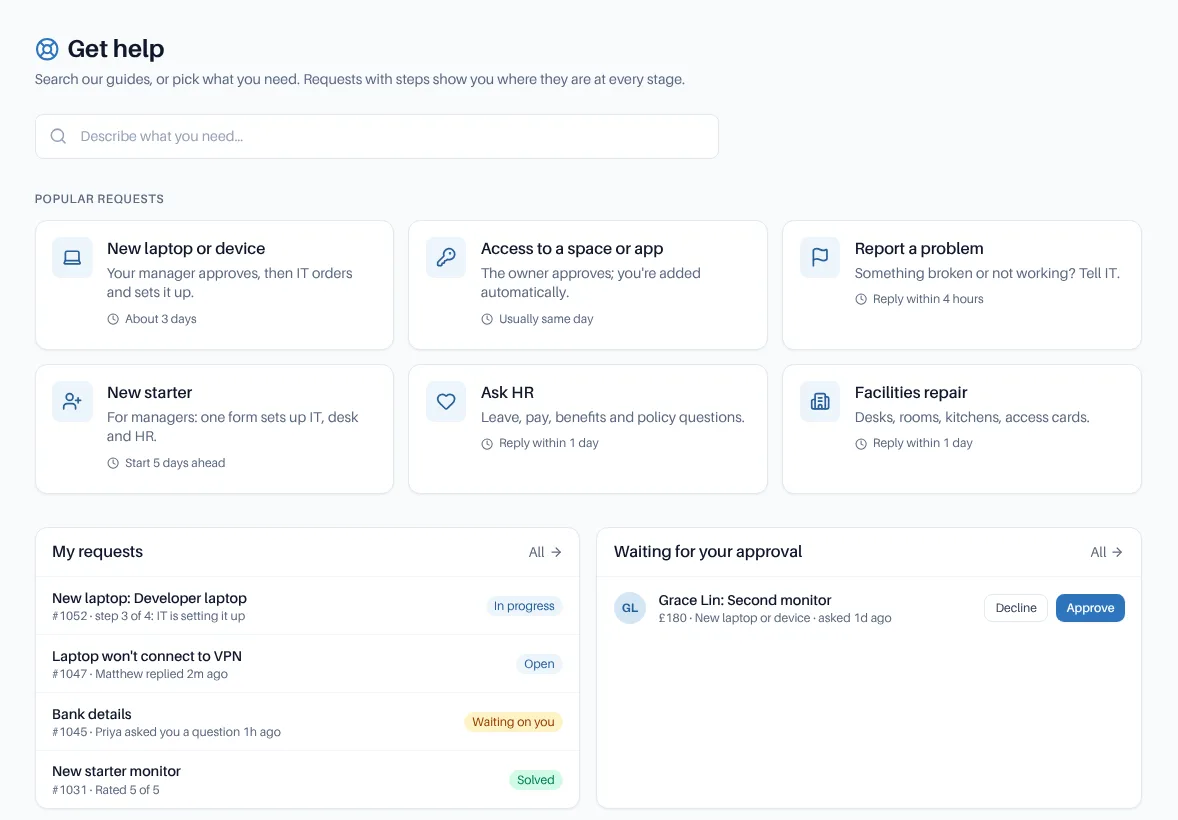
Search your guides first, then pick a request type.
Asking for help shouldn’t be a guessing game.
× People email whoever they know, and the request disappears with that person’s holiday.
× The answer was in a guide all along, but nobody found it.
× Clients and suppliers need a way in, without an account in your workspace.
→ A front door that answers first, then tracks every request to the end.
For colleagues and for everyone else.
A tracker, not a black hole.
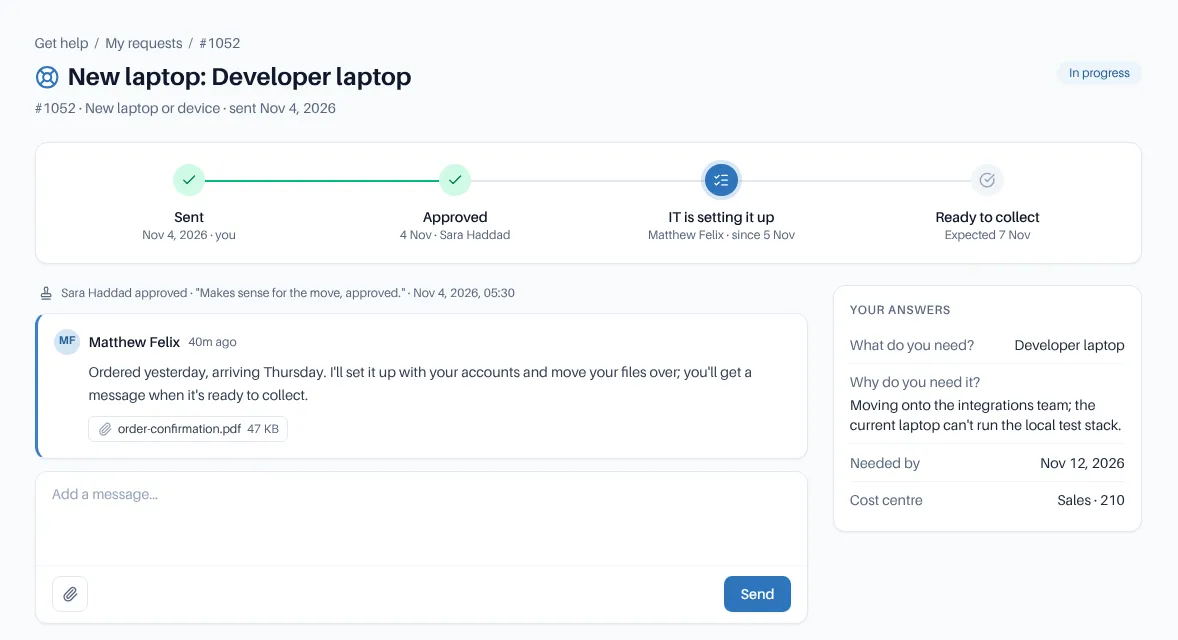
Every request opens on a step-by-step tracker with each reply, its files and the workflow’s progress. Requesters see who is helping them, with the agent’s team and availability, and a notice when the answering team is out of hours.
- Suggestions from your own documents, within each person’s space access, before they ask
- Forms prefill answers from the directory and name the approver
- Report a problem with this page, Ask about this policy, This link is broken and Request access start a request with the details filled in
- Copy colleagues in; requests you are copied on show in My requests
- Approve, decline or ask a question from Get help, the email, the dashboard or a chat app
A customer portal and help centre.
Customer portal
People outside your organisation raise and follow requests at /support. They sign in with a one-time link sent to their email; no account, no view of your workspace.
Help centre
Customers search your chosen articles with suggestions as they type, browse categories and read before raising a request, with no sign-in. The request form suggests articles from the subject.
Only what’s public
Customers see their own requests and the public conversation, with agents by first name and team. Drafts, private spaces, internal notes and your directory never are.
You choose the rules
Which request types customers can raise and the team each goes to, anyone with an email or approved domains only, the portal’s name and logo, limits and blocked words.
See what it answers
Help centre stats for the last 30 days: searches, questions answered without a request, and the top search. Search engines are told not to index it unless you allow it.
Ask how it went
A one-question survey when a request is solved, in Get help and in the portal. Answers count in the same satisfaction reports.
Search, ask, follow, rate.
The same journey in Get help and in the customer portal.
Search first
Suggestions from your guides, or the help centre’s articles, before a request is written.
Pick a request type
A short form that says what happens next and who approves.
Follow it
A tracker with every step and reply; reply by email or in the app.
Rate it
One question when it’s solved, counted in your satisfaction reports.
Frequently asked
Do customers need an account?
No. They sign in to the portal with a one-time link sent to their email, which works once, for 15 minutes.
Who can use Get help?
Your own colleagues, with the sign-in they already use for CompassDocs. Every built-in role includes the Get help permission, and you can add it to a custom role.
Related: Teams & Slack · Workflows & approvals · Major incidents · Public site · Docs
More in the helpdesk
A helpdesk without another tool to buy
Self-host CompassDocs with one Docker command. The helpdesk is part of CompassDocs Enterprise, with 3 agents included (extra agents $125/year each), alongside SSO, SCIM, directory sync, read confirmations and training.
Buying for a team? Get a formal quote to print for approval, or order by invoice with your PO number.