 CompassDocs
Internal wiki software your company will actually keep up to date
CompassDocs is open-source internal wiki software you run on your own servers. Pages live in spaces with clear permissions, anyone can write in a rich editor or Markdown, changes can go through approval, and people get answers that cite the page they came from. Add a dashboard, announcements, quick links and a people directory, and it becomes the company intranet wiki people open first.
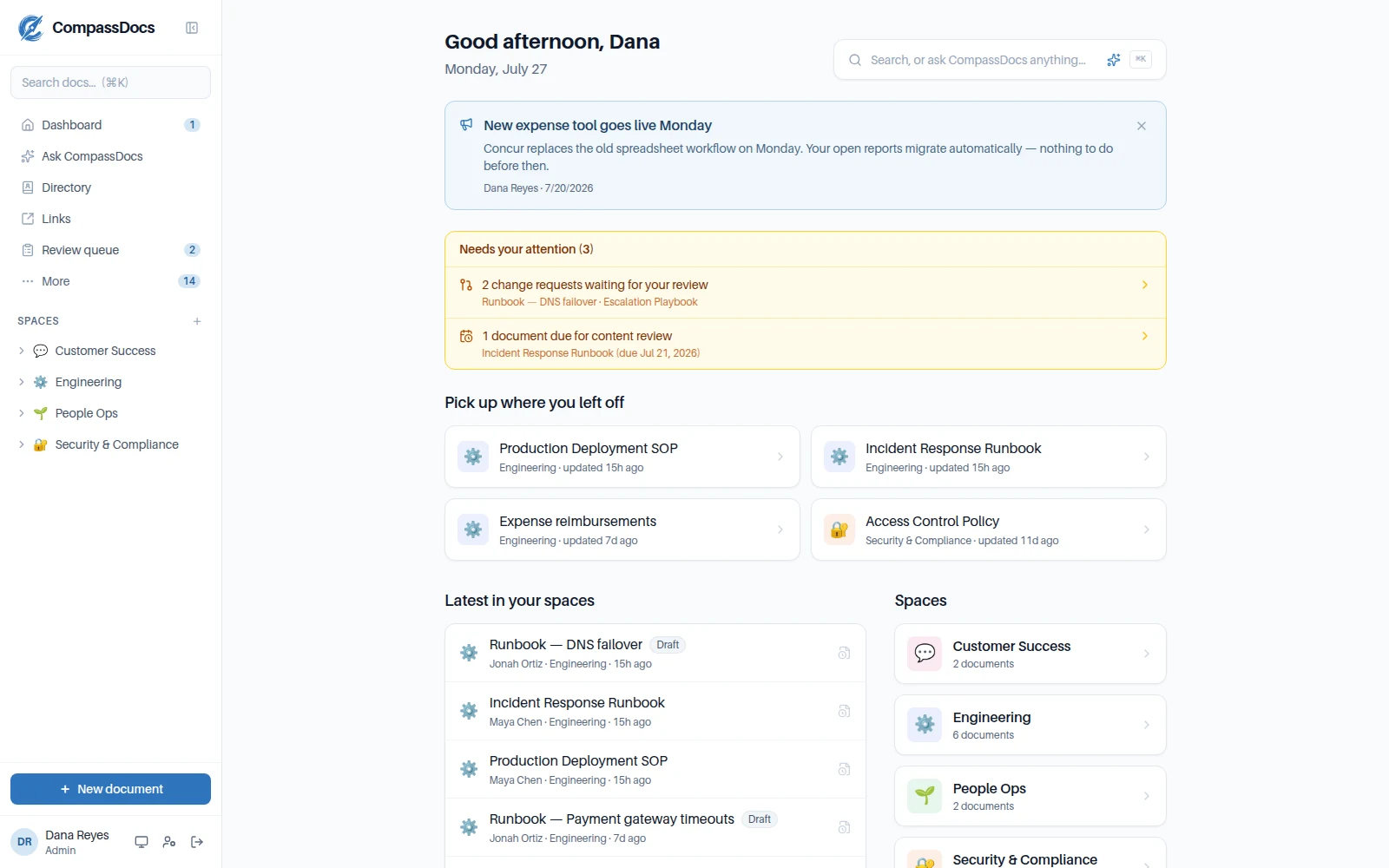
The dashboard: what needs your attention, documents to pick up again, and activity in your spaces.
Why most internal wikis go stale
Wikis are easy to start and hard to keep useful. The same few problems show up in almost every company.
× Nobody can find the page, so they ask in chat instead.
× Pages are out of date, and there’s no way to tell which ones.
× Everything is visible to everyone, or so locked down that nobody contributes.
× Edits to important pages go live with nobody checking them.
× The wiki, the intranet homepage and the staff directory are three different tools.
→ One self-hosted wiki with search that answers, review when you want it, and the intranet pieces built in.
What CompassDocs gives you as an internal wiki
Everything here is in the free, open-source Community edition unless it says Enterprise.
Spaces and permissions
Internal spaces for everyone, private spaces for chosen people and groups, public spaces for the world. Six views per space, from cards to a board.
Documents & spaces →A rich editor, or Markdown
Tables, callouts, tabs, checklists, Mermaid and PlantUML diagrams and pasted screenshots, with AI proofreading if you want it.
Rich editor →Search that answers
Keyword and semantic search, plus answers in plain English that cite the pages they came from. Answers only use pages the asker can see.
AI search →Version history
Every save is a version with author and change note. Compare any two, restore an old one, or draft a rewrite on a private branch.
Version history →Approvals when you need them
Open mode for speed, or strict mode where edits to published pages become change requests for an approver.
Roles & approvals →Comments and @mentions
Threads under each page that follow its permissions, with mentions that notify by email and on the dashboard.
Comments →Announcements and newsletter
Post an announcement to every dashboard, or draft a branded newsletter that an approver reviews before it sends.
Announcements →Quick links
A curated launchpad of your company’s tools, grouped by category and restricted by group, on everyone’s dashboard.
Quick links →People directory
Find colleagues by name, title or department, with an org chart. Microsoft 365 and Google Workspace sync on Enterprise.
People directory →An intranet wiki people find answers in
The test of an internal wiki is whether people use it instead of asking a colleague. CompassDocs puts answers a keystroke away and tells you where the gaps are.
- Ask “How do I request time off?” and get an answer from your own pages, with the sources cited underneath; if it isn’t in your docs, it says so
- A command palette on ⌘K (CtrlK on Windows and Linux) searches documents, people, spaces and actions from anywhere
- Search operators such as type:, tag:, space: and author: narrow results in a click
- Analytics show what people searched for and didn’t find, so the gaps become your writing backlog
- Content review reminders ping owners before a page goes stale
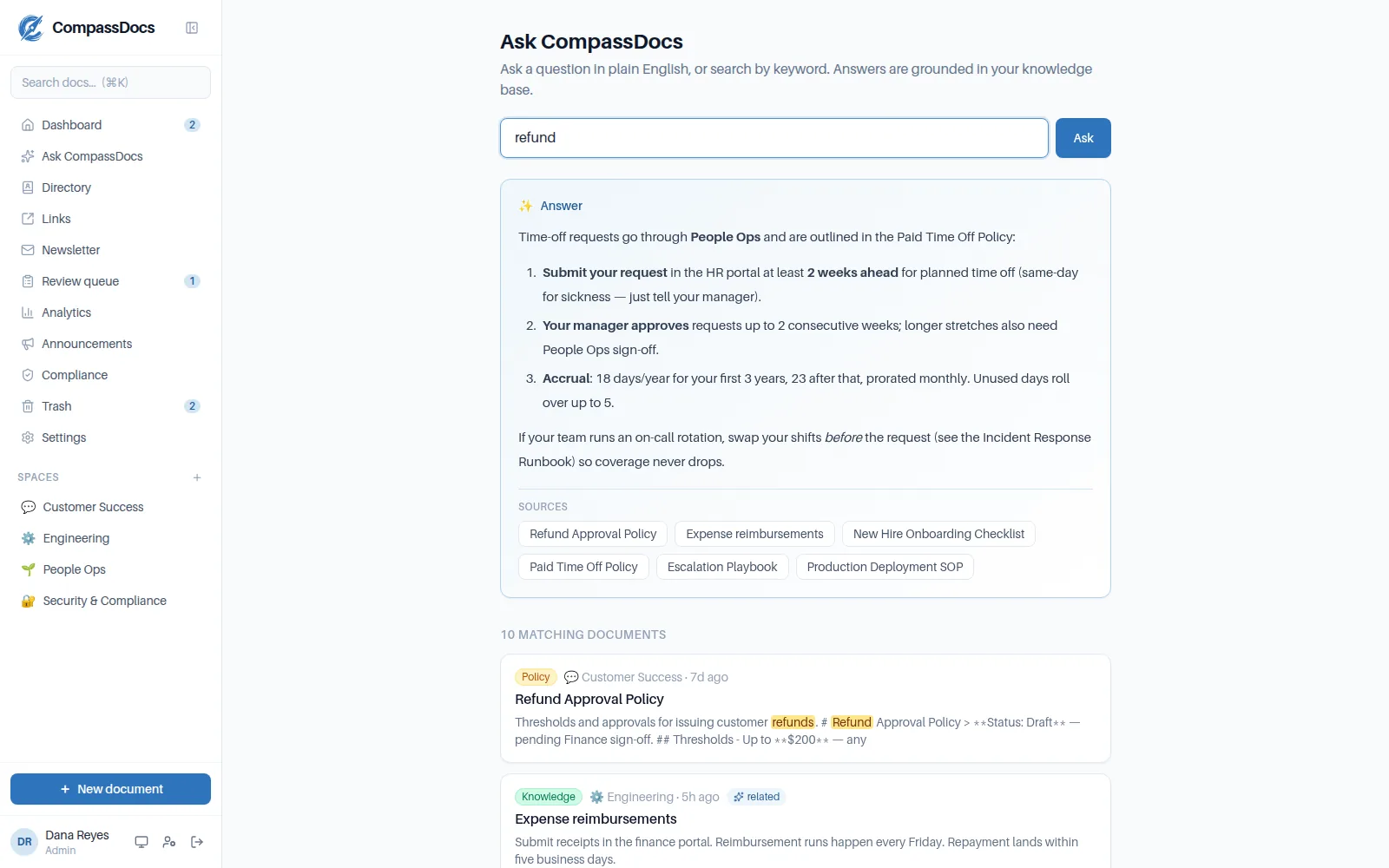
A cited answer from your own pages, with the matching documents below.
Self-hosted and portable
Your wiki holds how the company works. It should stay on your servers and stay yours.
Your servers
One Docker command installs CompassDocs and PostgreSQL. Scheduled backups with one-click restore, mirrored off-site to S3, R2, MinIO or Azure.
No lock-in
The whole knowledge base exports to front-matter Markdown and imports back. Confluence pages exported to Markdown can be imported too.
Sign-in your way
Two-factor authentication in every edition. Enterprise adds SAML 2.0 and OIDC single sign-on and SCIM provisioning.
Start your internal wiki in minutes
The Community edition is free and open source, with unlimited users and documents.
Run one command
The installer starts CompassDocs and PostgreSQL with Docker, and a setup wizard creates your admin account in the browser.
Create spaces
One per team or topic, internal or private, with categories for bigger spaces.
Bring your pages
Import front-matter Markdown, or Confluence pages exported to Markdown, or start writing in the editor.
Make it the homepage
Add quick links and an announcement, set your logo and domain, and turn on AI answers with your own Anthropic API key if you want them.
$ curl -fsSL https://raw.githubusercontent.com/Felix-AZ-Solutions-LLC/CompassDocs/main/install.sh | bash
  ✓ Fetched docker-compose.yml
  ✓ Generated .env with fresh secrets
  ▲ CompassDocs running at http://localhost:3000
  → open the URL to create your admin account
Requirements, platforms and the Node.js install path are on the self-hosting page →
Set up faster with Claude
CompassDocs is built for MCP, so Claude can do the first draft of your rollout while your team reviews and publishes. When you start, we walk you through it.
Bring your content in
Paste or attach the procedures and policies you already have, and Claude redrafts each one in your templates, screenshots included.
Draft the handbook and training
Claude assembles a draft handbook from your policies and, with Enterprise, turns procedures into training decks with quiz questions.
Configure the helpdesk as drafts
Request types, forms, workflows, macros and recurring tickets are drafted for an admin to review and publish. Nothing goes live on its own.
See everything Claude can do through MCP and the step-by-step rollout.
Frequently asked
Is CompassDocs free internal wiki software?
Yes. The Community edition is free and open source under AGPL-3.0, with unlimited users and documents, AI search, approvals, version history, private spaces, comments and an audit log. Enterprise adds single sign-on, SCIM, directory sync, read confirmations, training and the helpdesk.
Can it work as our company intranet?
Many of the intranet pieces are built in: a personal dashboard, announcements with email and chat delivery, an internal newsletter, quick links to your other tools and a people directory. Spaces can also be published as an anonymous public site when you want one.
Can some pages be visible to only part of the company?
Yes. Put them in a private space and grant specific people or groups. Search, AI answers and comments all respect that boundary.
Can we move from Confluence or another wiki?
Documents import as front-matter Markdown, and Confluence pages exported to Markdown can be imported. Everything exports back out the same way, so you’re never locked in.
Do we have to use AI?
No. Keyword search works without any AI provider. AI answers and proofreading need an Anthropic API key configured by an admin, and semantic search uses an embeddings provider you choose, which can be a local engine such as Ollama. Without them, everything else works.
Related: Knowledge management software · Confluence alternative · SharePoint wiki alternative · Open-source knowledge base software · All features
Free & open source to self-host
One Docker command installs CompassDocs with unlimited users and documents. Enterprise adds the helpdesk, SSO, Microsoft 365 sync, compliance, and training from $499.99/year.
Self-host it free See pricingBuying for a team? Get a formal quote to print for approval, or order by invoice with your PO number.