 CompassDocs
A Jira Service Management alternative with the knowledge base built in
Jira Service Management is Atlassian’s service desk, typically paired with Confluence for the knowledge base and priced per agent. CompassDocs puts the helpdesk and the knowledge base in one self-hosted, open-source product, with unlimited users.
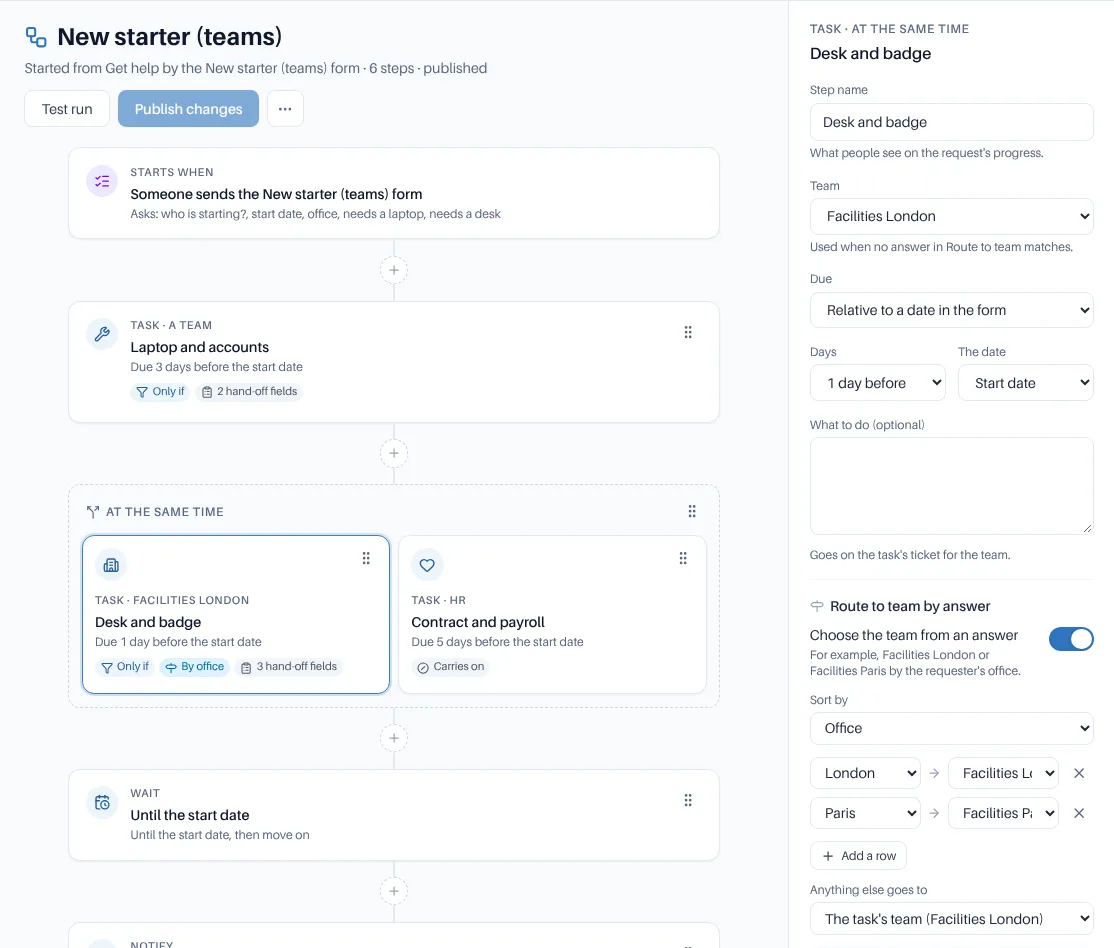
A New starter workflow: IT, Facilities and HR tasks in parallel, a wait until the start date, and routing by office.
Why teams move from Jira Service Management
- One product to run, sign in to and back up, instead of a service desk and a separate wiki
- HR and Facilities get a desk that isn’t built on a developer tool, and requesters use Get help where they already read policies
- Workflows with approvals, parallel tasks for several teams and waits, tested before you publish
- Self-hosted and open source under AGPL-3.0
- Unlimited users on one yearly price, with 3 helpdesk agents included
Knowledge base included
Spaces, approvals, version history and cited AI answers, in the same product as the desk.
Workflows across teams
Hand-offs, approvals and tasks for several teams on one request, tested before you publish.
Unlimited users
Requesters and readers never add to the bill. Only helpdesk agents beyond the 3 included cost extra, at $125 a year each.
CompassDocs and Jira Service Management side by side
How the two compare on the things that don’t change from one release to the next.
| Compared | CompassDocs | Jira Service Management |
|---|---|---|
| Main focus | Internal helpdesk for IT, HR and Facilities, with a full knowledge base | Service management on the Jira platform |
| Hosting | Self-hosted on your servers, in your own PostgreSQL database | Atlassian Cloud, a hosted service; see Atlassian for self-managed options |
| Source code | Open source, AGPL-3.0 | Proprietary |
| Pricing model | Community: free. Enterprise: $499.99/year per install, unlimited users, 3 helpdesk agents included, extra agents $125/year each | Subscription priced per agent |
| Knowledge base | Built in: the same product, sign-in and search as the desk | Typically paired with Confluence, a separate product |
| Helpdesk | Enterprise: Get help, the desk, request types, workflows and approvals, SLAs, automations, assets, major incidents and reports | The core product, built on Jira |
| Developer tools | REST API, signed webhooks and alert sources from monitoring tools | Shares a platform with Jira, so requests can link to engineering work |
| AI answers from your docs | Cited answers grounded only in your documents, with your own Anthropic key (keyword search is free). In the desk, Claude drafts replies and a person sends them | Atlassian offers its own AI features |
| SSO | Enterprise: SAML 2.0 and OIDC, one-click Microsoft Entra setup, SCIM provisioning | Supported; see Atlassian for details |
Jira Service Management details describe its general model, not a specific plan. Check Atlassian for current plans, features and pricing.
When Jira Service Management is the better fit
Jira Service Management is likely the better choice if:
Engineering lives in Jira
If incidents and requests need to link straight to issues your developers work in Jira, keeping the desk on the same platform is simpler.
You’re deep in the Atlassian ecosystem
If you already run Confluence, Jira and marketplace apps under one Atlassian admin, adding its service desk fits that setup.
You want it hosted
Atlassian runs its cloud for you. CompassDocs Cloud isn’t open yet, so today you run CompassDocs yourself.
Moving the desk and the wiki together
The knowledge base is free to self-host; an Enterprise license turns on the helpdesk.
Run one command
The installer starts CompassDocs and PostgreSQL with Docker, and a setup wizard creates your admin account in the browser.
Bring your knowledge base
Pages exported to Markdown can be imported as front-matter Markdown, into a space for each team.
Turn on the helpdesk
Add an Enterprise license (or a trial license), then build request types and workflows, and connect email, Teams or Slack.
Import ticket history
From a CSV file: map statuses, priorities and agents, check the dry run, then import in the background.
$ curl -fsSL https://raw.githubusercontent.com/mattny20/CompassDocs/main/install.sh | bash
  ✓ Fetched docker-compose.yml
  ✓ Generated .env with fresh secrets
  ▲ CompassDocs running at http://localhost:3000
  → open the URL to create your admin account
Requirements, platforms and the Node.js install path are on the self-hosting page →
Frequently asked
Do we still need Confluence?
Not for the helpdesk’s knowledge base: it’s part of CompassDocs. If you’re moving off Confluence as well, see the Confluence alternative page.
Can our developers keep using Jira?
Yes. There is no built-in Jira connector, but CompassDocs has a REST API with scoped tokens and signed webhooks, so your own scripts can pass tickets between the two.
How is the helpdesk priced?
The knowledge base (Community) is free and open source. The helpdesk is part of Enterprise: $499.99 a year per install with unlimited users and 3 agents included; each extra agent is $125 a year. Anyone can ask for help in Get help; only the people on the desk’s Agents list count as agents.
Can we bring our tickets across?
Ticket history can be imported from a CSV file, with statuses, priorities and agents mapped and a dry run before anything is written. There is no built-in Jira Service Management importer.
Related: Confluence alternative · Workflows & approvals · Zendesk alternative · Pricing
Helpdesk and knowledge base, one install
Self-host the open-source knowledge base with one Docker command. An Enterprise license adds the helpdesk, SSO and Microsoft 365 sync for $499.99/year with unlimited users and 3 agents included.
Self-host free Get a quoteWant to try the helpdesk with your own teams first? Request a trial license · See pricing