 CompassDocs
Clinical SOP and policy software that keeps every protocol current
Clinics, practices and care teams need protocols that are approved, current and read by the people who follow them. CompassDocs is self-hosted SOP and policy software for healthcare: procedures go through review before they change, every version is kept, and with Enterprise staff confirm what they have read, complete training built from the same documents and ask facilities, IT and HR for help in one place.
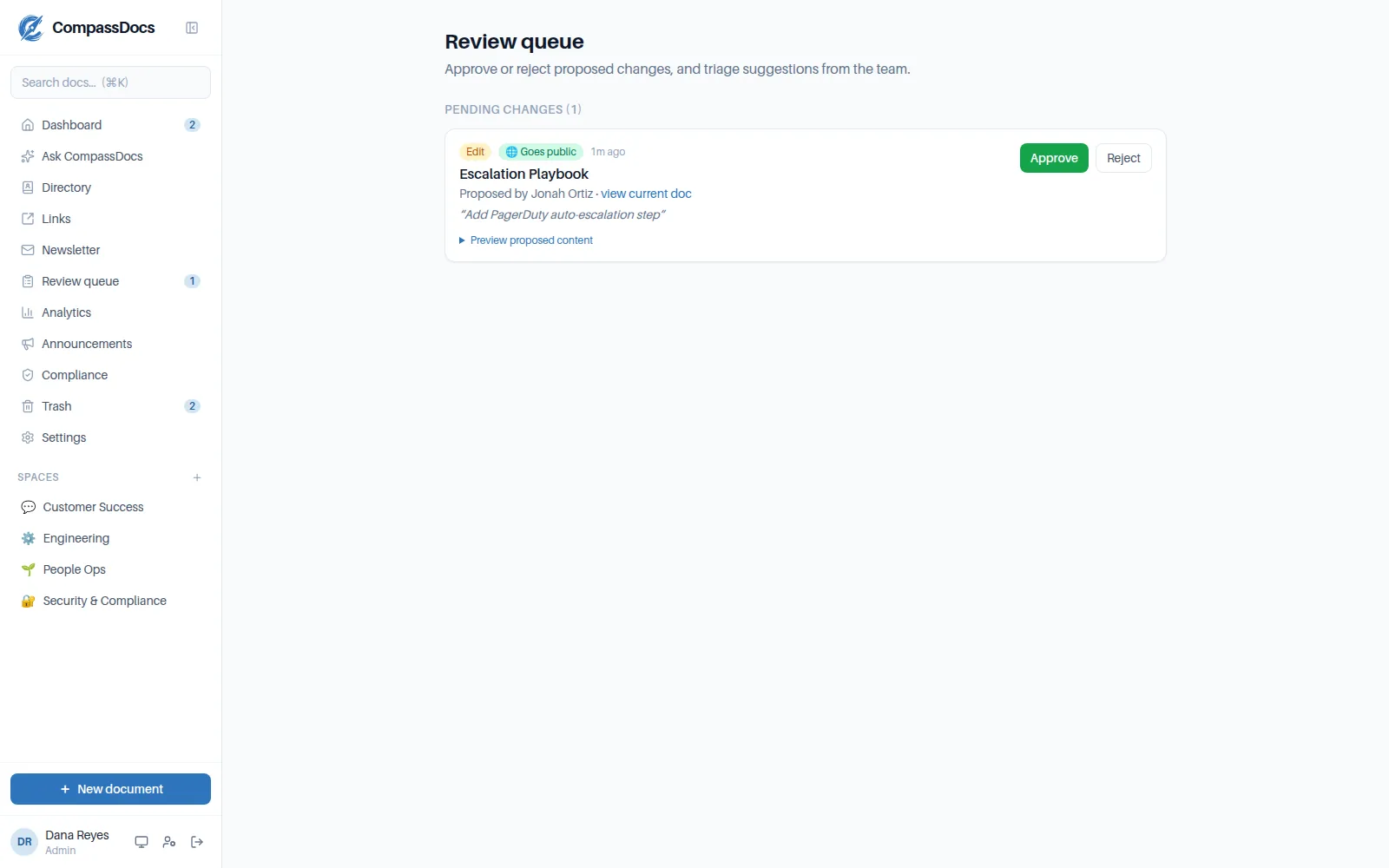
The review queue: a proposed change to a published procedure waits for an approver before it goes live.
Where clinical documentation goes wrong
The protocol itself is rarely the problem. Knowing which version is in force, and who has read it, usually is.
× Protocols live in a binder and a shared drive, and the two don’t match.
× A review date passes, and nobody notices until a survey.
× Staff sign a sheet, and nobody can say which version they read.
× Training is tracked in a spreadsheet, separate from the policy it covers.
× Per diem and agency staff can’t find the current procedure on their first shift.
× Repairs, IT problems and HR questions arrive by phone, hallway and sticky note.
→ Approved, versioned procedures in one place, with confirmations and training tied to the exact version.
What healthcare teams keep in CompassDocs
Typical content for a clinic, practice or care workspace:
- Clinical protocols and SOPs, each with an owner, a type and a review date
- Nursing procedures: admission and discharge steps, shift handoff, specimen handling, medication storage
- Infection prevention and cleaning procedures, with click-to-tick checklists
- Equipment and supplies procedures, with photos placed beside each step
- Incident reporting and escalation as decision-tree guides staff can follow under pressure
- Emergency and downtime procedures: fire, evacuation, power loss, and what to do when the EHR is down
- The staff handbook: conduct, leave, uniform and who to call
Policies linked to procedures
Link a policy to the procedures that carry it out, or mark an old version as superseded, with the links shown on both documents.
Found on the first shift
Ranked full-text search from any page, and optional AI answers that cite the procedure they came from.
One handbook
Gather policies and SOPs into one numbered handbook, and print it with an acknowledgement page.
Policy handbooks →Controlled documents, from draft to confirmed
Approvals, versions, review reminders and the audit log are in every edition. Read confirmations and training are part of Enterprise.
Draft, review, approve
In strict mode, edits to a published procedure become change requests an approver reviews as a diff, with a note on what changed and why.
Every version kept
Compare any two versions with word-level highlights and show what a protocol said on any date. Restoring never rewrites history.
Review reminders
Give each document a review cadence, and editors see it come due on their dashboard. Editing resets the clock.
Staff confirmations
Enterprise: ask staff to confirm a protocol against the exact version, with due dates, reminders, escalation and annual re-confirmation.
Training from the protocol
Enterprise: turn a published procedure into a training deck with an optional quiz, and record the version each person confirmed.
An audit log
Sign-ins, role changes, publishes and approvals are recorded with actor, IP and time. Enterprise exports it as CSV or JSON.
Sign-off and training your compliance lead can run
- The compliance portal shows every policy’s due date, owner and progress, with a Needs attention queue and bulk Remind
- Delegate it to the compliance officer or HR without making them workspace admins
- Nurse managers and department leads, as group leads, see where their team stands and get one weekly digest for policies and training
- Edits never reset silently: you decide whether a change is editorial or material, and staff see what changed since the version they confirmed
- Recertification reopens a training deck every N months, so the annual refresher comes round on its own
- Monthly snapshots with a SHA-256 hash, and an audit package with a hash manifest, when someone asks for evidence
More on read confirmations, training and HIPAA policy and training tracking.
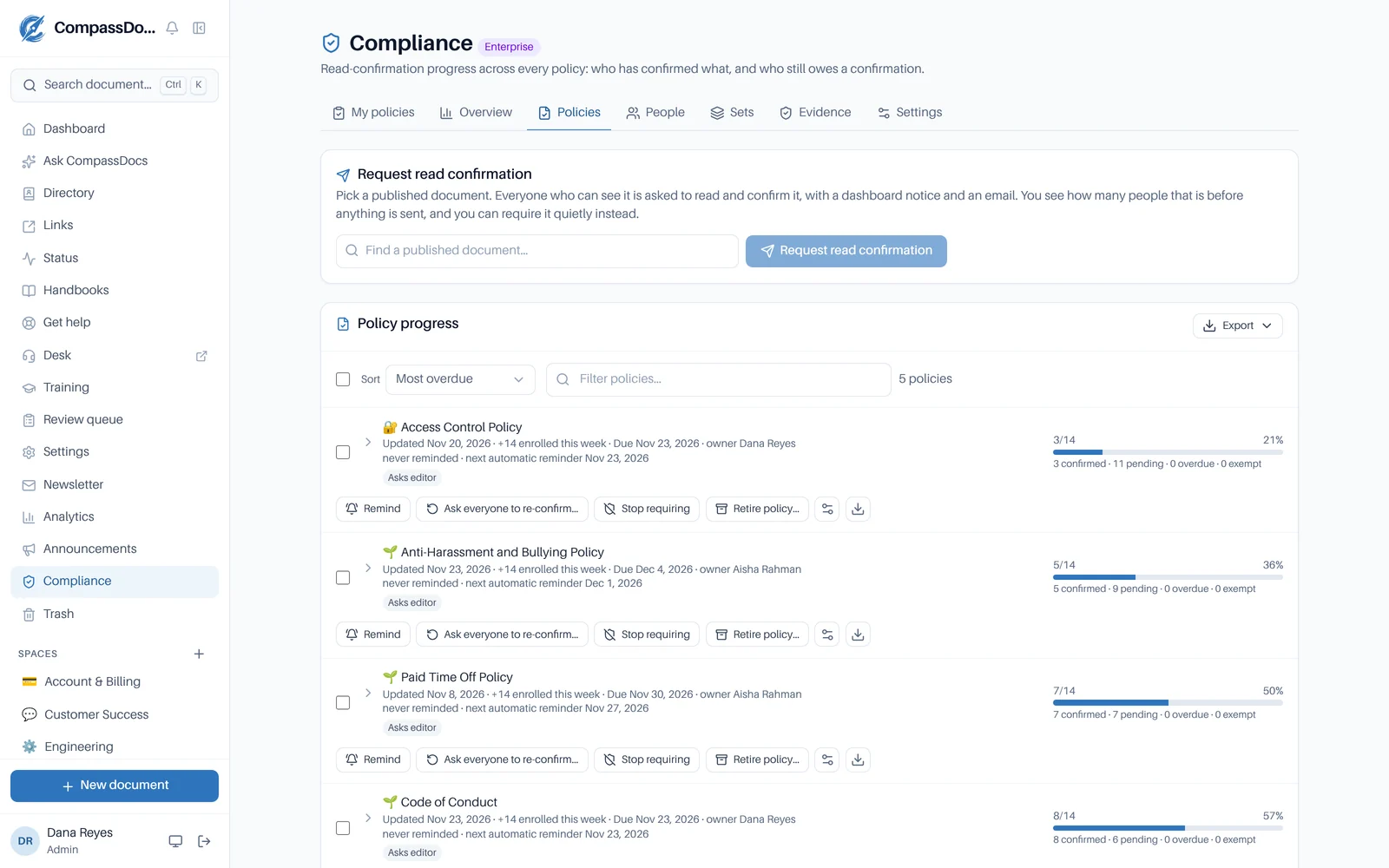
The compliance portal: each policy’s due date, owner and confirmation progress.
A staff helpdesk for facilities, IT and HR
Get help searches your procedures before anyone sends a request, then offers request types such as a facilities repair, an IT problem or Ask HR, each routed to its own team.
- Recurring tickets for routine checks, such as a monthly generator test or a weekly eyewash flush, each with a required checklist
- Major incidents: when a shared system goes down, one ticket gathers the duplicates and a Get help banner tells staff it’s known
- Workflows for a new hire’s HR, IT and facilities steps, with approvals from the requester’s manager
- An event calendar for room setups, such as a staff in-service, with reminders before setup is due
- A private HR queue, so leave and benefits questions stay with HR
- Part of Enterprise, with 3 agents included and extra agents at $125 a year each
Keep patient details out of tickets: the desk is for staff requests. See facilities requests, IT helpdesk software and the HR helpdesk.
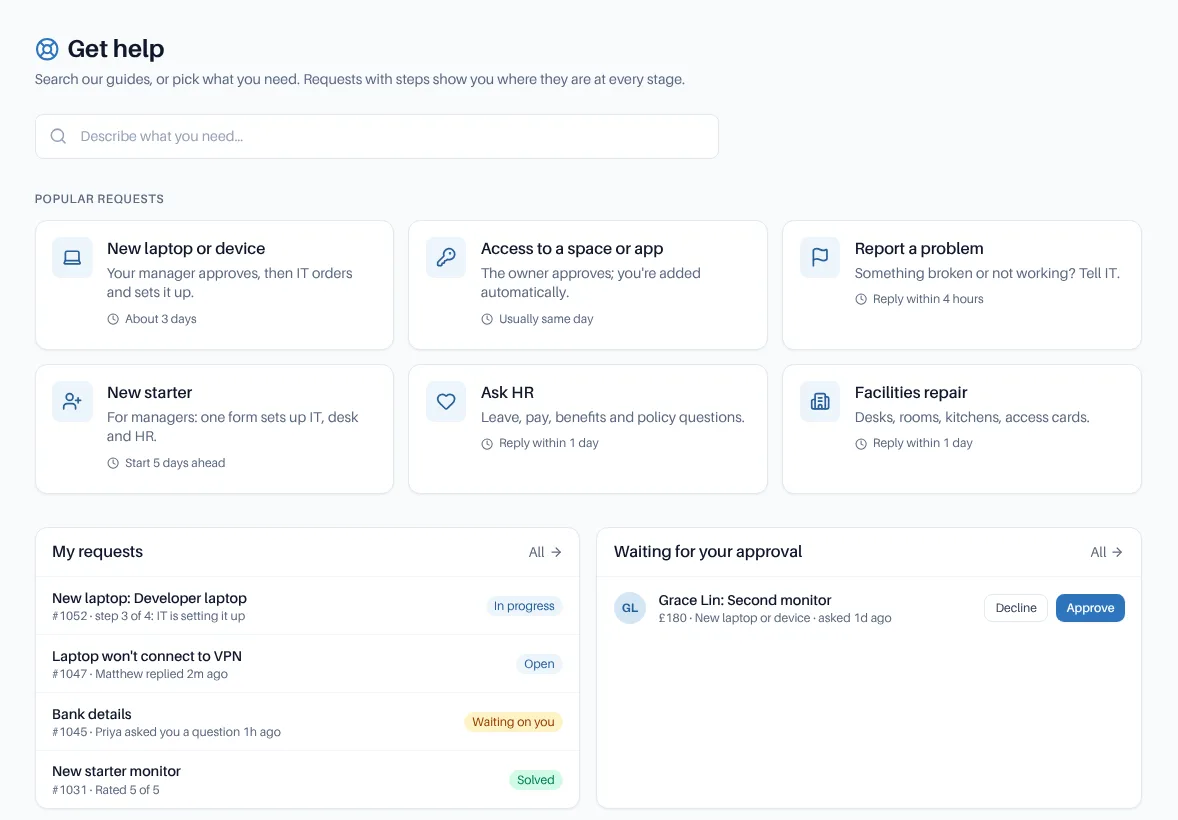
How each team uses CompassDocs
One concrete use per job. Read confirmations, training and the helpdesk rows are Enterprise; spaces, handbooks, versioning and approvals are in the free Community edition.
| Feature | Clinical | Nursing | Compliance | Facilities | IT | HR |
|---|---|---|---|---|---|---|
| Spaces | Protocols by service line | Unit procedures | Policy library | Environment of care procedures | Downtime and access guides | Private HR space |
| Handbooks | Clinical protocols manual | Unit orientation handbook | Compliance plan | Emergency procedures | Acceptable use guide | Staff handbook |
| Approvals | Medical director signs off | Nursing leadership approves | Policy committee reviews | Safety lead approves | IT lead approves | HR approves |
| Versioning | Protocol in force on a date | Handoff procedure as revised | Policy history for a survey | Evacuation plan revisions | Downtime steps over time | Leave policy as amended |
| Read confirmations | A revised protocol | Hand hygiene each year | Privacy policy each year | Fire and evacuation roles | Acceptable use each year | Handbook on hire |
| Training | New protocol walkthrough | Unit orientation deck | Privacy refresher with a quiz | Safety deck for environmental services | Phishing awareness | Onboarding program |
| Request types | Equipment problem | Supply or repair on the unit | Report a policy question | Repair or room setup | Access or device problem | Ask HR |
| Recurring tickets | Quarterly protocol review | Monthly crash cart check | Annual policy cycle | Monthly generator test | Quarterly access review | Annual handbook refresh |
A revised infection prevention procedure, confirmed by every nurse
The infection preventionist updates the isolation precautions procedure after a change in guidance.
Propose the change
In strict mode, the edit becomes a change request with a note on what changed and why. The current version stays live until it is approved.
Review and approve
The director of nursing, an approver on the Nursing space, reviews the diff with word-level highlights and approves. The version records author and approver.
Ask again, by version
Marked as a material change, the procedure asks every member of the Nursing group, per diem and agency staff included, to confirm by a due date, showing what changed (Enterprise).
Teach it
A training deck built from the same procedure, with three quiz questions and a pass mark, goes to the same group. Update the procedure and the deck updates with it.
Show the record
Nurse managers see who is outstanding on their unit. At survey time, the compliance portal exports per-policy and per-person records against the exact version.
A new nurse’s first week
A clinic hires three registered nurses and a medical assistant starting the same Monday.
The request
The hiring manager raises a New starter request in Get help. A workflow asks HR to approve, then sends tasks to IT, facilities and HR at the same time.
The accounts
IT creates the accounts, or SCIM from Microsoft Entra ID does it, and staff sign in with single sign-on (Enterprise).
The onboarding program
Every new account is enrolled automatically: the staff handbook, the unit orientation deck, the hand hygiene deck and the privacy refresher, each with a due date.
Waive what is current
One nurse transferred from a sister clinic with current training. Her decks are waived, and the record says waived, not completed.
Facilities and IT, on the record
A three-site practice with one facilities coordinator and an outsourced IT provider.
Routine checks
Recurring tickets open the monthly generator test, the weekly eyewash flush and the fire extinguisher round at each site, each with a checklist that must be ticked before the ticket can be solved.
Route by site
A repair request starts a workflow whose task routes by the requester’s site in the directory, with a fallback team, so each site’s work reaches the right person.
A system goes down
When the scheduling system is unavailable, IT declares a major incident, a banner in Get help points staff to the downtime procedure, and one update reaches everyone who said Me too.
The outside technician
The IT provider’s technician gets an account and a desk role on the IT team. Each person who works the desk counts as an agent; 3 are included.
Kept in-house, with access by role
- Policies, procedures and training records stay in one PostgreSQL database on infrastructure you control, under your own backups
- Private spaces limit a department’s documents to chosen people or groups
- Two-factor authentication in every edition; Enterprise adds single sign-on over SAML 2.0 or OIDC and SCIM, so a leaver’s sessions are revoked at once
- AI answers are optional, use your own Anthropic API key, and stay off until an admin adds one
- An offline, signed license with no license server to call
- One install for every clinic and site: Enterprise is $499.99 a year per install with unlimited users
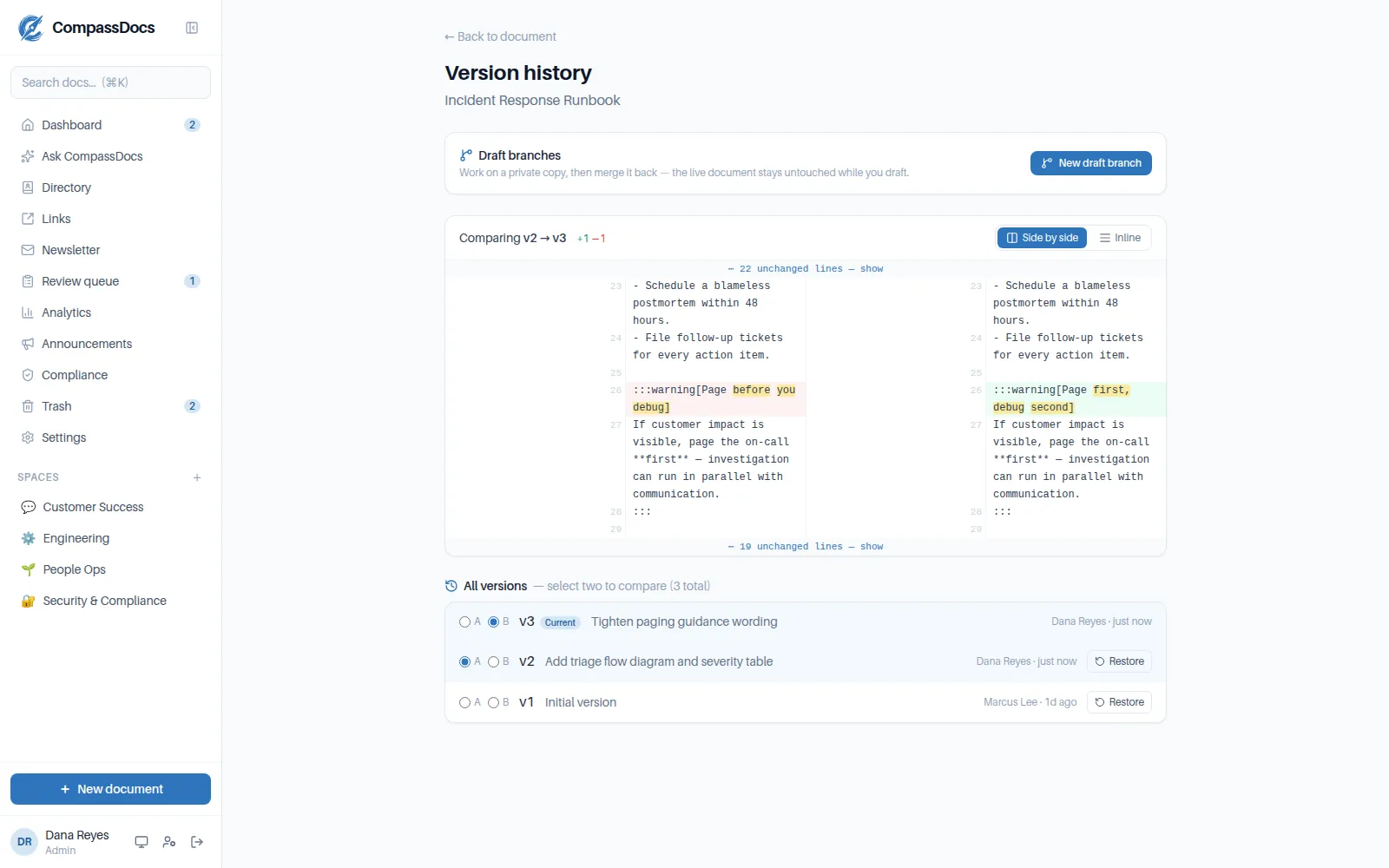
Version history: what changed in a procedure, who changed it and why.
Keeping records, not promising compliance
CompassDocs keeps the records surveys, inspections and audits tend to ask about: which version was in force, who approved it, who confirmed it and who completed which training. It is a documentation tool, not a compliance certification, and using it doesn’t make an organization compliant with any regulation or accreditation standard.
We don’t claim CompassDocs is HIPAA compliant or certified. It is for policies, procedures, training and staff requests, not for patient records or other protected health information. Self-hosting keeps your documents on infrastructure you control. Meeting your legal, accreditation and payer obligations remains your organization’s responsibility. For HIPAA-specific programs, see HIPAA policy and training tracking.
When another tool is the better fit
CompassDocs is the staff knowledge base and helpdesk. These jobs belong elsewhere:
Patient care and records
Charting, orders, scheduling and patient communication run in your EHR and practice management system. CompassDocs holds the procedures around them.
Patient safety events
Reporting and investigating patient safety events belongs in your incident reporting system. Keep the escalation procedure here and link to it.
Licensure and CE credits
Tracking licenses, credentialing and continuing education credits needs a credentialing system or LMS. CompassDocs training covers your own policies and procedures.
Set up faster with Claude
CompassDocs is built for MCP, so Claude can do the first draft of your rollout while your team reviews and publishes. When you start, we walk you through it.
Bring your content in
Paste or attach the procedures and policies you already have, and Claude redrafts each one in your templates, screenshots included.
Draft the handbook and training
Claude assembles a draft handbook from your policies and, with Enterprise, turns procedures into training decks with quiz questions.
Configure the helpdesk as drafts
Request types, forms, workflows, macros and recurring tickets are drafted for an admin to review and publish. Nothing goes live on its own.
See everything Claude can do through MCP and the step-by-step rollout.
Frequently asked
Can we keep documentation on our own systems?
Yes. CompassDocs is self-hosted: it runs on infrastructure you control, in one PostgreSQL database you back up, so policy and procedure documentation stays in-house rather than in a third-party cloud.
Can staff confirm protocols and policies?
Yes, with Enterprise read confirmations. Each confirmation records the statement, the version and the time, with an optional typed signature, and a compliance portal shows who is outstanding. In the free Community edition, a printed handbook ends with an acknowledgement page to sign.
Does it provide an audit trail for surveys and inspections?
Yes. Every document keeps its full version history, and the append-only audit log records sign-ins, role changes, publishes and approvals with actor, IP and time. With Enterprise, confirmations and training completions are recorded against the exact version.
Is CompassDocs HIPAA compliant?
We don’t claim CompassDocs is HIPAA compliant or certified, and using it doesn’t make an organization compliant with any regulation. It is a documentation, policy and training tool that keeps records to support your own compliance program.
Should we store patient information in CompassDocs?
No. Use CompassDocs for policies, procedures, training records and staff requests, not for patient records or other protected health information. Keep patient details out of documents and helpdesk tickets.
Do per diem and agency staff need paid seats?
No. Both editions have unlimited users, so every nurse, per diem clinician, float pool member and agency worker can have an account. Enterprise is $499.99 a year per install; only helpdesk agents beyond the 3 included cost extra, at $125 a year each.
Can a group of clinics share one install?
Yes. Enterprise is licensed per install, not per location. Give each clinic its own space and group, keep shared policies in organization-wide spaces, and route helpdesk requests by location.
Is there a nonprofit discount?
Nonprofit and education discounts on Enterprise are available on request, so ask us. The Community edition is free for any organization, with unlimited users.
Related: HIPAA policy and training · Policy management · SOP software · Facilities requests · IT helpdesk software · HR helpdesk · Security awareness training · Nonprofits · Small business
Clinical procedures, on your own servers
One Docker command installs CompassDocs with unlimited users and documents. Enterprise adds read confirmations, training, the helpdesk, SSO and SCIM for $499.99/year per install. Nonprofit discounts: ask us.
Self-host free See pricingBuying for a team? Get a formal quote to print for approval, or order by invoice with your PO number.
Need sign-off first? Build a business case with your own costs, free and with no sign-up.