 CompassDocs
Facilities request and work order software for internal teams
Broken lights, a boardroom for Thursday, a desk for Monday’s new starter. CompassDocs turns facilities requests into tracked work orders: colleagues ask in Get help, by email or from Teams and Slack, room setups land on a calendar the desk keeps, and routine checks open themselves on schedule. It runs on your own servers.
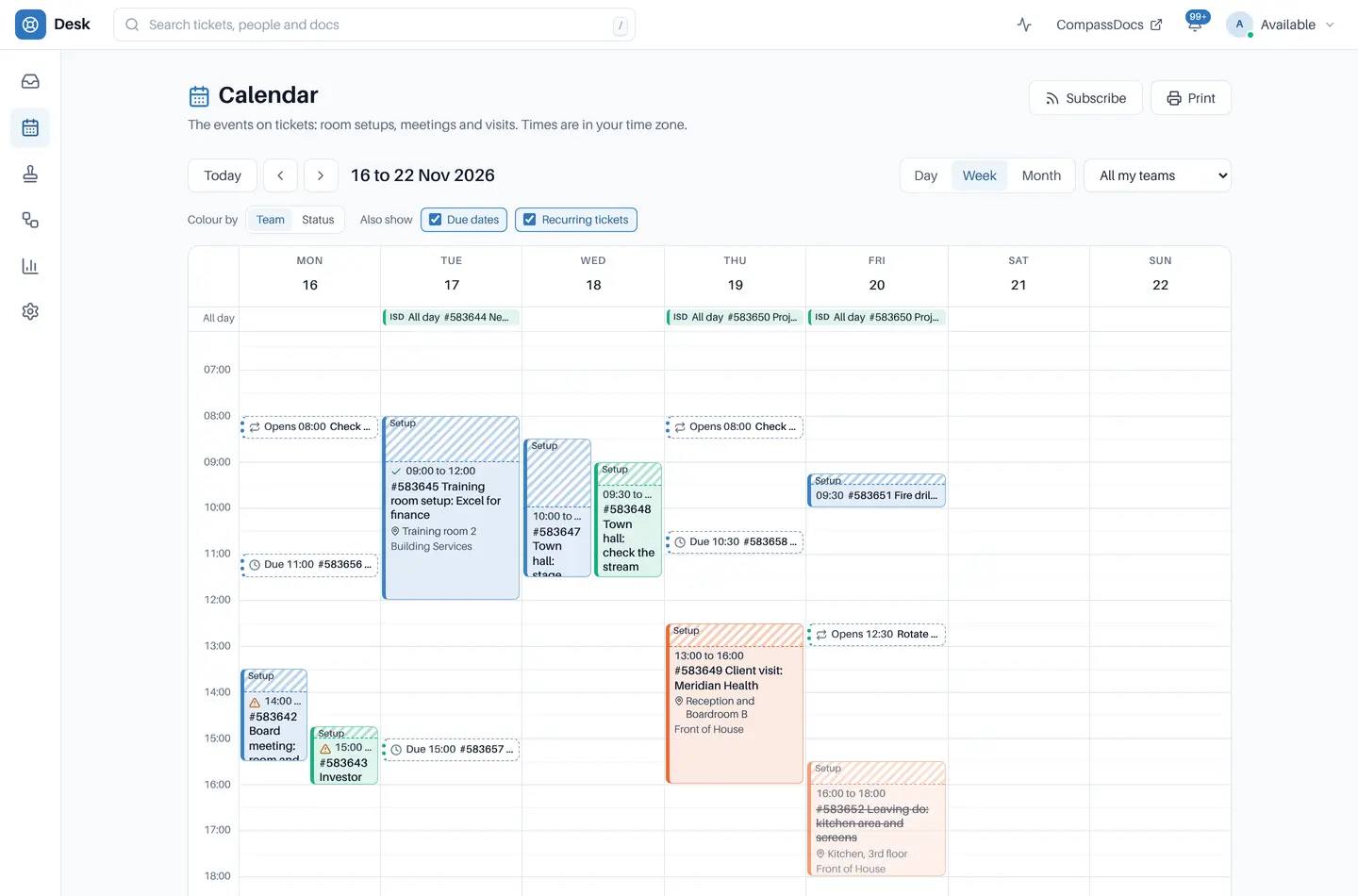
The desk’s calendar: room setups with their setup time, a visit at reception, due dates and recurring tickets.
Facilities work happens at a time, not just by a date
Facilities teams get requests from every direction, and many of them are tied to a room, a site and a moment in time.
× Repair requests arrive by email, in passing and on sticky notes, with no record of who asked.
× Room setups are tracked in a spreadsheet beside the helpdesk.
× The meeting starts, and nobody set up the room.
× Monthly checks live in someone’s calendar, and get forgotten over a holiday.
× A request for the Paris office lands with the London team.
→ Every facilities request becomes a ticket, and the ticket carries the event, the site and the steps.
How CompassDocs handles facilities work orders
Facilities uses the same helpdesk as IT and HR, with its own team, queue, office hours and request types.
Requests in Get help
A facilities repairs request type with a short form, a tracker for the requester, and your guides suggested before anyone asks.
Get help →Room setups on a calendar
A ticket can carry an event with a place and setup time, shows on the desk’s calendar, and can’t be solved until setup is marked complete.
Event calendar →Recurring checks
Maintenance and checks open themselves daily, weekly or monthly, with holidays handled and a checklist of required steps.
Recurring tickets →Routing by office
Workflows send a task to Facilities London or Facilities Paris by the requester’s office, with a fallback team.
Workflows →Checklists and Before you solve
Reusable steps with required items, and rules that say what a ticket needs before it can be solved.
Request types & forms →A facilities mailbox
Give Facilities its own help address or Microsoft 365 shared mailbox. Emailed meeting invites fill in the ticket’s event.
Email →Room setups, meetings and visits, kept by the desk
Some requests are for a moment in time: the boardroom for Thursday, a laptop ready for a first day, a visitor at reception. The event calendar keeps them on the ticket instead of in a spreadsheet.
- Start and end times or all day, a place (with places used before suggested), and how long before the start setup must be ready
- Reminders a day and an hour before setup is due, plus one if an event starts with setup still open; each agent chooses bell, email or push
- A warning when two events share a place and overlap; it never blocks
- Day, week and month views by team, and a printable day sheet with tick boxes
- Private feed links for Outlook, Google Calendar and Apple Calendar
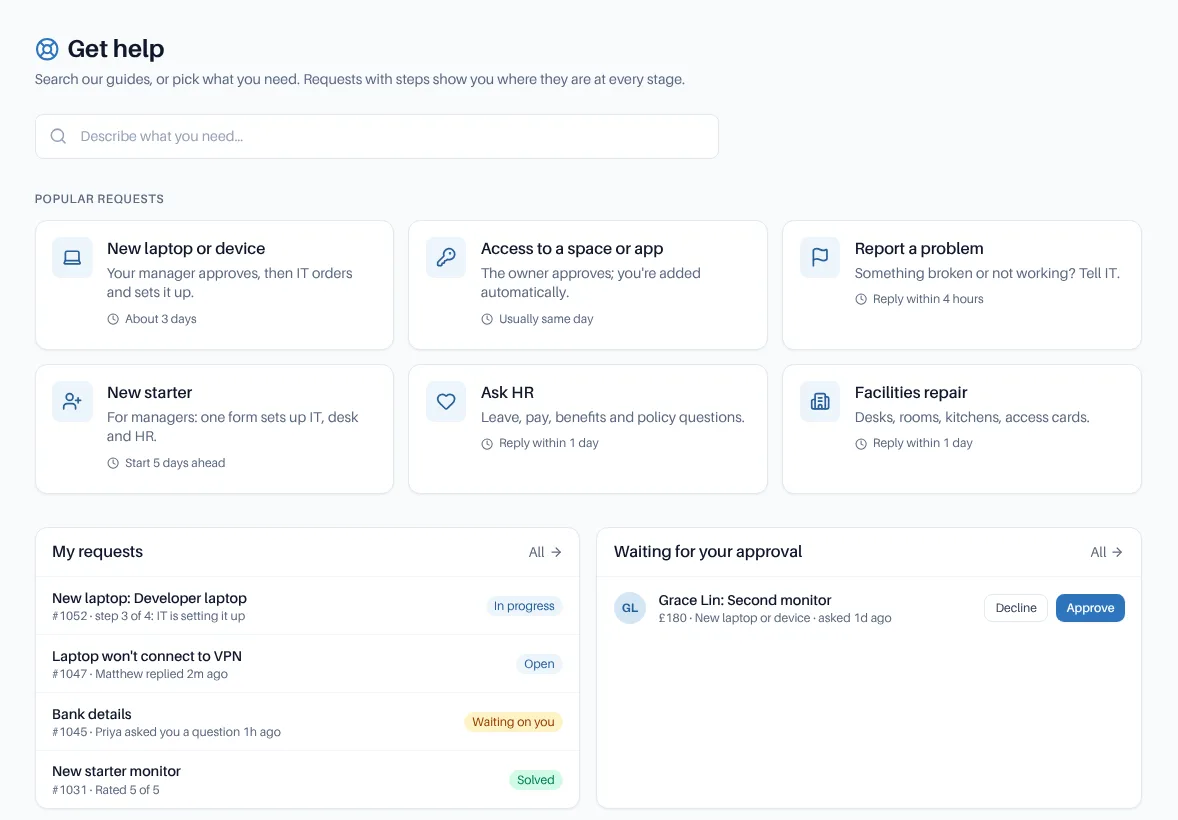
Facilities repairs sits beside IT and HR request types in Get help.
The rest of the facilities workload
Because Facilities shares the desk with IT and HR, the work that crosses teams doesn’t fall between them.
New starters
One New starter request runs IT, Facilities and HR tasks in parallel, then waits until the start date.
Rules that sort
An automation can move tickets that mention “printer” or “toner” to Facilities and set the priority, so nobody re-routes them by hand.
Your hours, your targets
Office hours, holidays and reply targets per team, with a timer and Log time on each ticket for time-tracking reports.
Setting up facilities requests
Start with the free knowledge base, then add an Enterprise license to turn on the helpdesk and its event calendar.
Run one command
The installer starts CompassDocs and PostgreSQL with Docker, and a setup wizard creates your admin account in the browser.
Load the starter set
The desk’s setup checklist offers a one-click starter set with IT, HR and Facilities teams, starter targets and request types to edit.
Add your request types
Repairs, room setups, visitors: a request type with a Date and time question puts its requests on the calendar.
Schedule the routine
Add recurring tickets for checks and maintenance, each with a checklist, in the team’s time zone.
$ curl -fsSL https://raw.githubusercontent.com/Felix-AZ-Solutions-LLC/CompassDocs/main/install.sh | bash
  ✓ Fetched docker-compose.yml
  ✓ Generated .env with fresh secrets
  ▲ CompassDocs running at http://localhost:3000
  → open the URL to create your admin account
Requirements, platforms and the Node.js install path are on the self-hosting page →
Set up faster with Claude
CompassDocs is built for MCP, so Claude can do the first draft of your rollout while your team reviews and publishes. When you start, we walk you through it.
Bring your content in
Paste or attach the procedures and policies you already have, and Claude redrafts each one in your templates, screenshots included.
Draft the handbook and training
Claude assembles a draft handbook from your policies and, with Enterprise, turns procedures into training decks with quiz questions.
Configure the helpdesk as drafts
Request types, forms, workflows, macros and recurring tickets are drafted for an admin to review and publish. Nothing goes live on its own.
See everything Claude can do through MCP and the step-by-step rollout.
Frequently asked
Can people request a room setup for a specific date?
Yes. A request type with a Date and time question puts the request on the desk’s calendar, or an agent adds the event to any ticket. The ticket can’t be solved until its setup is marked complete.
Can we schedule recurring maintenance checks?
Yes. Recurring tickets open daily, weekly, on the nth weekday, on a day of the month or every N days or weeks, at a set time in the team’s time zone. A holiday can move a run, skip it or be ignored, and each run can carry a checklist of required steps.
Can requests go to the right site’s team?
Yes. Workflows can route a task by the requester’s office from the directory, for example to Facilities London or Facilities Paris, with a fallback team. Assignment rules can also match on the requester’s office.
Can facilities see bookings in Outlook or Google Calendar?
Yes. The desk’s calendar has private feed links for Outlook, Google Calendar and Apple Calendar, and you can print a day sheet, a week or a month.
How is it priced?
The helpdesk is part of CompassDocs Enterprise: $499.99 a year per install with unlimited users and 3 agents included; each extra agent is $125 a year. Anyone can raise a request; only agents count.
Related: Event calendar · SLAs & assignment · IT helpdesk software · HR helpdesk · Pricing
A facilities desk on your own servers
Self-host the open-source knowledge base with one Docker command. An Enterprise license adds the helpdesk, the event calendar and SSO for $499.99/year with unlimited users and 3 agents included.
Self-host it free Get a quoteWant to try it with your facilities team first? Request a trial license · See pricing