 CompassDocs
SOP software your whole team actually reads
Turn tribal knowledge into standard operating procedures people can find in seconds. Draft an SOP from a template, route it through review, publish a clean versioned page, and let anyone ask “how do we…?” and get an answer that cites the SOP it came from. Open source, self-hosted, and free for unlimited users.
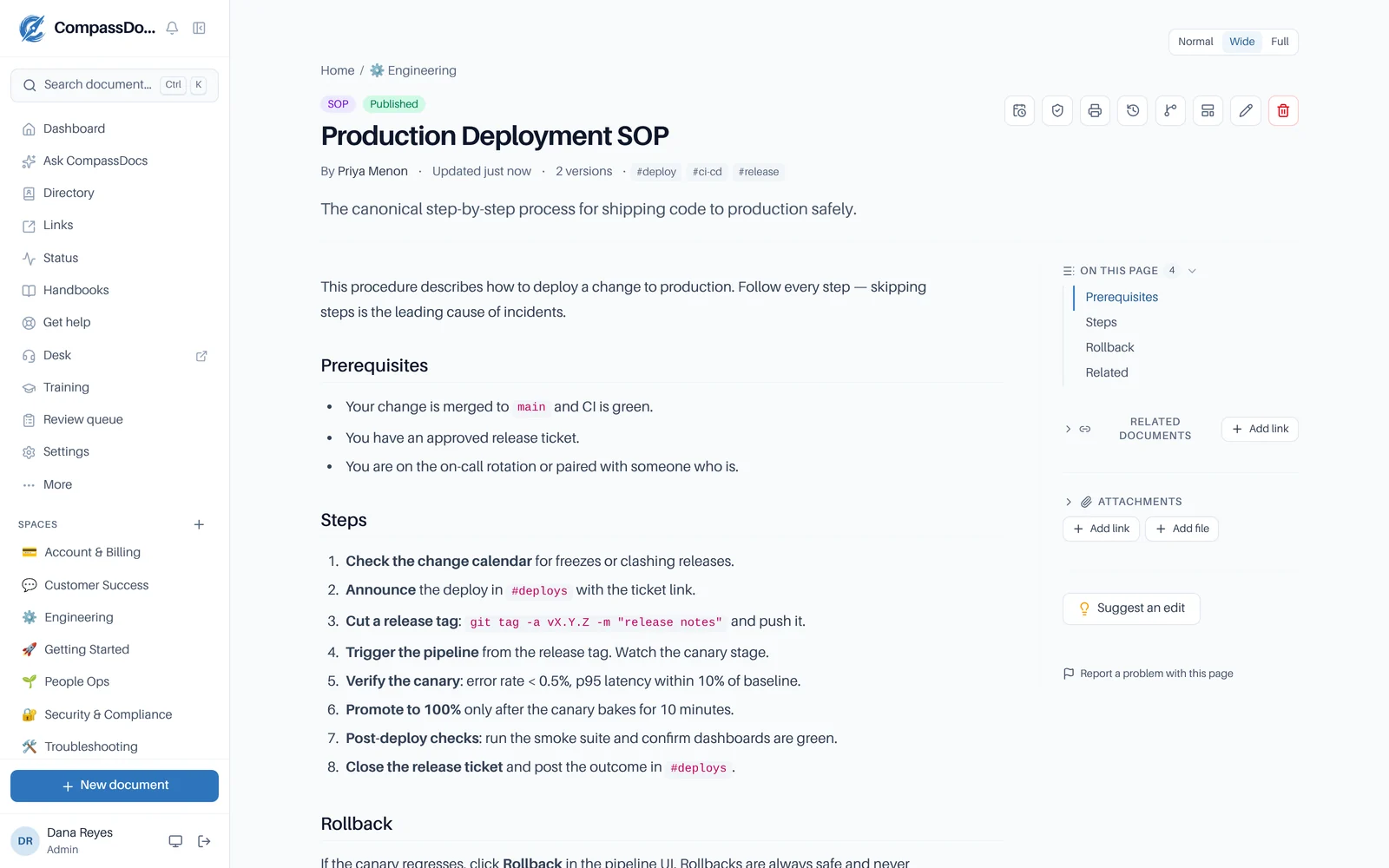
A published SOP: typed as an SOP, with its owner, version history, tags and numbered steps.
Why SOPs don’t get followed
Most teams have procedures. The trouble is that people can’t find them, don’t trust them, or follow an old copy.
× The SOP is a Word file in a folder nobody remembers.
× Two versions exist, and nobody knows which one was approved.
× A step changed, but nobody reviewed the change before it went live.
× Every author writes SOPs in a different shape.
× The procedure was last checked two years ago.
→ SOPs with one structure, one approved version and a review date, findable by anyone in seconds.
From draft to published SOP, step by step
- Start from the SOP template. Placeholders fill themselves, and a space can make it the default
- Write the steps. Numbered steps, callouts, tables, click-to-tick checklists, decision-tree guides and screenshots pasted right where they belong, in rich text or Markdown
- Submit for review. In strict mode, the draft or edit goes to an approver as a change request with a “what changed and why” note
- Approve and publish. The approved version goes live, and the approver is recorded with it
- Set a review cadence. Owners are reminded when the SOP is due for a check
- Find it. Search, the ⌘K command palette and optional AI answers surface the right step
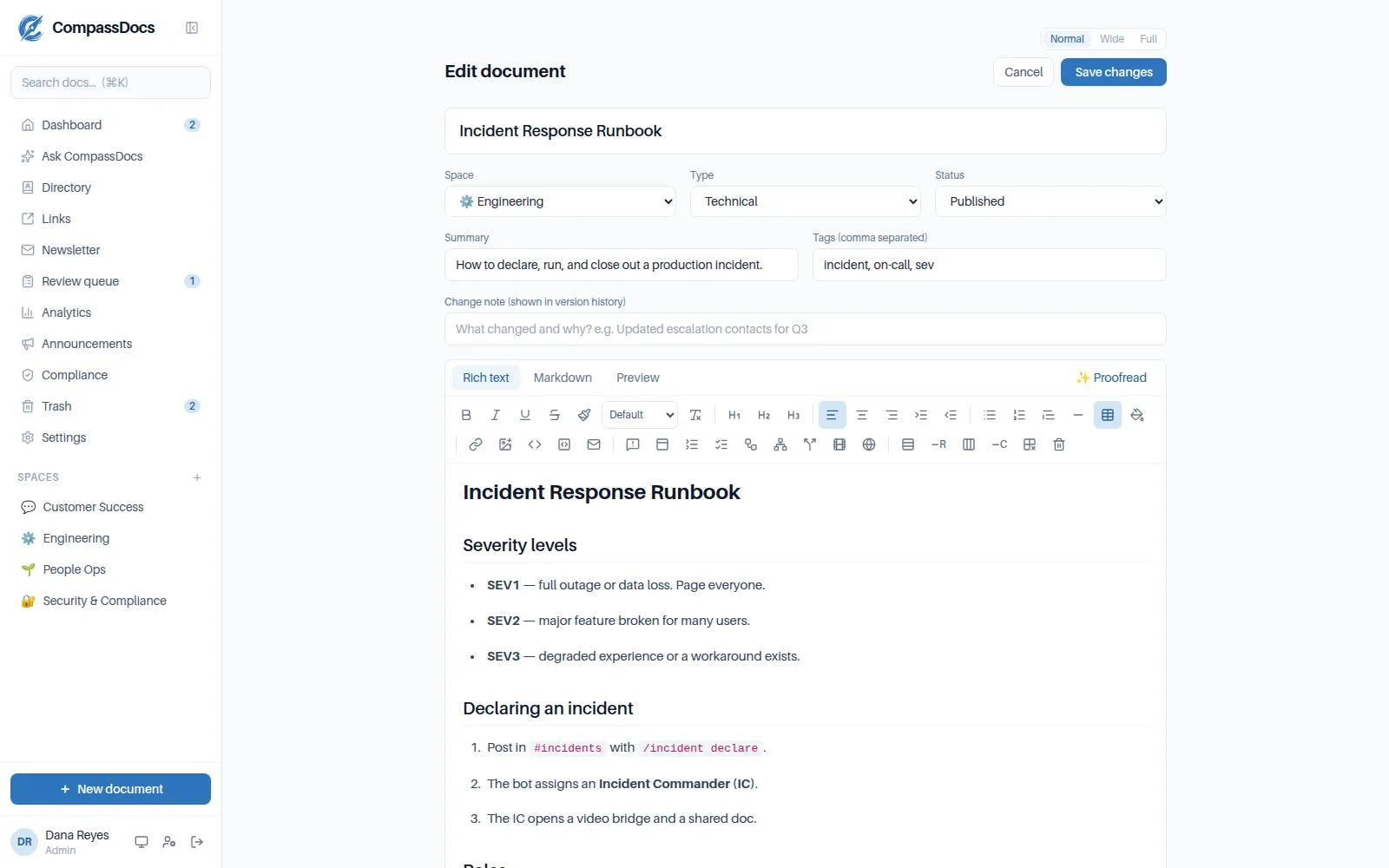
The editor: rich text or Markdown, with a toolbar for tables, callouts, diagrams and checklists.
What makes an SOP trustworthy and fast to find
Everything here is in the free Community edition unless it says Enterprise.
Structured, repeatable
Six built-in templates, including SOP and runbook, plus your own. Admins can turn any document into a template.
Rich editor →Approved before publish
Open mode for speed or strict mode for control, switchable at any time. Anyone, even a Viewer, can suggest an edit.
Roles & approvals →Every revision kept
Compare revisions with word-level highlights, restore in a click, and rewrite a live SOP on a draft branch.
Version history →Findable under pressure
Ranked full-text search with type:, tag: and space: operators, plus cited AI answers on your own Anthropic API key.
AI search →SOPs in a handbook
Gather SOPs and policies into one numbered handbook, read as one and printed for the people who need paper.
Policy handbooks →Trained and confirmed
Enterprise: turn an SOP into a training deck with a quiz, or ask people to confirm they have read the current version.
Training & onboarding →Who uses CompassDocs for SOPs
Any team that does the same work more than once.
IT and engineering
Runbooks, deployment steps and incident playbooks. See IT runbooks.
Operations and manufacturing
Work instructions with photos and controlled revisions. See manufacturing.
Healthcare and regulated teams
Clinical and compliance procedures with sign-off. See healthcare.
Customer support
Refunds, escalations and account changes, answered from the SOP itself.
Finance and admin
Month-end close, expenses and approvals, with a record of every change.
HR
Onboarding, leave and leaver procedures. See HR teams.
Get your SOPs in one place
The Community edition is free and open source, with unlimited users and documents.
Run one command
The installer starts CompassDocs and PostgreSQL with Docker, and a setup wizard creates your admin account in the browser.
Bring what you have
Import SOPs as front-matter Markdown, including Confluence pages exported to Markdown, or start from the free SOP template.
Set the rules
Give owners the Approver role and turn on strict mode, so changes to published SOPs are reviewed first.
Set review dates
Add a review cadence to each SOP so nothing quietly goes out of date.
$ curl -fsSL https://raw.githubusercontent.com/Felix-AZ-Solutions-LLC/CompassDocs/main/install.sh | bash
  ✓ Fetched docker-compose.yml
  ✓ Generated .env with fresh secrets
  ▲ CompassDocs running at http://localhost:3000
  → open the URL to create your admin account
Requirements, platforms and the Node.js install path are on the self-hosting page →
Set up faster with Claude
CompassDocs is built for MCP, so Claude can do the first draft of your rollout while your team reviews and publishes. When you start, we walk you through it.
Bring your content in
Paste or attach the procedures and policies you already have, and Claude redrafts each one in your templates, screenshots included.
Draft the handbook and training
Claude assembles a draft handbook from your policies and, with Enterprise, turns procedures into training decks with quiz questions.
Configure the helpdesk as drafts
Request types, forms, workflows, macros and recurring tickets are drafted for an admin to review and publish. Nothing goes live on its own.
See everything Claude can do through MCP and the step-by-step rollout.
Frequently asked
What makes a knowledge base good for SOPs?
Structure, review and findability. CompassDocs gives you templates, numbered steps and checklists, a draft, review and approve workflow, full version history, review reminders, and search that answers with a citation to the SOP.
Can we require SOPs to be reviewed and approved?
Yes, in every edition. In strict mode, edits to a published SOP become change requests an approver reviews before they go live. You can also set review reminders so each SOP is re-checked on a schedule.
How do people find the right procedure quickly?
Every document is typed, tagged and filed in a space, with ranked keyword search from any page. With your own Anthropic API key, people can ask a plain-English question and get an answer with inline citations to the source SOP.
Can we prove people have read an SOP?
With Enterprise, yes: ask people to confirm the current version, or turn the SOP into a training deck with a quiz and a confirmation gate. Each record carries the version confirmed.
Is it really free to self-host?
Yes. The core app is open source under the AGPL-3.0 with unlimited users and documents, and approvals are included. Enterprise, $499.99 a year per install, adds the helpdesk, SSO, directory sync, read confirmations and training.
Related: What is an SOP? · SOP template · Policy management · Roles & approvals · Version history · IT runbooks
Procedures people can find and trust
One Docker command installs CompassDocs with unlimited users and documents. Enterprise adds read confirmations, training, SSO and the helpdesk for $499.99/year.
Self-host it free See pricingBuying for a team? Get a formal quote to print for approval, or order by invoice with your PO number.