 CompassDocs
Key takeaways
- An SOP is an approved, step-by-step description of how a recurring task is done, so the result is consistent no matter who does it.
- A policy says what must happen and why; an SOP says how it is done. A runbook covers operational situations like alerts and outages.
- Good SOPs have a clear owner, a defined scope, one action per step, an expected result for each step and a review date.
- Writing the SOP is half the job. Keeping it approved, current and read is the other half.
- Start from our free SOP template rather than a blank page.
What is an SOP?
A standard operating procedure (SOP) is a document that describes, step by step, how a specific recurring task is performed in your organization. It is “standard” because everyone who does the task follows the same steps, and “operating” because it describes real day-to-day work rather than goals or principles.
What makes an SOP different from a note in someone’s drive is that it is owned and approved. Someone is responsible for keeping it accurate, someone signed it off, and it carries a version number and a date. When an auditor, a customer or a new hire asks “how do you do this?”, the SOP is the answer you can point to.
SOPs show up everywhere: in manufacturing and laboratories, in finance and payroll, in IT and security, in healthcare, in customer support and in HR. The subject changes; the shape stays remarkably similar.
SOP vs policy vs work instruction vs runbook
These terms get mixed up, and the confusion produces documents that try to do everything at once. A simple way to tell them apart:
| Document | Answers | Example |
|---|---|---|
| Policy | What must happen, and why. Rules and principles, usually short and stable. | “All vendor payments over $5,000 require a matching purchase order.” |
| SOP | How a recurring task is done, step by step, by whom. | The invoice approval procedure that implements the payment policy. |
| Work instruction | How one detailed task inside an SOP is done, often for one role or machine. | How to enter a three-way match in the finance system, with screenshots. |
| Runbook | What to do when an operational situation occurs, often unplanned. | What on-call does when the payment service’s error rate alert fires. |
One policy can be implemented by several SOPs, and one SOP can point to several work instructions. Runbooks sit slightly apart: they start from a symptom and guide diagnosis. If that’s what you need, read how to write a runbook.
Why SOPs matter
- Consistency. The same task produces the same result whether it is done by your most experienced person or someone in their second week.
- Fewer errors. Written steps with expected results catch mistakes early, especially in tasks that are done rarely.
- Faster onboarding. New hires learn from the document instead of interrupting colleagues, and trainers teach from one source.
- Resilience. Knowledge stops living in one person’s head, so vacations, resignations and reorganizations hurt less.
- Evidence. Audits, certifications and customer security questionnaires routinely ask for documented, approved procedures and proof that staff know them.
- A baseline for improvement. You can’t improve a process nobody has written down. An SOP gives you something concrete to measure and change.
Common SOP formats
Most SOPs use one of four formats, or mix them:
- Simple step-by-step. A numbered list. Best for short, linear tasks with few decisions.
- Hierarchical steps. Numbered steps with sub-steps (1, 1.1, 1.2). Best for longer tasks where experienced staff skim the top level and newer staff read the detail.
- Flowchart or decision tree. Best when the path depends on conditions: “if the customer is in the EU, do this; otherwise, that”.
- Checklist. Best for tasks where order matters less than completeness, like opening or closing a site, or onboarding a new hire.
Whatever the format, the surrounding sections stay the same: purpose, scope, roles, prerequisites, the procedure itself, exceptions, records and revision history.
SOP examples
Here are four short, realistic SOP outlines. Each would be a full document in practice; the point is the shape.
IT: provisioning a new user account. Purpose: every new starter has the right access on day one, and nothing more. Steps: confirm the approved request and start date; create the directory account from the role template; add the person to the groups for their team; enroll multi-factor authentication; assign licenses; record the asset tag of the issued laptop; confirm to the manager. Records: the request, the group list, the asset record.
Finance: approving a vendor invoice. Purpose: invoices are paid only for goods and services that were ordered and received. Steps: match invoice to purchase order; confirm receipt; check amounts and tax; route amounts over the threshold to a second approver; schedule payment; file the approval. Exception: invoices without a PO go to the finance lead.
Operations: cleaning shared equipment between batches. Purpose: prevent contamination between batches. Steps: lock out the equipment; remove residue; clean with the approved agent for the required contact time; rinse; inspect; record the clean on the equipment log; release for use. Safety precautions are listed before step 1, not buried in the middle.
HR: offboarding a leaver. Purpose: leavers lose access on time and return company property. Steps: confirm last day; schedule account deactivation; collect equipment; transfer document ownership; run the exit interview; confirm final pay with payroll. Records: the completed checklist.
How to write an SOP, step by step
- Pick one process and name it precisely. “Invoice approval for vendor payments”, not “Finance processes”. If you can’t describe the outcome in one sentence, the scope is too wide.
- Talk to the people who do the work. Watch the task being done, or have the person talk you through it. Written procedures drafted from memory miss the workarounds that make the real process function.
- Define scope and roles. Say who does each part, where the procedure applies and what is out of scope.
- List prerequisites. Access, tools, forms, training and safety precautions needed before step 1.
- Write the steps. One action per step, starting with a verb. Add the expected result after each step and write decisions as explicit branches.
- Add exceptions, escalation and records. What to do when something doesn’t match, who to contact, and what evidence the procedure leaves behind.
- Test it. Ask someone who hasn’t done the task to follow the draft while you watch. Every question they ask is a gap in the document.
- Review, approve and publish. A reviewer checks it, an approver signs it off, and only then does it become the version people follow. Set the next review date at the same time.
Our free SOP template follows exactly this structure, so you can work through the list section by section.
Common SOP mistakes
- Writing for the expert. Steps like “reconcile as usual” only work for people who don’t need the SOP.
- Mixing policy and procedure. Long paragraphs of rules make the steps hard to find. Link to the policy instead.
- No owner. An SOP without a named owner is out of date within a year.
- Hiding it. A perfect SOP in a folder nobody can find doesn’t change behavior. Findability matters as much as content.
- Silent edits. Changing steps without a new version and a note means people who learned the old way never notice.
Keeping SOPs approved, current and read
The hard part of SOPs is not writing them. It’s keeping a hundred of them accurate for years, and knowing that the people who must follow them have read the current version. That takes a few habits, and a tool that supports them:
- An approval step before publishing, so a draft can’t quietly become the procedure.
- Version history that shows what changed between versions and lets you restore an older one.
- Review dates with reminders to the owner, so stale procedures surface on their own.
- Search that finds the right step, even when the reader doesn’t know the procedure’s title.
- A record of who read what, for procedures where you need proof that staff know them.
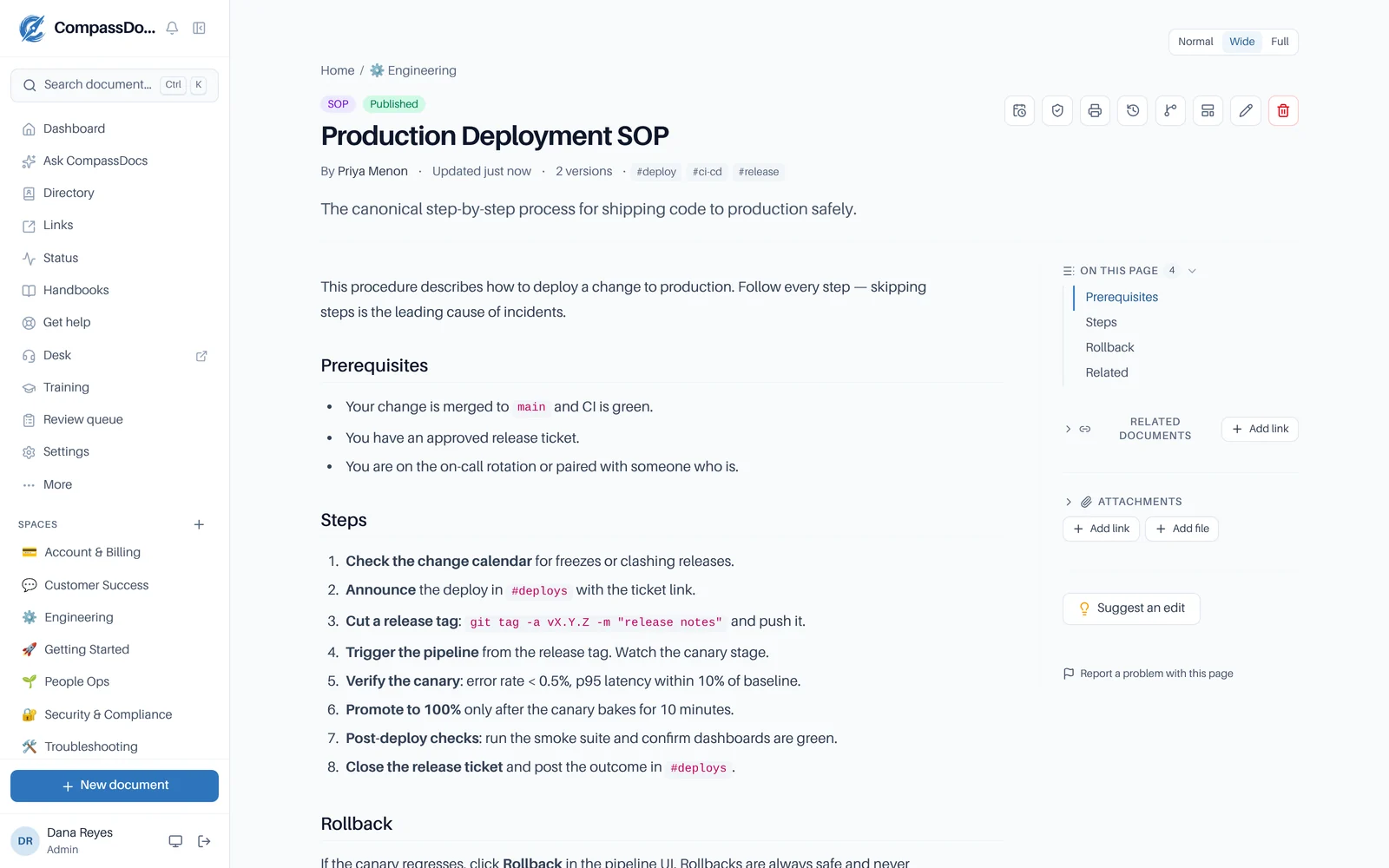
CompassDocs is an open-source, self-hosted knowledge base built around these habits. It has a draft, review and approve workflow in every edition, full version history, content review reminders, typed documents and a built-in SOP template. Enterprise adds read confirmations, where people confirm a procedure against the exact version they read. See SOP software in CompassDocs and roles and approvals for the details.