 CompassDocs
Franchise operations manual software, with sign-off across every unit
A franchise system runs on its operations manual: the brand standards, the procedures behind every unit and the policies franchisees agreed to follow. CompassDocs is a self-hosted home for that manual, with approvals and version history on every change, franchisee onboarding and training, recorded sign-off across units and a support helpdesk for franchisee questions, all on one install.
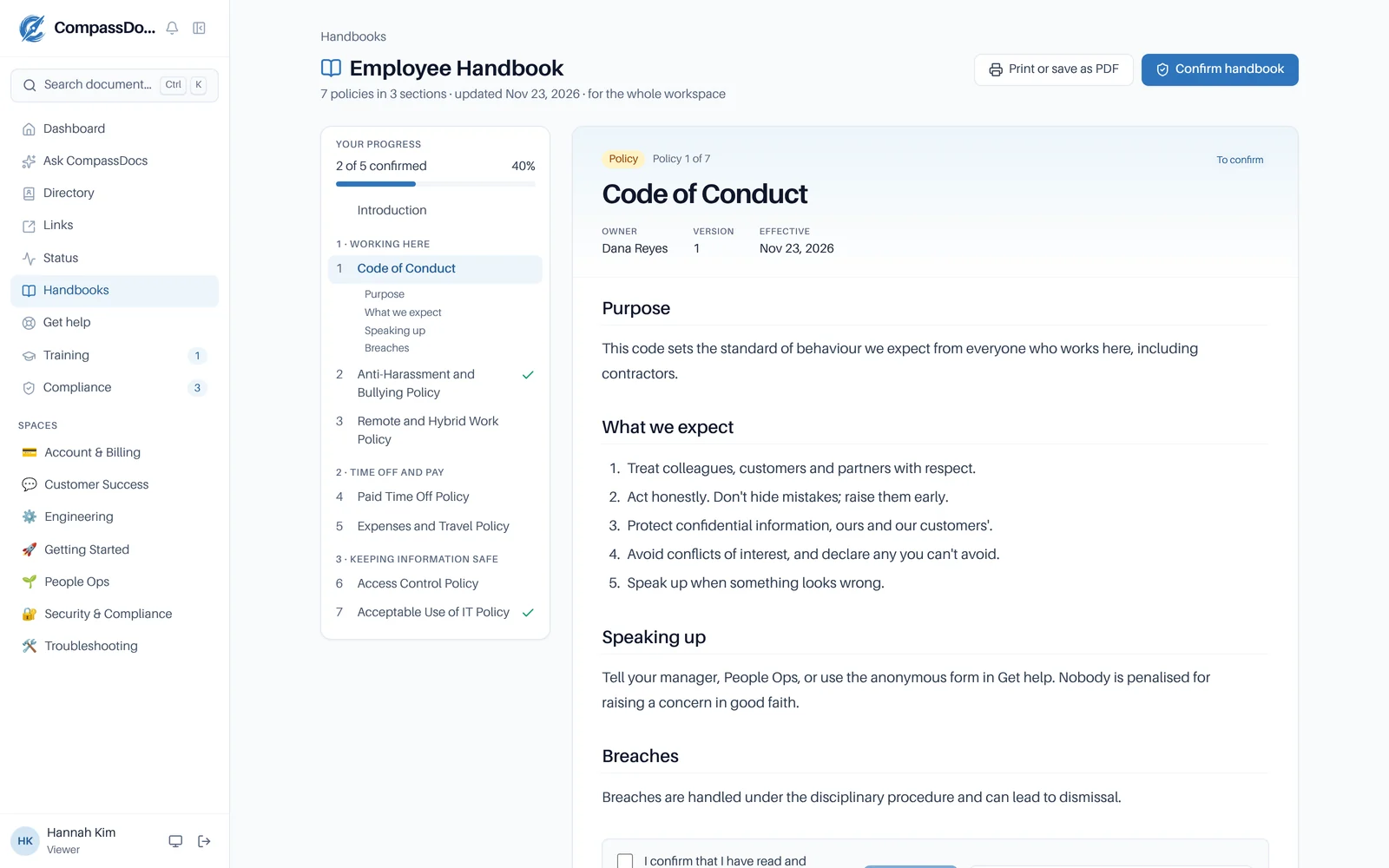
A handbook gathers published policies and SOPs into numbered sections, the shape of most operations manuals.
The manual is the system, and it’s a PDF
Most franchisors start with a confidential operations manual in a binder or a long PDF, and a support team answering the same questions by phone and email.
× The manual is a 300-page PDF on a franchisee portal, and units still print the 2023 edition.
× Brand standards change by memo, and nobody can say which units read the memo.
× A new franchisee’s training runs on a spreadsheet the training manager keeps by hand.
× Field consultants find the same gaps visit after visit because the procedure was never clear.
× Franchisees call whoever they know at the support center, and the answer helps one unit.
→ One live manual with a version history, recorded acknowledgments per unit, and one front door for franchisee support.
The operations manual, as documents people can actually find
Instead of one file, the manual becomes documents with owners: each SOP, standard and policy in a space, gathered into a numbered handbook for reading in order or printing with an acknowledgement page.
- Brand standards: logo use, signage, uniforms, store layout, the guest experience and what “on brand” means
- Unit operations: opening and closing, cash handling, food or product preparation, cleaning schedules, inventory and ordering
- Required versus recommended: a document type and tags mark which standards are mandatory and which are suggested practice
- Local procedures: a space a franchisee owns for their own unit, kept apart from the system’s standards
- Handbook only: keep a policy out of search and the dashboard so readers find it only in its place in the manual
- Review cadence: every standard has an owner and a review date, with overdue notices on the page and a queue for editors
Confidential by default
Private spaces limit the manual to the groups you choose, such as franchisee owners and unit managers. Search, AI answers and comments respect that boundary.
Every edition kept
Each change is a version with its author, approver and note. Compare any two versions word by word, so you can show what the manual said when a unit opened.
Strict mode for standards
Turn on strict mode and edits to a published standard become change requests an approver reviews before they reach any unit.
Policy acknowledgment across every unit
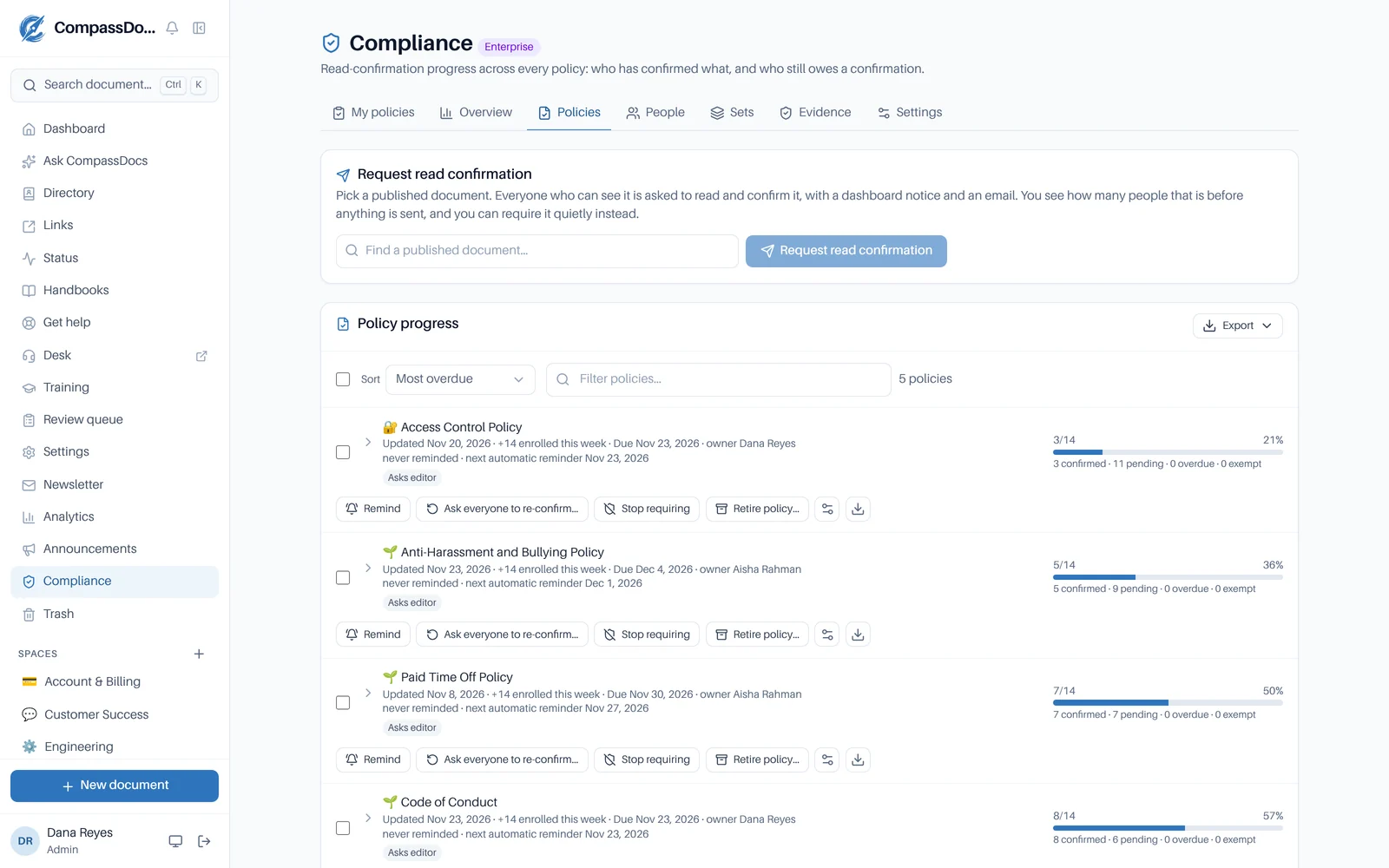
When a standard changes, the franchisor needs to know that every unit got it. Turn on read confirmations and the policy asks its audience to read and confirm the exact version.
- Choose the audience: franchisee owners, unit managers, a region, or everyone who can see the space
- Due dates per person, automatic reminders, and escalation to owners and group leads
- You decide whether an edit is editorial or material; only a material change asks people again, and readers see what changed since the version they confirmed
- New accounts join the audiences that cover them, with a grace period for new joiners, so a new franchisee’s managers are enrolled on day one
- Confirm the whole manual in one step from the handbook, each policy against its current version
- The compliance portal shows every policy’s progress, with bulk reminders, exports and an audit package
Franchisee onboarding and training, from signing to opening day
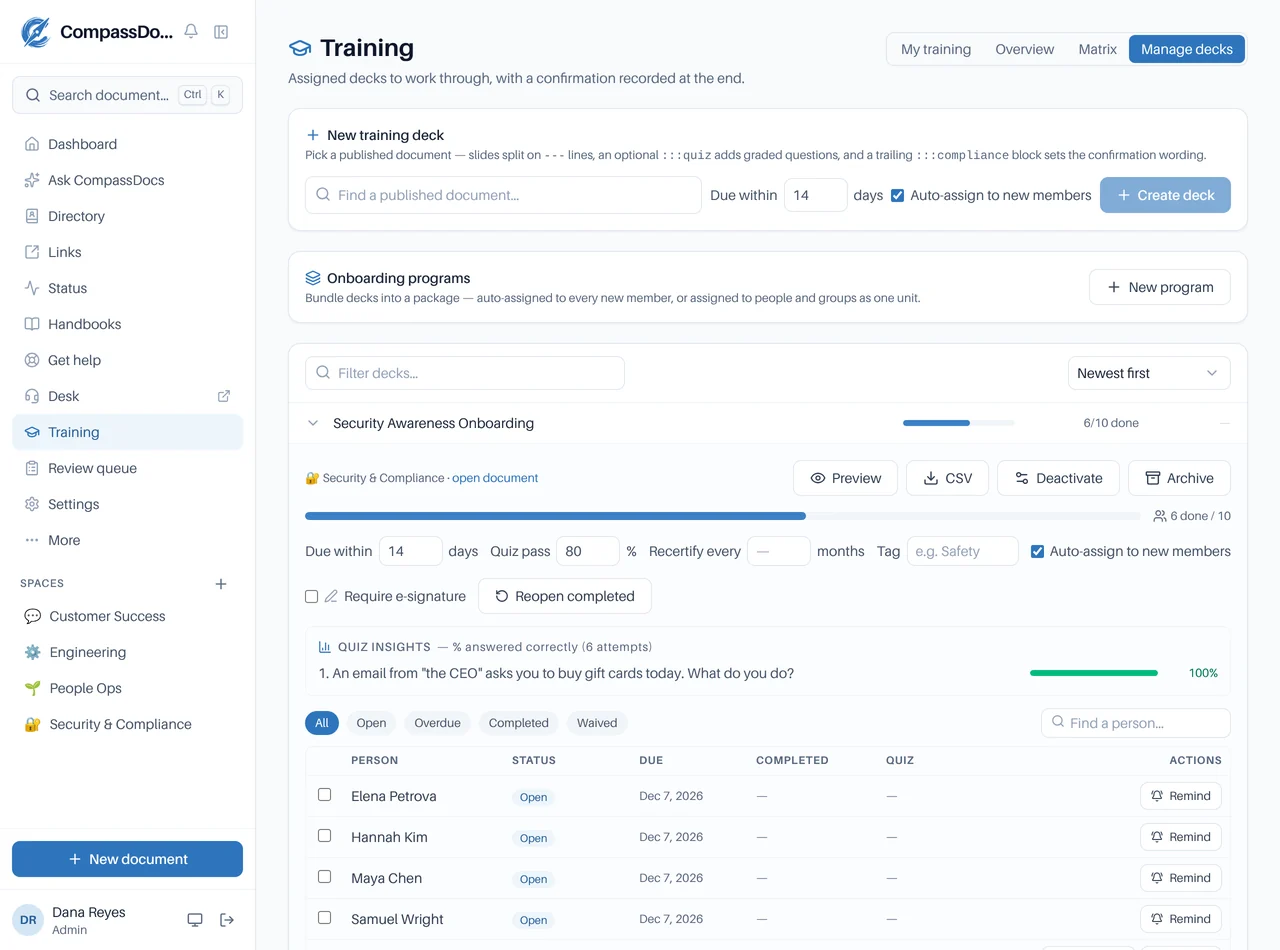
New owners have weeks of material to get through before they open, and their managers and crew need it again after every turnover. Training turns published documents into decks without a separate LMS.
- Onboarding programs assign every deck to each new account the moment it’s created, locally, by single sign-on or by SCIM
- Multiple-choice quizzes, graded on the server, with a pass mark that unlocks the confirmation
- Recertification reopens a deck every N months, so the annual refresher comes round on its own
- Waive decks for owners who trained before you moved to CompassDocs; the record says waived, not completed
- Field consultants, as group leads, get one weekly email on their region’s training and policies
- Certificates, per-person progress with quiz scores, and CSV export
A franchisee support helpdesk next to the manual
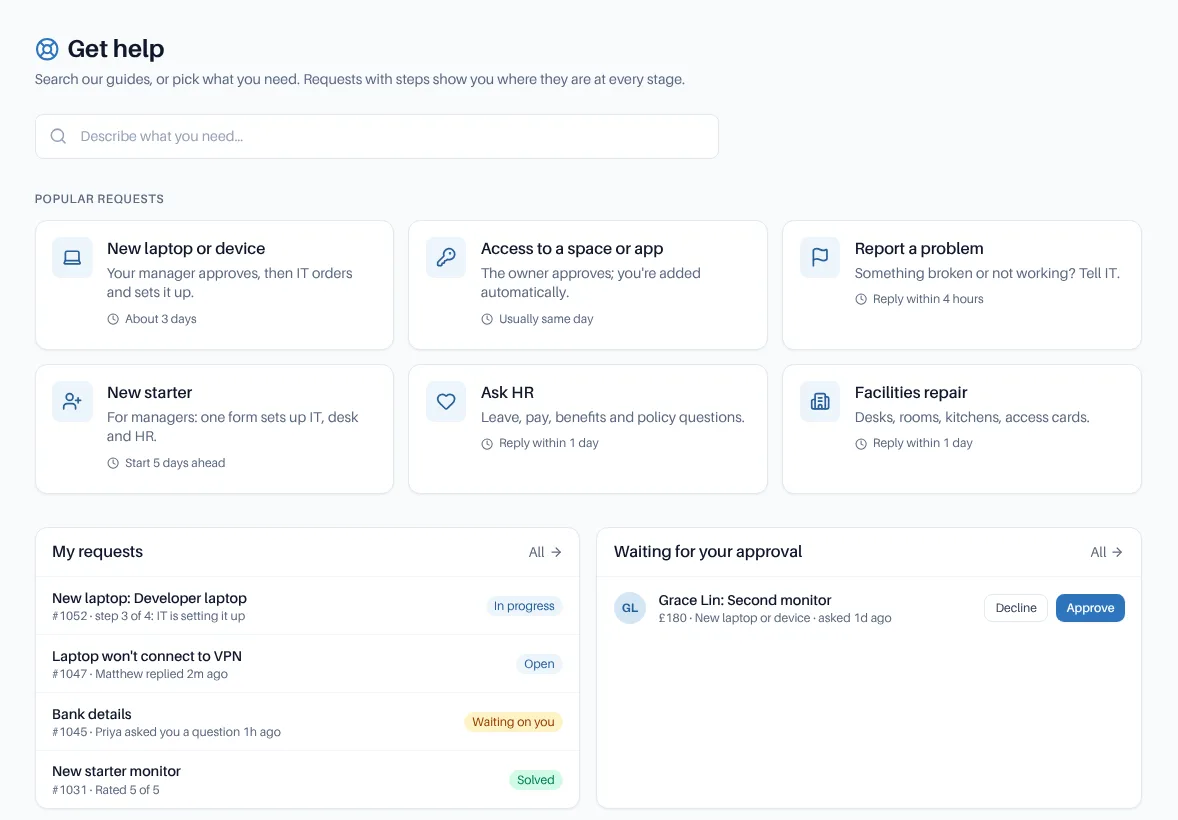
- Get help searches the manual before a franchisee sends anything, then offers request types such as POS support, an equipment issue, a local marketing approval or “ask operations”
- Mail to your support address becomes tickets, and franchisees can ask from Microsoft Teams or Slack
- Workflows route a request by the requester’s region from the directory, with approvals and tasks for several teams
- When online ordering or the POS fails for many units at once, a major incident posts one update to everyone affected and a banner with a Me too button
- Recurring tickets with a checklist open each month for unit self-audits or quarterly consultant visits
- 3 agents included; extra agents are $125 a year, and franchisees who only ask never count
One install, five jobs in the franchise system
One concrete use per job. Spaces, handbooks, versioning, AI answers and announcements are in the free Community edition; read confirmations, training and the helpdesk are Enterprise.
| Job | Franchisor operations | Field consultants | Franchisee owners & managers | Marketing & brand | Training |
|---|---|---|---|---|---|
| Spaces | Operations manual, one space per chapter | Visit guides and audit forms | Their unit’s local procedures | Brand standards and logo files | Course content by role |
| Handbooks | The manual as one numbered handbook | Field visit handbook | Read the manual as one, with “Policy 3 of 40” | Brand standards handbook | New-owner orientation pack |
| Versioning & approvals | Strict mode: every change reviewed | Comment on a standard that doesn’t work in the field | See what changed since they last read it | Approve logo and signage changes | Decks follow the latest version |
| Read confirmations | Roll out a material change to all units | Chase their region’s stragglers | Confirm the whole manual at signing | Confirm a new promotion’s rules | Annual re-confirmation of key policies |
| Training | Onboarding program for new owners | Digest of who in their region is behind | Assign decks to their own managers | Launch deck for a new menu or service | Quizzes with a pass mark, recertification |
| Ask CompassDocs | Fewer repeat questions to the support center | Find the standard during a visit | “What temperature does the walk-in hold?” | “Can I run my own local ad?” | Content gaps show what to write next |
| Announcements | Critical notice to every dashboard | Region notices emailed to a group | Monthly franchisee newsletter | Campaign calendar each month | New courses this month |
| Helpdesk | Support center queue for franchisees | Visit follow-ups as tickets | POS help, equipment, “ask ops” | Local marketing approval requests | Training access and questions |
| Workflows | New unit opening across teams | Corrective action after a visit | Route by the requester’s region | Brand review, then approve | Access for new managers, then training |
A new brand standard, rolled out to 140 units
A quick-service franchisor changes its drive-thru greeting and order-confirmation standard.
Draft the change
The operations manager edits the Drive-thru standard in the manual space. Strict mode turns the edit into a change request with a “what changed and why” note.
Approve it
The VP of operations compares the two versions word by word and approves. The standard publishes with a new version and effective date.
Mark it material
Because it changes what crews do, the change is marked material, so franchisee owners and unit managers are asked to confirm it within 14 days.
Tell everyone
A critical announcement goes to every dashboard and the franchisee Teams channel, and a short training deck with a two-question quiz goes to unit managers.
Chase by region
Reminders go out on their own. Each field consultant’s weekly digest lists the units in their region still waiting, and the compliance portal shows the system-wide total.
A new franchisee, from signing to grand opening
Accounts and access
The new owner and two general managers get accounts in the Franchisees group. The onboarding program assigns orientation, food safety procedures, cash handling and brand standards decks at once.
One opening request
The development team raises a New unit opening request. Its workflow gives tasks to IT for the POS and network, Marketing for the grand opening kit and Training for the on-site trainer, in parallel.
Wait for the date
A wait step holds the final checks until five business days before opening, and the opening itself sits on the desk’s event calendar with reminders.
Sign the manual
Before opening, the owner confirms the whole operations manual from the handbook, with a typed signature recorded against each policy’s version.
Keeping records, not giving legal advice
CompassDocs keeps the records franchisors tend to be asked for: which version of a standard was in force on a date, who approved it, which owners and managers confirmed it and when, and who finished which training. It is a documentation tool. It doesn’t know your franchise agreement, your disclosure document or the franchise laws that apply to you, and it doesn’t replace your franchise counsel.
Many franchisors also take care over how far the manual reaches into a franchisee’s own employment decisions. CompassDocs can keep system standards and a franchisee’s own local policies in separate spaces with separate owners; where to draw that line is a decision for you and your advisers, not the software.
When another tool is the better fit
CompassDocs is the manual, the training and the support desk. These jobs belong elsewhere:
Franchise development
Lead tracking, discovery days and disclosure delivery for prospective franchisees run in a franchise development CRM.
Scored inspections with photos
If consultants score visits on a tablet with photos and weighted scores, use an inspection app. Keep the standards it checks in CompassDocs.
Purchased course libraries
If you buy packaged e-learning courses to play as-is, that needs an LMS. CompassDocs training is built from your own documents.
Set up faster with Claude
CompassDocs is built for MCP, so Claude can do the first draft of your rollout while your team reviews and publishes. When you start, we walk you through it.
Bring your content in
Paste or attach the procedures and policies you already have, and Claude redrafts each one in your templates, screenshots included.
Draft the handbook and training
Claude assembles a draft handbook from your policies and, with Enterprise, turns procedures into training decks with quiz questions.
Configure the helpdesk as drafts
Request types, forms, workflows, macros and recurring tickets are drafted for an admin to review and publish. Nothing goes live on its own.
See everything Claude can do through MCP and the step-by-step rollout.
Frequently asked
Can one install serve the franchisor and every franchised unit?
Yes. Enterprise is licensed per install, not per unit or per location: $499.99 a year with unlimited users. Corporate staff, field consultants, franchisee owners and their unit managers all sign in to the same install, with groups and private spaces deciding who sees what.
Does every franchisee and unit manager need a paid seat?
No. Both editions have unlimited users. The only thing counted is helpdesk agents, the people who answer requests: Enterprise includes 3, and each extra agent is $125 a year. Franchisees who only ask for help never count as agents.
Can we keep the operations manual confidential?
Yes. Put the manual in private spaces limited to chosen people or groups, and search, AI answers and comments respect that boundary. The public site is off by default and only ever shows published documents in spaces you mark public. Publishes, approvals and handbook prints are written to the audit log.
Can we show that a franchisee acknowledged a brand standard change?
With Enterprise read confirmations, each confirmation records the statement, the version and the time, with an optional typed signature, and you can export per-policy and per-person records or an audit package. Whether that record meets the terms of your franchise agreement is a question for your counsel.
How do franchisees ask the support center a question?
With the Enterprise helpdesk, franchisees open Get help, which searches your manual first and then offers request types such as POS support, a marketing approval or an equipment issue. They can also email your support address or message the app in Microsoft Teams or Slack, and people without an account can use the customer portal with a one-time email link.
Can field consultants see only their own region?
Yes. Make a group per region and make the consultant its group lead: they see where their units stand on policies and training, remind one person at a time and get one weekly digest. On the helpdesk, agents work only the queues of the teams they belong to.
Can we try it before committing?
Yes. The Community edition is free to self-host with unlimited users, and you can request a time-limited trial license to test Enterprise features. Your first Enterprise purchase also comes with a 30-day money-back guarantee.
Related: Hospitality · Small business · SOPs · Policy management · Employee handbook · Facilities requests · IT helpdesk software · SOP template
One install for the whole franchise system
Self-host CompassDocs free with unlimited users. Enterprise adds read confirmations, training, the franchisee helpdesk and SSO for $499.99 a year per install, however many units you have.
Self-host free See pricingBuying for a team? Get a formal quote to print for approval, or order by invoice with your PO number.