 CompassDocs
Employee handbook software that stays current and gets signed off
A handbook PDF is out of date the week after it goes out, and nobody can say who read which edition. CompassDocs builds your employee handbook from the policies you already publish: one numbered book people can read, search and print, which shows the new version the moment a policy changes. With Enterprise, staff confirm the whole handbook in one step and you keep the record.
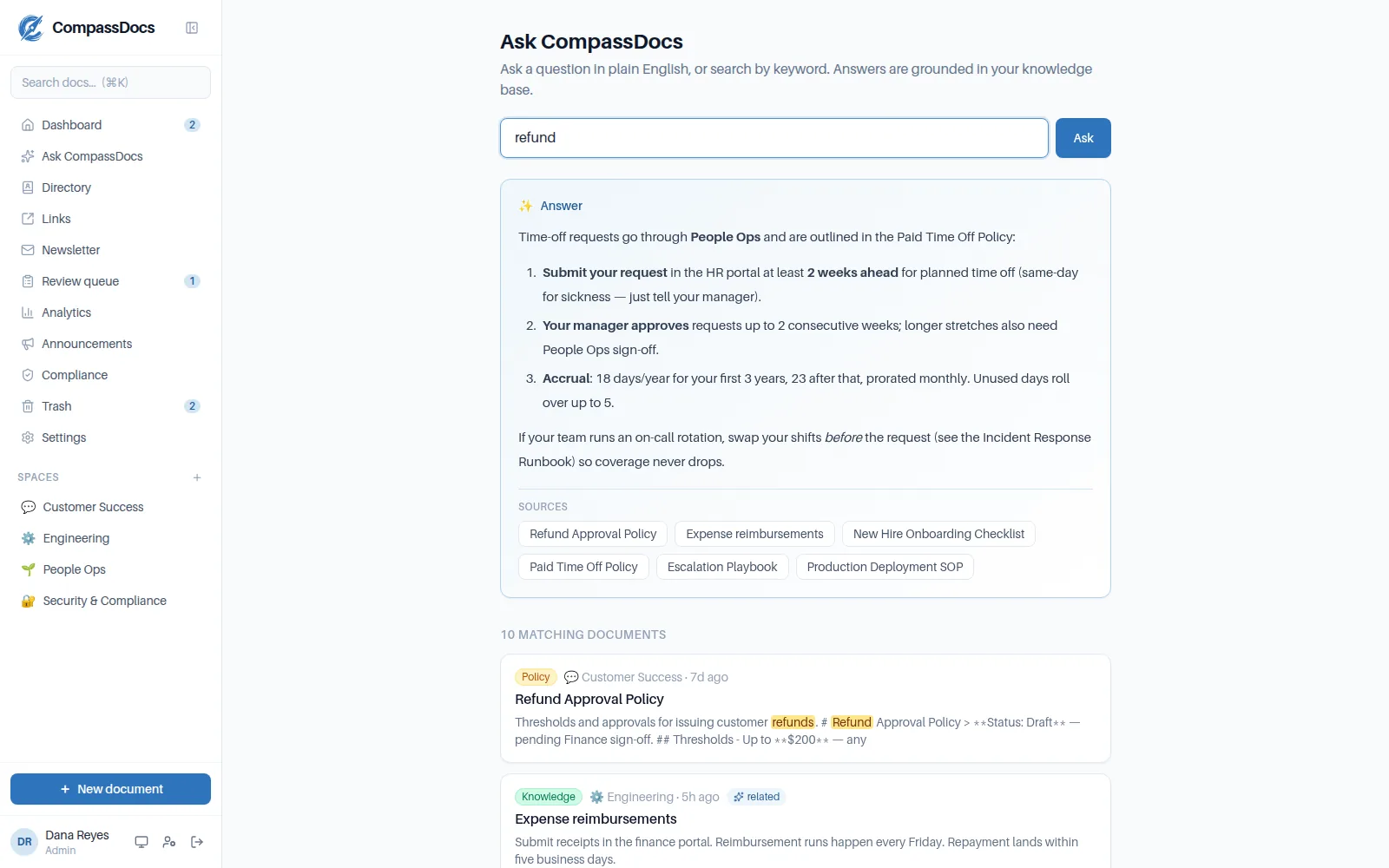
Ask a plain-English question and get an answer from your own handbook policies, with the sources listed underneath.
Why the PDF handbook stops working
Most handbooks start as a document someone writes once. Keeping it current, findable and signed off is the hard part.
× Three versions of the handbook are in circulation, and nobody is sure which one is current.
× A policy changes in March, and the handbook isn’t reissued until next year.
× New starters sign a form saying they read it, and nobody can tell which edition.
× The answer is on page 47, so people ask HR instead.
× Internal HR procedures sit in the same file as the bits everyone should read.
→ One handbook built from live, approved policies, searchable on day one and confirmed against the exact version.
How an employee handbook works in CompassDocs
Writing, approving, gathering and printing the handbook are in the free Community edition. Asking people to confirm it is part of Enterprise.
Each policy is its own document
Leave, conduct, expenses, IT use: each policy lives in a space with an owner, a type, tags and its own version history.
Documents & spaces →Approved before it changes
Turn on strict mode and edits to a published policy become change requests an approver reviews, each with a “what changed and why” note.
Roles & approvals →One numbered handbook
Gather published policies and SOPs from any space into sections with an introduction. Readers get contents down the side and a facts row with owner, version and next review.
Policy handbooks →A printed copy to sign
Print a cover, a contents page and each policy on a new page, with an acknowledgement page at the end. A4 or Letter, and every print is audited.
Printing handbooks →Every version kept
Every save is a version. Compare any two side by side with word-level highlights, so “which version did I agree to?” always has an answer.
Version history →Confirm the whole handbook
Enterprise: one statement confirms every policy still waiting, each against its current version, with due dates, reminders and an optional typed signature.
Read confirmations →Answers instead of page 47
- Ask “how many days of leave do I get?” and get an answer written from your own policies, with each source cited and linked
- AI answers are optional: they use your own Anthropic API key, and keyword search works without one
- Answers only draw on documents the person asking is allowed to see
- Press ⌘K (Ctrl K on Windows and Linux) to search documents, people and spaces from any page
- Keep a policy “handbook only” so readers find it inside the handbook rather than in general search
- Analytics show searches that found nothing, so you know which policy to write next
Who’s who, built in
A people directory with titles, departments, an org chart and new starters, so the handbook’s “who to call” section stays true. Enterprise syncs it from Microsoft 365 or Google Workspace.
Nothing quietly goes stale
Give each policy a review cadence and it shows an overdue notice on the page and a queue for editors when its review is due.
Which edition does your handbook need?
Most teams start free and add Enterprise when they need tracked sign-off.
| Need | Community (free) | Enterprise |
|---|---|---|
| Write, approve and version policies | Included | Included |
| Build, read and print the handbook | Included, with an acknowledgement page to sign | Included |
| Know who has read it | Paper sign-off on the printed copy | Read confirmations with due dates, reminders, typed signatures and a compliance portal |
| New-starter onboarding | Guides and checklists | Onboarding programs that assign training decks to every new account |
| Sign-in | Accounts with two-factor auth | Single sign-on (SAML 2.0, OIDC) and SCIM |
| Price | $0, unlimited users | $499.99 a year per install, unlimited users |
Prices in USD. 30-day money-back guarantee on your first Enterprise purchase.
Publishing your handbook
Start with the free Community edition, then add Enterprise when you want people to confirm it.
Run one command
The installer starts CompassDocs and PostgreSQL with Docker, and a setup wizard creates your admin account in the browser.
Bring your policies
Import them as front-matter Markdown, write them in the editor, or start from the free employee handbook template.
Build the handbook
Add sections and an introduction, pick the published policies, choose who reads it, and publish.
Ask people to confirm
With Enterprise, require confirmation, set due dates with a grace period for new joiners, and let reminders do the chasing.
$ curl -fsSL https://raw.githubusercontent.com/Felix-AZ-Solutions-LLC/CompassDocs/main/install.sh | bash
  ✓ Fetched docker-compose.yml
  ✓ Generated .env with fresh secrets
  ▲ CompassDocs running at http://localhost:3000
  → open the URL to create your admin account
Requirements, platforms and the Node.js install path are on the self-hosting page →
Set up faster with Claude
CompassDocs is built for MCP, so Claude can do the first draft of your rollout while your team reviews and publishes. When you start, we walk you through it.
Bring your content in
Paste or attach the procedures and policies you already have, and Claude redrafts each one in your templates, screenshots included.
Draft the handbook and training
Claude assembles a draft handbook from your policies and, with Enterprise, turns procedures into training decks with quiz questions.
Configure the helpdesk as drafts
Request types, forms, workflows, macros and recurring tickets are drafted for an admin to review and publish. Nothing goes live on its own.
See everything Claude can do through MCP and the step-by-step rollout.
Frequently asked
How is this better than a PDF or shared-drive handbook?
Each policy is a live, approved document with its own version history, and the handbook always shows the published version. People can search it or ask a question in plain English, you can print it with an acknowledgement page, and with Enterprise you can see who confirmed which version.
Do handbooks need Enterprise?
No. Building, publishing, reading and printing handbooks is in every edition. Asking people to confirm each policy or the whole handbook, with typed signatures and progress tracking, is part of Enterprise read confirmations.
Does a handbook copy the policies?
No. It points at the published documents. Publish a new version of a policy and the handbook shows it; take a document out, or unpublish the handbook, and the access the handbook gave ends.
What happens when we change a policy people already confirmed?
With Enterprise read confirmations, CompassDocs suggests whether a change is editorial or material and you choose. Only a material change or a deliberate re-ask asks people again, and readers see what changed since the version they confirmed.
Can HR keep some documents private?
Yes. Put internal HR procedures in a private space limited to chosen people or groups; search and AI answers respect that boundary. Readers of a published handbook can read every document in it, so keep private material out of the handbook.
Related: For HR teams · HR helpdesk · Policy handbooks · Read confirmations · Employee handbook template · Policy management
A handbook people can find, read and confirm
One Docker command installs CompassDocs with unlimited users, and handbooks are included free. Enterprise adds read confirmations, training and SSO for $499.99/year.
Self-host it free See pricingBuying for a team? Get a formal quote to print for approval, or order by invoice with your PO number.