 CompassDocs
An HR knowledge base for the handbook, policies, onboarding and who’s who
HR owns the documents everyone eventually needs, and answers the same questions about them every week. CompassDocs gives HR one self-hosted place for the employee handbook, policies, onboarding guides and a people directory, so staff find answers themselves and HR can see who has read what.
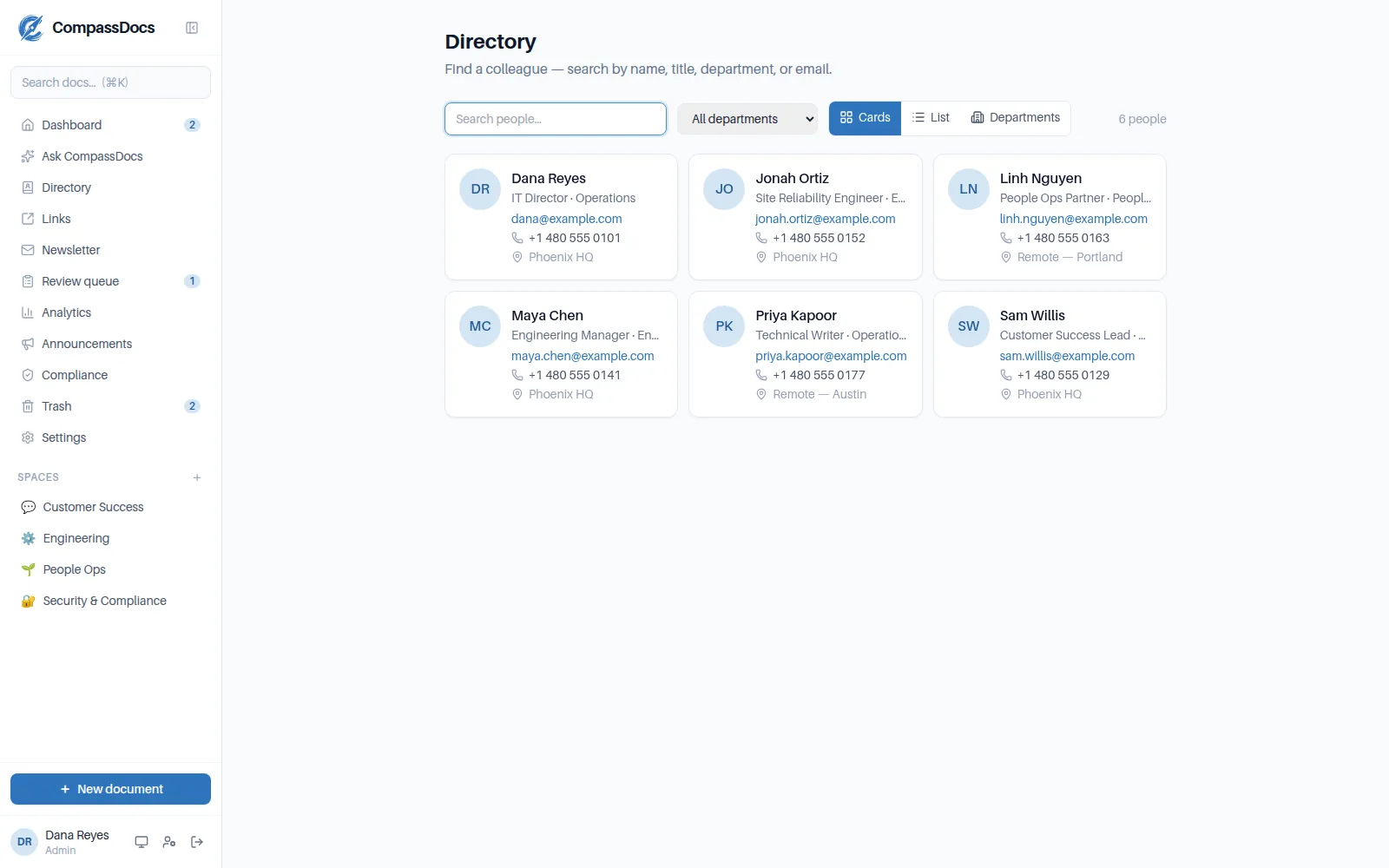
The people directory: who’s who by title, department and office, with new starters and work anniversaries at the top.
HR knowledge is spread too thin
The handbook is in one place, the org chart in another and onboarding lives in someone’s inbox.
× Policies sit in a shared drive, and staff email HR rather than look.
× Onboarding is a checklist one person keeps, and it changes every time they do it.
× The org chart is a slide that was right last quarter.
× Nobody can say which policies a new joiner has actually read.
× Sensitive HR procedures are either visible to everyone or impossible to find.
→ One HR knowledge base with the handbook, policies, onboarding and directory together, on servers you control.
Everything HR publishes, in one place
The knowledge base, handbooks and directory are free in Community. Read confirmations, training and the helpdesk are part of Enterprise.
The employee handbook
Gather published policies into one numbered handbook people read as one and print with an acknowledgement page.
Employee handbook →Policies staff confirm
Enterprise: ask people to confirm each policy against the exact version, with due dates, reminders, escalation and a compliance portal.
Read confirmations →Onboarding that runs itself
Enterprise: turn guides into training decks and bundle them into an onboarding program every new account gets automatically.
Training & onboarding →A people directory
Cards, a sortable list or an org chart, with your own fields and a branded PDF export. Enterprise syncs it from Microsoft 365 or Google Workspace.
People directory →Announcements and a newsletter
Post an announcement to every dashboard, or send a branded newsletter that an approver reviews before it goes.
Announcements →Ask HR requests
Enterprise: what the documents don’t answer becomes a tracked Ask HR request in HR’s own queue.
HR helpdesk →New starters, handled from day one
- New accounts, whether created locally, by single sign-on or by SCIM, join the policy audiences and onboarding programs that cover them (Enterprise)
- An onboarding program sends one notification, not one per deck, and the due clock starts on day one
- Every dashboard shows what is waiting on that person, their open training, and tiles for new starters and anniversaries
- The directory shows who started this month, so the team can say hello
- Waive training for existing staff who already did it; the record says waived, not completed
- With the Enterprise helpdesk, one New starter request runs IT, Facilities and HR tasks in parallel
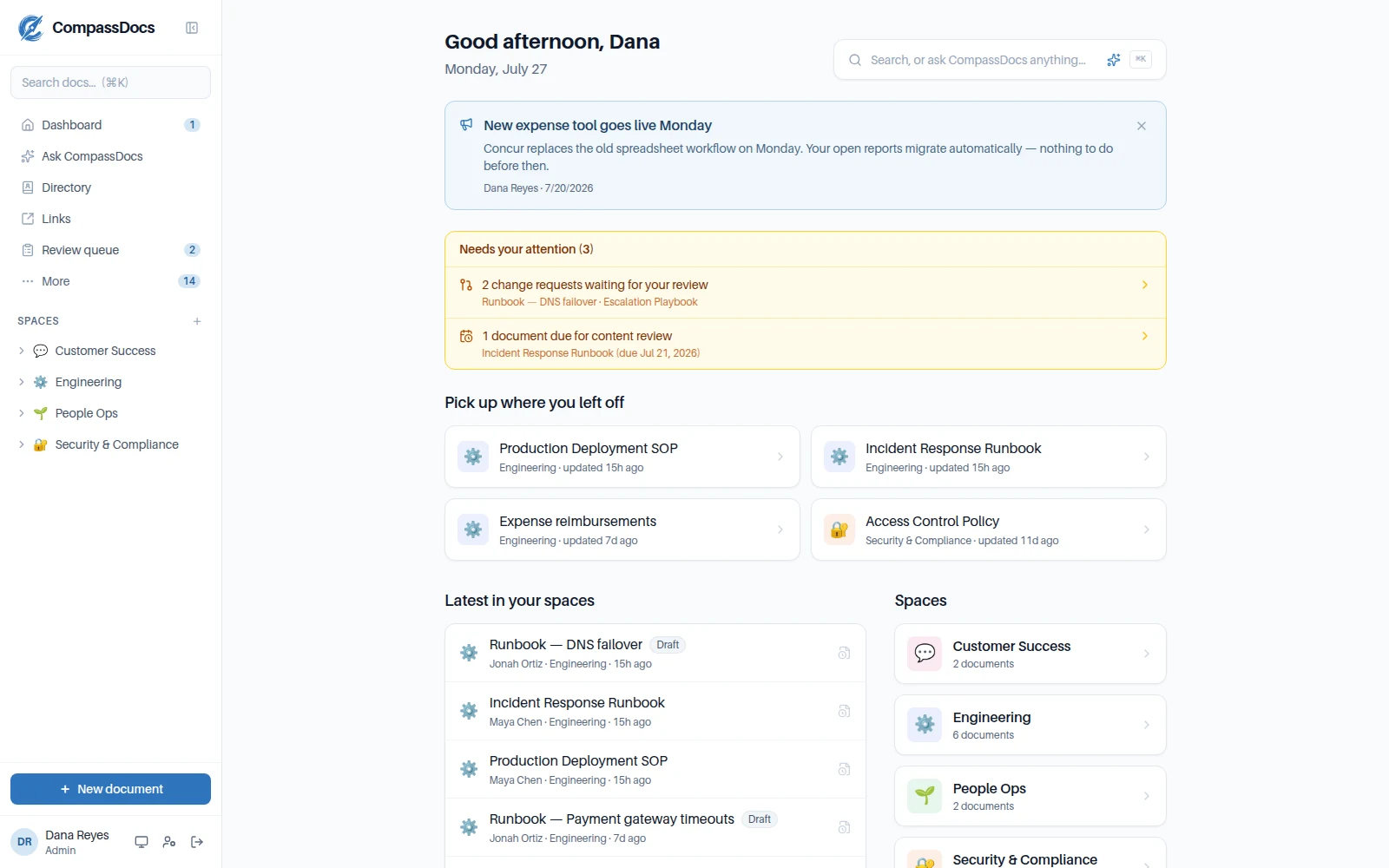
The personal dashboard: what needs your attention, documents to pick up again, and quick links.
Keep HR material where it belongs
HR holds personal and sensitive information. CompassDocs gives you several ways to keep it with the right people.
Private spaces
Restrict a space to chosen people or groups. Search, AI answers and comments respect that boundary.
Admin-only directory fields
Set any directory field to admins only, and it is stripped on the server before it reaches a page, an export or a contact card.
Delegate without admin rights
Hand training or the compliance portal to HR through delegated section access, without making HR workspace admins.
An audit log
Sign-ins, role changes, publishes and approvals are recorded with actor, IP and time.
Every version kept
Show what a policy said on any date, with who changed it and why.
Review reminders
Give each policy a review cadence so owners are reminded before it goes stale.
Setting up HR’s knowledge base
Install the free Community edition, publish your handbook, then add Enterprise for sign-off, training and the helpdesk.
Run one command
The installer starts CompassDocs and PostgreSQL with Docker, and a setup wizard creates your admin account in the browser.
Create an HR space
Import policies as Markdown or write them in the editor, and keep internal procedures in a private space.
Publish the handbook
Gather the published policies into a numbered handbook and choose who reads it.
Add Enterprise when ready
Turn on read confirmations, build onboarding programs, and sync the directory from your identity provider.
$ curl -fsSL https://raw.githubusercontent.com/Felix-AZ-Solutions-LLC/CompassDocs/main/install.sh | bash
  ✓ Fetched docker-compose.yml
  ✓ Generated .env with fresh secrets
  ▲ CompassDocs running at http://localhost:3000
  → open the URL to create your admin account
Requirements, platforms and the Node.js install path are on the self-hosting page →
Set up faster with Claude
CompassDocs is built for MCP, so Claude can do the first draft of your rollout while your team reviews and publishes. When you start, we walk you through it.
Bring your content in
Paste or attach the procedures and policies you already have, and Claude redrafts each one in your templates, screenshots included.
Draft the handbook and training
Claude assembles a draft handbook from your policies and, with Enterprise, turns procedures into training decks with quiz questions.
Configure the helpdesk as drafts
Request types, forms, workflows, macros and recurring tickets are drafted for an admin to review and publish. Nothing goes live on its own.
See everything Claude can do through MCP and the step-by-step rollout.
Frequently asked
Can we track policy acknowledgements?
Yes, with Enterprise read confirmations. Choose who must confirm each policy, set due dates, and let reminders and escalation run on their own. A compliance portal shows who is outstanding, and you can delegate it to HR without making them admins.
Is there a people directory?
Yes, in every edition. Staff find colleagues by name, title or department, in cards, a list or an org chart. Enterprise syncs the directory from Microsoft 365 or Google Workspace on a schedule.
Can new hires ask questions?
Yes. Keyword search works in every edition without any AI key. With your own Anthropic API key, AI answers respond to plain-English questions using only your documents and cite the sources.
Can sensitive HR documents stay restricted?
Yes. Private spaces limit access to chosen people or groups, directory fields can be set to admins only, and self-hosting keeps everything on infrastructure you control.
Do HR staff need to be admins to run training?
No. Admins can hand the training program or the compliance portal to HR through delegated section access, so HR manages decks and sees progress without becoming workspace admins.
Related: Employee handbook · HR helpdesk · Policy management · People directory · Training & onboarding · Onboarding checklist template
HR’s knowledge base, on your own servers
One Docker command installs CompassDocs with unlimited users and documents. Enterprise adds read confirmations, onboarding training, directory sync and the helpdesk for $499.99/year.
Self-host it free See pricingBuying for a team? Get a formal quote to print for approval, or order by invoice with your PO number.