 CompassDocs
Free onboarding checklist template
An employee onboarding checklist template that covers the whole first quarter, not just the first day: before day one, day one, week one, the first 30 days, days 31 to 60 and 61 to 90, with an owner on every item. Read it below, then download the onboarding checklist as Markdown.
What this onboarding checklist template is for
Onboarding is a cross-team project with a fixed deadline: HR, IT, Facilities, the manager and a buddy each own part of it, and the new hire notices every part that slips. A checklist turns that into a list of named tasks with owners, so nothing depends on someone remembering.
This free onboarding checklist template is organized by time, because that’s how onboarding fails: the laptop isn’t ready on day one, the training isn’t assigned in week one, the 30-day check-in never happens. Every item names an owner in brackets. Copy the checklist for each new hire, delete what doesn’t apply, and add role-specific items in section 7.
When to use an onboarding checklist
- Every new hire, including contractors and internal transfers, with the sections that apply.
- When onboarding is spread across teams, so each team can see its tasks and the manager can see the whole picture.
- When you need a record that required training and policy reading happened, for example for audits or customer security reviews.
- When you are fixing onboarding. Use the feedback items at 30 and 90 days to find out which steps actually helped.
Day one usually includes reading the handbook; if you don’t have one yet, start with the employee handbook template.
The full onboarding checklist template
Everything in [square brackets] is a placeholder. Owners are shown in brackets after each item.
Front matter: title: "Onboarding checklist: [New hire name], [Role]" · tags: [onboarding, checklist, hr]
Onboarding checklist: [New hire name]
Copy this checklist for each new hire. Each item has an owner in brackets. Remove items that don’t apply and add role-specific ones in section 7.
| Field | Value |
|---|---|
| New hire | [Name] |
| Role and team | [Role, team] |
| Start date | [YYYY-MM-DD] |
| Location | [Office / remote, time zone] |
| Manager | [Name] |
| Onboarding buddy | [Name] |
| HR contact | [Name] |
1. Before day one
- ☐ Offer signed and start date confirmed (HR)
- ☐ Employment paperwork and right-to-work checks started (HR)
- ☐ Payroll and benefits enrollment set up (HR)
- ☐ Laptop, phone and accessories ordered and prepared (IT)
- ☐ Accounts created: email, chat, knowledge base, core systems (IT)
- ☐ Access to team spaces, drives and tools requested (Manager, IT)
- ☐ Desk, badge or building access arranged, or home-office equipment shipped (Facilities)
- ☐ Buddy chosen and briefed (Manager)
- ☐ First-week schedule shared with the new hire (Manager)
- ☐ Welcome message sent with start time, location and who to ask for (Manager)
2. Day one
- ☐ Welcome and introductions to the team (Manager)
- ☐ Laptop handed over, sign-in and multi-factor authentication working (IT)
- ☐ Tour of the office or of the tools you use to work remotely (Buddy)
- ☐ Read the employee handbook and required policies (New hire)
- ☐ Health, safety and emergency information covered (Facilities)
- ☐ Lunch or a video coffee with the buddy (Buddy)
- ☐ End-of-day check-in: questions and anything missing (Manager)
3. First week
- ☐ Role expectations and what success looks like at 30, 60 and 90 days discussed (Manager)
- ☐ Meetings with key colleagues and stakeholders booked (Manager)
- ☐ Required training assigned: security awareness, data protection, role-specific (HR)
- ☐ Knowledge base tour: where SOPs, runbooks and policies live (Buddy)
- ☐ How to ask for help: IT, HR and Facilities requests (Buddy)
- ☐ First small, real task completed (New hire)
4. First 30 days
- ☐ Required training completed (New hire)
- ☐ Policies confirmed where your organization requires it (New hire)
- ☐ 30-day check-in held and notes recorded (Manager)
- ☐ Access reviewed: anything missing or not needed (Manager, IT)
- ☐ Feedback on onboarding collected (HR)
5. Days 31 to 60
- ☐ Owns a recurring piece of work (New hire)
- ☐ 60-day check-in: progress against goals (Manager)
- ☐ Gaps in documentation the new hire found are written up (New hire)
6. Days 61 to 90
- ☐ 90-day review completed (Manager)
- ☐ End of probation or introductory period confirmed, if applicable (HR)
- ☐ Development goals for the next six months agreed (Manager, New hire)
- ☐ Onboarding feedback survey completed (New hire)
7. Role-specific items
- ☐ [Item] ([Owner])
- ☐ [Item] ([Owner])
- ☐ [Item] ([Owner])
8. Sign-off
| Stage | Signed off by | Date |
|---|---|---|
| Before day one complete | [Manager] | [YYYY-MM-DD] |
| First 30 days complete | [Manager] | [YYYY-MM-DD] |
| 90-day review complete | [Manager, HR] | [YYYY-MM-DD] |
Tips for filling in the onboarding checklist
- Start a week or two before day one. Hardware, accounts and building access are the items most likely to be late, and they are all in “Before day one”.
- One owner per item. “HR and IT” often means nobody. Where two teams are involved, name the one who confirms it is done.
- Make access requests explicit. List the systems and spaces the role needs, so IT isn’t guessing and the new hire isn’t asking for access one tool at a time.
- Give the buddy real tasks. The buddy explains the unwritten rules: where things are documented, how to ask for help, who to talk to.
- Put the check-ins in the calendar on day one. The 30, 60 and 90-day conversations are the items most often skipped.
- Collect feedback and act on it. Each new hire is a fresh pair of eyes on your documentation. Ask them to write up the gaps they found.
Run onboarding from the same place as the docs
CompassDocs keeps the checklist, the handbook and the policies new hires read in one knowledge base. Import the checklist as front-matter Markdown; the editor’s interactive checklists work for ticking items off.
- Import it as front-matter Markdown into your HR space, or make it a template of your own
- Interactive checklists in the editor for each new hire’s copy
- With Enterprise training, onboarding programs assign decks to every new account automatically, with due dates and reminders
- With Enterprise read confirmations, new joiners get a due date to confirm the policies that cover them
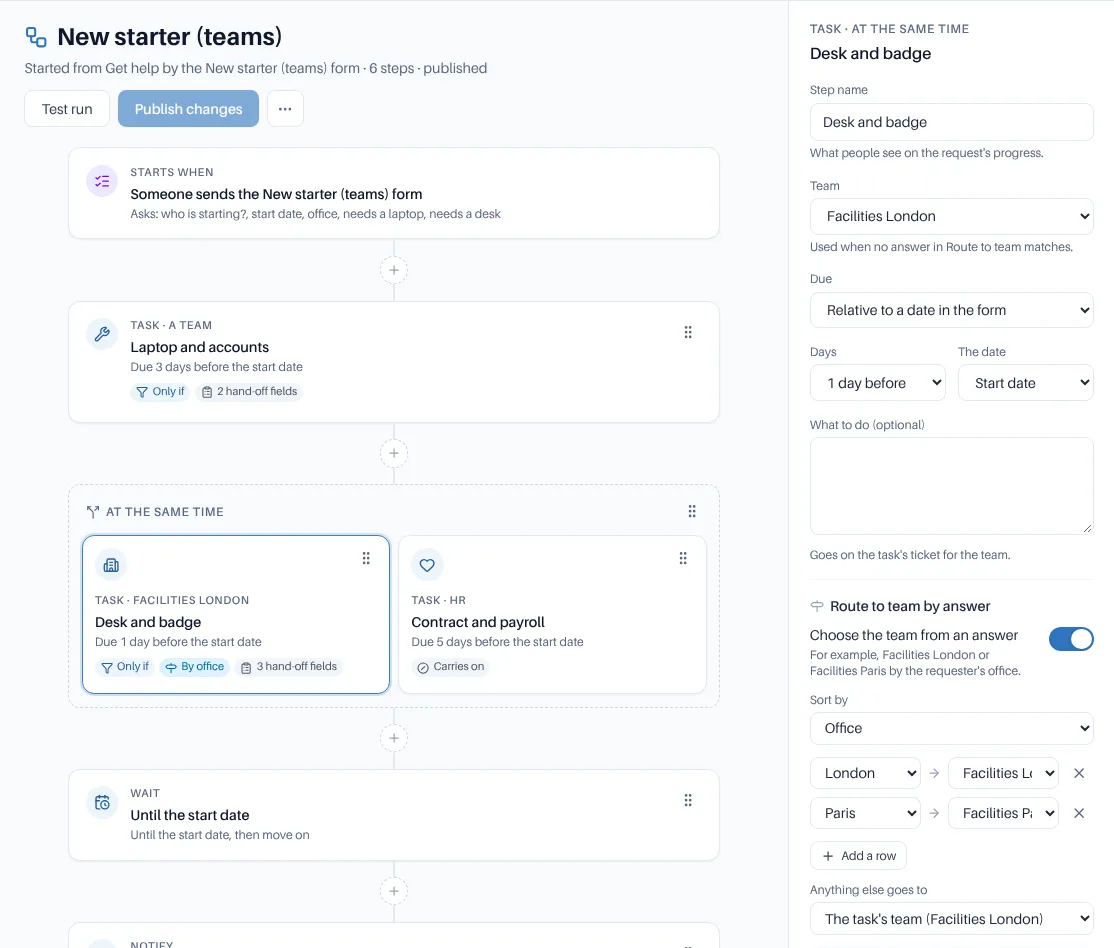
- With the Enterprise helpdesk, a New starter request can start a workflow with tasks for IT, Facilities and HR in parallel and a wait until the start date
Frequently asked
What should an onboarding checklist include?
Tasks for before day one (paperwork, equipment, accounts, access), day one (welcome, sign-in, handbook, safety), week one (expectations, meetings, training), and check-ins at 30, 60 and 90 days, each with an owner. This template includes all of these.
How long should onboarding last?
Most teams plan the first 90 days, with formal check-ins at 30, 60 and 90. Day one matters, but people decide whether a job is working out over weeks, not hours.
Who owns onboarding?
The hiring manager usually owns the overall experience, with HR, IT and Facilities owning their parts and a buddy helping day to day. The checklist names an owner for each item so the responsibilities are clear.
Can new hires see their own checklist?
That’s up to you. Many teams share the checklist with the new hire so they know what to expect and can tick off their own items.
Can onboarding be automated in CompassDocs?
Parts of it, with Enterprise. Onboarding programs assign training decks to every new account automatically, read confirmations give new joiners a due date for required policies, and helpdesk workflows can send a New starter request to IT, Facilities and HR at the same time.
Related: Training & onboarding · For HR teams · Workflows & approvals · Employee handbook template · HR helpdesk
Onboarding that doesn’t depend on memory
Self-host the open-source knowledge base free. Enterprise adds training, read confirmations and the helpdesk with workflows (3 agents included) from $499.99/year with unlimited users.
Self-host free See pricingBuying for a team? Get a quote · More free templates