 CompassDocs
Self-hosted IT helpdesk software, next to the docs your team already reads
CompassDocs gives your IT team a ticketing system that runs on your own servers. Colleagues ask in Get help and see your guides before they send anything; agents work tickets in a live desk with workflows, reply targets, device details and reports. The knowledge base is free and open source, and the helpdesk is part of Enterprise with 3 agents included.
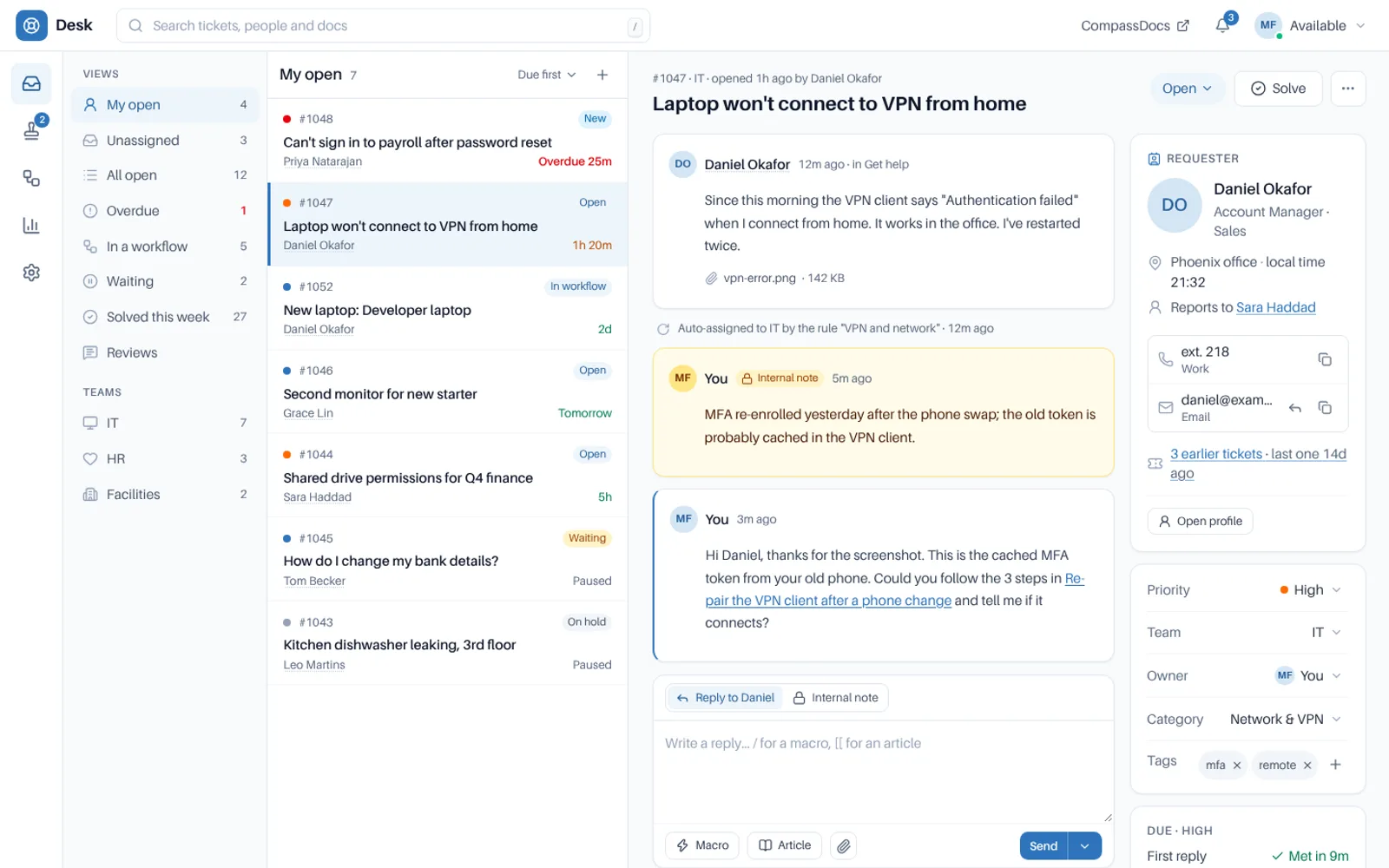
The desk: team queues on the left, the ticket beside the list, and the reply-target clock on every ticket.
Why IT teams outgrow a shared inbox
Most internal IT teams start with an email address and good intentions. It works until it doesn’t, and the problems are always the same ones.
× Requests arrive by email, chat and in the corridor, and nobody can say how many are open.
× The fix was written down in a guide all along, but nobody found it before raising a ticket.
× Every hardware ticket starts with “which laptop?” and a serial number hunt.
× When the VPN goes down, forty people raise forty tickets, and someone answers each one.
× The clock on a ticket keeps running over the weekend and through the holiday shutdown.
→ One IT ticketing system for every channel, sitting on top of your own knowledge base.
How CompassDocs works as an IT ticketing system
Every part of the helpdesk has its own page. These are the ones IT teams use most.
Get help, docs first
Colleagues search your guides before they ask, then pick a request type with a short form. Every request gets a step-by-step tracker.
Get help & portal →A desk agents can live in
Live queues, the ticket beside the list, keyboard shortcuts, collision warnings and a pop-out reply. It installs as an app with push notifications.
The desk →Email and Microsoft 365
Help addresses become tickets, and Microsoft 365 mailboxes are read directly through Microsoft Graph. Replies go out from the address the ticket came in on.
Email →Teams and Slack
People raise and follow requests by messaging the CompassDocs app, and approvers decide from a card in the chat.
Teams & Slack →Reply targets and assignment
Office hours and holidays per team, targets counted in business time, round robin or load-balanced assignment, skills, languages and on-call rotas.
SLAs & assignment →Assets on every ticket
Connect Snipe-IT, Microsoft Intune or both: the requester’s devices, warranty, compliance and earlier tickets show right on the ticket.
Assets →Major incidents
Gather the duplicates under one ticket, post one update to everyone affected, and show a banner in Get help with a Me too button.
Major incidents →Automations and macros
Rules sort tickets as they arrive, macros apply a reply and field changes in one click, and recurring tickets open themselves on schedule.
Automations & macros →Reports and export
Six built-in dashboards and your own, over 30 measures in business hours, and CSV export of any list.
Reports & export →Your runbooks and your tickets, in one product
An IT helpdesk is only as good as what agents and requesters can find. In CompassDocs the knowledge base isn’t a separate tool bolted on: it’s the product the helpdesk was added to.
- Get help suggests articles from your own documents, within each person’s space access, before a request is written
- Agents insert articles into replies from the desk, next to macros and canned responses
- Runbooks with Mermaid diagrams, checklists and version history live in the same place as the tickets they solve (see IT runbooks)
- Claude in the desk can read the ticket, search solved tickets and articles, and draft a reply; a person always sends it
- Monitoring tools such as Prometheus Alertmanager, Grafana and Datadog open and solve their own tickets through alert sources
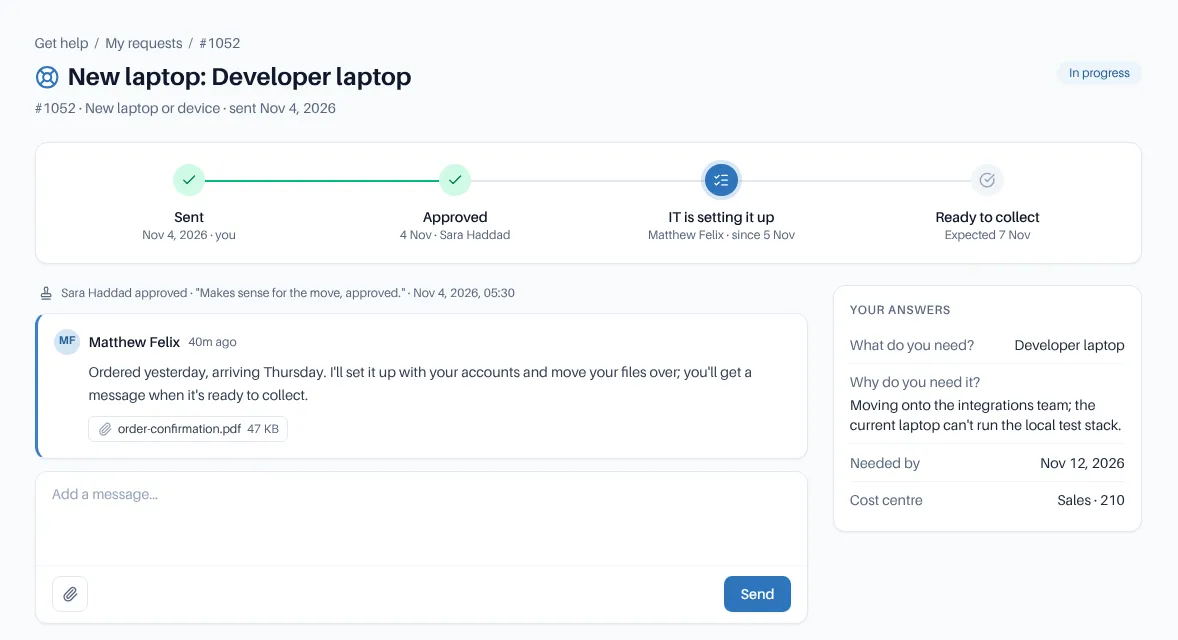
What the requester sees: a tracker, the approver’s note and the agent’s reply.
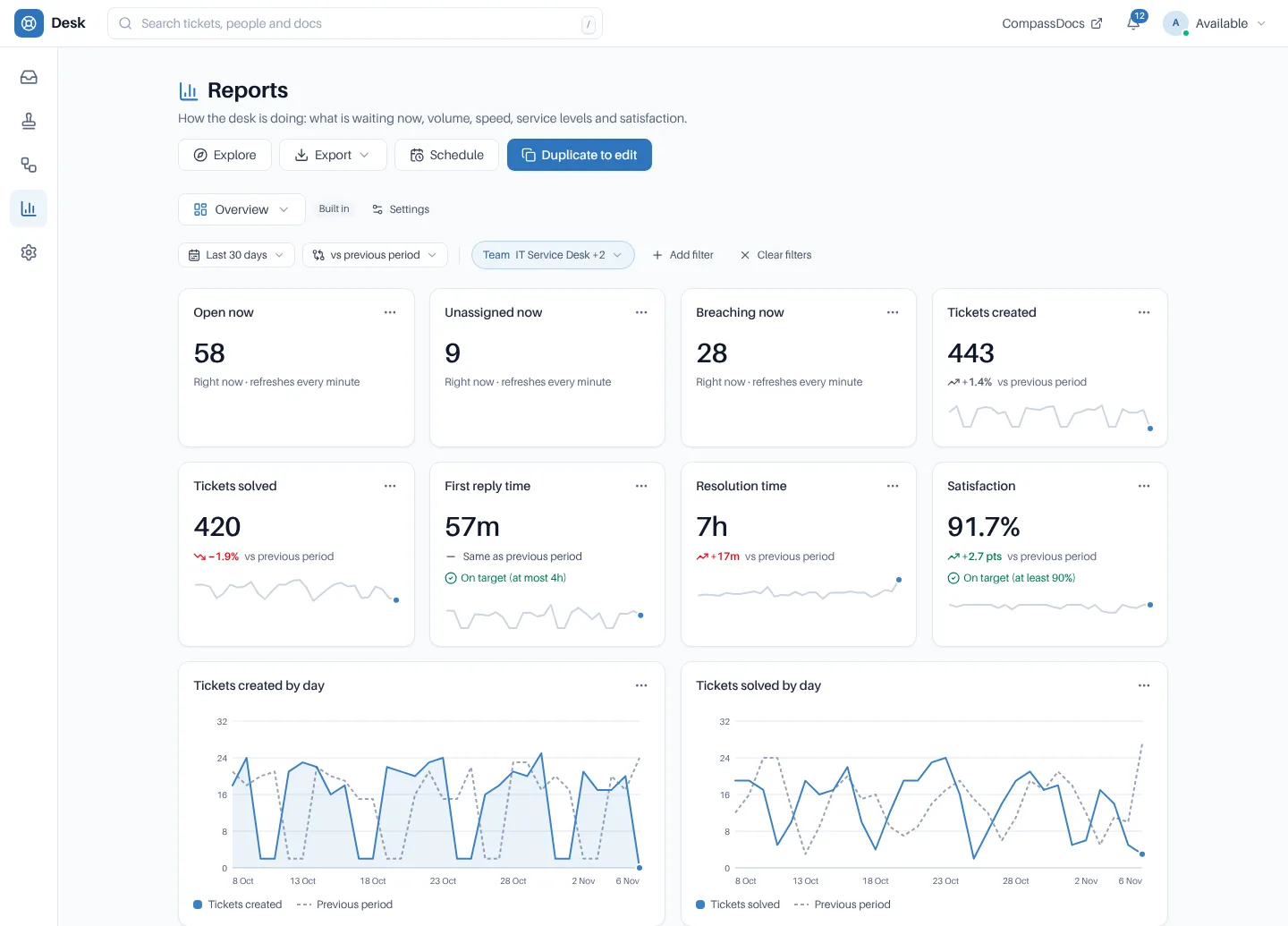
The Overview dashboard, compared with the previous period.
Self-hosted, with the controls your security team will ask about
The helpdesk runs inside your own CompassDocs install, so tickets, attachments and articles stay in a PostgreSQL database you control and back up.
- Single sign-on with SAML 2.0 or OIDC, and SCIM for joiners and leavers (Enterprise)
- An optional Duo approval after sign-in, or only when someone opens the desk
- Five desk roles from Newbie to Admin, scoped to teams, with reply review for new agents
- Every helpdesk change in the audit log, plus retention, legal hold and a 30-day recycle bin
- An offline, signed license key validated on your server, with no license server to call
From install to first ticket
Start with the free knowledge base, then add an Enterprise license (or a trial license) to turn the helpdesk on.
Run one command
The installer starts CompassDocs and PostgreSQL with Docker, and a setup wizard creates your admin account in the browser.
Add your guides
Import IT guides and runbooks as front-matter Markdown into spaces, or write them in the editor.
Load the starter set
The desk’s five-step setup covers teams, hours and reply targets, email, a request form and satisfaction. A one-click starter set adds IT, HR and Facilities teams, six request types with workflows, three macros and an example rule.
Connect mail and history
Forward help addresses or connect Microsoft 365 mailboxes, then import ticket history from Zoho Desk or CSV, with a dry run first.
$ curl -fsSL https://raw.githubusercontent.com/Felix-AZ-Solutions-LLC/CompassDocs/main/install.sh | bash
  ✓ Fetched docker-compose.yml
  ✓ Generated .env with fresh secrets
  ▲ CompassDocs running at http://localhost:3000
  → open the URL to create your admin account
Requirements, platforms and the Node.js install path are on the self-hosting page →
Set up faster with Claude
CompassDocs is built for MCP, so Claude can do the first draft of your rollout while your team reviews and publishes. When you start, we walk you through it.
Bring your content in
Paste or attach the procedures and policies you already have, and Claude redrafts each one in your templates, screenshots included.
Draft the handbook and training
Claude assembles a draft handbook from your policies and, with Enterprise, turns procedures into training decks with quiz questions.
Configure the helpdesk as drafts
Request types, forms, workflows, macros and recurring tickets are drafted for an admin to review and publish. Nothing goes live on its own.
See everything Claude can do through MCP and the step-by-step rollout.
Frequently asked
Is CompassDocs a full IT ticketing system?
Yes, for internal IT. Requests arrive from Get help, email (including Microsoft 365 mailboxes), Teams, Slack, a customer portal and monitoring alerts, and become tickets in the desk with categories, custom fields, reply targets, assignment rules, workflows, approvals and reports. It is built for teams answering colleagues.
How much does the IT helpdesk cost?
The knowledge base (Community) is free and open source. The helpdesk is part of Enterprise: $499.99 a year per install with unlimited users and 3 agents included; each extra agent is $125 a year. Anyone can ask for help in Get help; only the people on the desk’s Agents list count as agents.
Does it need to call home?
No. The Enterprise license is an offline, signed key that your server checks locally, so there is no license server to reach. AI answers and Claude in the desk are optional: they use your workspace’s own Anthropic API key and stay off until an admin turns them on.
Can we bring our existing tickets?
Ticket history can be imported from Zoho Desk or a CSV file, with departments, statuses, priorities and agents mapped and a dry run that counts what will happen before anything is written. Articles come in as front-matter Markdown.
Do requesters need a separate account?
No. Colleagues sign in with the account they already use for CompassDocs, including single sign-on. Every built-in role includes the Get help permission.
Related: Helpdesk overview · Workflows & approvals · IT runbooks · Freshservice alternative · Internal helpdesk vs service desk · Pricing
An IT helpdesk on your own servers
Self-host the open-source knowledge base with one Docker command. An Enterprise license adds the helpdesk, SSO and Microsoft 365 sync for $499.99/year with unlimited users and 3 agents included.
Self-host it free Get a quoteWant to try the helpdesk with your own teams first? Request a trial license · See pricing