 CompassDocs
Key takeaways
- A helpdesk fixes problems: it is a reactive, ticket-based point of contact for people who need help.
- A service desk is broader: the single point of contact for incidents and service requests, with a catalog, SLAs and communication.
- ITSM (IT service management) is the whole discipline of designing, delivering and improving IT services; the service desk is one part of it.
- An internal helpdesk serves employees rather than customers, and the same approach now spreads to HR, Facilities and other teams.
- Most organizations need less process than they think at first, and a good knowledge base next to the desk matters at every level.
What is a helpdesk?
A helpdesk is a point of contact where people get help with problems. Someone has an issue (a laptop won’t connect, a password is locked, a printer jams), they raise a ticket by email, form or chat, and an agent works it until it is solved. The emphasis is on break/fix: reacting to issues quickly and well.
An internal helpdesk serves employees rather than customers. The requesters are colleagues who share your directory, your sign-in and often your knowledge base, which changes the tooling: there are no customer accounts to manage, and requests often need approvals from managers or tasks for other internal teams.
Typical helpdesk capabilities: a ticket queue, assignment, statuses and priorities, email intake, canned replies, a simple knowledge base and basic reporting.
What is a service desk?
A service desk is the single point of contact between a service provider (often IT) and its users, covering more than fixing problems. The term comes from ITIL, the most widely used framework for IT service management. A service desk typically handles:
- Incidents: something is broken or degraded and needs restoring.
- Service requests: someone needs something standard, like a new laptop, access to an application or a new starter set up.
- Communication: telling people about outages and changes, and keeping requesters informed.
To do that, a service desk usually adds a service catalog (request types with forms), workflows and approvals that route requests across teams, SLAs or response targets measured against business hours, links to assets, and reporting on performance. A helpdesk can grow into a service desk gradually; the line between them is about scope, not a single feature.
What is ITSM?
IT service management (ITSM) is the whole discipline of designing, delivering, managing and improving the IT services an organization relies on. The service desk is the visible front of ITSM, but ITSM also covers practices that happen behind it, commonly including:
- Incident management: restoring service as quickly as possible.
- Problem management: finding and removing the underlying causes of incidents.
- Change management (or change enablement): assessing, approving and scheduling changes to reduce risk.
- Asset and configuration management: knowing what you have and how it is connected.
- Service level management: agreeing and tracking targets with the business.
- Knowledge management: capturing and sharing what the team knows.
Frameworks such as ITIL describe these practices. Full ITSM platforms implement many of them as connected modules and are usually aimed at larger IT organizations.
Helpdesk vs service desk vs ITSM at a glance
| Compared | Helpdesk | Service desk | ITSM |
|---|---|---|---|
| What it is | A point of contact for fixing problems | The single point of contact for incidents, requests and communication | The discipline of managing IT services end to end |
| Focus | Reactive break/fix | Incidents plus standard service requests | Strategy, design, delivery and improvement of services |
| Typical features | Tickets, queues, email, canned replies | Request catalog, workflows and approvals, SLAs, assets, reports | Service desk plus problem, change and configuration management |
| Who uses it | Small IT or support teams | IT teams of any size, and increasingly HR and Facilities | Larger IT organizations with formal processes |
| Effort to run | Low | Moderate | High |
Think of them as nested: a helpdesk is part of what a service desk does, and a service desk is part of ITSM.
Internal support beyond IT
The service desk approach works for any team that takes requests from colleagues. HR answers questions about leave and payroll, Facilities handles repairs and room setups, Finance handles expense queries. Applying service desk practices across these teams is sometimes called enterprise service management. The benefit for employees is one place to ask for anything, instead of guessing which inbox to email.
For internal support, a strong knowledge base next to the desk matters as much as the ticketing. When people can search clear guides before they raise a ticket, simple questions get answered without an agent, and agents can link the same guides in their replies. See HR helpdesk and facilities requests for examples.
Which one do you need?
A helpdesk is probably enough if you are a small IT or support team, most requests are problems rather than standard requests, and nobody is asking you for SLA reports or approvals.
You probably need a service desk if requests cross teams (a new starter needs IT, HR and Facilities), you need manager approvals, you are asked to report on response times, or several teams beyond IT want to take requests in the same way.
You probably need a full ITSM platform if you run formal change advisory processes, problem management and a configuration management database as connected modules, often because of regulation, scale or outsourcing contracts.
A common mistake is buying for the third category when you live in the first two. Heavy process slows small teams down and the unused modules still cost money. Start with what you will actually run, and grow the process when the need is real.
Where CompassDocs fits
CompassDocs is a knowledge base first, with an internal helpdesk in the Enterprise edition. In the terms of this guide, it sits between a helpdesk and a service desk, built for internal teams:
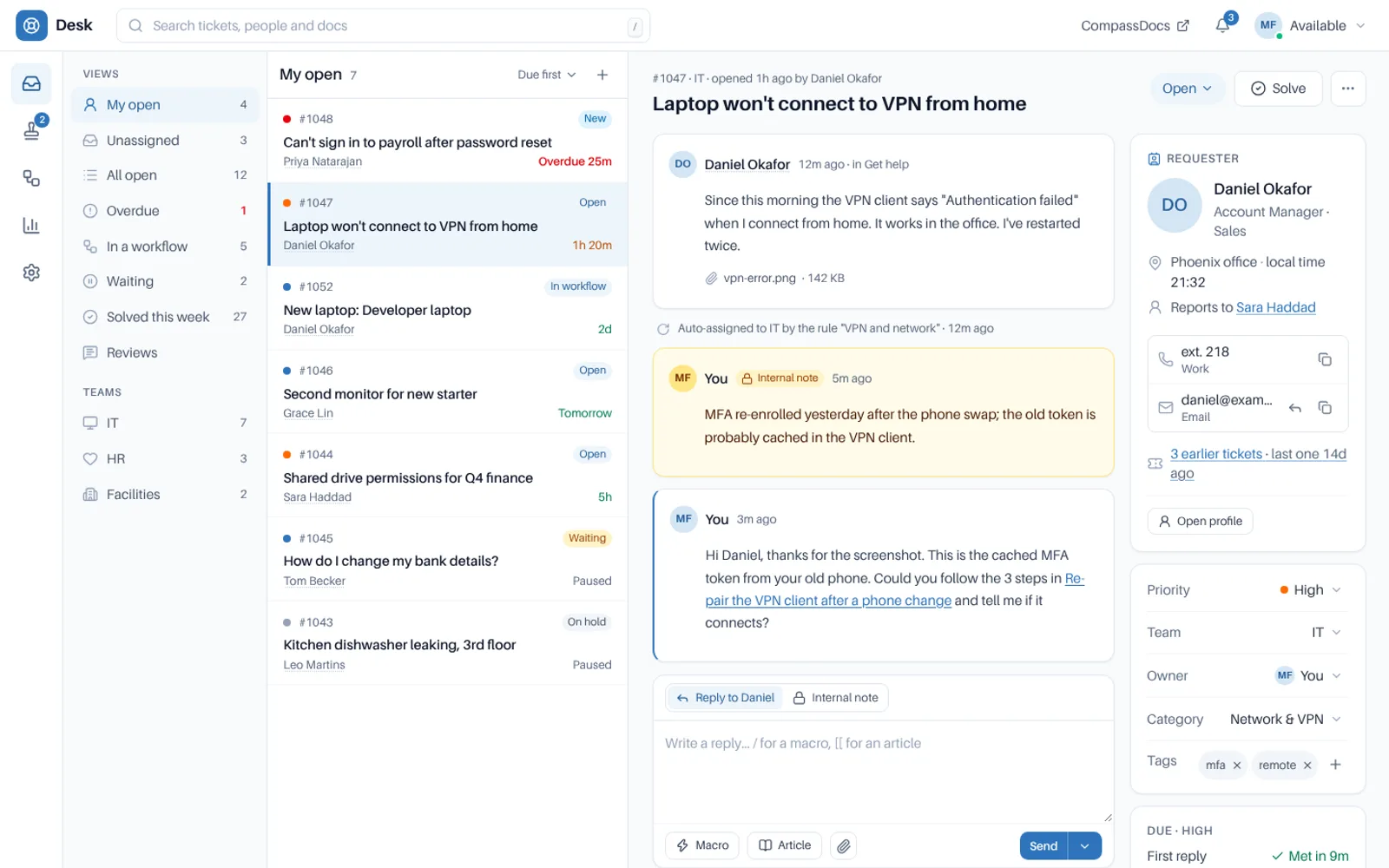
- Get help, where colleagues search your guides before they send a request, with the same sign-in they use for your docs
- The desk, a full-screen workspace with live queues for IT, HR, Facilities and other teams
- Request types and forms, workflows and approvals across teams, SLAs with business calendars and assets from Snipe-IT and Microsoft Intune
- Major incidents that gather duplicate tickets under one, with one update to everyone affected
- Email (including Microsoft 365 mailboxes), Teams and Slack, automations, macros and reports
It isn’t a full ITIL suite, so if you run formal change and problem management as built-in modules, compare those needs carefully. The helpdesk is part of Enterprise: $499.99 a year per install with unlimited users and 3 agents included; each extra agent is $125 a year. Read more about the CompassDocs helpdesk, IT helpdesk software, or how it compares with ServiceNow and Jira Service Management. To put the costs in front of a manager, use the business case builder.