 CompassDocs
SOP and training software for hotel and restaurant groups
Every property, outlet and shift runs on procedures: how the front desk checks a guest in, how the line closes down, how a room is turned, what engineering does when the walk-in alarms. CompassDocs is self-hosted SOP and training software for hospitality groups: SOPs and brand standards by property and outlet, onboarding for shift staff, maintenance and engineering requests, and event setups on a shared calendar.
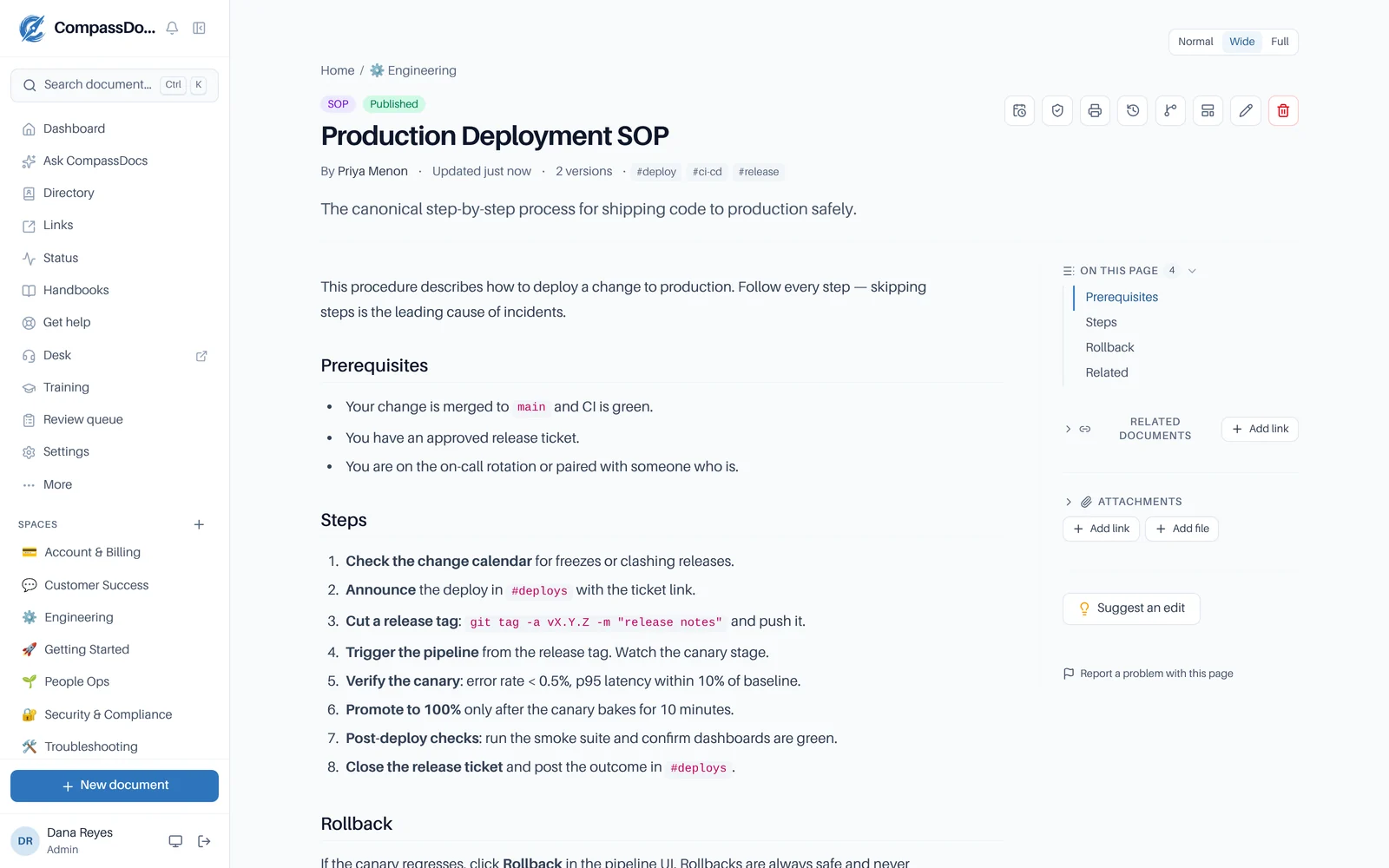
Every SOP has the same shape: an owner, a version history, prerequisites and numbered steps.
High turnover, many outlets, and the standard lives in one person’s head
Hospitality teams train constantly, across shifts that never meet, in properties that each drift a little from the brand.
× The opening checklist is a laminated sheet in the kitchen, and each outlet has its own version.
× A new server shadows whoever is on that night, so training depends on the shift.
× Brand standards come out as a PDF from the group office, and no one knows which properties read it.
× Engineering requests arrive on paper, by radio and in passing, and the history is lost.
× The banquet setup for Saturday’s wedding is in an email thread engineering never saw.
→ Live SOPs by property and outlet, training that starts on day one, and every request on one desk.
SOPs by property and outlet, front and back of house
Give each property a space, and use categories inside it for each outlet: the restaurant, the bar, banquets, the spa, rooms. Group-wide brand standards live in their own space, so every property reads the same version.
- Front of house: check-in and check-out, reservations, the host stand, guest complaints and service recovery, cash and comps
- Back of house: opening and closing, line checks, prep lists, allergen handling, receiving and storage, cleaning schedules
- Housekeeping: room cleaning standards by room type, linen par, lost property, chemical safety
- Engineering: building systems, equipment guides, lockout procedures, who to call after hours
- Brand standards: what every property must do, with tags that separate required standards from local practice
- Review dates: every SOP has an owner and a review cadence, so last season’s menu procedures don’t linger
One install, every property
Enterprise is licensed per install, not per property. Private spaces and groups keep each property’s documents with its own team.
Answers mid-shift
Staff ask “how do I process a late checkout?” and get an answer from your SOPs with the sources cited. Keyword search works without any AI key.
Every version kept
Compare any two versions word by word, so you can show what a procedure said on the night something went wrong.
Shift staff onboarding and training that doesn’t depend on who is on
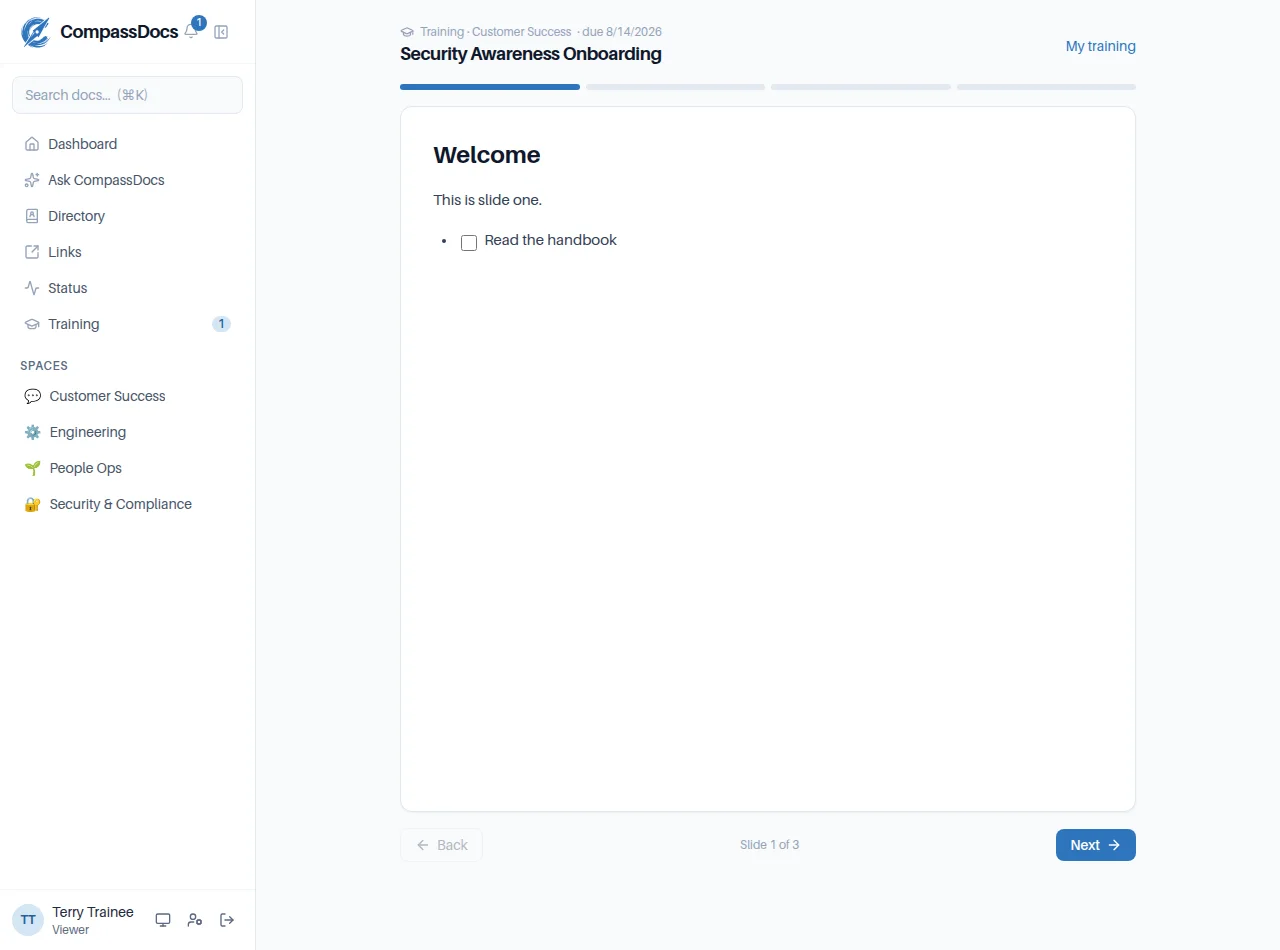
Turn an SOP into a training deck and every new hire gets the same version of it, whichever shift they start on.
- Onboarding programs per role: room attendant, line cook, front desk agent, server, each assigned automatically when the account is created
- Short decks with multiple-choice quizzes and a pass mark, built from the SOP itself, so updating the SOP updates the deck
- Recertification every N months for refreshers such as allergen handling or chemical safety
- Waive decks for staff transferring from another property who already trained; the record says waived
- Outlet managers, as group leads, get one weekly email on their team’s training and policies
- With SCIM from Microsoft Entra, a leaver’s account is deactivated and their sessions revoked at once
Maintenance and engineering requests, with a history
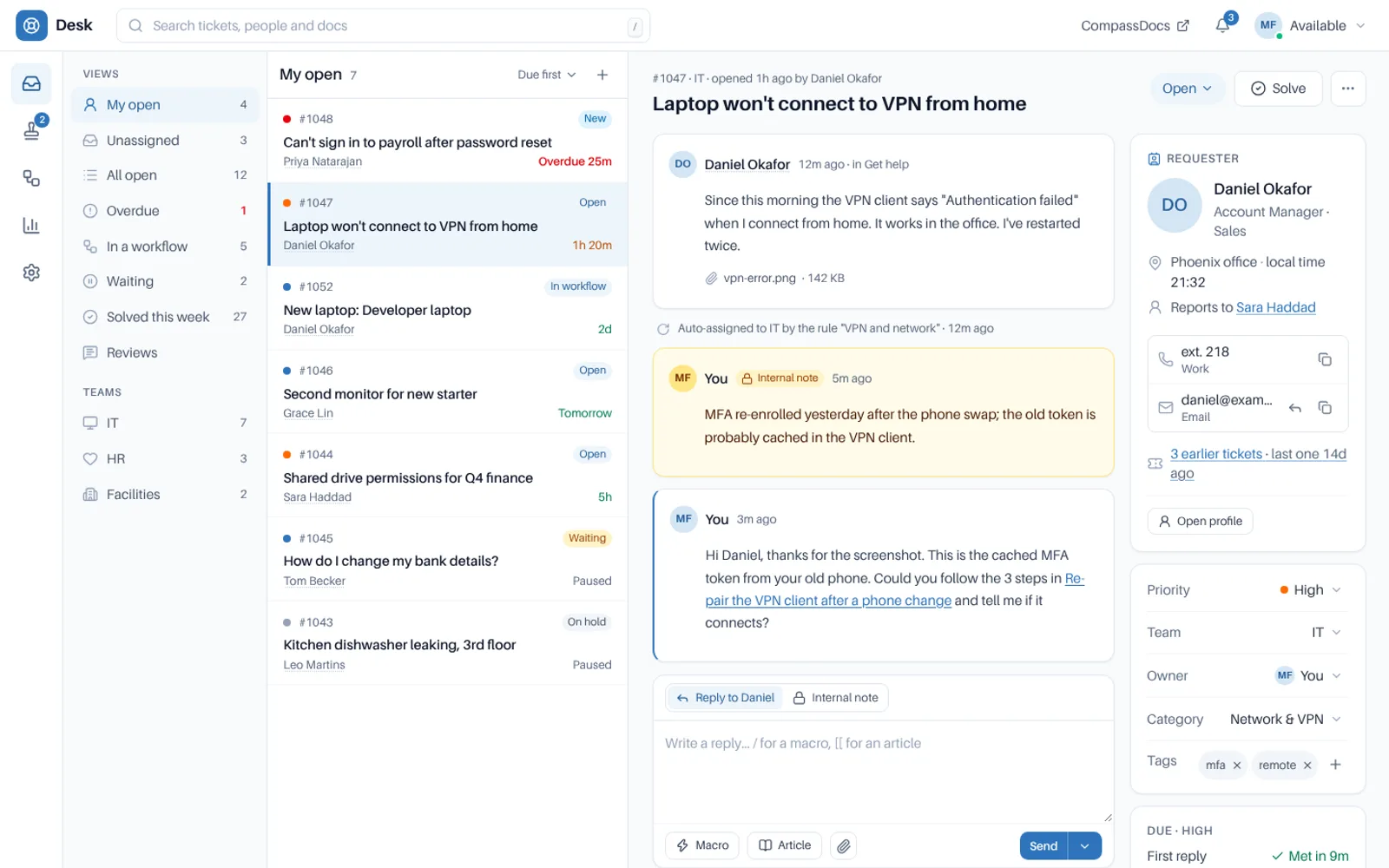
- Request types for a room out of order, a kitchen equipment repair, a safety issue or missing amenities, each with a short form that says what happens next
- Office hours per team: engineering can run 24/7 or split shifts past midnight, with on-call rotas and reply targets counted in that time
- Recurring tickets open preventive maintenance on schedule, paired with a checklist of required steps so they can’t be solved half-done
- Workflows route each request by the requester’s property from the directory, with a fallback team
- Staff raise requests in Get help, by email, or from Microsoft Teams or Slack
- Reports show volume, backlog and time to resolve per team, and any list exports as CSV
Event setups on the event calendar
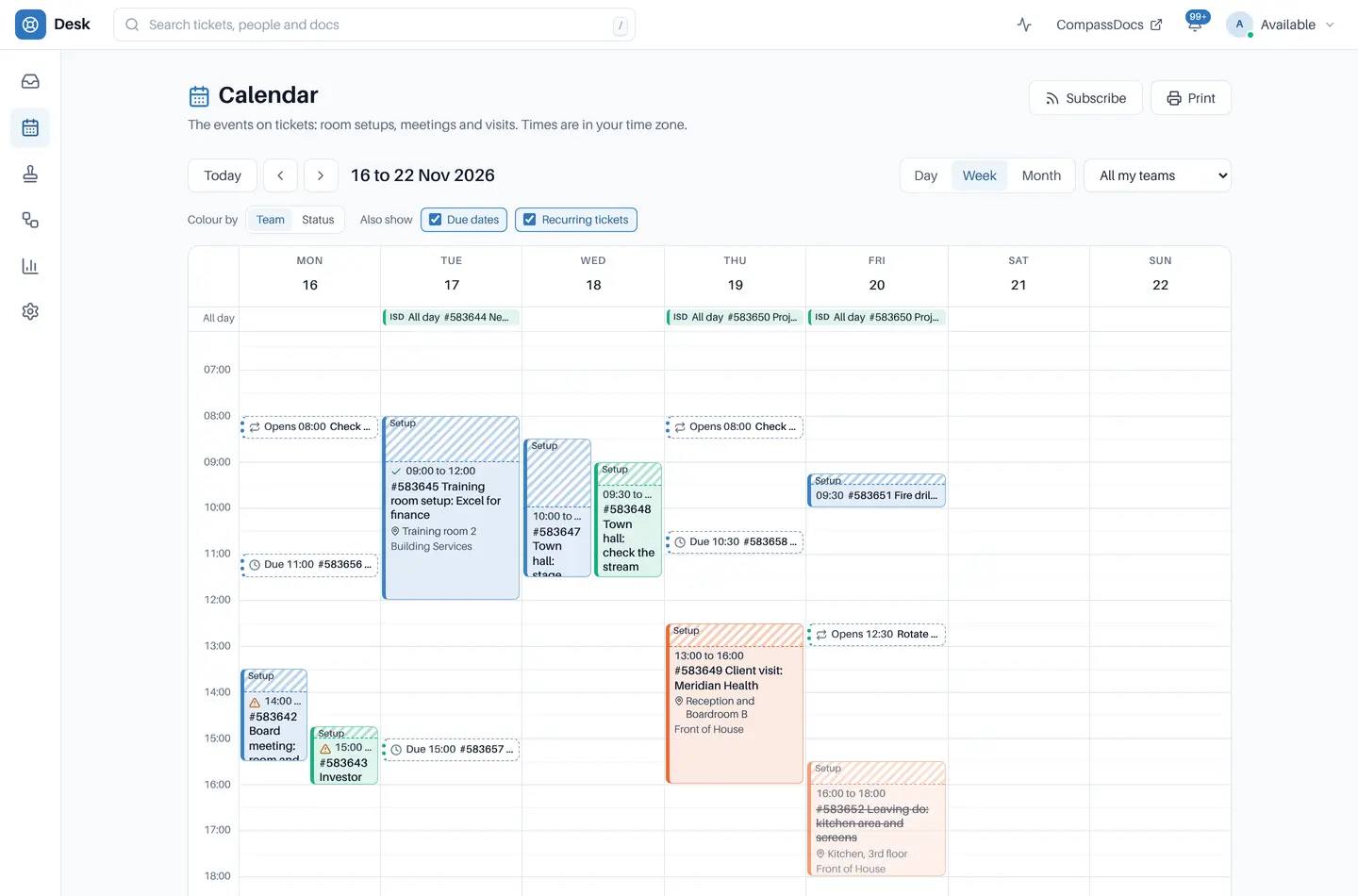
Your sales and catering system stays the source for the banquet event order. The setup work it creates for engineering, banquet housekeeping and AV rides on the desk’s event calendar.
- A ticket carries the event: start and end, the function room, and how long before the start setup must be ready
- An emailed meeting invite fills in the event; an update changes the same ticket
- Reminders a day and an hour before setup is due, and a warning when two events overlap in one room
- The ticket can’t be solved until setup is marked complete
- Print a day sheet with tick boxes for the morning briefing, or subscribe in Outlook, Google Calendar or Apple Calendar
Six teams, one property, one install
One concrete use per job. Spaces, handbooks, versioning and AI answers are in the free Community edition; read confirmations, training and the helpdesk rows are Enterprise.
| Job | Property & outlet GMs | Front of house | Back of house & kitchen | Housekeeping | Engineering & maintenance | HR & training |
|---|---|---|---|---|---|---|
| Spaces | A space per property, categories per outlet | Front desk, concierge and service SOPs | Recipes, prep lists and line checks | Room cleaning standards by room type | Building systems and equipment guides | Private HR space |
| Handbooks | Property standards handbook | Service standards for servers and hosts | Kitchen procedures manual | Room attendant handbook | Life safety procedures | Employee handbook |
| Versioning & approvals | Approve outlet SOP changes | What the check-in script said last season | Menu change history | Amenity standard as changed | Lockout procedure revisions | Leave policy as amended |
| Read confirmations | Brand standard changes by property | Guest data handling policy | Allergen procedure sign-off | Chemical safety procedures | Hot work and lockout rules | Handbook sign-off on hire |
| Training | Weekly digest of who is behind | Check-in and upsell deck | Line cook onboarding with a quiz | New room attendant program | Equipment safety refresher | Onboarding programs for each role |
| Ask CompassDocs | “What’s the comp policy?” | “How do I process a late checkout?” | “What goes in the closing checklist?” | “How do I report lost property?” | Find the right breaker panel guide | “How do I swap a shift?” |
| Helpdesk request types | Ask operations | Room out of order | Kitchen equipment repair | Missing linen or amenities | Engineering repair queue | Ask HR |
| Recurring tickets | Monthly brand audit | Weekly lobby walk-through | Hood and filter cleaning | Deep-clean rotation | Preventive maintenance with a checklist | Annual policy refresh |
| Event calendar | See the week’s functions | VIP arrival setup | Banquet kitchen timings | Turn the room after an event | AV and room setup | Training room for orientation |
Forty seasonal hires before Memorial Day
A resort with a restaurant, a pool bar and 180 rooms staffs up for the summer.
Accounts for each hire
HR creates the new hires’ accounts, each in the group for their outlet or department. Onboarding programs for each role assign their decks the moment the accounts exist.
Role decks
Pool bar staff get responsible service, cash handling and pool safety procedures; room attendants get cleaning standards and chemical safety, each with a short quiz.
The handbook
Everyone confirms the employee handbook in one step, with the version recorded against each policy.
Managers see the gaps
Each outlet manager’s weekly digest lists who hasn’t finished. Returning staff who trained last summer are waived, not marked complete.
A Saturday wedding, from the BEO to the last chair
Ticket from the BEO
The catering manager raises a Function setup request with the ballroom, the guest count and the setup time, and attaches the BEO. It lands on the calendar.
Teams in parallel
A workflow sends tasks to engineering for staging and power, banquet housekeeping for linens and AV for the microphones, at the same time.
Reminders
The day before and an hour before setup is due, the assigned agents are reminded by bell, email or push.
Setup complete
The banquet captain ticks the day sheet, marks setup complete, and the ticket can be solved.
Keeping records, not promising compliance
When a health inspector, an insurer or the brand asks, CompassDocs helps you show which version of a procedure was in force, who approved it, who confirmed it and when, and who finished which training. It is a documentation tool, not a food safety program or a certification body. We don’t claim it makes you compliant with any health code or licensing rule; meeting those obligations stays with your managers.
When another tool is the better fit
CompassDocs is the SOPs, the training and the internal desk. These jobs belong elsewhere:
Guests, rooms and checks
Reservations, folios, the POS, and banquet event orders run in your property management, point of sale and catering systems.
Staff scheduling
Shift schedules, time clocks and tip pooling belong in your scheduling and payroll tools. Quick links can put them one click away.
Parts and meter readings
If engineering tracks spare parts inventory, meter readings and capital plans, use a CMMS. The desk is for requests, recurring work and their history.
Set up faster with Claude
CompassDocs is built for MCP, so Claude can do the first draft of your rollout while your team reviews and publishes. When you start, we walk you through it.
Bring your content in
Paste or attach the procedures and policies you already have, and Claude redrafts each one in your templates, screenshots included.
Draft the handbook and training
Claude assembles a draft handbook from your policies and, with Enterprise, turns procedures into training decks with quiz questions.
Configure the helpdesk as drafts
Request types, forms, workflows, macros and recurring tickets are drafted for an admin to review and publish. Nothing goes live on its own.
See everything Claude can do through MCP and the step-by-step rollout.
Frequently asked
Can every property and outlet run on one install?
Yes. Enterprise is licensed per install, not per property or outlet: $499.99 a year with unlimited users. Give each property its own space and group, keep group-wide brand standards in shared spaces, and route helpdesk requests by property.
Do part-time and seasonal staff need paid seats?
No. Both editions have unlimited users, so every server, cook, room attendant and banquet captain can have an account. The only thing counted is helpdesk agents: Enterprise includes 3, and each extra agent is $125 a year. Staff who only raise requests never count as agents.
Can new hires be enrolled in training automatically?
Yes, with Enterprise training. Onboarding programs assign every deck in the program to each new account the moment it is created, whether locally, by single sign-on or by SCIM, with a due date that starts from day one.
Can engineering take room and outlet repair requests?
Yes. The Enterprise helpdesk gives engineering its own team and queue, with request types for a repair, a room out of order or a safety issue. Office hours can be 24/7 or split shifts past midnight, and recurring tickets with a checklist cover preventive maintenance.
Can banquet and event setups go on a calendar?
Yes. A ticket can carry an event with a start, an end, a place and how long before the start setup must be ready. It shows on the desk calendar, reminders go out before setup is due, the desk warns about double bookings, and the ticket can't be solved until setup is marked complete.
Does CompassDocs replace our PMS, POS or catering system?
No. Reservations, guest folios, checks and banquet event orders stay in the systems built for them. CompassDocs holds the SOPs, brand standards and training behind that work, and the internal requests that go with it.
Does the training count as a food safety or alcohol service certificate?
No. CompassDocs records your own house training: who completed which deck, when, the quiz score and the version they confirmed. It doesn't issue accredited certificates and isn't a substitute for any certificate your jurisdiction requires.
Related: Franchises · Property management · Facilities requests · SOPs · Employee handbook · HR helpdesk · Onboarding checklist template
One install for every property and outlet
Self-host CompassDocs free with unlimited users. Enterprise adds training, read confirmations, the engineering and HR helpdesk and SSO for $499.99 a year per install.
Self-host free See pricingBuying for a team? Get a formal quote to print for approval, or order by invoice with your PO number.