 CompassDocs
SOPs, work orders and unit-turn checklists for property management teams
Each property runs the move-out inspection a little differently, the make-ready steps live in a regional manager’s head, and the monthly smoke detector check depends on who remembers. CompassDocs gives a property management company one set of SOPs for every property, maintenance work orders routed by property, unit-turn checklists that can’t be skipped, staff policies people confirm, and recurring inspections that open themselves. It runs on your own servers, beside the property management system you already use.
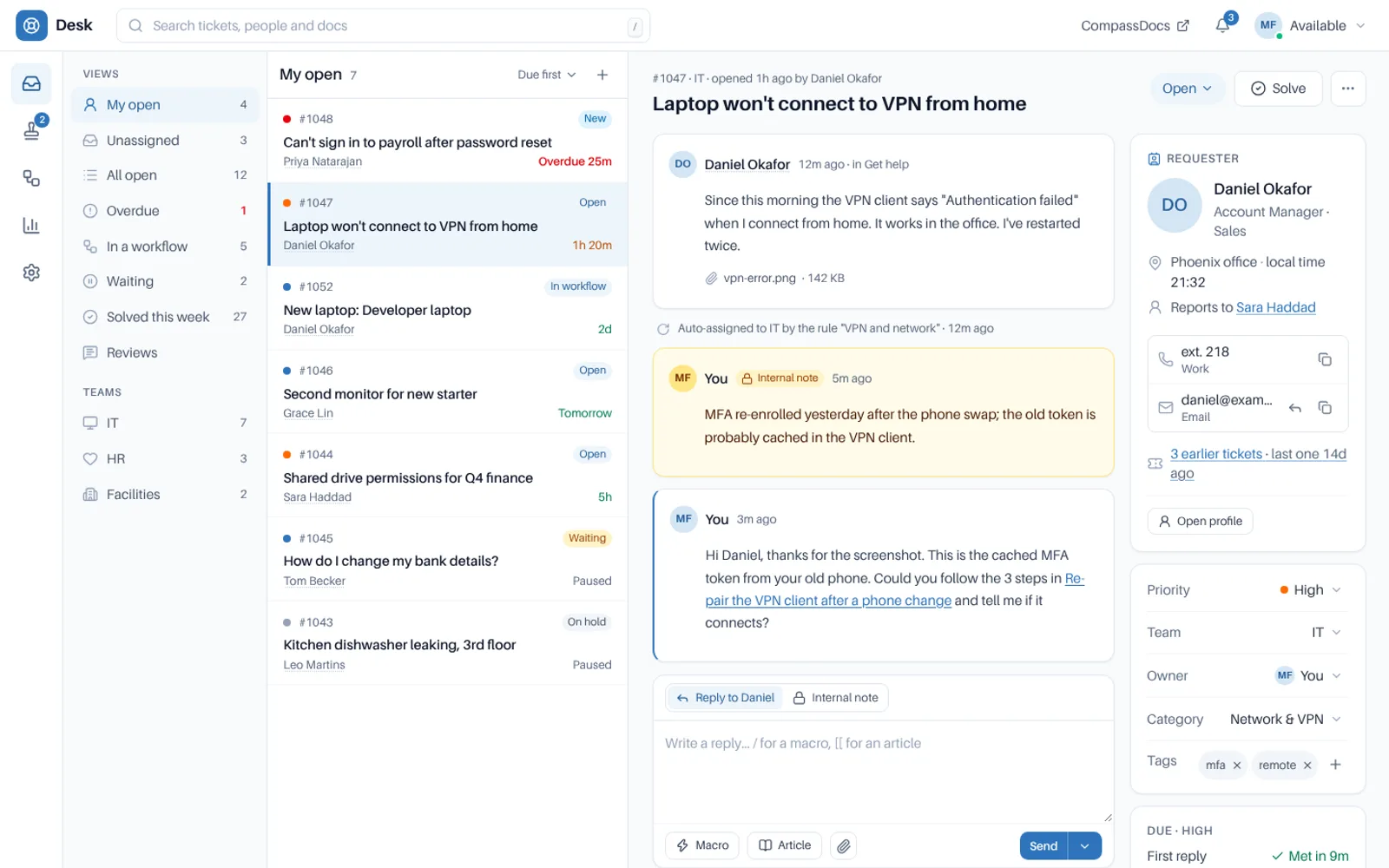
The desk: queues per team, due times on every ticket, and the requester beside the conversation.
Every property runs its own version of the process
A portfolio grows one acquisition at a time, and each property brings its own binder, spreadsheet and habits.
× The make-ready checklist is a spreadsheet each property manager edited differently.
× A unit sits vacant two extra days because nobody told leasing the turn was finished.
× Monthly fire extinguisher and smoke detector checks slip when the maintenance supervisor is on vacation.
× The new leasing consultant learns the application process from whoever is at the desk that day.
× A staff policy changed, and nobody can say who at which property read it.
→ One set of procedures for the portfolio, every work order and turn on a ticket, and a record of who confirmed what.
One operations manual for the whole portfolio
The knowledge base is in every edition, including the free Community edition. Write a procedure once, then add a page only where a property genuinely differs.
- A space each for Maintenance, Leasing, Accounting and HR, plus a private space for regional managers; a page per property for its shut-offs, vendor contacts, gate codes and quirks
- Leasing procedures: showing a unit, processing an application, move-in and move-out inspections, renewals and notices, all from the built-in SOP template so they share one shape
- Maintenance SOPs with photos of the actual boiler room or panel, warning callouts and tick-box checklists for make-ready and preventive maintenance
- Strict mode sends edits to an approver before they go live, and version history shows what the move-out procedure said when a deposit dispute began
- Review cadences bring each procedure due on its owner’s dashboard, so the manual doesn’t drift as properties are added
- A new property manager asks “what’s our process for a lease renewal at Maple Court?” and gets an answer from your documents with the source cited (optional AI, your own Anthropic API key)
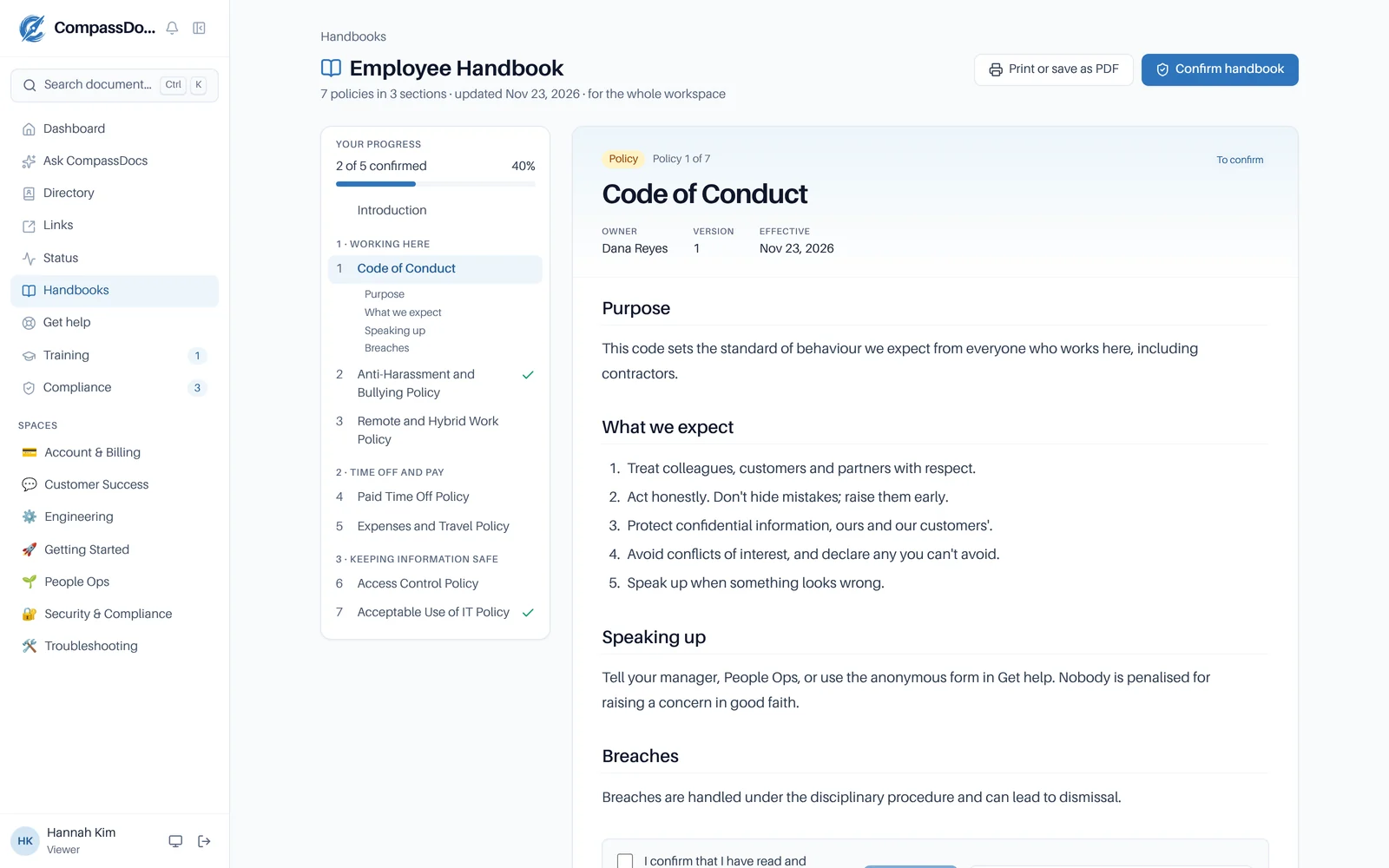
A handbook gathers published policies into numbered sections to read, print and, with Enterprise, confirm at once.
Maintenance work orders across every property
The helpdesk gives maintenance, leasing support, accounting and IT their own teams and queues on one desk.
- Request types for a work order, a unit turn, a vendor or purchase approval, a new hire and IT help, each with a form that asks for the property, the unit and what’s wrong
- Categories such as Plumbing › Leak, HVAC › No heat or Appliance › Refrigerator, kept in one managed list, so reports compare properties fairly
- Assignment rules route by property, category or words, assign by skill (HVAC, plumbing, electrical) and send after-hours work to whoever is on the maintenance on-call rota
- Reply and resolution targets per priority in business hours, with holiday sets, so an emergency leak and a squeaky closet door are measured differently
- A major incident gathers twenty reports of the same outage at one building under one ticket, with one update to everyone
- Technicians install the desk as an app on their phones with push notifications, and staff raise requests from Get help, email or Teams and Slack
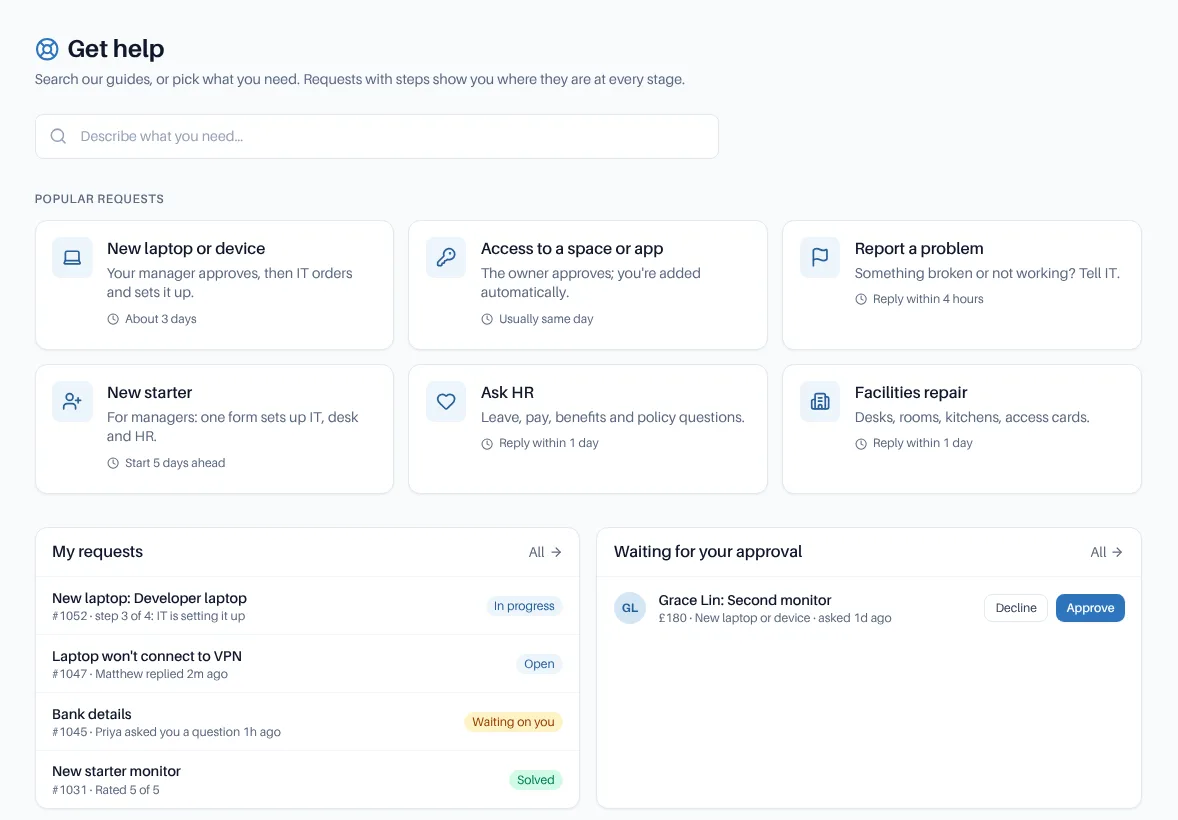
Get help: request types as cards, with My requests and approvals below. Your own types replace these examples.
Unit turns and recurring inspections that don’t slip
Days vacant cost money. A workflow carries each turn from team to team, and recurring tickets keep routine inspections on schedule.
- A Unit turn request asks for the property, the unit, the move-out date and the target ready date, and starts a workflow
- Parallel tasks for maintenance (make-ready), leasing (marketing the unit) and accounting (the deposit disposition), with due dates counted in business days
- Waits that end a set number of days before or after the move-out date in the form, so the final walk is scheduled from the lease, not from memory
- Checklists with required items: paint, carpet, appliances, smoke detectors, keys and fobs; Before you solve stops a turn being closed with steps skipped
- Recurring tickets for monthly smoke detector and extinguisher checks, quarterly unit inspections and seasonal HVAC service, per property, with holidays handled
- Each run is a ticket that records who solved it, when, and which checklist items were ticked, with the photos attached
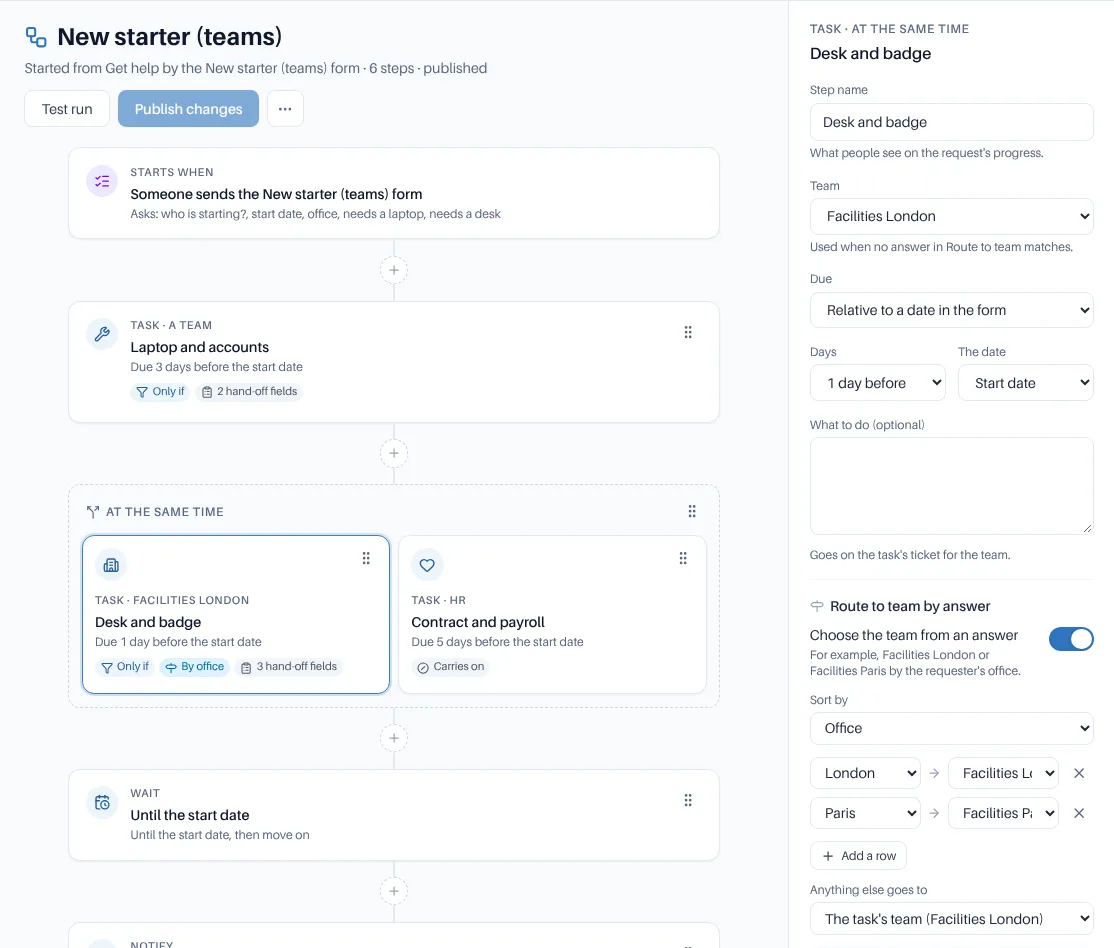
The workflow builder, shown with a New starter workflow. A unit turn uses the same parts: tasks in parallel, then a wait on a date.
Property managers, maintenance, leasing, accounting and regional ops
The jobs each part of a property management company does, and what CompassDocs does for each. One install covers the whole portfolio.
| Job | Property managers | Maintenance | Leasing | Accounting | Regional ops |
|---|---|---|---|---|---|
| Procedures | Property page: shut-offs, vendors, codes | Make-ready and PM SOPs with photos | Showings, applications, renewals | Deposit disposition, month-end steps | Owns the portfolio standard |
| Approvals & versions | Propose a change to a procedure | Always the current revision | Approved wording for notices | Version in force on a date | Approves procedure changes |
| Read confirmations | Staff handbook confirmed | Safety procedures confirmed | Fair housing policy confirmed yearly | Handling of resident funds policy | Sees every property’s roster |
| Training | New PM onboarding program | Equipment and safety decks | Leasing process deck with a quiz | System procedures deck | Recertification every 12 months |
| Work orders | Raise and follow for residents’ issues | Queue by property and skill | Raise move-in readiness issues | Purchase approvals | Reports and CSV export |
| Unit turns | Starts the turn | Make-ready task and checklist | Marketing task, ready date | Deposit task | Workflow time per team in reports |
| Recurring tickets | Monthly property walk | Smoke detector and HVAC checks | Weekly vacancy review | Month-end close checklist | Quarterly audits per property |
Work order, unit turn and recurring ticket rows are part of the Enterprise helpdesk. Procedures, approvals and version history are in every edition.
A month in a portfolio
A resident moves out of 4B on the 30th
The property manager raises a Unit turn with the move-out date. Maintenance, leasing and accounting get their tasks at once; the final walk waits until the day after move-out, and the ticket can’t be solved until paint, carpet, smoke detectors and keys are ticked.
No heat at Building C on a Saturday night
Emails and Teams messages from the on-site team land as tickets; the maintenance on-call rota shows who is covering, and the agent declares a major incident so twenty reports get one update. The boiler restart SOP for that building is one search away on the tech’s phone.
An acquisition joins the portfolio
Add the property to the directory and the routing rules, add its recurring inspections, and give it a property page for its own shut-offs and vendors. Its staff get the onboarding program and the handbook to confirm on day one.
The fair housing policy is updated
Regional ops approves the new wording under strict mode. Every leasing consultant and property manager is asked to confirm the new version by a due date; the compliance portal shows who is behind, and reminds them in bulk.
What it costs
The knowledge base, with SOPs, approvals, version history, handbooks and search, is free in the Community edition, open source under AGPL-3.0, with unlimited users. Enterprise is $499.99 a year per install with unlimited users and adds read confirmations, training and onboarding, SSO, SCIM, directory sync, audit-log export and the helpdesk with 3 agents included. Each extra agent is $125 a year.
One install covers the whole portfolio; there is no per-property or per-unit charge. A company with eight maintenance technicians working tickets, a maintenance supervisor and an office coordinator has ten agents: $499.99 plus seven extra agents, $1,374.99 a year at list price. Leasing consultants, property managers and owners’ representatives who only raise requests never count. Optional dedicated support is $3,000 a year, and your first Enterprise purchase has a 30-day money-back guarantee. CompassDocs Cloud is coming soon and not on sale yet, so today you self-host.
Keeping records, not promising compliance
CompassDocs keeps records that help when an owner, an insurer, an auditor or a lawyer asks: which version of the move-out procedure was in force on a date, who approved it, who confirmed the fair housing policy and when, who finished which training, and when each inspection ticket was solved, by whom, with which checklist items ticked. Self-hosting keeps them in a PostgreSQL database on infrastructure you control, with an append-only audit log.
It is a documentation, training and work order tool, not a compliance program. We don’t claim it meets fair housing, landlord-tenant, habitability, fire or building code requirements, or any other law. Meeting those obligations remains your company’s responsibility.
What it isn’t, and when another tool fits better
CompassDocs is not a property management system. It has no rent roll, leases, resident ledger, rent payments, owner statements, trust accounting, listings, applicant screening or vendor payments. Your property management software stays the system of record for residents, units and money; CompassDocs is where your staff find the procedure, confirm the policy and send the work.
If your property management system already takes resident maintenance requests well, keep residents there and use CompassDocs for internal work orders, unit turns and inspections. If you need a CMMS with parts inventory, equipment registers and labor costing, use one: CompassDocs has work orders, schedules and checklists, not those. For facilities work in a single building, see facilities requests.
Set up faster with Claude
CompassDocs is built for MCP, so Claude can do the first draft of your rollout while your team reviews and publishes. When you start, we walk you through it.
Bring your content in
Paste or attach the procedures and policies you already have, and Claude redrafts each one in your templates, screenshots included.
Draft the handbook and training
Claude assembles a draft handbook from your policies and, with Enterprise, turns procedures into training decks with quiz questions.
Configure the helpdesk as drafts
Request types, forms, workflows, macros and recurring tickets are drafted for an admin to review and publish. Nothing goes live on its own.
See everything Claude can do through MCP and the step-by-step rollout.
Frequently asked
Can work orders be routed by property?
Yes, with the Enterprise helpdesk. A request type can ask which property and unit, and assignment rules match on that answer, the requester's office in the directory, the category or words in the request, then assign to the property's maintenance team, whoever is on call or a technician with the right skill.
Can we build a unit-turn checklist that can't be skipped?
Yes. A Unit turn request type can start a workflow with tasks for maintenance, leasing and accounting, waits counted from the move-out date in the form, and checklists with required items. Before you solve rules stop the ticket being closed until the required steps are ticked.
Can we schedule recurring property inspections?
Yes, as recurring tickets: daily, weekly, on the nth weekday, on a day of the month, in chosen months or every N days or weeks, in the team's time zone. Give each property its own schedule, and pair each inspection with a checklist so it can't be solved half-done.
Can residents submit maintenance requests?
They can, through the Enterprise customer portal, where people outside your organization raise and follow requests after signing in with a one-time link sent to their email. It has no rent payments, leases or resident ledger. If your property management system already takes resident work orders, keep them there and use CompassDocs for staff procedures and internal requests.
Is CompassDocs a property management system?
No. It has no rent roll, leases, resident ledger, accounting, owner statements, listings or applicant screening. It holds your SOPs, leasing procedures, staff policies, training records and internal work orders, and sits beside the property management software you already use.
Does every maintenance tech and leasing agent need a paid seat?
No. Both editions have unlimited users. On the helpdesk only the active people on the desk's Agents list count: Enterprise includes 3 agents, and each extra agent is $125 a year. A leasing agent who raises a request never counts; a technician who works tickets does.
Can we show staff confirmed the fair housing policy?
Yes, with Enterprise read confirmations. Each confirmation records the person, the statement, the version and the time, with an optional typed signature, and annual re-confirmation brings it round each year. It is a record of who confirmed your policy, not a guarantee of compliance with fair housing law.
Related: Facilities requests · SOP software · Employee handbook · Policy management · Recurring tickets · Workflows & approvals · Hospitality · Construction · Small business
A portfolio’s procedures on your own servers
Self-host the open-source knowledge base free with one Docker command and unlimited users. Enterprise adds work orders, unit-turn workflows, recurring inspections, policy sign-off and SSO for $499.99/year per install.
Self-host free See pricingBuying for the company? Get a formal quote to print for approval, or order by invoice with your PO number.