 CompassDocs
SOPs, safety procedures and toolbox talks for construction crews
The fall protection procedure is in a binder in the office trailer, the new hire’s orientation is a stack of photocopies, and the equipment request went to the yard by text. CompassDocs puts job-site SOPs and safety procedures where a superintendent can pull them up on a phone, records who received each toolbox talk and orientation, and gives the field one place to ask the office for equipment, IT and HR help. It runs on your own servers.
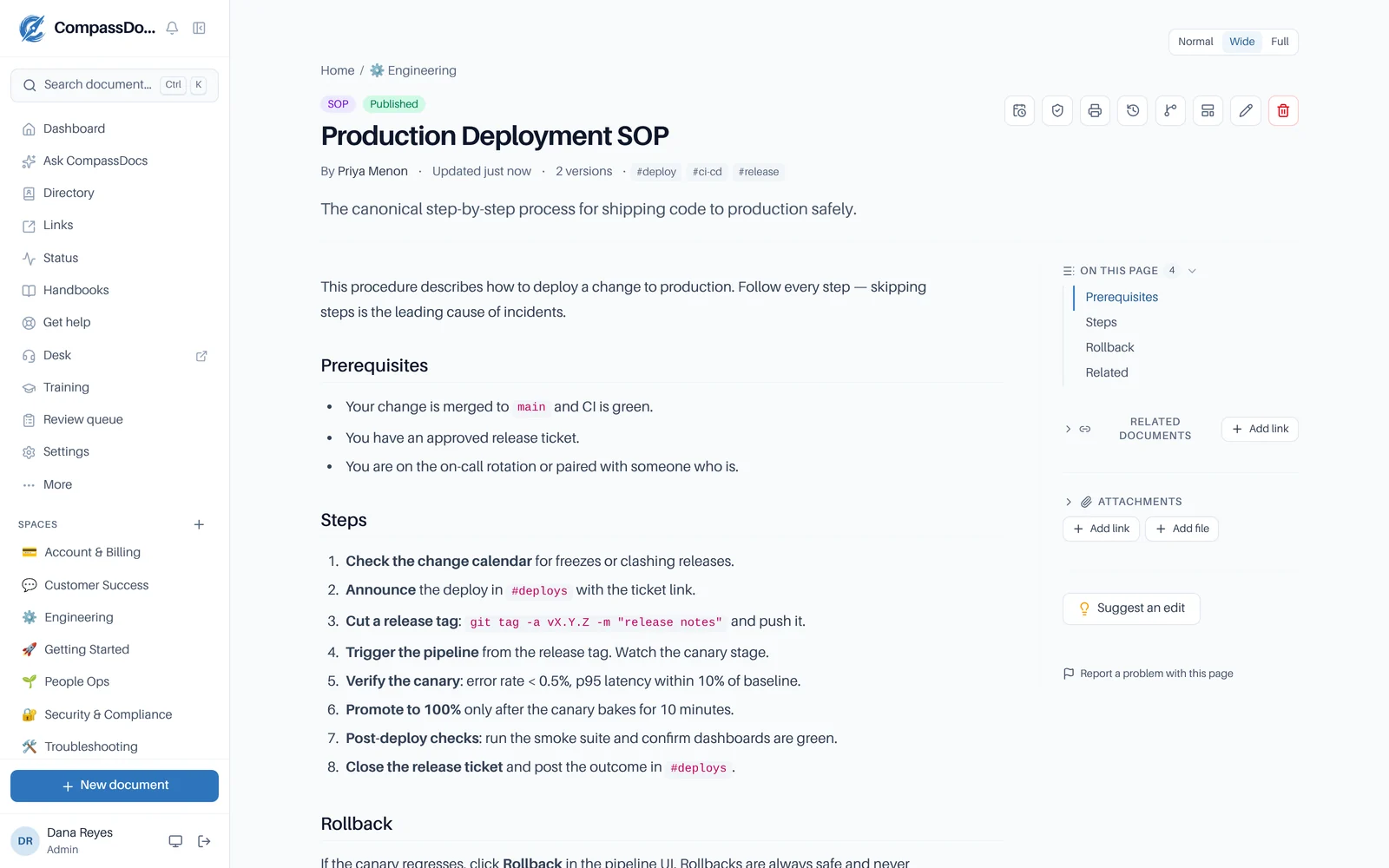
The SOP layout: owner, version, prerequisites and numbered steps. A lockout/tagout or trench procedure uses the same shape.
The procedure exists. It just isn’t on the job site.
Construction companies write good procedures and then lose them between the office and the field.
× The binder in the trailer holds last year’s silica plan; the update is in someone’s email.
× Toolbox talk sign-in sheets go back to the office in a truck and get filed, or don’t.
× A new laborer starts Monday at a site 60 miles away, and orientation depends on which foreman he gets.
× The excavator for Thursday was asked for by text, and the yard never saw it.
× Field staff call the office manager for a password reset, a PPE order and a payroll question, all in one call.
→ Current procedures one search away on any phone, a record of who confirmed what, and every field request on a ticket.
Job-site SOPs and safety procedures crews can read on a phone
The knowledge base is in every edition, including the free Community edition. CompassDocs is a web app, so the current procedure opens in the browser on whatever phone or tablet is on site.
- A space per area: Safety, Field operations, Equipment, Office and HR, with private spaces for what only supervisors or the office should see
- Start every procedure from the built-in SOP template, so lockout/tagout, confined space entry, trenching and excavation, hot work and crane lift plans all follow the same shape
- Paste photos of the actual guardrail, tie-off point or valve straight into the step, add a warning callout, a table of torque or load values and a tick-box pre-task checklist
- Strict mode sends edits to a published safety procedure to an approver first, with a change note; version history shows what the procedure said on any date
- Give each procedure a review cadence so it comes due on the safety manager’s dashboard before it drifts
- A superintendent asks “what’s our tie-off requirement on a leading edge?” and gets an answer from your documents with the source cited (optional AI, your own Anthropic API key; keyword search works without one)
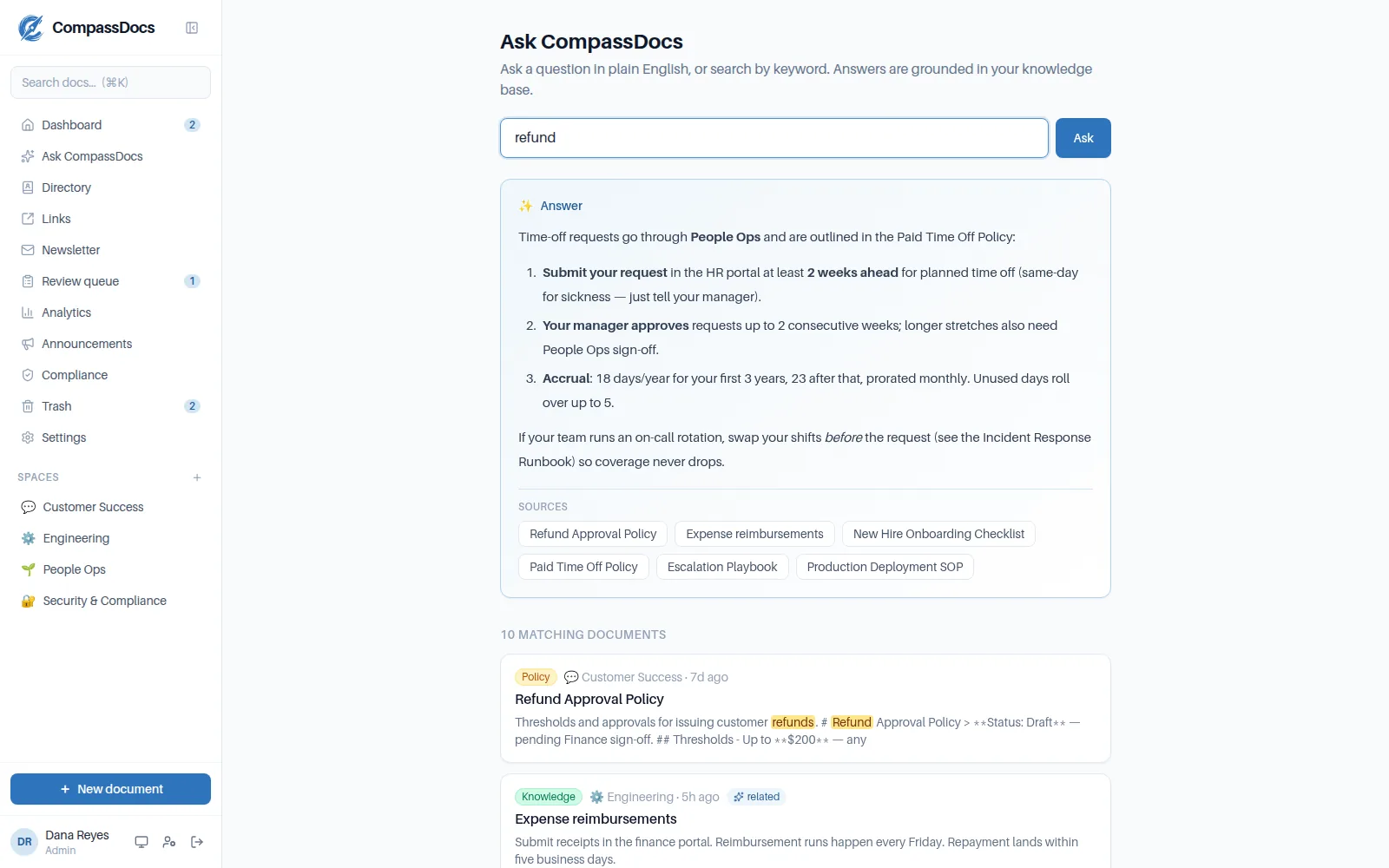
Ask a question, get an answer from your own procedures with the sources listed.
Toolbox talks, orientation and crew onboarding, on the record
Read confirmations and training are part of Enterprise. The talk, the orientation and the record live next to the procedure they come from.
- Write this week’s toolbox talk as a document, then turn it into a short deck with a quiz question or two and a confirmation at the end; each completion records the person, the time and the version
- Or ask a crew to read and confirm a changed procedure by a due date, with automatic reminders and an optional typed signature; a material change asks them again
- An onboarding program assigns site orientation, PPE, hazard communication and your drug and alcohol policy to every new account automatically, whether it was created by hand, by SSO or by SCIM
- Recertification reopens a deck every N months, so annual refreshers come round on their own
- Waive a deck for a hand who already trained with you; the record says waived, not completed
- Group leads, such as a superintendent for their crews, get one weekly email showing who is behind
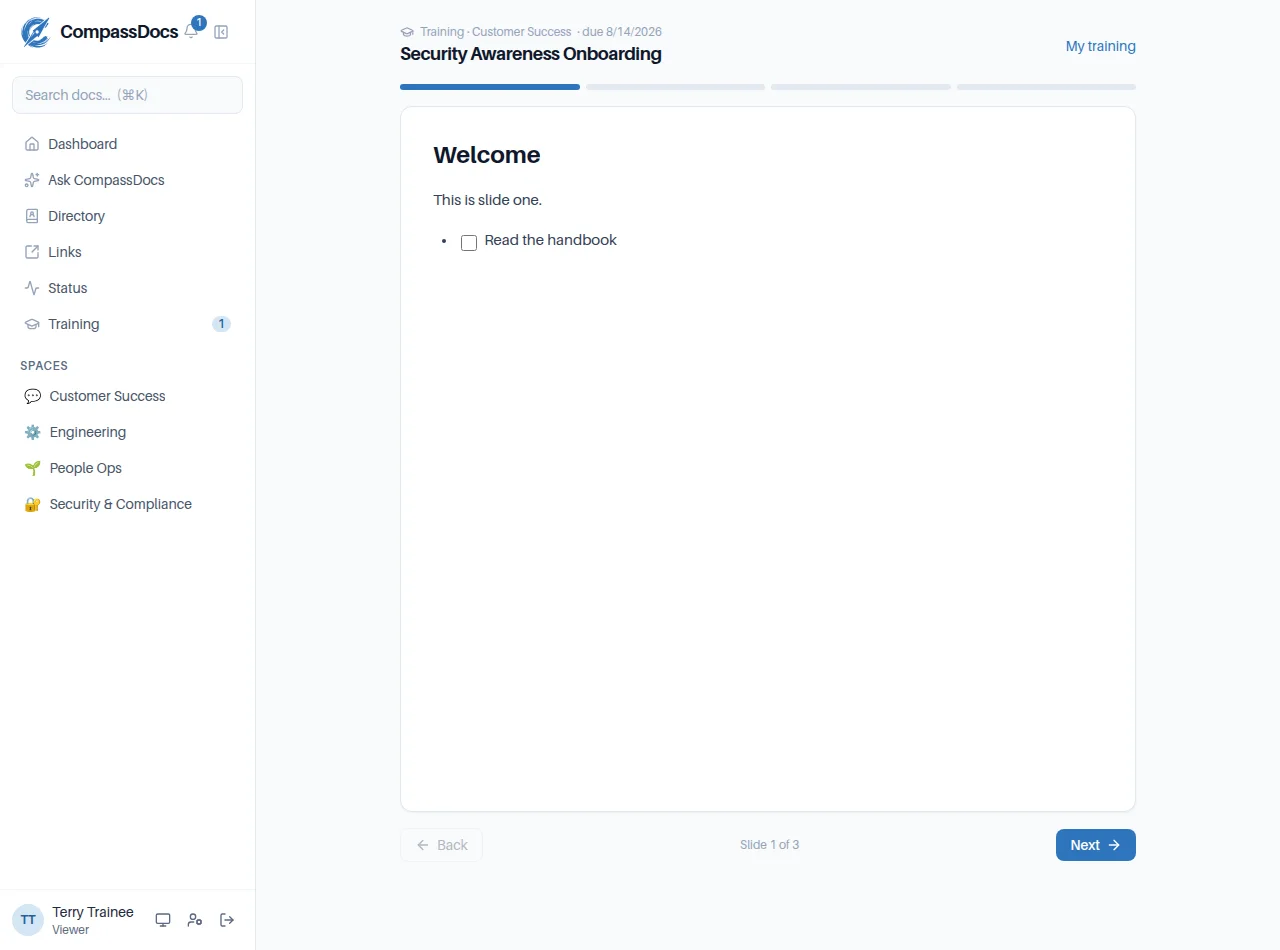
The training player, shown with a security deck: one slide at a time and a recorded confirmation at the end.
One front door from the field to the office
The helpdesk gives the office, the yard and IT their own teams and queues on one desk, and gives the field one place to ask.
- Get help searches your guides first, then offers request types: Equipment request, Small tools and PPE, Report a near miss to the office, New hire, IT problem, Ask HR
- Forms ask for the job number, the site and the date needed, and a Date and time question puts deliveries on the desk’s calendar
- Workflows send the project manager an approval, then a task to the yard and a task to fleet, and tell the requester where it is
- Assignment rules route by job, category or form answer; tag agents with the languages they speak so a request written in Spanish goes to someone who reads it
- Field staff raise and follow requests from Microsoft Teams or Slack or by email, and the desk installs as an app on phones with push notifications
- Recurring tickets open weekly equipment inspections and monthly fire extinguisher checks per yard, each with a required checklist
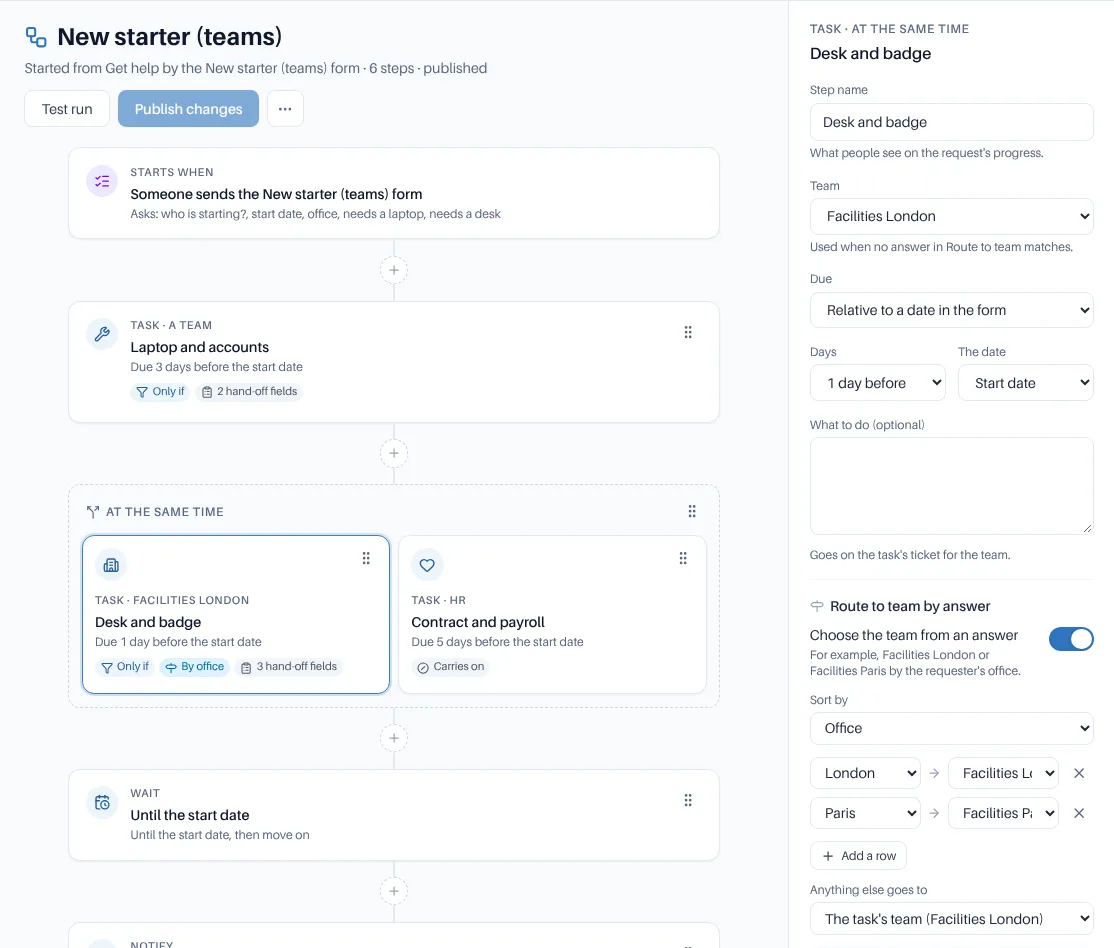
The workflow builder, shown with a New starter workflow. An equipment request uses the same steps: approval, tasks per team, a wait.
Office, field, safety, yard and HR on one install
The jobs each part of a contractor does, and what CompassDocs does for each. One install covers every office and job site.
| Job | Office & PMs | Field crews & supers | Safety | Equipment & fleet | HR |
|---|---|---|---|---|---|
| Procedures | Closeout and change-order steps | Pre-task checklists on a phone | LOTO, trenching, hot work SOPs | Pre-use inspection steps per machine | Hiring and leave procedures |
| Approvals & versions | Approve office procedure changes | Always the current revision | Approves every safety edit | Owner of equipment SOPs | Approves policy wording |
| Read confirmations | Confirm the subcontractor procedure | Confirm a changed procedure | Due dates, reminders, roster | Operators confirm machine SOPs | Handbook confirmed at hire |
| Training | PM onboarding deck | Toolbox talks with a quiz | Annual refreshers by recertification | Operator orientation deck | Onboarding programs for new hires |
| Get help | Ask IT for project software access | Equipment, PPE, IT, HR in one place | Hazard or near-miss report to the office | Receives equipment requests | Ask HR, new hire |
| Workflows | Approve equipment for their job | See where a request is | Signs off a new hire’s orientation task | Delivery task after PM approval | New hire: HR, IT and safety tasks |
| Recurring tickets | Monthly office checks | Weekly toolbox talk per crew | Monthly site walk | Weekly yard inspections | Annual policy cycle reminder |
Helpdesk rows are Enterprise. Procedures, approvals and version history are in every edition.
A season on the job
A procedure changes mid-project
After a near miss, the safety manager edits the trenching SOP. Strict mode sends it to the safety director for approval, then the field crews on that job are asked to confirm the new version by Friday. The roster shows who has, and reminders chase the rest.
Monday toolbox talk at three sites
A recurring ticket opens for each superintendent every Monday with a link to this week’s talk and a checklist. The super delivers it from a phone; crew with accounts confirm in the training deck, and a photo of the paper sign-in sheet goes on the ticket for the rest.
Thursday’s excavator
A foreman raises an Equipment request in Teams: job 2417, a mini excavator, needed Thursday at 7 a.m. The PM approves from the chat card, the yard gets a task with the delivery on the desk calendar, and the foreman sees it move on the tracker.
A new laborer starts Monday
HR raises a New hire request. The workflow runs HR paperwork, a safety orientation task and an IT account in parallel; the new account is enrolled in the onboarding program, so orientation, PPE and hazard communication decks are waiting on day one.
What it costs
The knowledge base, with SOPs, approvals, version history, handbooks and search, is free in the Community edition, open source under AGPL-3.0, with unlimited users. Enterprise is $499.99 a year per install with unlimited users and adds read confirmations, training and onboarding, SSO (SAML or OIDC), SCIM, directory sync, audit-log export and the helpdesk with 3 agents included. Each extra agent is $125 a year.
A contractor with an office, a yard and IT working tickets might have two IT agents, two in the equipment yard and one safety coordinator: five agents, so $499.99 plus two extra agents, $749.99 a year at list price, for every office, yard and job site on one install. Crews who only ask for help never count. Optional dedicated support is $3,000 a year, and your first Enterprise purchase has a 30-day money-back guarantee. CompassDocs Cloud, starting from $199 a month billed annually, is coming soon and not on sale yet, so today you self-host.
Keeping records, not promising compliance
CompassDocs keeps the records a safety audit, an insurer or a general contractor’s prequalification questionnaire tends to ask about: which version of a procedure was in force on a date, who approved it, who confirmed it and when, who completed which training, and when each recurring inspection ticket was solved and which checklist items were ticked. Self-hosting keeps those records in a PostgreSQL database on infrastructure you control, with an append-only audit log.
It is a documentation, training and request tool. It is not a safety management program, an incident reporting system of record or an emergency notification system, and we don’t claim it makes you OSHA compliant or meets any other safety standard. Meeting those obligations remains your company’s responsibility.
What it isn’t, and when another tool fits better
CompassDocs is not a field service management system or a construction project management platform. It has no dispatch board, crew scheduling, estimating, job costing, timesheets, plan and drawing management, RFIs, submittals, daily logs or punch lists. If you dispatch technicians to customer sites and invoice the work, a field service management tool is the right home for that, and your project management and accounting software stay where they are.
It also isn’t a fleet telematics system or a full equipment register with hours, parts and maintenance costs. The helpdesk can show assets from Snipe-IT or Microsoft Intune on a ticket, which suits laptops, tablets and anything your yard already tracks in Snipe-IT, but it does not replace a CMMS. CompassDocs is the layer beside all of that: the procedures, the training record and the internal requests between the field and the office. Facilities teams can read more in facilities requests.
Set up faster with Claude
CompassDocs is built for MCP, so Claude can do the first draft of your rollout while your team reviews and publishes. When you start, we walk you through it.
Bring your content in
Paste or attach the procedures and policies you already have, and Claude redrafts each one in your templates, screenshots included.
Draft the handbook and training
Claude assembles a draft handbook from your policies and, with Enterprise, turns procedures into training decks with quiz questions.
Configure the helpdesk as drafts
Request types, forms, workflows, macros and recurring tickets are drafted for an admin to review and publish. Nothing goes live on its own.
See everything Claude can do through MCP and the step-by-step rollout.
Frequently asked
Can crews read SOPs and safety procedures on a phone?
Yes. CompassDocs is a web app, so a foreman or superintendent opens the current procedure in the phone's browser and searches it there. Procedures can carry photos, callouts, tables and tick-box checklists. Anyone who works tickets can also install the desk as an app on iPhone, iPad or Android, with push notifications.
Can we record who received a toolbox talk?
With Enterprise, yes, when each person confirms on their own account. Turn the talk into a training deck with an optional quiz and a confirmation at the end, or ask the crew to read and confirm it as a policy; each record keeps the person, the time and the version they confirmed. If a crew signs a paper sheet instead, attach a photo of it to that week's toolbox talk ticket.
Is CompassDocs a field service management or construction project management system?
No. It has no scheduling and dispatch board, estimating, job costing, timesheets, plans and drawings, RFIs, submittals or punch lists. It holds your procedures, training records and internal requests, and sits beside the project management and accounting software you already run.
Does every crew member need a paid seat?
No. Both editions have unlimited users. On the helpdesk only the active people on the desk's Agents list count: Enterprise includes 3 agents, and each extra agent is $125 a year. A laborer who raises an equipment request never counts.
Can equipment and fleet requests go to the yard and need a PM's approval?
Yes, with the Enterprise helpdesk. An Equipment request type asks for the job, the machine and the date it's needed, and its workflow can send an approval to the project manager or the requester's manager before the yard gets the task. Assignment rules can route by job, category or form answer.
Does CompassDocs make us OSHA compliant?
No, and we don't claim it does. It keeps records that help when someone asks: which version of a procedure was in force, who approved it, who confirmed it and when, and who finished which training. Meeting OSHA and other safety obligations remains your company's responsibility.
How is it priced for a contractor with several offices and job sites?
One install covers the whole company. The Community edition is free and open source with unlimited users. Enterprise is $499.99 a year per install with unlimited users, and adds read confirmations, training, SSO, SCIM and the helpdesk with 3 agents included. There is no per-site or per-crew charge.
Related: SOP software · SOP template · Training & onboarding · Read confirmations · IT helpdesk software · HR helpdesk · Manufacturing · Property management · Small business
Job-site procedures on your own servers
Self-host the open-source knowledge base free with one Docker command and unlimited users. Enterprise adds toolbox talk sign-off, training, the helpdesk and SSO for $499.99/year per install.
Self-host free See pricingBuying for the company? Get a formal quote to print for approval, or order by invoice with your PO number.