 CompassDocs
HIPAA policy and training tracking for your workforce
HIPAA programs generally call for written privacy and security policies, workforce training, and records you can produce when asked. CompassDocs handles HIPAA policy and training tracking on your own servers: staff confirm the policies they’ve read, complete training decks built from those policies, and every confirmation is recorded against the exact version.
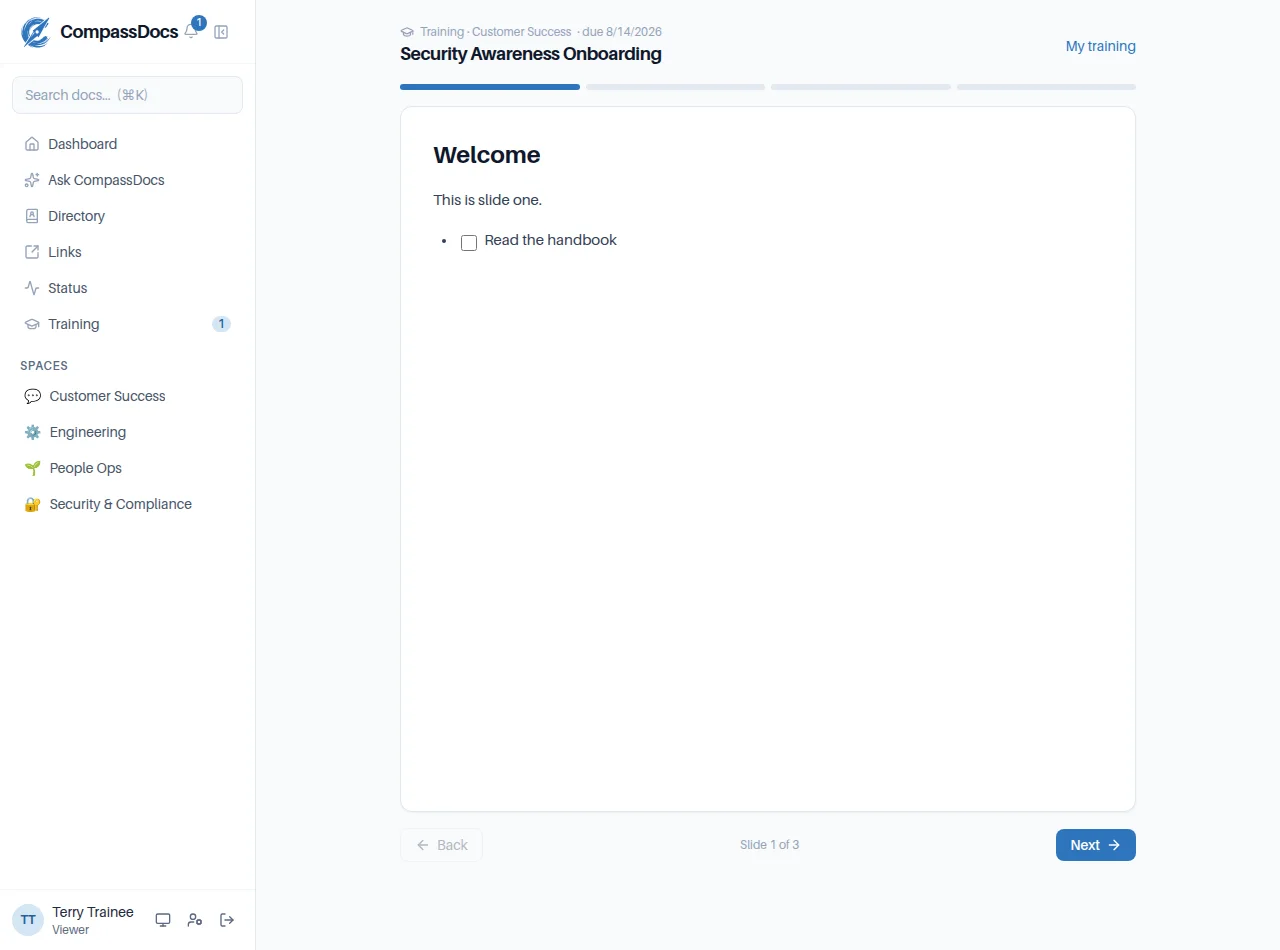
The training player: one slide at a time, resume where you left off, and a recorded confirmation at the end.
Policy and training records shouldn’t live in three places
Clinics, practices and the organizations that work with them often keep policies in a shared drive, sign-off sheets in a binder and training in a separate system.
× Staff sign a paper sheet, and nobody can say which version of the policy they read.
× Training is tracked in a spreadsheet that one person maintains.
× New hires start work before anyone checks their policy sign-off.
× The yearly refresher depends on someone remembering to send it.
× Policy documents sit in a third-party cloud you don’t control.
→ Policies, acknowledgements and training completion in one self-hosted system, with an audit trail.
How CompassDocs supports HIPAA policy and training tracking
Policies, approvals, versions, handbooks and the audit log are in every edition. Read confirmations and training are part of Enterprise.
Approved policies
A draft, review and approve workflow, so the published privacy or security policy is the one that was signed off.
Roles & approvals →A policy handbook
Gather privacy and security policies into one handbook, read as one and printed with an acknowledgement page to sign.
Policy handbooks →Workforce acknowledgements
People confirm against the exact version they read, with due dates, automatic reminders and a compliance portal.
Read confirmations →Training completion records
Decks built from your documents, with optional graded quizzes, recertification every N months, certificates and CSV export.
Training & onboarding →What a policy said, on any date
Every save is a version with author and change note, and restores and merges are written to the append-only audit log.
Version history →Access by role
Private spaces for restricted documents, single sign-on and SCIM so leavers are cut off and their sessions revoked at once (Enterprise).
Single sign-on →Training records that hold up
The training is the document. Update the policy and the deck updates with it, and each completion records the version the person confirmed.
- Assign decks to people, groups or everyone, with due dates and automatic due and overdue reminders
- Onboarding programs enroll every new account automatically, whether created locally, by single sign-on or by SCIM
- Recertification reopens a deck every N months and keeps every prior completion in the record
- Waive a deck for staff who trained before you adopted CompassDocs; the record says waived, not completed
- Per-person progress with quiz scores, printable certificates and CSV export for your records
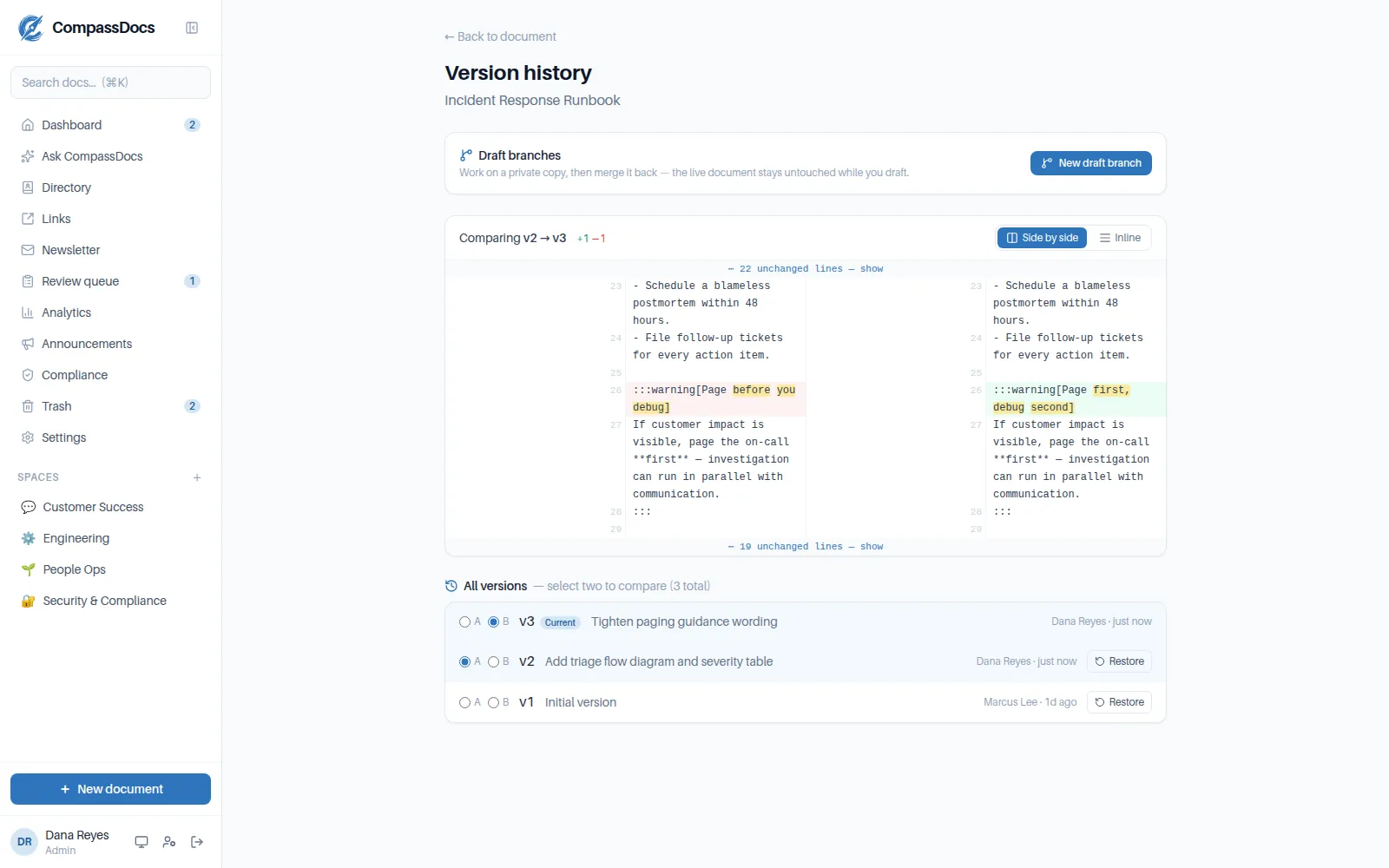
Version history shows exactly what changed in a policy, who changed it and why.
Keep your policy documentation in-house
CompassDocs is self-hosted. Your policies, procedures and training records stay on infrastructure you control, not in a vendor’s cloud.
Your servers
Everything lives in one PostgreSQL database you control, with scheduled backups, one-click restore and off-site mirrors you choose.
An audit trail
Sign-ins, role changes, publishes and approvals are recorded with actor, IP and time. Enterprise exports the log as CSV or JSON.
Not for patient records
CompassDocs is for policies, procedures and training. Don’t use it to store patient records or other protected health information.
A note on HIPAA compliance
CompassDocs doesn’t claim HIPAA compliance, and no documentation tool makes an organization HIPAA compliant. It helps you keep the records a HIPAA program relies on: approved and versioned policies, workforce acknowledgements, training completion and an audit trail. Your compliance program, your risk analysis and how you protect patient information remain your organization’s responsibility.
Getting started
Install the free Community edition for policies and approvals, then add an Enterprise license for read confirmations and training.
Run one command
The installer starts CompassDocs and PostgreSQL with Docker on your own server, and a setup wizard creates your admin account.
Publish your policies
Write or import your privacy and security policies, route them through approval, and gather them into a handbook.
Ask staff to confirm
Turn on read confirmations with due dates and a grace period for new joiners.
Assign training
Turn your training material into decks, bundle them into an onboarding program, and set recertification.
$ curl -fsSL https://raw.githubusercontent.com/Felix-AZ-Solutions-LLC/CompassDocs/main/install.sh | bash
  ✓ Fetched docker-compose.yml
  ✓ Generated .env with fresh secrets
  ▲ CompassDocs running at http://localhost:3000
  → open the URL to create your admin account
Requirements, platforms and the Node.js install path are on the self-hosting page →
Set up faster with Claude
CompassDocs is built for MCP, so Claude can do the first draft of your rollout while your team reviews and publishes. When you start, we walk you through it.
Bring your content in
Paste or attach the procedures and policies you already have, and Claude redrafts each one in your templates, screenshots included.
Draft the handbook and training
Claude assembles a draft handbook from your policies and, with Enterprise, turns procedures into training decks with quiz questions.
Configure the helpdesk as drafts
Request types, forms, workflows, macros and recurring tickets are drafted for an admin to review and publish. Nothing goes live on its own.
See everything Claude can do through MCP and the step-by-step rollout.
Frequently asked
Is CompassDocs HIPAA compliant?
CompassDocs doesn’t claim HIPAA compliance or certification. It is a documentation, policy and training tool that helps you keep records such as policy acknowledgements, training completion and an audit trail. Compliance remains your organization’s responsibility.
Should we store patient information in CompassDocs?
No. Use CompassDocs for your policies, procedures and training records, not for patient records or other protected health information.
Can we show who completed training and when?
Yes. Every completion records who completed which deck, when, the quiz score and the exact document version confirmed. Each completion earns a printable certificate, and progress exports to CSV.
What about staff who were trained before we started?
Waive the deck for selected people or for everyone. They are marked done with no notifications, and the record shows waived, distinct from a real completion.
Where are our documents kept?
On your own server, in one PostgreSQL database you control and back up. CompassDocs is self-hosted, so policy and training documentation stays in-house rather than in a third-party cloud.
Related: Healthcare & clinics · Policy management · Security awareness training · Training & onboarding · Self-hosting
Policies and training, on your own servers
Self-host CompassDocs with one Docker command. Enterprise adds read confirmations, training, SSO and SCIM from $499.99/year with unlimited users.
Self-host it free See pricingBuying for a team? Get a formal quote to print for approval, or order by invoice with your PO number.