 CompassDocs
Security awareness training tracking, built on your own docs
Your security team already writes the guidance: the acceptable use policy, how to spot phishing, what to do with a lost laptop. CompassDocs turns those documents into training decks, assigns them with due dates, and keeps security awareness training tracking in one place: who finished, who’s overdue, quiz scores and the exact version each person confirmed, with CSV export for your auditor.
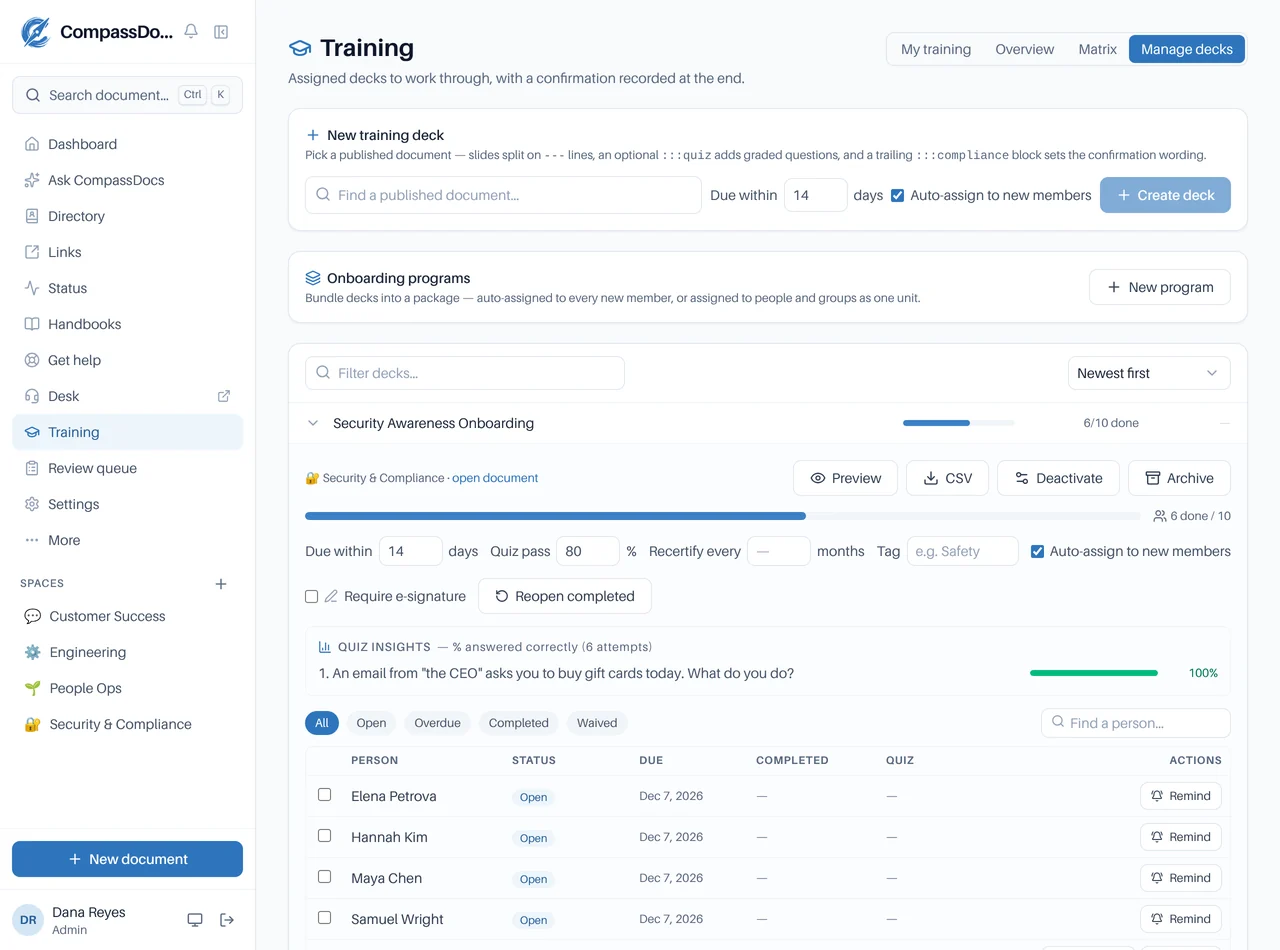
Manage decks: a Security Awareness Onboarding deck, auto-assigned to new members, with progress and CSV export.
Why security awareness training is hard to prove
Running the training is only half the job. The other half is showing, months later, that everyone did it.
× Training content lives in one tool and the policies it covers live in another, and they drift apart.
× Completion is tracked in a spreadsheet that has to be rebuilt before every audit.
× New starters miss the training because nobody enrolled them.
× The annual refresher depends on someone remembering to send it.
× Staff who were trained before the new tool get nagged, or counted as never trained.
→ Training decks made from your documents, assigned automatically, with records an auditor will accept.
How CompassDocs handles security awareness training tracking
Training is part of CompassDocs Enterprise. The documents it’s built from are in every edition.
Docs become decks
Add slide breaks to any published document and turn it into a deck. Outside the player it still reads as one normal page.
Training decks →Quizzes and a confirmation gate
Multiple-choice questions graded on the server, a pass threshold that unlocks the confirmation, and the exact wording people confirm.
Quizzes & confirmation →Assignments with due dates
Assign to people, groups or everyone, with automatic due and overdue reminders and a My training tile on each dashboard.
Assignments →Annual recertification
Decks reopen automatically every N months, keeping every prior completion in the record.
Recertification →Completion records and CSV
Per-deck and org-wide dashboards, per-person progress with quiz scores, printable certificates and CSV export.
Proof that holds up →Policies people confirm
Pair training with read confirmations on the acceptable use and security policies themselves, with due dates and annual re-confirmation.
Read confirmations →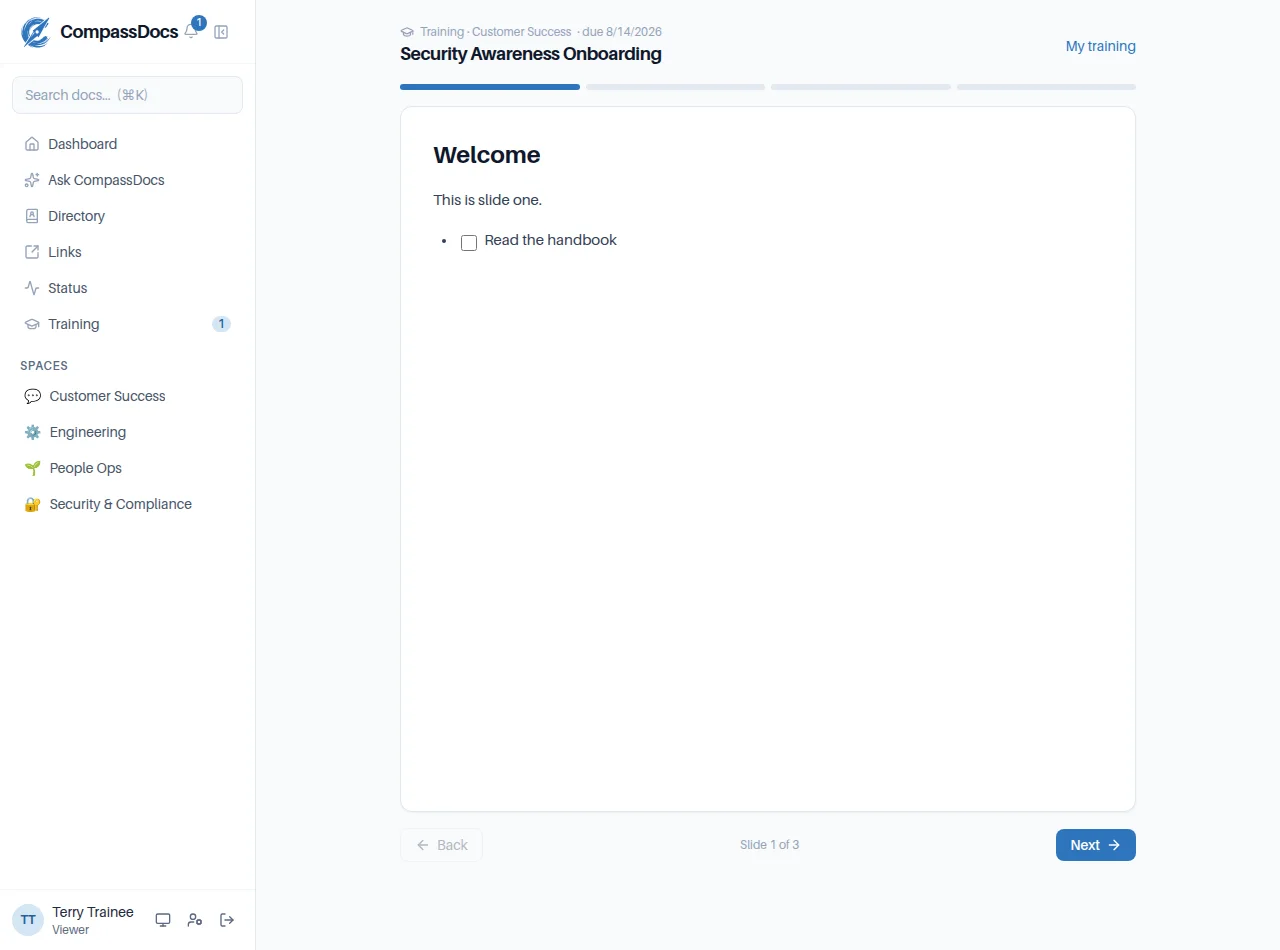
The player: one slide at a time, arrow keys, and a recorded confirmation at the end.
From rollout day to audit day
Built for the awkward realities of real organizations, not just the happy path.
- Onboarding programs bundle decks into a package every new account gets automatically, whether created locally, by single sign-on or by SCIM
- Waive a deck for staff who already did security awareness training elsewhere: marked done, no notifications, and the record honestly says waived
- Every completion carries a timestamp and the document version confirmed, so a later edit is visible in the record
- Group leads get one weekly email covering their team’s training and policies
- Hand the program to your security or HR team through delegated section access, without making them workspace admins
Also from Claude
The Claude connector can create a deck, assign it, and tell you who hasn’t finished, with the same permissions as the person asking.
Draft the deck
Ask Claude to turn your phishing guidance into a training deck from a published document.
Assign it
Assign it to a group with a due date, the same as you would in the app.
Check progress
Ask who hasn’t finished, then follow up from the training dashboard.
Records, not a compliance guarantee
CompassDocs helps you run security awareness training and keep completion records with CSV export, alongside the audit log. It doesn’t certify your organization against any framework, and which training you need and what your auditor accepts remain your organization’s responsibility.
Getting started
Install CompassDocs, publish your security guidance, and add an Enterprise license to turn on training.
Run one command
The installer starts CompassDocs and PostgreSQL with Docker, and a setup wizard creates your admin account in the browser.
Write the content
Write or reuse your security guidance as documents, add slide breaks, and add an optional quiz and compliance block.
Create the deck
Publish the document and turn it into a deck from the Training tab, with a due window and auto-assign to new members.
Assign and track
Assign it to everyone or chosen groups, set recertification, and export completions to CSV when you need them.
$ curl -fsSL https://raw.githubusercontent.com/Felix-AZ-Solutions-LLC/CompassDocs/main/install.sh | bash
  ✓ Fetched docker-compose.yml
  ✓ Generated .env with fresh secrets
  ▲ CompassDocs running at http://localhost:3000
  → open the URL to create your admin account
Requirements, platforms and the Node.js install path are on the self-hosting page →
Set up faster with Claude
CompassDocs is built for MCP, so Claude can do the first draft of your rollout while your team reviews and publishes. When you start, we walk you through it.
Bring your content in
Paste or attach the procedures and policies you already have, and Claude redrafts each one in your templates, screenshots included.
Draft the handbook and training
Claude assembles a draft handbook from your policies and, with Enterprise, turns procedures into training decks with quiz questions.
Configure the helpdesk as drafts
Request types, forms, workflows, macros and recurring tickets are drafted for an admin to review and publish. Nothing goes live on its own.
See everything Claude can do through MCP and the step-by-step rollout.
Frequently asked
Does CompassDocs include ready-made security awareness courses?
No. CompassDocs turns documents you write, or already have, into training decks. If you need a ready-made course library or phishing simulations, you would pair it with a provider that offers them.
How do we prove who completed the training?
Every confirmation records who completed which deck, when, the quiz score and the exact document version confirmed. Progress lives on per-deck and org-wide dashboards with CSV export, each completion earns a printable certificate, and the audit log sits alongside.
Can the training repeat every year?
Yes. Recertification reopens a deck automatically every N months, and every prior completion stays in the record.
Can new hires be enrolled automatically?
Yes. A deck can auto-assign to every new member, and onboarding programs bundle several decks into a package every new account receives, whether created locally, by single sign-on or by SCIM.
Which edition includes training?
Training is part of CompassDocs Enterprise: $499.99 a year per install with unlimited users. The documents themselves, approvals and version history are in the free Community edition.
Related: Training & onboarding · SOC 2 and ISO 27001 policies · HIPAA policy and training · Read confirmations · Pricing
Security training, minus the LMS
Self-host CompassDocs with one Docker command and unlimited users. Enterprise adds training, read confirmations, the helpdesk, SSO and SCIM from $499.99/year.
Self-host it free See pricingBuying for a team? Get a formal quote to print for approval, or order by invoice with your PO number.