 CompassDocs
Policy acknowledgement for SOC 2 and ISO 27001, with evidence you can hand over
Auditors for programs like SOC 2 and ISO 27001 commonly ask to see your security policies, who approved them, and proof that staff have read them. CompassDocs keeps that policy acknowledgement evidence in one self-hosted place: approved and versioned policies, read confirmations against the exact version, annual re-confirmation, training records and an audit log.
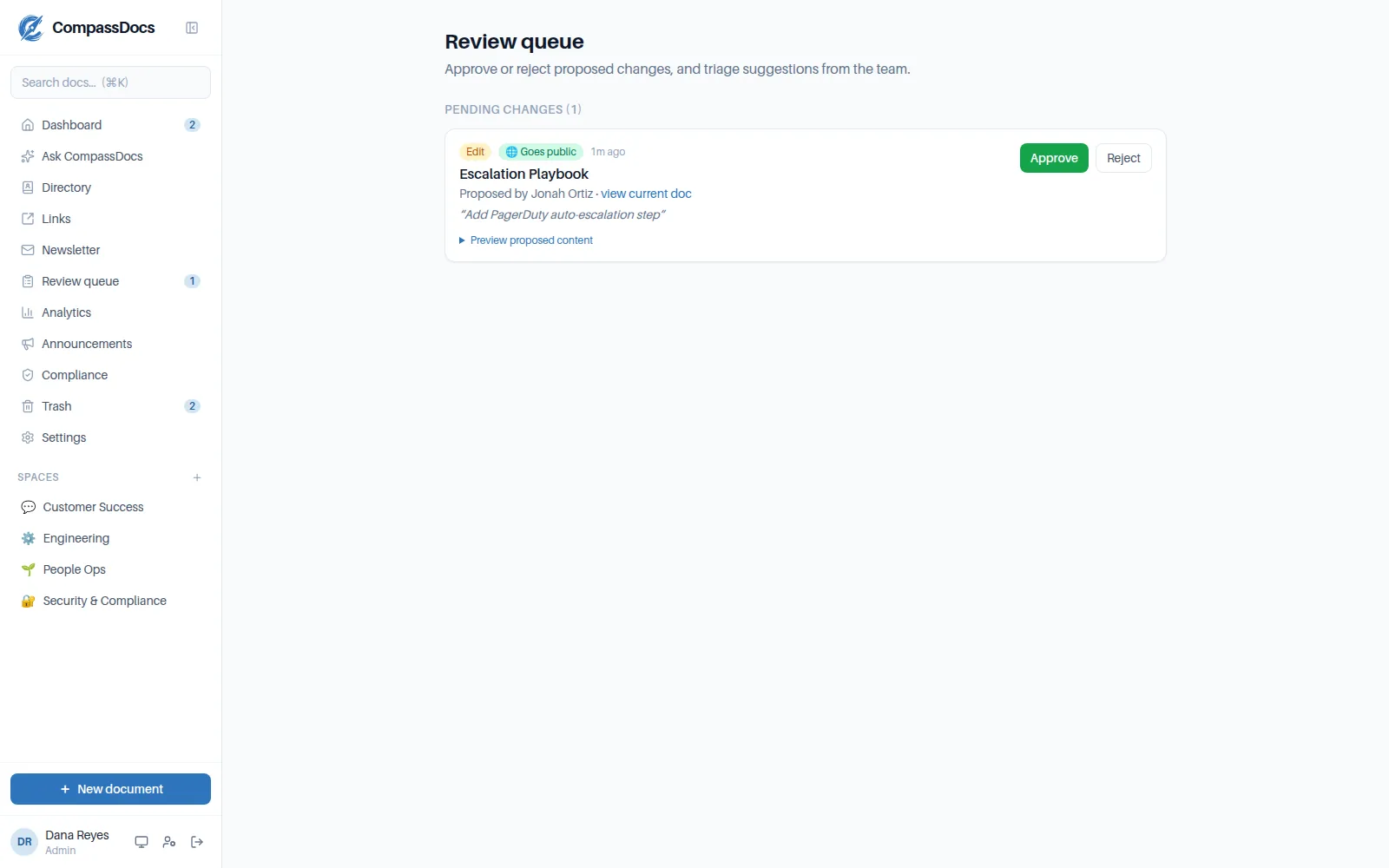
The review queue: a proposed change waits for an approver before it publishes.
Policy evidence is the part of an audit that hurts
Writing the policies is the easy part. Proving, a year later, that the right people read the right version is where spreadsheets and email trails fall apart.
× Policies live in shared drives, and nobody is sure which file is the approved one.
× Acknowledgements are collected by email or a form, and matched to names by hand before the audit.
× A policy changes mid-year, and there’s no record of who read the old version or the new one.
× New joiners slip through, and the annual refresh gets forgotten.
× Training completion lives in a separate tool, with no link to the policy it covers.
→ Approved policies, confirmations tied to versions, and records an auditor can check, from one system.
How CompassDocs keeps SOC 2 and ISO 27001 policy evidence
Policies, approvals, version history, handbooks and the audit log are in every edition. Read confirmations, training and audit-log export are Enterprise.
Approved before publish
A draft, review and approve workflow, with strict mode turning edits to published policies into change requests. Approved changes record the approver.
Roles & approvals →Every version kept
Every save is a version with author, time and change note. Compare any two side by side and show what a policy said on any date.
Version history →Read confirmations
People confirm against the exact version they read, with a statement and an optional typed signature. Due dates, reminders and escalation run on their own.
Read confirmations →Policy handbooks
Gather your information security policies into one handbook, confirmed in one step and printed with an acknowledgement page.
Policy handbooks →Training records
Turn a policy into a training deck with an optional quiz and confirmation gate. Completions record the document version and export to CSV.
Training & onboarding →Audit log
An append-only log of sign-ins, role changes, publishes and approvals, with actor, IP and time. Enterprise exports it as CSV or JSON.
Admin console & audit log →Evidence an auditor can verify
Read confirmations are built around the question an auditor asks: who confirmed which version, and when.
- A per-policy and per-person record with the statement, version and time of every confirmation
- Monthly snapshots with a SHA-256 an auditor can recompute
- One audit package: a ZIP with a hash manifest
- One compliance record per person, CSV exports and a scheduled report
- A compliance portal with a Needs attention queue, which you can delegate to compliance staff without making them admins
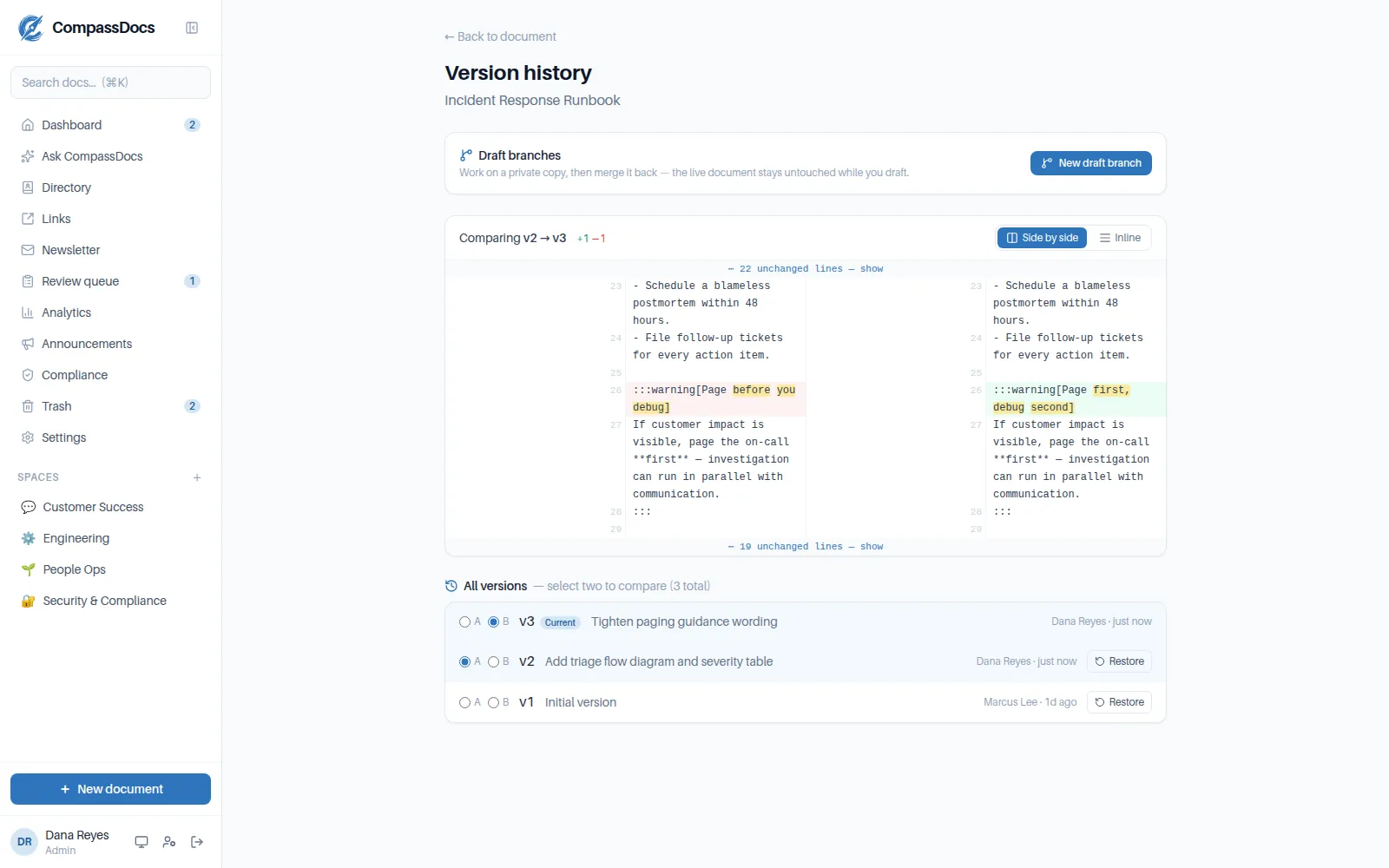
Version history: what changed, who changed it and why, with word-level highlights.
The annual cycle, without the chasing
Policy acknowledgement isn’t a one-off. CompassDocs handles the year around it.
Annual re-confirmation
Set a policy to be re-confirmed every year, with effective dates and retirement that keeps the history. Policy sets run the annual cycle as one unit.
Joiners enrolled
New accounts, local, SSO or SCIM, join the audiences that cover them and get a due date from the new-joiner grace period.
Changes handled honestly
Edits never reset silently. You decide whether a change is editorial or material; only a material change asks people again, and they see what changed.
CompassDocs is not a certification
Using CompassDocs doesn’t make your organization SOC 2 or ISO 27001 compliant or certified. It helps you keep the records those programs ask for: approved and versioned policies, read confirmations, training completion and an audit log. Your compliance program, your controls and what your auditor accepts remain your organization’s responsibility.
Setting up policy acknowledgement
Write and approve policies in the free Community edition, then add an Enterprise license for read confirmations, training and the compliance portal.
Run one command
The installer starts CompassDocs and PostgreSQL with Docker, and a setup wizard creates your admin account in the browser.
Publish your policies
Put them in a space, turn on strict approval mode, and gather them into a handbook.
Require readers to confirm
Choose who must confirm, set due dates and annual re-confirmation, and bundle the set for new joiners.
Hand over the evidence
Export CSVs, the per-person record or the audit package when the auditor asks.
$ curl -fsSL https://raw.githubusercontent.com/Felix-AZ-Solutions-LLC/CompassDocs/main/install.sh | bash
  ✓ Fetched docker-compose.yml
  ✓ Generated .env with fresh secrets
  ▲ CompassDocs running at http://localhost:3000
  → open the URL to create your admin account
Requirements, platforms and the Node.js install path are on the self-hosting page →
Set up faster with Claude
CompassDocs is built for MCP, so Claude can do the first draft of your rollout while your team reviews and publishes. When you start, we walk you through it.
Bring your content in
Paste or attach the procedures and policies you already have, and Claude redrafts each one in your templates, screenshots included.
Draft the handbook and training
Claude assembles a draft handbook from your policies and, with Enterprise, turns procedures into training decks with quiz questions.
Configure the helpdesk as drafts
Request types, forms, workflows, macros and recurring tickets are drafted for an admin to review and publish. Nothing goes live on its own.
See everything Claude can do through MCP and the step-by-step rollout.
Frequently asked
Does CompassDocs make us SOC 2 or ISO 27001 compliant?
No. CompassDocs is a documentation and policy tool, not a certification, and using it doesn’t make your organization compliant or certified. It helps you keep evidence such as approved policies, read confirmations, training records and an audit log. Compliance remains your organization’s responsibility.
What evidence can we give an auditor?
A per-policy and per-person record with the statement, version and time of every confirmation; monthly snapshots with a SHA-256 they can recompute; an audit package as a ZIP with a hash manifest; CSV exports; training completions with the document version confirmed; and the audit log.
How does annual re-confirmation work?
A policy can be set to be re-confirmed every year. People are asked again on schedule and reminded automatically, with escalation to owners and leads. Policy sets let you run the annual cycle as one unit.
What happens when we change a policy?
CompassDocs suggests whether a change is editorial or material and you choose. Only a material change or a deliberate re-ask asks people again, and readers see what changed since the version they confirmed.
Which edition do we need?
Policies, approvals, version history, handbooks and the in-app audit log are in the free Community edition. Read confirmations, the compliance portal, training and audit-log export are part of Enterprise, $499.99 a year per install with unlimited users.
Related: Policy management · Security awareness training · HIPAA policy and training · Helpdesk security · Pricing
Policy evidence without a second system
Self-host CompassDocs with one Docker command. Enterprise adds read confirmations, training, the helpdesk, SSO and SCIM from $499.99/year with unlimited users.
Self-host it free See pricingBuying for a team? Get a formal quote to print for approval, or order by invoice with your PO number.