 CompassDocs
Key takeaways
- Read the license first: permissive (like MIT), copyleft (like AGPL-3.0) and source-available licenses carry different terms.
- Self-hosting is a commitment. Look at the stack, the install path, upgrades and backups before features.
- Search, permissions and governance (approvals, version history, review dates) decide whether a knowledge base stays useful past year one.
- Check where SSO, SCIM and audit features sit: in the open-source edition or a paid one.
- Insist on a clean export. Markdown in, Markdown out is the simplest guarantee against lock-in.
Why choose open-source knowledge base software?
A knowledge base holds some of your most sensitive and long-lived information: procedures, architecture, policies, customer details in support notes. Teams choose open-source software for it for a few recurring reasons:
- Control of data. Self-hosting keeps content on infrastructure you run, under your own security and retention rules.
- Transparency. You (or your security team) can read the code that handles your data.
- Longevity. If a vendor changes direction, the code and your data don’t disappear.
- Cost shape. Many open-source tools are free to run, with paid editions or support that aren’t priced per user.
The trade-off is responsibility: someone has to install, update, back up and secure it. The criteria below help you see how much work that is for each option.
1. Licensing
“Open source” is a family of licenses, and the differences matter:
- Permissive licenses such as MIT let you use, modify and redistribute the software with few conditions.
- Copyleft licenses such as the GNU AGPL-3.0 require that if you distribute a modified version, or let others use a modified version over a network, you make your modified source available under the same license. For an organization running unmodified software internally, this usually changes little, but read the license or ask counsel for your situation.
- Source-available licenses such as the Business Source License publish the code but restrict some uses. They are not open source in the OSI sense, though they may still suit you.
Also check what the license covers. Some projects keep features such as SSO or audit logs in a separately licensed paid edition. That’s a reasonable business model; just know which edition you are evaluating.
2. Self-hosting and operations
- Stack. Which language, database and services does it need? Prefer a stack your team already knows how to run.
- Install path. Is there an official Docker image or compose file? A guided setup? Support for the platforms you use (x86-64, ARM64, your cloud)?
- Upgrades. How often are releases published, and are upgrades a single step or a manual migration?
- Administration. Can settings such as the domain, HTTPS, email and backups be managed in a UI, or only in config files?
- Monitoring. Is there a health check you can point your monitoring at?
3. Search
Search is the feature people judge a knowledge base by. Test it with your own content and real questions, not the demo data. Look for ranked full-text search that handles typos and partial words, filters by space, type or tag, and results that respect permissions. Some tools now add semantic search (finding by meaning) and AI-generated answers; if you consider those, ask where the model runs, whose API key is used, whether answers cite their sources, and whether they can be turned off.
4. Permissions
Ask how access is structured (spaces, books, collections, groups) and whether it matches how your organization is divided. Check for private areas, group-based grants that follow people when they join or leave, roles beyond simple viewer and editor, and a way to answer “why can this person see this?”. Permissions that are hard to understand get loosened until they mean nothing.
5. Approvals and governance
A knowledge base without governance decays. If you store procedures, policies or anything an auditor might ask about, look for:
- A review or approval step before changes go live
- Full version history with comparison and restore
- Owners and review dates, with reminders
- An audit log of sign-ins, permission changes and publishes
- Read tracking or acknowledgements, if you need proof people read a policy
Many open-source wikis focus on writing and organizing and leave formal governance to process. That may be fine for an engineering wiki; it’s a gap for SOPs and policies.
6. SSO and user management
Check which identity providers are supported (SAML 2.0, OpenID Connect, LDAP), whether accounts can be provisioned and deprovisioned automatically through SCIM, and whether groups sync from your directory. Then check which edition each is in. Offboarding is where this matters most: a leaver should lose access to the knowledge base the moment they lose access to everything else.
7. Import and export
The best protection against lock-in is a clean, documented export in an open format. Markdown is the most portable choice for text, ideally with front matter for titles and tags and with attachments included. Test both directions: import a sample of your existing content, then export it again and see what survives. Check whether there are importers for the tool you are leaving, or whether you will convert content to Markdown first.
8. Backups and restore
When you self-host, backups are your job. Look for built-in scheduled backups, off-site copies (to object storage such as S3 or Azure), and a documented restore. Then do a test restore before you go live. A backup that has never been restored is a hope, not a backup.
Examples of open-source knowledge base software
A few well-known projects, with stable, widely known facts only. Check each project for current details; this is not a ranking.
| Project | License | Notes |
|---|---|---|
| BookStack | MIT | A PHP (Laravel) application that organizes content as shelves, books, chapters and pages. Self-hosted. |
| Outline | Business Source License (source-available) | A collaborative wiki with a Markdown-friendly editor, available as a hosted service and for self-hosting. |
| Wiki.js | AGPL-3.0 | A Node.js wiki with Markdown and visual editors. Self-hosted. |
| CompassDocs | AGPL-3.0 | A self-hosted knowledge base on PostgreSQL with approvals, version history and policy handbooks; Enterprise adds SSO, SCIM, read confirmations, training and a helpdesk. |
For side-by-side detail, see BookStack alternative, Outline alternative and Wiki.js alternative.
Evaluation checklist
- License read and understood; edition boundaries known
- Installed on a test server using the official path; upgrade tested
- Search tested with your own content and real questions
- Permission model mapped to your teams; private areas tested
- Approval, version history, review dates and audit log checked
- SSO and SCIM tested with your identity provider
- Import and export round-trip tested
- Backup scheduled and a restore tested
- Total cost estimated: hosting, admin time and any paid edition (the business case builder can turn these into a deck for sign-off)
How CompassDocs approaches these criteria
We build CompassDocs, so take this as a description, not a verdict. CompassDocs is open source under AGPL-3.0. It installs with one Docker command (or with Node.js), runs on x86-64 and ARM64 with PostgreSQL, and a browser setup wizard creates the admin account. The admin console covers the domain with automatic HTTPS, scheduled backups to S3 or Azure and one-click restore. Search is ranked PostgreSQL full-text search, with optional semantic search and cited AI answers using your own Anthropic API key.
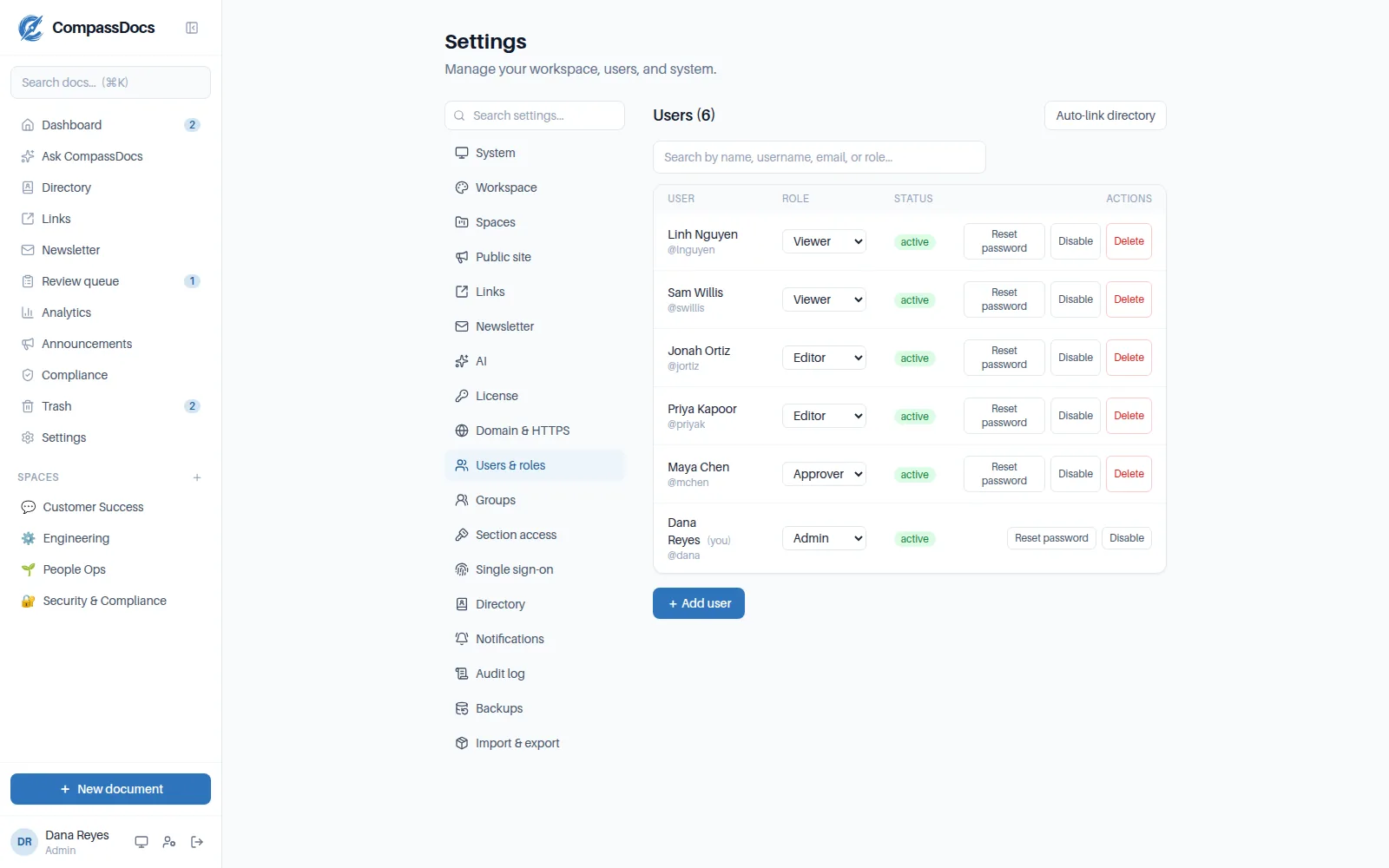
Governance is in every edition: roles with per-space edit rights, a draft, review and approve workflow, version history, review reminders, an in-app audit log and policy handbooks. When the four built-in roles aren’t enough, you can build custom roles from 200+ permissions. Content imports and exports as front-matter Markdown. Community is free with unlimited users; Enterprise ($499.99 a year per install, unlimited users) adds SSO (SAML 2.0 and OIDC), SCIM, Microsoft 365 directory sync, read confirmations, training and the internal helpdesk. Details are on features, self-hosting and knowledge management software.