 CompassDocs
An Outline wiki alternative with approvals and policy tracking
Outline is a fast, clean team wiki that you can use as a hosted service or run yourself. Teams look for an Outline wiki alternative when their docs need more control: review before changes go live, SOPs and policies with review dates, proof that people read them, and help requests handled next to the guides. CompassDocs is open source under AGPL-3.0, self-hosted, and has unlimited users.
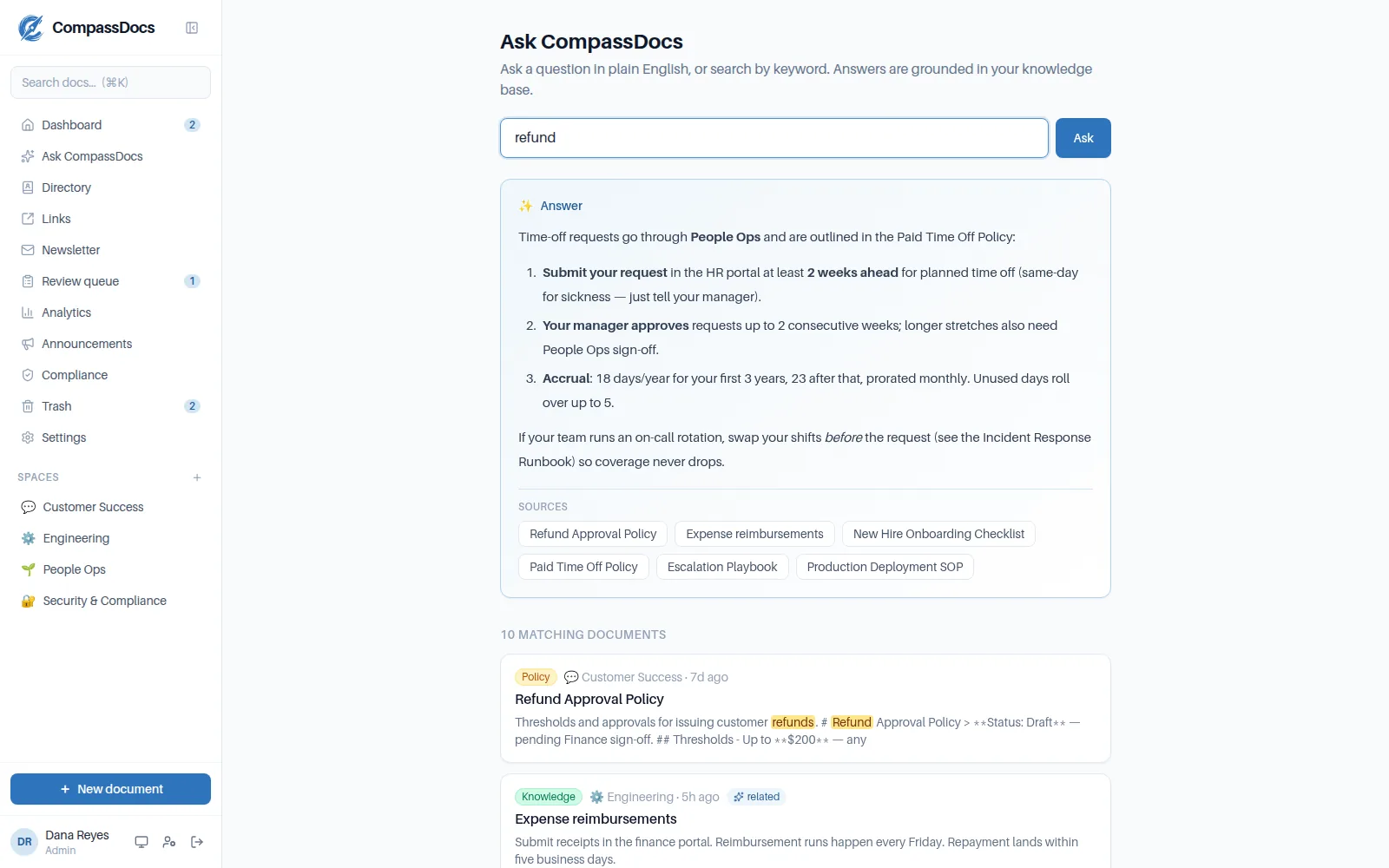
Ask in plain English and get an answer that cites the documents it came from.
Why teams look for an Outline wiki alternative
- Strict approval mode: edits to published documents become change requests that an approver reviews as a diff before they go live
- Documents typed as SOPs, policies and guides, with templates and review reminders so content is re-checked on schedule
- Custom roles built from 200+ permissions, granted to people or groups across the workspace or inside one space
- Policy handbooks in every edition, and read confirmations and training on Enterprise
- An internal helpdesk on the same install, where Get help suggests your guides before anyone sends a request
Markdown in, Markdown out
Write in rich text or Markdown. Documents are stored as portable Markdown, and the whole knowledge base exports to front-matter Markdown.
Governance when you want it
Open mode for speed, strict mode for control. Switch at any time, as your risk tolerance changes.
Open source, AGPL-3.0
The Community edition is free to self-host with unlimited users and documents, and you can read every line of the code.
CompassDocs and Outline side by side
Both are modern, Markdown-friendly knowledge bases you can run on your own servers. Here is where they differ.
| Compared | CompassDocs | Outline |
|---|---|---|
| What it is | A knowledge base with approvals, policy handbooks and an optional internal helpdesk | A team wiki and knowledge base |
| Hosting | Self-hosted with Docker, or Node.js and PostgreSQL, in one PostgreSQL database you control. A managed Cloud is coming soon | A hosted service, or self-hosted |
| Source code | Open source, AGPL-3.0 | Source-available under the Business Source License |
| Pricing model | Community: free, unlimited users. Enterprise: $499.99/year per install, unlimited users, 3 helpdesk agents included, extra agents $125/year each | Subscription for the hosted service; self-hosting under its license terms |
| Structure | Spaces (internal, private or public) with optional categories; documents typed as SOP, policy or guide, with tags | Collections of nested documents |
| Review before publishing | Optional strict mode: edits to published docs become change requests for an approver. Viewers can suggest edits, and big rewrites go on draft branches | Collaborative editing with document history |
| AI answers from your docs | Cited answers grounded only in your documents, with your own Anthropic key (keyword search is free) | See Outline for its search and AI options |
| Policies and training | Policy handbooks in every edition. Enterprise: read confirmations with due dates, reminders and a compliance portal, and training decks with completion tracking | Not built in |
| Helpdesk | Enterprise: Get help, the desk, request types, workflows and approvals, SLAs, automations, assets, major incidents and reports | Not part of the product |
| Sign-in | Community: CompassDocs accounts with two-factor auth. Enterprise: SAML 2.0 and OIDC, one-click Microsoft Entra setup, SCIM provisioning | Sign-in through identity providers such as Google, Microsoft, Slack or OIDC |
Outline details describe its general model, not a specific plan. Check Outline for current plans, features, pricing and license terms.
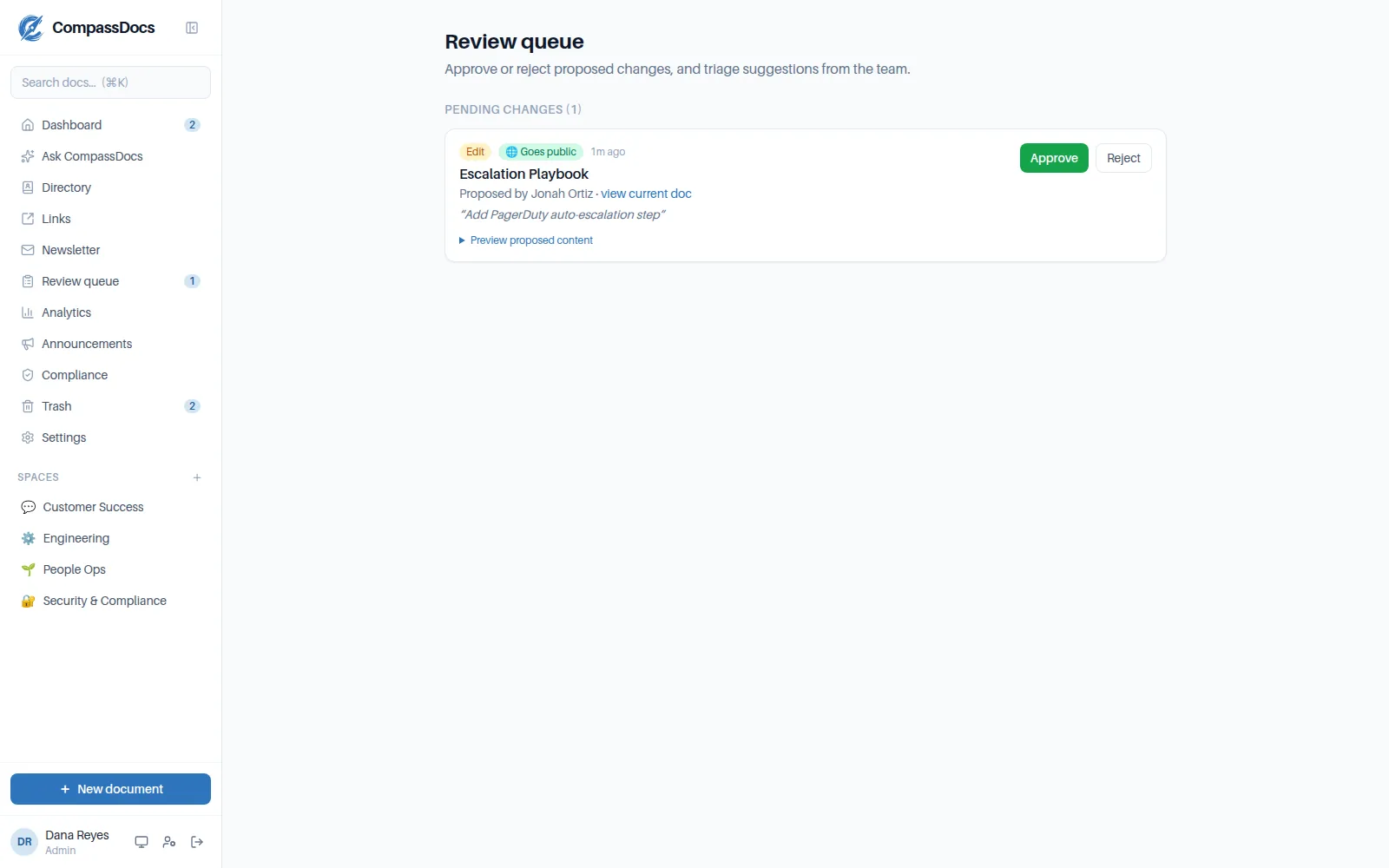
The review queue: in strict mode, a proposed edit waits here, and an approver checks the changes against the live version before they go live.
When Outline is the better fit
Outline is a good wiki for many teams. It’s likely the better choice if:
You want a hosted wiki today
Outline offers a hosted service. CompassDocs Cloud isn’t open yet, so today CompassDocs means running it yourself: Docker, backups and updates.
Co-writing in real time is central
Outline is built around several people editing one document at once. If that’s how your team writes, try that workflow in both before you switch.
You want a light wiki
If you don’t need approvals, policy tracking or a helpdesk, Outline’s simpler model may suit you better.
Moving from Outline to CompassDocs
Bring collections across one at a time, and keep Outline running until you’re done.
Run one command
The installer starts CompassDocs and PostgreSQL with Docker, and a setup wizard creates your admin account in the browser.
Export your collections
Outline exports collections as Markdown files. Export one collection at a time so each lands in its own space.
Import as front-matter Markdown
Import the files into a space for each collection, attaching images and files. There is no built-in Outline importer.
Set access and review
Make each space internal, private or public, choose open or strict approval mode, and give key documents a review cadence.
$ curl -fsSL https://raw.githubusercontent.com/Felix-AZ-Solutions-LLC/CompassDocs/main/install.sh | bash
  ✓ Fetched docker-compose.yml
  ✓ Generated .env with fresh secrets
  ▲ CompassDocs running at http://localhost:3000
  → open the URL to create your admin account
Requirements, platforms and the Node.js install path are on the self-hosting page →
Set up faster with Claude
CompassDocs is built for MCP, so Claude can do the first draft of your rollout while your team reviews and publishes. When you start, we walk you through it.
Bring your content in
Paste or attach the procedures and policies you already have, and Claude redrafts each one in your templates, screenshots included.
Draft the handbook and training
Claude assembles a draft handbook from your policies and, with Enterprise, turns procedures into training decks with quiz questions.
Configure the helpdesk as drafts
Request types, forms, workflows, macros and recurring tickets are drafted for an admin to review and publish. Nothing goes live on its own.
See everything Claude can do through MCP and the step-by-step rollout.
Frequently asked
Is CompassDocs open source?
Yes. The Community edition is open source under AGPL-3.0 and free to self-host with unlimited users and documents. Outline publishes its code under the Business Source License, which has its own terms; check them if licensing matters to you.
Is there an Outline importer?
No. CompassDocs imports and exports front-matter Markdown. Outline exports Markdown, so content moves across after a conversion step, and everything exports back out of CompassDocs the same way.
Do we need an identity provider to sign in?
No. The Community edition uses CompassDocs accounts with two-factor authentication. Enterprise adds single sign-on over SAML 2.0 or OIDC, one-click Microsoft Entra setup and SCIM provisioning.
What does it cost?
The self-hosted Community edition is free with unlimited users and documents, and already includes roles and approvals, version history, policy handbooks and AI answers. Enterprise is $499.99 a year per install with unlimited users, and adds SSO and SCIM, Microsoft 365 sync, read confirmations, training and the helpdesk (3 agents included, extra agents $125 a year each).
Can we publish some docs publicly?
Yes. Mark a space public and its published documents get an anonymous, searchable website with your branding. Drafts are never public, and everything else stays behind sign-in.
Related: BookStack alternative · Notion alternative · Policy handbooks · Read confirmations · Self-hosting
A team wiki with approvals, on your own servers
Self-host CompassDocs free with one Docker command and unlimited users. Enterprise adds SSO, read confirmations, training and the internal helpdesk for $499.99/year.
Self-host free See pricingBuying for a team? Get a formal quote to print for approval, or order by invoice with your PO number.
Need sign-off first? Build a business case deck with your own costs, free and with no sign-up.