 CompassDocs
Open-source knowledge management software you run yourself
Knowledge management software should do more than store pages. CompassDocs helps your team capture what it knows, review it before it goes live, find it with answers that cite the source, see what’s missing, and keep it current. It’s open source, self-hosted, and free for unlimited users.
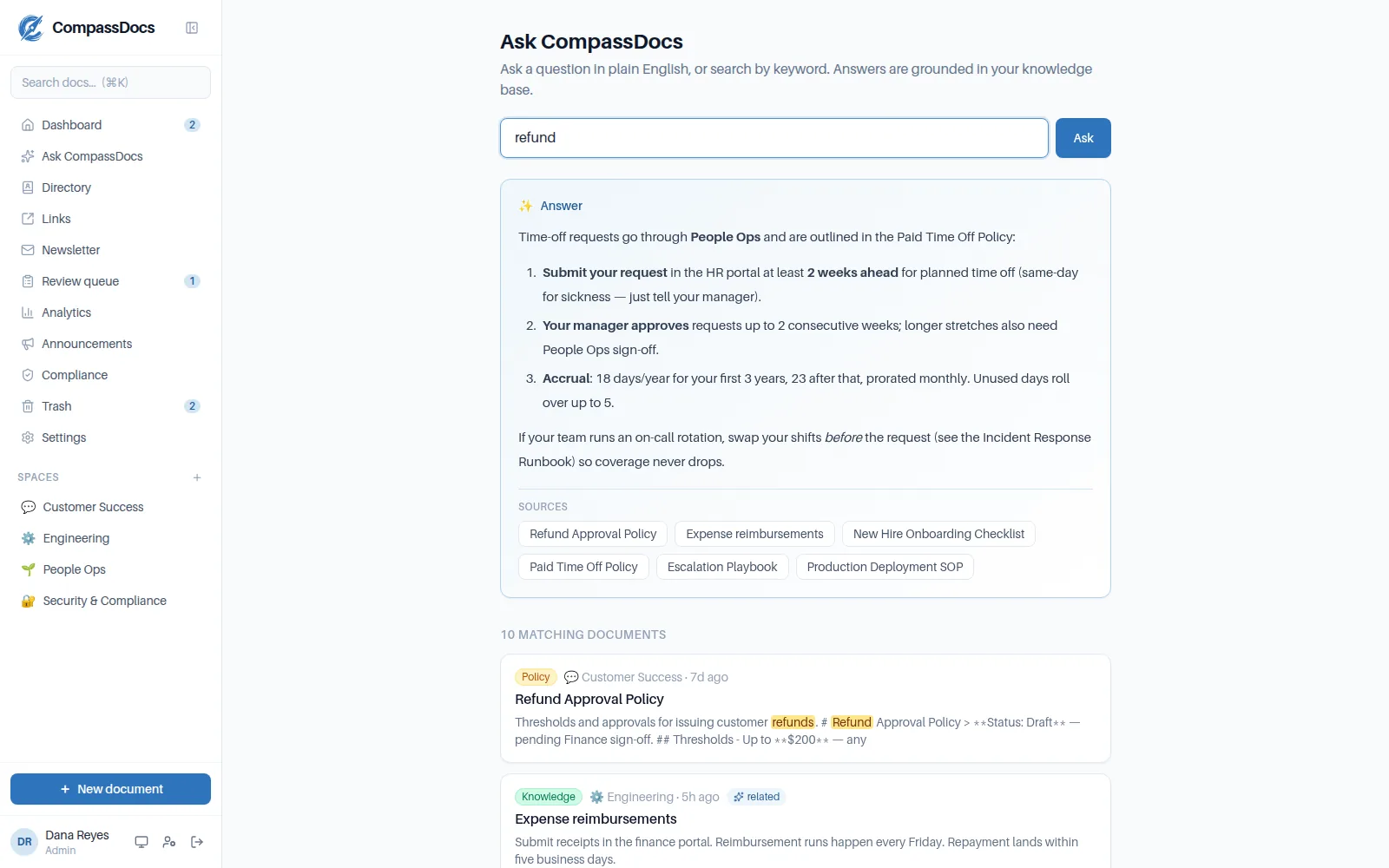
Ask in plain English and get an answer from your own documents, with every source cited.
Where team knowledge gets lost
Most organizations don’t lack knowledge. They lack a reliable way to write it down, trust it and find it again.
× What people know lives in chat threads, inboxes and the heads of a few long-serving colleagues.
× When it is written down, nobody knows whether the page is current or who owns it.
× Search needs the exact title, so people give up and ask someone.
× Nobody can tell which documents get read, and which questions have no answer at all.
× The knowledge sits in a vendor’s cloud, in a format that’s hard to take with you.
→ A knowledge management system that covers the whole lifecycle, on servers you control.
Knowledge management software for the whole lifecycle
Capture, govern, find, deliver, measure. Each step has its own feature page.
Capture
A rich editor or Markdown, with tables, callouts, checklists, decision trees, diagrams and pasted screenshots. Typed documents such as SOP, policy and guide.
Rich editor →Govern
Custom roles from 200+ permissions, and a strict mode where every change to a published document is reviewed before it goes live.
Roles & approvals →Keep a record
Every save is a version with who, when and why. Compare, restore, and see changes in the append-only audit log.
Version history →Find
Keyword and semantic search, a ⌘K command palette, and AI answers grounded only in documents the asker can see.
AI search →Measure
Views, time on page, trending and least-read documents, and searches that returned nothing, all computed on your own server.
Analytics →Deliver as policy
Gather policies and SOPs into handbooks people read as one, with Enterprise read confirmations and training on top.
Policy handbooks →Publish
Mark a space public and its published documents get a clean, anonymous site with search, your branding and print to PDF.
Public site →Answer requests
With Enterprise, the helpdesk suggests articles before people ask and lets agents insert them into replies.
Helpdesk →Work from Claude
The Claude connector lets Claude search, draft and update documents with the same permissions the user has, with approvals still applying.
Claude connector →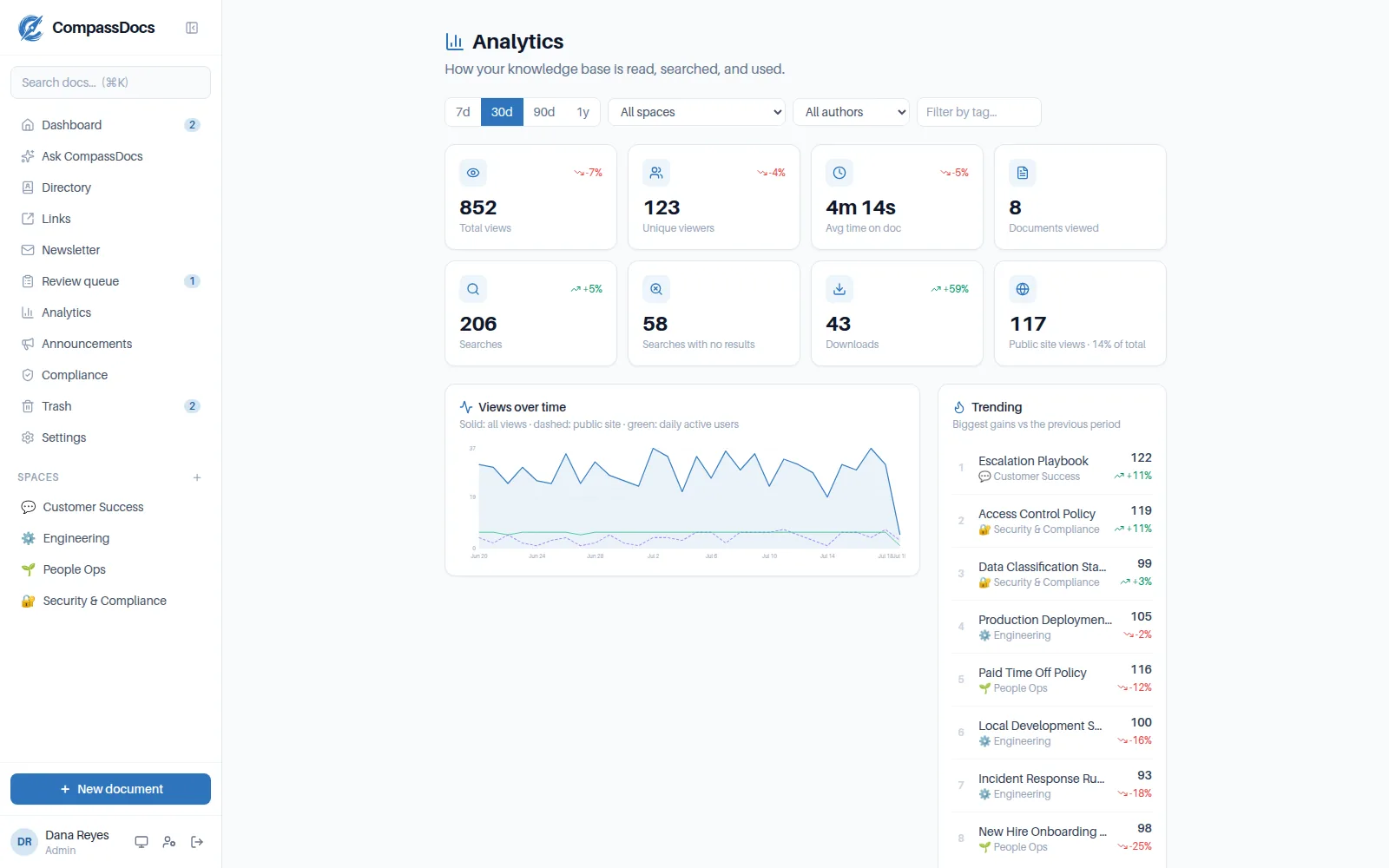
Analytics: KPIs with trends, views over time and trending documents.
See what your knowledge base is missing
Knowledge management isn’t finished when a page is published. CompassDocs shows you what’s working and where the gaps are, without sending usage data anywhere.
- Total and unique views, average time on document and downloads, with trends against the previous period
- Trending, most-viewed and least-viewed documents, so you know what to refresh, promote or retire
- Search analytics with content gaps: what people looked for and didn’t find, each linked so you can fill it
- Content review reminders so owners re-check documents on a schedule
- Events stored in your own PostgreSQL database, with no third-party analytics service
Open source, self-hosted, yours
Your knowledge base is one of the most valuable things your team owns. CompassDocs keeps it that way.
AGPL-3.0
The Community edition is open source, with unlimited users and documents and no feature gates on the essentials.
One database you control
Docs, versions, users and settings live in one PostgreSQL database, with scheduled backups and one-click restore.
Markdown in and out
Everything exports to front-matter Markdown and imports back. Embeddings for semantic search can come from a local engine such as Ollama.
Getting started
Install the free Community edition, bring your existing documents, and add Enterprise when you need SSO, compliance or the helpdesk.
Run one command
The installer starts CompassDocs and PostgreSQL with Docker, and a setup wizard creates your admin account in the browser.
Set up spaces and roles
A space per team or topic, with Viewer, Editor, Approver and Admin presets or your own custom roles.
Import what you have
Bring documents in as front-matter Markdown, including Confluence pages exported to Markdown.
Turn on answers
Add your Anthropic API key for AI answers, and choose an embeddings provider for semantic search.
$ curl -fsSL https://raw.githubusercontent.com/Felix-AZ-Solutions-LLC/CompassDocs/main/install.sh | bash
  ✓ Fetched docker-compose.yml
  ✓ Generated .env with fresh secrets
  ▲ CompassDocs running at http://localhost:3000
  → open the URL to create your admin account
Requirements, platforms and the Node.js install path are on the self-hosting page →
Set up faster with Claude
CompassDocs is built for MCP, so Claude can do the first draft of your rollout while your team reviews and publishes. When you start, we walk you through it.
Bring your content in
Paste or attach the procedures and policies you already have, and Claude redrafts each one in your templates, screenshots included.
Draft the handbook and training
Claude assembles a draft handbook from your policies and, with Enterprise, turns procedures into training decks with quiz questions.
Configure the helpdesk as drafts
Request types, forms, workflows, macros and recurring tickets are drafted for an admin to review and publish. Nothing goes live on its own.
See everything Claude can do through MCP and the step-by-step rollout.
Frequently asked
What is knowledge management software?
Software that helps an organization capture what its people know, keep it accurate, and get it to the people who need it. In CompassDocs that means an editor and typed documents, approvals and version history, search and cited answers, analytics, and ways to deliver knowledge as handbooks, training or helpdesk answers.
Is CompassDocs open source?
Yes. The Community edition is open source under AGPL-3.0 and free to self-host, with unlimited users and documents. Enterprise ($499.99 a year per install, unlimited users) adds SSO, SCIM, directory sync, read confirmations, training and the helpdesk.
How does it keep knowledge current?
Approvals mean a change is reviewed before it publishes, content review reminders ask owners to re-check documents on a schedule, version history shows what changed and why, and analytics show which documents nobody reads and which searches find nothing.
Does our content get sent to an AI provider?
Only if you turn AI on. AI answers use your own Anthropic API key, configured in the admin console. Semantic search embeddings can come from Voyage AI, OpenAI or a fully local engine such as Ollama, so document text never leaves your network. Without a key, keyword search and everything else still work.
How do we get existing content in?
Import documents as front-matter Markdown, including Confluence pages exported to Markdown. Everything exports back out the same way.
Related: Internal wiki software · SOP software · Confluence alternative · Open-source knowledge base software · All features
Free & open source to self-host
One Docker command installs CompassDocs with unlimited users and documents. Enterprise adds the helpdesk, SSO, Microsoft 365 sync, compliance, and training from $499.99/year.
Self-host it free See pricingBuying for a team? Get a formal quote to print for approval, or order by invoice with your PO number.