 CompassDocs
An HR helpdesk and staff handbook for school districts and charter schools
School HR answers the same questions every August, chases handbook acknowledgments by spreadsheet and onboards teachers, substitutes and paraprofessionals across every campus at once. CompassDocs is a self-hosted school district HR helpdesk and staff handbook in one: policies staff can find, acknowledgments recorded against the exact version, onboarding that starts with the account, and Ask HR requests that stay with HR.
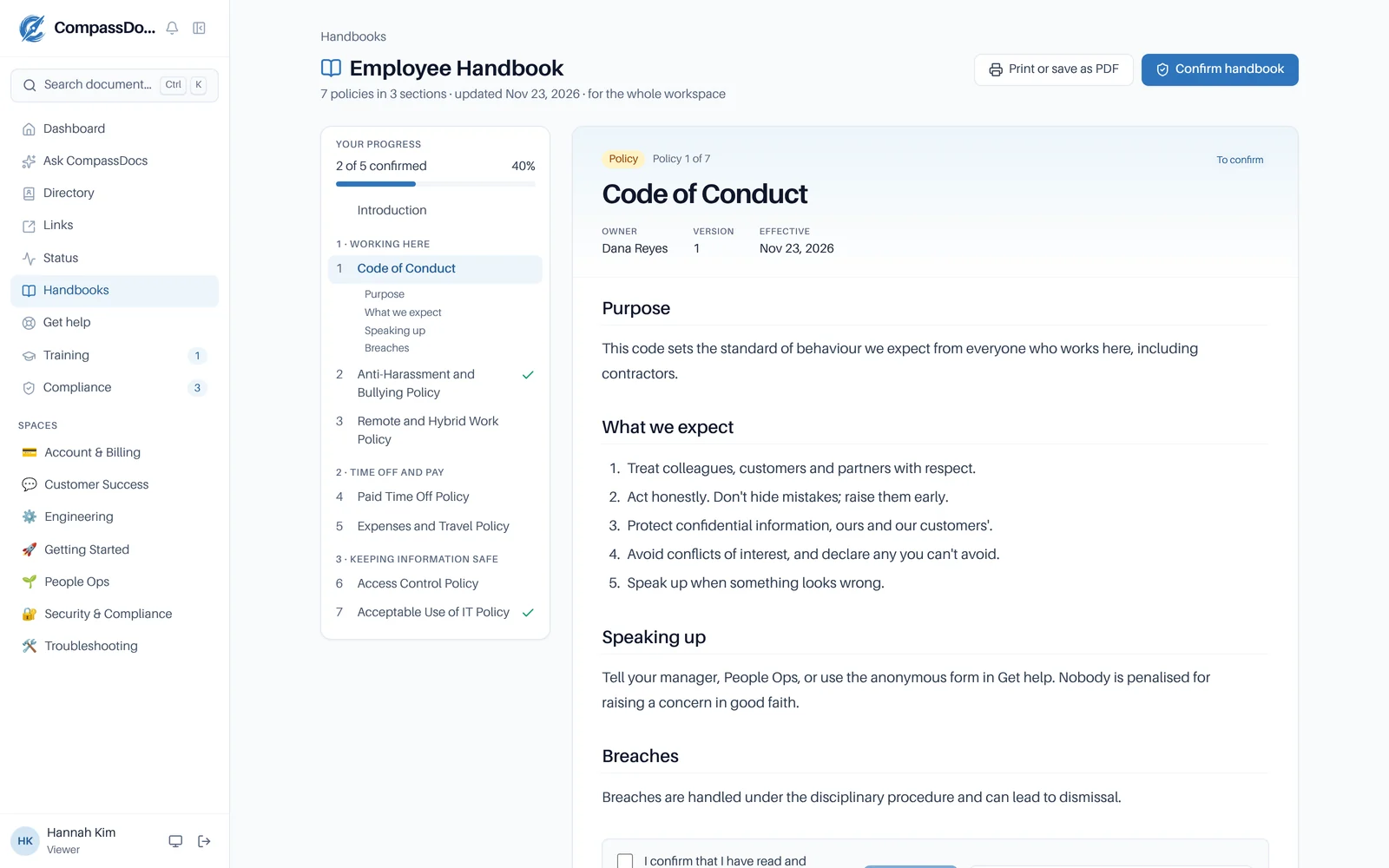
A staff handbook built from live policies: numbered sections, each policy’s owner and version, and the reader’s progress.
Back-to-school shouldn’t mean 400 emails to HR
School HR teams are small for the number of people they serve, and most of the work is answering, chasing and proving.
× The staff handbook is a PDF from two summers ago, and the board revised three policies since.
× Acknowledgment forms come back on paper, by email and through a survey tool, and someone types them into a spreadsheet.
× A new teacher’s laptop, badge, keys and classroom all depend on someone remembering to email IT and facilities.
× When an auditor or the authorizer asks who received the current policy, nobody can answer quickly.
→ One place for the handbook, the acknowledgments, onboarding and HR requests.
How school HR uses CompassDocs
Each HR job, the CompassDocs feature that does it, and what that looks like in a district or charter.
| Job | Feature | How it works |
|---|---|---|
| Publish the staff handbook | Policy handbooks | Gather published policies from any space into numbered sections, always current, with a printed copy that ends in an acknowledgement page. |
| Collect handbook and policy acknowledgments | Read confirmations (Enterprise) | Staff confirm the whole handbook in one step, with an optional typed signature. Each confirmation records the statement, the version and the time. |
| Run the annual sign-off | Policy sets and annual re-confirmation | Bundle the back-to-school policies as one set, give it a due date, and let reminders and escalation to group leads do the chasing. |
| Onboard new teachers and staff | Training & onboarding (Enterprise) | An onboarding program assigns every deck to each new account, created locally, by single sign-on or by SCIM, with the due clock starting on day one. |
| Coordinate a new hire across departments | Workflows & approvals | A New starter request starts IT, facilities and HR tasks in parallel, routed by the new hire’s campus, and waits until the start date. |
| Answer staff questions | Get help and AI search | Staff see answers from your documents before they ask; the rest become Ask HR requests with reply targets in HR’s office hours. |
| Keep personnel matters private | Desk roles and private spaces | Agents work only their own teams’ queues, custom fields can be Agent only, and HR procedures sit in a private space. |
| Keep the staff directory current | People directory | Campus and position as fields, an org chart, and on Enterprise, sync from Google Workspace or Microsoft 365. |
| Close out a leaver | SCIM and ticket privacy | With SCIM from Microsoft Entra, leavers are cut off and their sessions revoked at once; removing an account anonymises their tickets unless on legal hold. |
Staff handbook and policy acknowledgment for schools
Turn on Require readers to confirm on a published policy and choose the audience; CompassDocs works out who is due. HR can run the compliance portal without being workspace admins.
- Audiences by group, person or role: all certified staff, all classified staff, one campus, or everyone
- A separate grace period for new joiners, so a teacher hired in October still gets a fair due date
- Exemptions and extensions for staff on leave
- You decide whether a board revision is editorial or material; only a material change asks staff again, and they see what changed since the version they confirmed
- Group leads, such as principals, see where their staff stand and get one weekly digest for policies and training
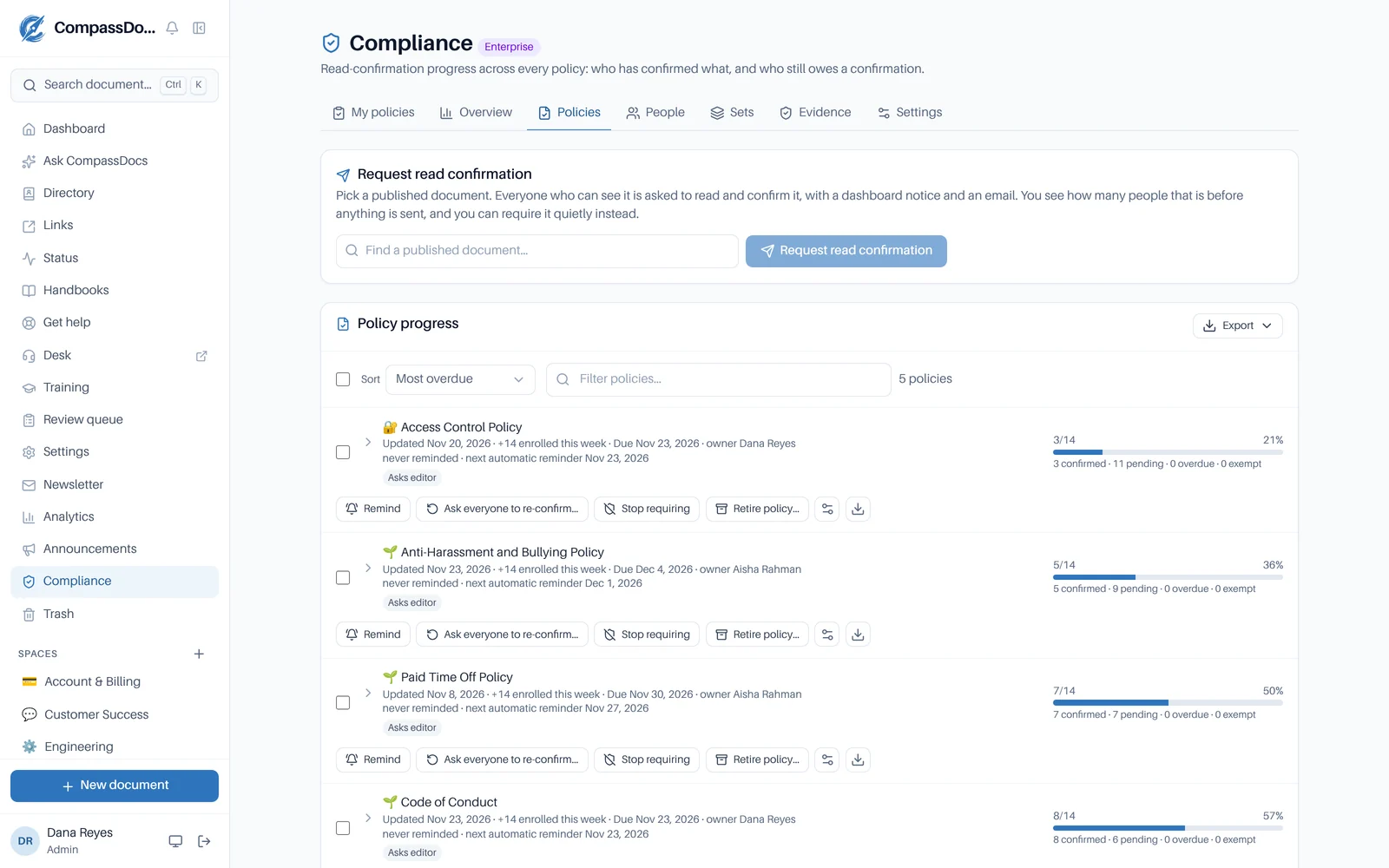
The compliance portal: each policy’s due date, owner and how many staff have confirmed it.
A school district HR helpdesk that answers first
One helpdesk serves IT, facilities, the business office and HR, each with its own queue.
- Get help suggests your own documents, within each person’s space access, before anyone sends a request
- Request types such as Ask HR, Leave question and New starter, each with a form that prefills from the directory
- Ask about this policy starts a request with the policy’s details already filled in
- HR’s office hours and holidays, so reply targets skip winter break and summer closures
- Retention, legal hold and personal data export for the tickets you keep
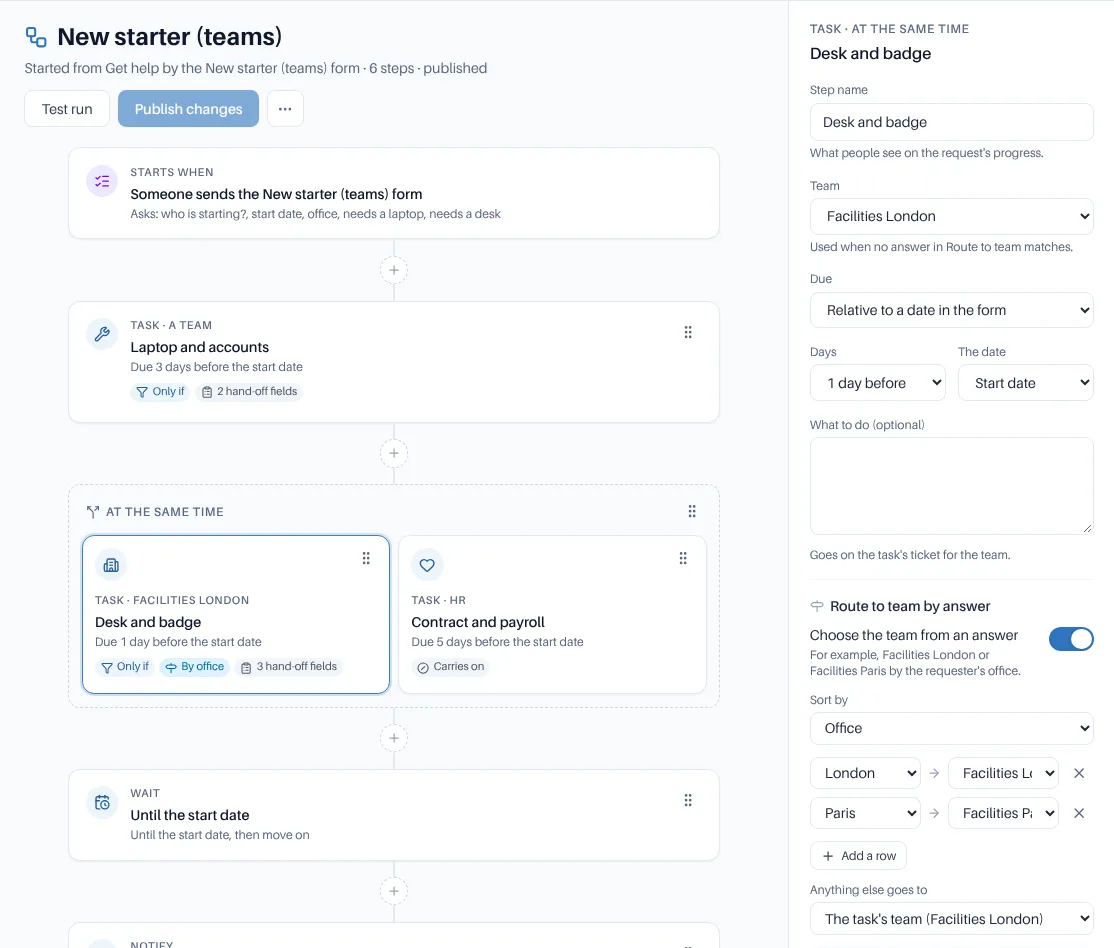
A New starter workflow: IT, facilities and HR tasks in parallel, then a wait until the start date.
The first week of August: 40 new teachers
A district hires 40 teachers, 12 paraprofessionals and a few long-term substitutes. Here is how the week runs.
Accounts arrive on their own
HR creates each hire in your identity provider as usual. SCIM from Microsoft Entra, or just-in-time accounts on first single sign-on, give each person a CompassDocs account with no extra step.
Onboarding starts from the account
The “New certified staff” onboarding program assigns its decks to every new account: the handbook walkthrough, acceptable use of technology and your own required trainings, in one notification.
The handbook joins their list
New accounts join the policy audiences that cover them, with a due date from the new-joiner grace period. My policies and the dashboard show each person what is due.
One request per hire
The campus secretary raises a New starter request with the start date and campus. The workflow sends tasks to IT for a Chromebook and accounts, to that campus’s facilities team for keys and a badge, and to HR for paperwork.
Principals see who is behind
Before in-service, each principal’s weekly digest lists new staff who haven’t finished, and HR reminds in bulk from the compliance portal.
Two more weeks HR will recognise
A long-term sub starts Monday
The sub gets an account like anyone else; there are no seats to count. A shorter “Substitutes” program assigns only the decks a sub needs.
The board revises a policy in March
In strict mode HR’s edit waits for an approver. HR marks it material, and only the staff it applies to confirm the new version.
Open enrollment in November
A critical announcement reaches every dashboard and Teams or Slack. The most common benefits answer becomes a canned response.
Public districts and charter schools
The same features, set up differently. For the wider picture, see K-12 school districts and charter schools.
| Area | Public school district | Charter school or CMO |
|---|---|---|
| Where HR policy comes from | Board policy, administrative regulations and negotiated agreements | A staff handbook adopted by the charter board, often with site addenda in a network |
| Who HR serves | Central office HR with specialists for certified staff, classified staff and benefits | One HR lead at a single-site charter, or a network HR team serving every school in the CMO |
| Handbook setup | A workspace handbook for district-wide policies, with space handbooks for campus procedures | A workspace handbook for the network, with a space handbook for each school’s own procedures |
| When someone asks for evidence | Auditors, the board or a grievance asks which version was in force and who confirmed it | An authorizer site visit or charter renewal asks which policies staff received; export per-policy and per-person records |
Every teacher, sub and para gets an account
Per-seat pricing pushes schools to leave out substitutes, paraprofessionals, bus drivers, food service and custodial staff. CompassDocs has unlimited users in both editions.
- Community: free and open source under AGPL-3.0, self-hosted on a server you control, with handbooks, private spaces, approvals and version history
- Enterprise: $499.99 a year per install, whether it serves 40 staff or 4,000, adding read confirmations, training, the helpdesk, SSO (Google Workspace or Microsoft Entra ID), SCIM and directory sync
- The helpdesk includes 3 agents across every team on the install; each extra agent is $125 a year, and staff who only ask for help never count
- Education discounts are available: ask us
Keeping records, not promising compliance
CompassDocs keeps the records HR is usually asked for: which version of a policy was in force, who approved and confirmed it and when, who finished which training, and an append-only audit log, with CSV exports. It is a tool for staff documents and requests, not a student information system, and we don’t claim it makes a district or charter compliant with FERPA, state employment law or any other requirement. Meeting those obligations stays with your school.
When another tool fits better
CompassDocs is not an HRIS or applicant tracking system. Applications, position control, certification and licensure tracking, payroll and benefits enrollment belong in the systems built for them, and substitute placement belongs in your absence management system. CompassDocs sits beside them: it holds the handbook, records who confirmed what, onboards people once hired and answers the questions around it all. Quick links can put those systems on every dashboard.
Set up faster with Claude
CompassDocs is built for MCP, so Claude can do the first draft of your rollout while your team reviews and publishes. When you start, we walk you through it.
Bring your content in
Paste or attach the procedures and policies you already have, and Claude redrafts each one in your templates, screenshots included.
Draft the handbook and training
Claude assembles a draft handbook from your policies and, with Enterprise, turns procedures into training decks with quiz questions.
Configure the helpdesk as drafts
Request types, forms, workflows, macros and recurring tickets are drafted for an admin to review and publish. Nothing goes live on its own.
See everything Claude can do through MCP and the step-by-step rollout.
Frequently asked
Can every teacher, substitute and paraprofessional have an account?
Yes. Both editions have unlimited users. Enterprise is $499.99 a year per install whatever your headcount; only helpdesk agents are counted, with 3 included and each extra agent at $125 a year.
Can staff acknowledge the staff handbook online?
Yes, with Enterprise read confirmations. Staff confirm the whole handbook in one step, with an optional typed signature, and each confirmation records the statement, the version and the time. In the free Community edition you can print the handbook with an acknowledgement page to sign.
How are new teachers enrolled in onboarding?
Automatically. New accounts, whether created locally, by single sign-on or by SCIM, receive every deck in the active onboarding programs and join the policy audiences that cover them, with due dates from a new-joiner grace period.
Can HR tickets stay private from IT and facilities agents?
Agents work the queues of the teams they belong to, so IT and facilities agents don’t work HR’s queue. Managers and Admins see every team out of the box, adjustable per role, and HR documents can sit in a private space.
Is CompassDocs FERPA compliant?
We don’t claim FERPA compliance or any certification. CompassDocs is built for staff documents and requests, not student records, which belong in your student information system. Self-hosting keeps what you do store on a server you control, and the audit log and confirmation records help when someone asks.
Does CompassDocs replace our HRIS or substitute system?
No. Applications, certification tracking, payroll, benefits and substitute placement stay in their own systems. CompassDocs holds the handbook, records acknowledgments and training, and handles staff questions and onboarding tasks.
Is there a discount for school districts and charter schools?
Yes. Education and nonprofit discounts on Enterprise are available on request; contact us. The Community edition is free for any school, with unlimited users.
Related: K-12 school districts · Charter schools · School IT helpdesk · School facilities · Business office · Curriculum & instruction · Education · HR helpdesk software
One handbook, every staff member, on your own server
Self-host CompassDocs free with unlimited users. Enterprise adds read confirmations, training, the helpdesk and SSO for $499.99/year.
Self-host free See pricingBuying for a district or network? Get a formal quote to print for approval, or order by invoice with your PO number.