 CompassDocs
Knowledge base and policy software for schools
Staff handbooks, safeguarding and acceptable-use policies, IT how-tos and the procedures that keep a campus running usually live in shared drives nobody can search. CompassDocs is self-hosted knowledge base and policy software for schools, colleges and universities: one place for staff documentation, with approvals, version history, staff sign-off and an internal helpdesk on the same sign-in.
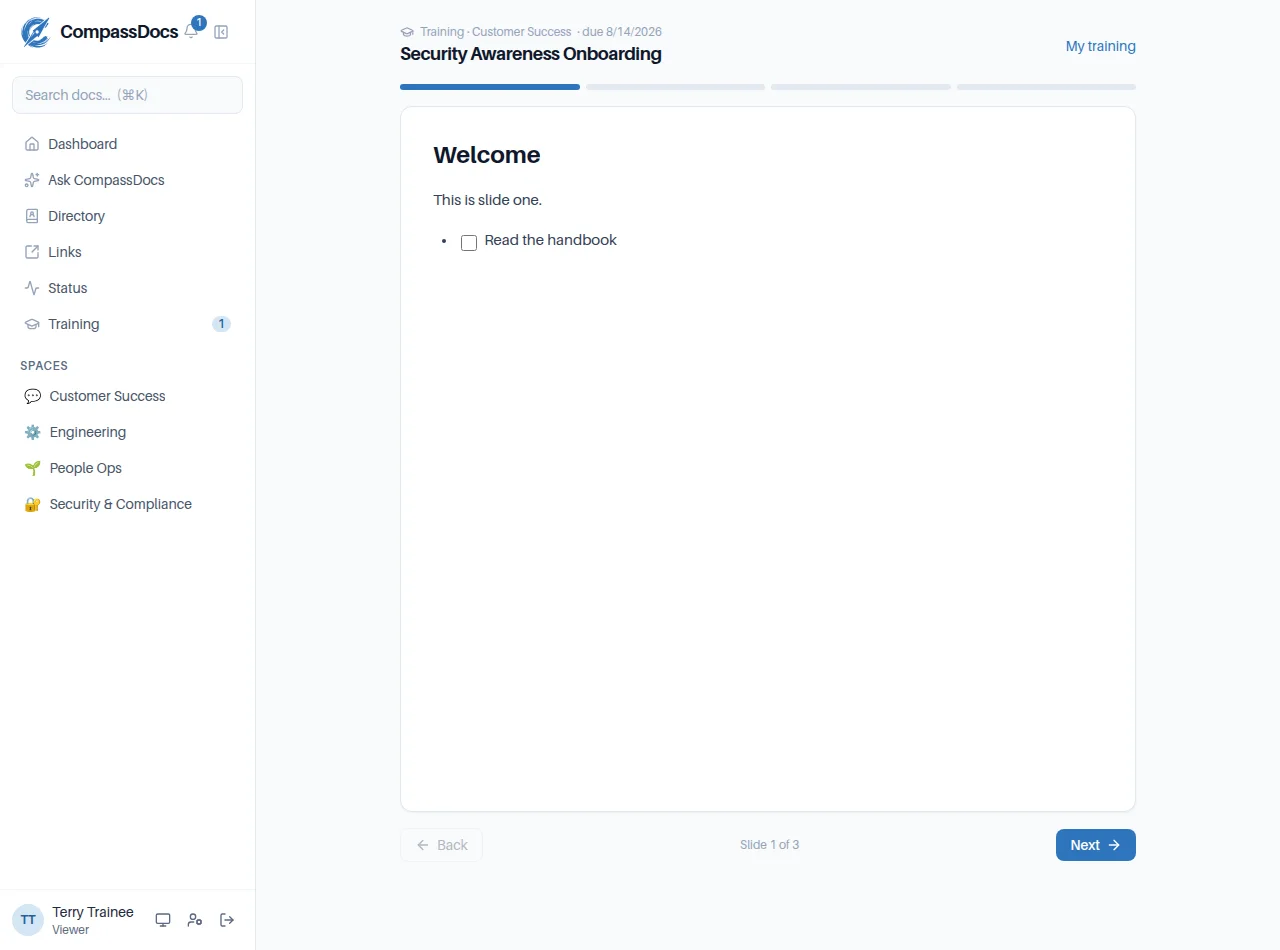
A published policy turned into a training deck: one slide at a time, with a recorded confirmation at the end.
What schools keep in their knowledge base
Most schools start with the documents staff ask about most. Typical content we see planned for a school or college workspace:
- The staff handbook: code of conduct, absence and leave, pay and benefits, and who to call about what
- Policies: safeguarding, acceptable use of IT, data protection, health and safety, complaints
- Office and exams procedures: admissions steps, exam-day checklists, reporting deadlines
- IT guides for staff: joining the Wi-Fi, resetting a password, using the classroom display, getting into the learning platform
- Site and facilities procedures: fire drills, lockdown steps, visitor sign-in, room setup
- New-starter onboarding: a first-week checklist, key contacts and where everything is
A space per department
Give each department, school or campus its own space. Private spaces limit a space to chosen people or groups, and search and AI answers respect that boundary.
Templates to start from
Six built-in scaffolds, including SOP, policy and meeting notes, plus your own. Admins can turn any document into a template.
Answers, not folders
Staff ask “how do I report an absence?” and get an answer from your documents with the sources cited. Keyword search works without any AI key.
Policy software for schools: approvals, sign-off and a record
Policies change every year. CompassDocs keeps each change reviewed, versioned and, with Enterprise, confirmed by the staff it applies to.
Draft, review, approve
Turn on strict mode and edits to a published policy become change requests an approver reviews before they go live, each with a “what changed and why” note.
Every version kept
Compare any two versions side by side with word-level highlights, and restore an older one in a click, so you can show what a policy said last term.
Read confirmations
Enterprise: ask staff to read and confirm a policy by a due date, with automatic reminders, escalation, an optional typed signature and annual re-confirmation.
One staff handbook
Gather published policies from any space into one numbered handbook, read it as one, and print a copy with an acknowledgement page. Enterprise lets staff confirm the whole handbook at once.
Review reminders
Give a policy a review cadence and it shows overdue notices on the page and a queue for editors, so nothing quietly goes out of date.
An audit log
Sign-ins, role changes, publishes and approvals land in an append-only audit log with the actor, IP and time.
Start-of-year training without a separate LMS
- Turn any published document into a slide deck, with a final confirmation gate that records the version each person saw
- Add multiple-choice quiz questions, graded on the server, with a pass mark that unlocks the confirmation
- Recertification: a deck reopens every N months, so annual training comes round on its own
- Onboarding programs assign every deck to each new staff account automatically, whether it was created locally, by single sign-on or by SCIM
- Waive decks for staff who already trained elsewhere; the record says waived, not completed
- Printable certificates, per-person progress and CSV export when someone asks for evidence
Group leads see their team
Group leads get one weekly email covering their team’s training and policies, so heads of department know who is behind.
The training is the document
Update the policy and the deck updates with it; completions record which version each person confirmed.
An IT helpdesk for staff, next to the guides
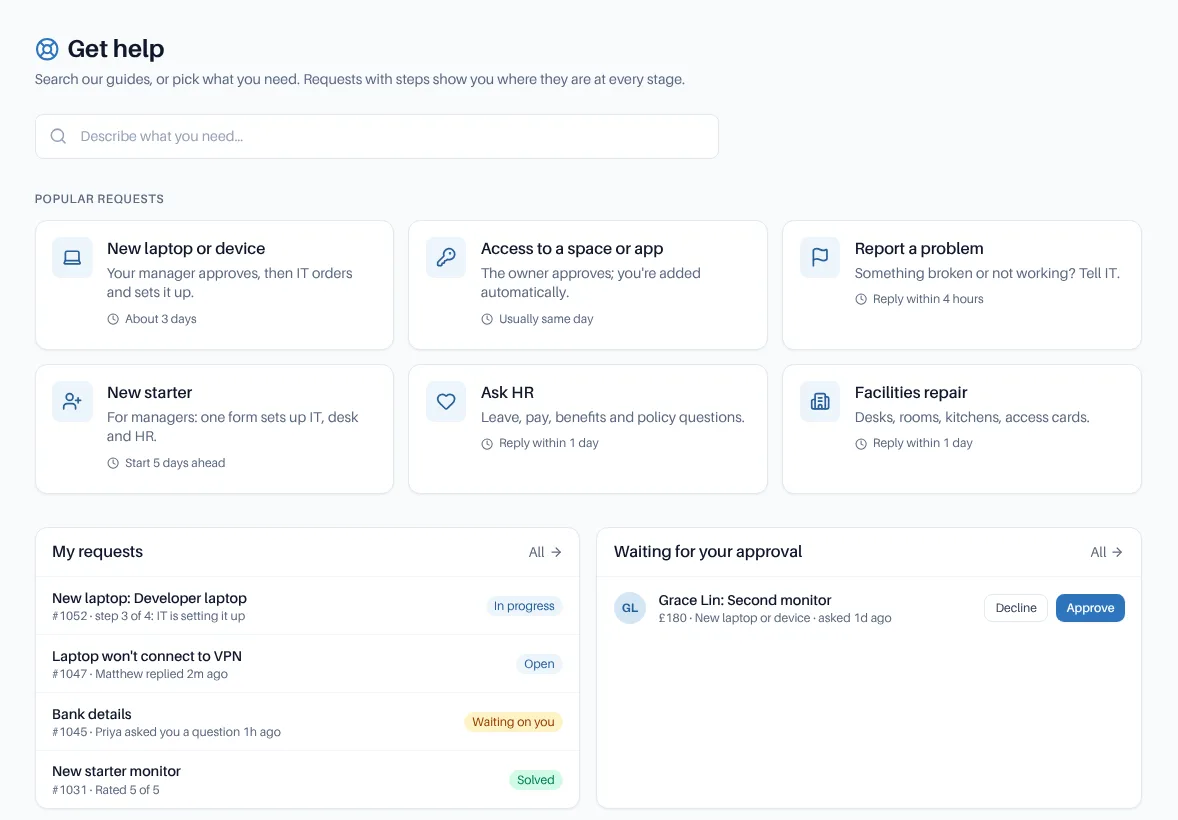
- Get help searches your guides before anyone sends a request, then offers request types such as a new laptop, access to an app, reporting a problem or a new starter
- Staff raise, follow and approve requests from Microsoft Teams or Slack, as well as by email
- Read help mailboxes in Microsoft 365 directly, so mail to your IT address becomes tickets
- Connect Snipe-IT or Microsoft Intune and agents see the requester’s devices, warranty and compliance on the ticket
- Facilities teams can put room setups on the desk’s event calendar, with reminders before setup is due
- Part of Enterprise, with 3 agents included and extra agents at $125 a year each
Why schools self-host their knowledge base
- Staff documents, tickets and attachments stay in one PostgreSQL database on a server you control, and you back it up
- Staff sign in with Google Workspace over SAML 2.0 or Microsoft Entra ID over OpenID Connect (Enterprise)
- The people directory can sync from Google Workspace, Microsoft 365 or both (Enterprise)
- AI answers are optional: they use your own Anthropic API key and stay off until an admin adds one
- Open source under AGPL-3.0, with an offline, signed license that never calls home
Priced for schools
Community is free with unlimited users. Enterprise is $499.99 a year per install with unlimited users. Education and nonprofit discounts are available on request.
Leavers cut off
With SCIM from Microsoft Entra, accounts are created and deactivated for you, and a leaver’s sessions are revoked at once.
Public school districts and charter schools, department by department
Detailed guides for K-12: how district and charter offices use CompassDocs, and how HR, IT, facilities, the business office and curriculum teams each work in it.
School districts
Board policy, staff handbooks with sign-off, and one helpdesk for IT, HR and facilities across every campus.
Learn more → Charter schools & networksCharter schools
Policies and handbooks stood up fast, sign-off records for renewal, and one helpdesk for a lean central office.
Learn more → DepartmentSchool HR
Staff handbook and policy acknowledgment, new-teacher onboarding and an Ask HR helpdesk.
Learn more → DepartmentSchool IT helpdesk
Staff tickets, 1:1 device support, classroom tech guides and recurring start-of-year checks.
Learn more → DepartmentSchool facilities
Work orders by campus, recurring maintenance and event setups on a calendar.
Learn more → DepartmentBusiness office
Purchasing requests with approvals, finance SOPs and fiscal-year-close checklists.
Learn more → DepartmentCurriculum & instruction
Curriculum maps and pacing guides with approvals, and PD tracked to completion.
Learn more →Keeping records, not promising compliance
CompassDocs helps you keep the evidence inspections and audits tend to ask for: which version of a policy was in force, who approved it, who confirmed it and when, and who finished which training. It is a documentation tool, not a compliance program. Meeting your legal and inspection obligations remains your school’s responsibility.
Set up faster with Claude
CompassDocs is built for MCP, so Claude can do the first draft of your rollout while your team reviews and publishes. When you start, we walk you through it.
Bring your content in
Paste or attach the procedures and policies you already have, and Claude redrafts each one in your templates, screenshots included.
Draft the handbook and training
Claude assembles a draft handbook from your policies and, with Enterprise, turns procedures into training decks with quiz questions.
Configure the helpdesk as drafts
Request types, forms, workflows, macros and recurring tickets are drafted for an admin to review and publish. Nothing goes live on its own.
See everything Claude can do through MCP and the step-by-step rollout.
Frequently asked
Is there an education discount?
Yes. Education and nonprofit discounts on Enterprise are available on request, and they apply to extra helpdesk agents too. The Community edition is free for any school, with unlimited users.
Can staff sign in with Google Workspace or Microsoft 365?
Yes, with Enterprise single sign-on: SAML 2.0 for Google Workspace and other identity providers, or OpenID Connect for Microsoft Entra ID with one-click setup. The directory can also sync from Google Workspace, Microsoft 365 or both.
Can we show that staff have read a policy?
Yes, with Enterprise read confirmations. Each confirmation records the statement, the version and the time, with an optional typed signature, and you can export per-policy and per-person records or an audit package.
Does every member of staff need a paid seat?
No. Both editions have unlimited users. The only thing counted is helpdesk agents: Enterprise includes 3, and each extra agent is $125 a year.
Where is our data stored?
On your own server, in a PostgreSQL database you control. CompassDocs Cloud is not open yet, so today CompassDocs means self-hosting it, with Docker or with Node.js and your own PostgreSQL.
Related: K-12 school districts · Charter schools · Employee handbook · Read confirmations · Training & onboarding · IT helpdesk software · Policy management · Employee handbook template
Free for every school to self-host
One Docker command installs CompassDocs with unlimited users and documents. Enterprise adds read confirmations, training, the helpdesk and SSO from $499.99/year, with education discounts on request.
Self-host it free See pricingBuying for a team? Get a formal quote to print for approval, or order by invoice with your PO number.