 CompassDocs
School business office procedures, purchasing requests and approvals in one place
Purchasing, payroll and finance run on rules a few people know by heart and a binder nobody else can find. CompassDocs gives a district or charter business office one home for its procedures, purchasing requests that reach the right approver, fiscal year close checklists, and a record of who approved what. It sits beside your finance system, not in place of it.
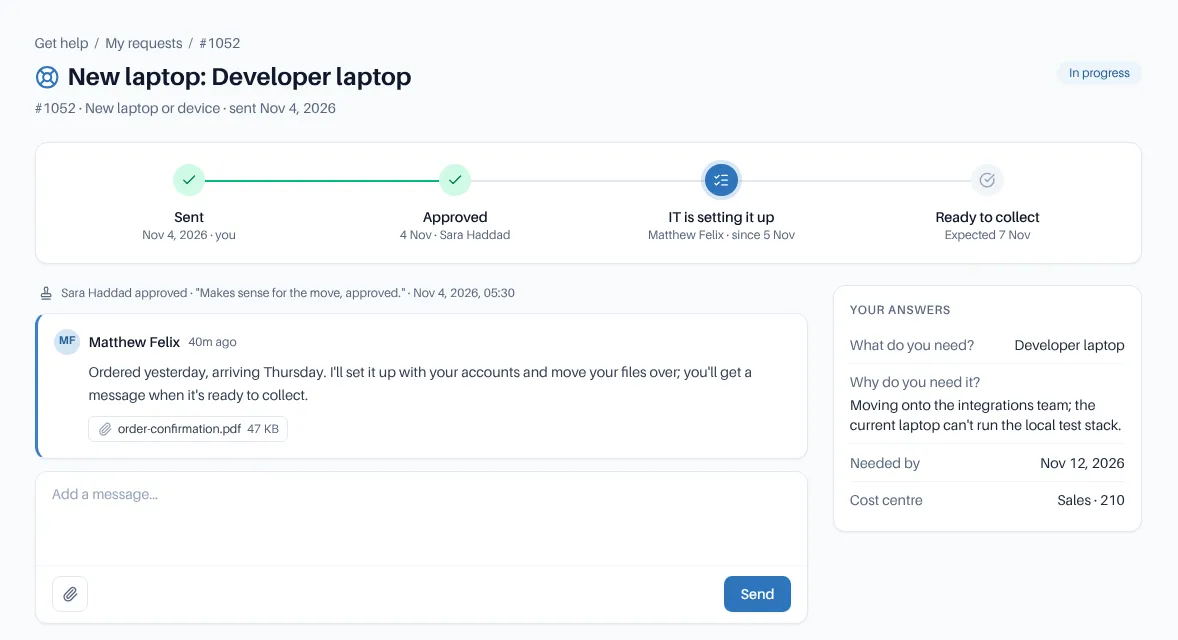
A request the requester can follow: each step, the approver’s note and who is helping.
Finance procedures shouldn’t live in one bookkeeper’s head
Campus secretaries and principals touch money a few times a year, and each time they ask the business office how.
× A purchase request arrives by email with no budget code, and the principal’s approval is a forwarded “OK”.
× The approver is on a field trip, and nobody knows who can stand in.
× A new campus secretary asks how to make an activity fund deposit, and the answer is a photocopy from 2019.
× The fiscal year close checklist is a spreadsheet one person updates, and that person is retiring.
× The auditor asks what the travel reimbursement procedure said last October.
→ Written procedures, structured requests and a record of every approval.
How the business office uses CompassDocs
Each business office job, the feature that does it, and how it looks in practice.
| Job | Feature | How it works |
|---|---|---|
| Write district finance SOPs | Documents & spaces | A Business office space holds SOPs for purchase orders, travel reimbursement, activity fund deposits, P-card use and payroll deadlines, started from the built-in SOP template. |
| Publish the procedures manual | Policy handbooks | Gather the board’s fiscal policies and your SOPs into one numbered manual, read online or printed, always pointing at the current versions. |
| Take purchasing requests | Request types & forms | A Purchase request form asks for vendor, amount, funding source, budget code and the date it’s needed, and prefills the requester’s campus from the directory. |
| Route approvals | Workflows & approvals | The requester’s principal approves first; a step that runs only if the funding source is a grant adds the grants coordinator; then the business office gets a task. |
| Approve from anywhere | Teams & Slack | Approvers approve, decline or ask a question from the email, Get help, the dashboard or a chat app. One reminder goes out if nobody decides. |
| Run fiscal year close | Recurring tickets and checklists | A recurring ticket opens in June with a checklist of required steps, so it can’t be solved half-done. Monthly reconciliations open on the nth weekday. |
| Answer payroll questions | Get help | An Ask payroll request type goes to a payroll team’s own queue, after Get help has offered the pay calendar and the deductions FAQ. |
| Get policies acknowledged | Read confirmations (Enterprise) | P-card holders confirm the purchasing card policy each year, against the exact version, with an optional typed signature. |
| Train campus staff | Training (Enterprise) | The deposits SOP becomes a short deck with a quiz, assigned to every campus secretary and bookkeeper with a due date. |
| Report on requests | Reports & export | Volume by request type and category, approval and workflow time per team, and any list exported as CSV. |
School purchasing requests and approvals that reach the right person
Each request type can start a workflow of approvals, tasks, waits and messages. You build it in the desk’s workflow builder, test it with sample answers and a sample requester, and publish when it’s right.
- Approvals go to a team, a named person or the requester’s manager from the directory; when there is nobody to ask, the team’s leads stand in
- Steps run only if a form answer matches: a yes to “Is this a technology purchase?” adds a task for the IT department
- Hand-off fields carry a value from one step to later ones, and a custom field marked Public shows the requester a value such as the PO number, read-only
- Business days follow the team’s calendar, with winter and spring break loaded as holidays from a pasted list or an .ics file
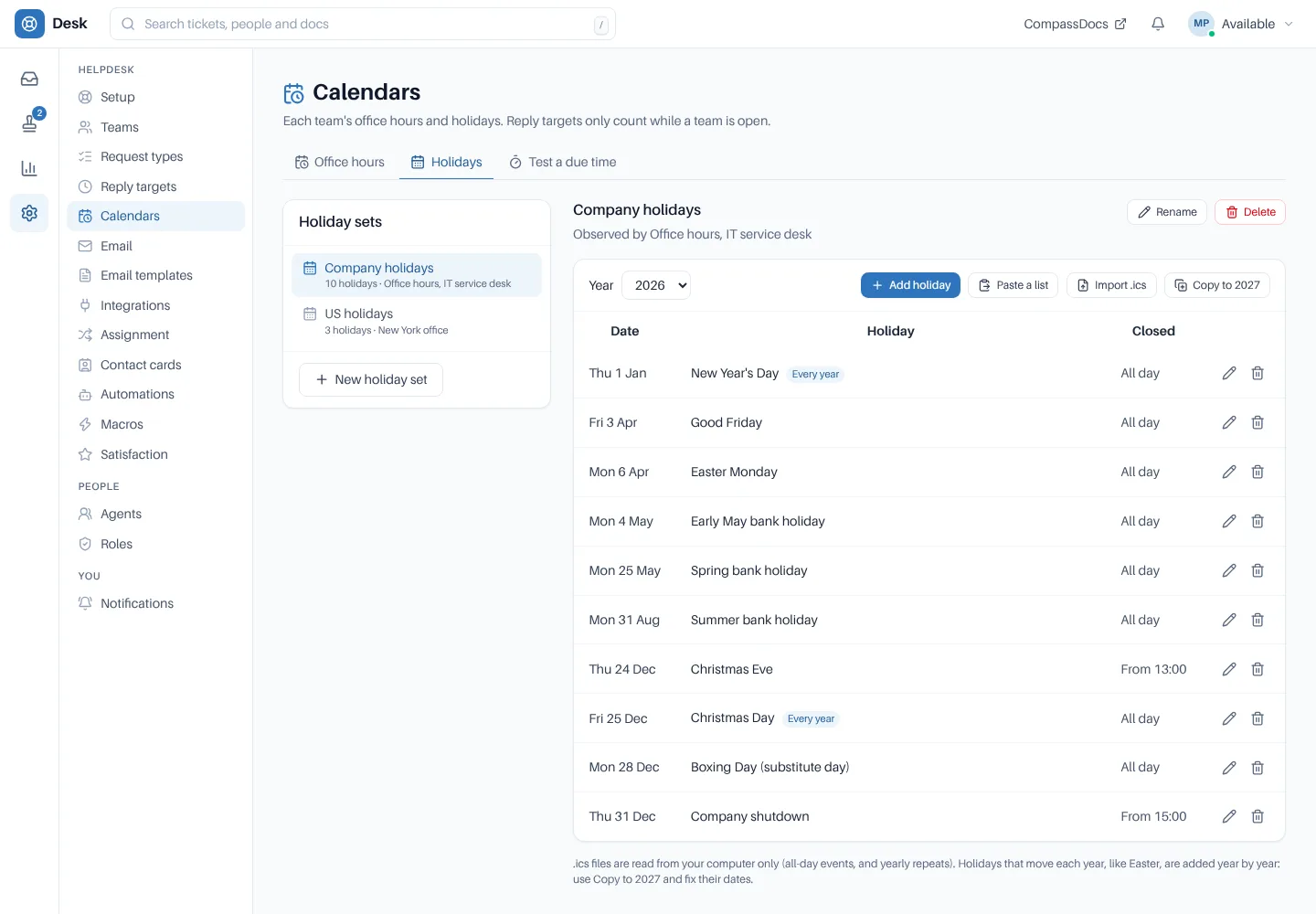
Holidays on a team calendar, so due dates and approval reminders skip days the office is closed.
A principal orders 30 Chromebooks for a classroom set
One purchase request, three departments, and a record at the end.
The request
The campus secretary opens Get help, picks Purchase request and fills in the vendor quote, amount, budget code and funding source, and answers yes to “Is this a technology purchase?”. The campus and principal come from the directory.
The approvals
The principal approves from the email. Because the funding source is a grant, the grants coordinator approves next, from Microsoft Teams.
The technology check
The yes answer sends a task to IT to confirm the model fits the district’s device standard and management setup. IT finishes the task with a note.
The purchase order
The business office task asks for the PO number. Purchasing raises the PO in the finance system as usual and records the number in a custom field marked Public, so the requester sees it read-only on the request.
The record
The ticket keeps every approval, note and date. If the auditor samples the purchase, the procedure version in force that day is in version history.
More weeks the business office will recognise
June: fiscal year close
A recurring ticket opens on the first Monday in June with the close checklist: purchasing cutoff, open PO review, accruals, inventory counts. Required items must be ticked before it can be solved.
October: a new campus secretary
Their onboarding program assigns the deposits and receipts deck. The SOP itself is in the procedures manual, and “how do I void a receipt?” gets an answer from it in search.
Spring: budget season
An announcement with an expiry date puts the budget calendar on every principal’s dashboard; the instructions sit in the manual with a review date.
Public districts and charter schools
The business office looks different in a district and a charter. For the wider picture, see K-12 school districts and charter schools.
| Area | Public school district | Charter school or CMO |
|---|---|---|
| Where the rules come from | Board fiscal policy, state purchasing rules and bid thresholds, and the terms of each grant | The charter board’s fiscal policies, the charter contract and the authorizer’s financial reporting requirements |
| Who does the work | A central business office with purchasing, accounts payable and payroll, plus bookkeepers or secretaries at each campus | An operations or office manager at a single-site charter, a network finance team at a CMO, or an outside back-office provider |
| How requests route | By campus and funding source, with principals and department heads as first approvers | To the school leader, then the network or the board treasurer for larger purchases |
| Outside help | Usually all in-house | Give a back-office provider’s staff accounts; if they work requests on the desk, they count as agents |
| When someone asks for evidence | The annual audit and the board ask who approved a purchase and what the procedure said | The annual audit, the authorizer’s financial review and charter renewal ask the same |
Priced for a school budget
- Community is free and open source under AGPL-3.0, self-hosted, with unlimited users: procedures, handbooks, approvals and version history included
- Enterprise is $499.99 a year per install with unlimited users, adding the helpdesk, read confirmations, training, SSO, SCIM, directory sync and audit-log export
- The helpdesk includes 3 agents across every team on the install, and each extra agent is $125 a year; principals who only request and approve never count
- A 30-day money-back guarantee on your first Enterprise purchase, and education discounts on request: ask us
- Order by invoice with your PO number from a formal quote
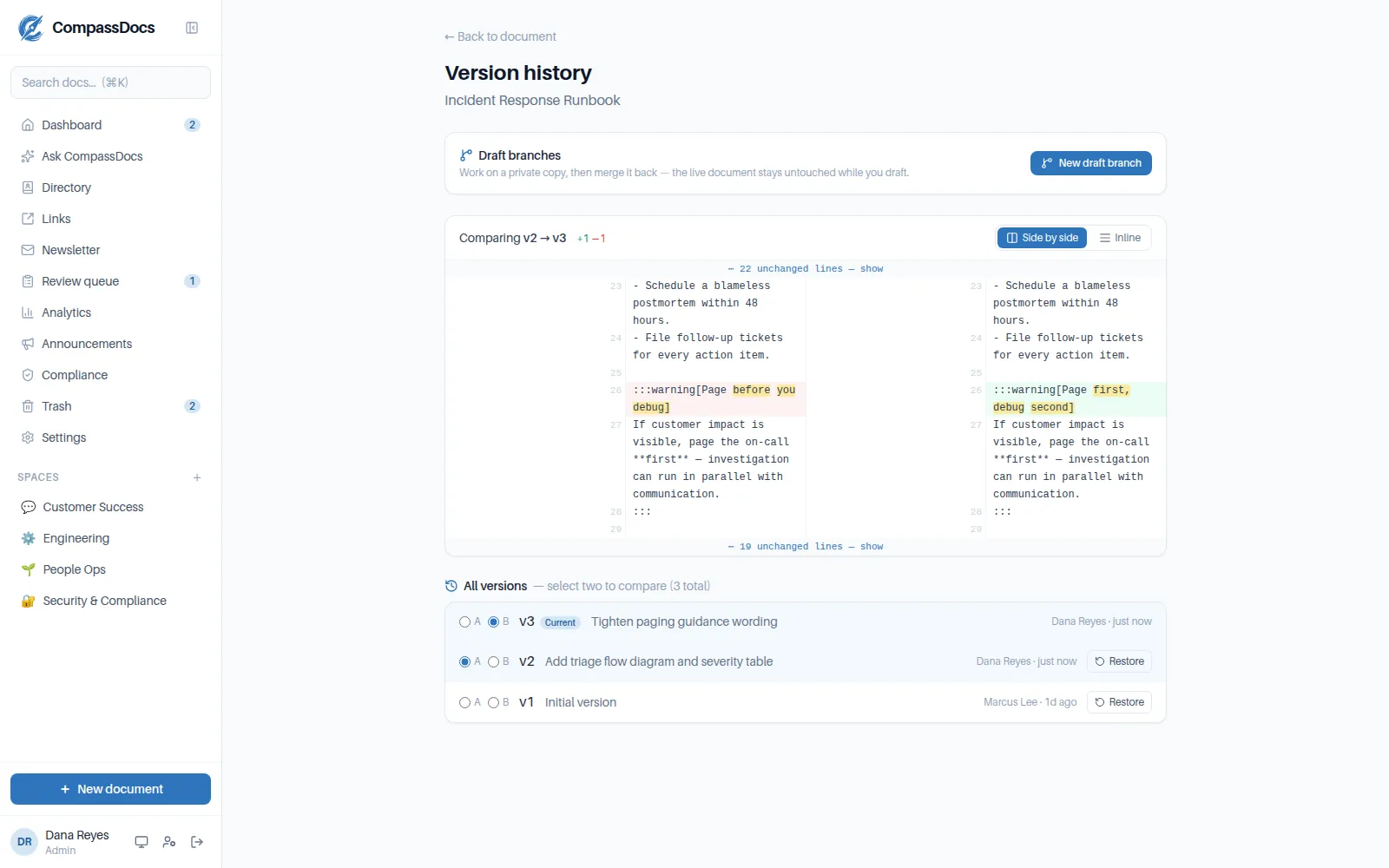
Version history: what a procedure said, who changed it and why.
Keeping records, not promising compliance
CompassDocs keeps the records an auditor tends to ask the business office for: the procedure in force on a date, who approved each change to it, who approved each request and when, and an append-only audit log of sign-ins, publishes and approvals, exportable as CSV or JSON on Enterprise. It is a documentation and request tool. It doesn’t make your purchasing compliant with state law or grant terms, and meeting those obligations stays with your district or charter.
When another tool fits better
CompassDocs is not an ERP or accounting system. It doesn’t hold budgets, encumber funds, issue purchase orders, match invoices, pay vendors or run payroll; your finance system does that, and it stays the system of record for money. CompassDocs handles what happens around it: the written procedures, the request and its approvals, the checklist, the training and the questions. If your finance system already has a requisition flow you rely on, keep it.
Set up faster with Claude
CompassDocs is built for MCP, so Claude can do the first draft of your rollout while your team reviews and publishes. When you start, we walk you through it.
Bring your content in
Paste or attach the procedures and policies you already have, and Claude redrafts each one in your templates, screenshots included.
Draft the handbook and training
Claude assembles a draft handbook from your policies and, with Enterprise, turns procedures into training decks with quiz questions.
Configure the helpdesk as drafts
Request types, forms, workflows, macros and recurring tickets are drafted for an admin to review and publish. Nothing goes live on its own.
See everything Claude can do through MCP and the step-by-step rollout.
Frequently asked
Can CompassDocs replace our finance system or ERP?
No. Budgets, encumbrances, purchase orders, accounts payable and payroll stay in your finance system. CompassDocs holds the business office procedures and takes requests and approvals before an order is placed, and the PO number can be recorded on the request.
Can purchase requests go to the right approver automatically?
Yes, with Enterprise helpdesk workflows. An approval can go to a team, a named person or the requester’s manager from the directory, and a step can run only if a form answer matches, such as a grant funding source. When there is nobody to ask, the team’s leads stand in, and one reminder goes out if nobody decides.
Can principals approve requests without signing in to another system?
Approvers can approve, decline or ask a question from the email, from Get help, from the dashboard or from Microsoft Teams or Slack. Only the approver’s own click decides.
How do we keep a fiscal year close checklist from slipping?
Make it a recurring ticket with a checklist. Recurring tickets open on a schedule, such as the first Monday in June, in the team’s time zone, and a checklist with required items keeps the ticket from being solved until those steps are ticked.
Can we show an auditor which procedure was in effect?
Yes. Every save is a version with its author, time and change note, and you can compare any two versions word by word. Publishes and approvals are written to the append-only audit log, and strict mode makes edits to published procedures wait for an approver.
How many helpdesk agents does the business office need?
Only the people who work requests on the desk count as agents. Enterprise includes 3 agents per install across every team, and each extra agent is $125 a year. Staff who only raise or approve requests never count.
Is there a discount for school districts and charter schools?
Yes. Education and nonprofit discounts on Enterprise are available on request; contact us. The Community edition is free for any school, with unlimited users.
Related: K-12 school districts · Charter schools · School HR · School IT helpdesk · School facilities · Curriculum & instruction · Education · SOPs
Procedures people can find, approvals you can show
Self-host CompassDocs free with unlimited users. Enterprise adds the helpdesk, workflows, read confirmations, training and SSO for $499.99/year.
Self-host free See pricingBuying for a district or network? Get a formal quote to print for approval, or order by invoice with your PO number.