 CompassDocs
A self-hosted knowledge base for local government
Councils, municipalities, agencies and other public bodies run on procedures that have to be current, findable and accountable. CompassDocs is a self-hosted knowledge base for local government and the public sector: open source, running on servers you choose, with single sign-on, an append-only audit log and code anyone can read.
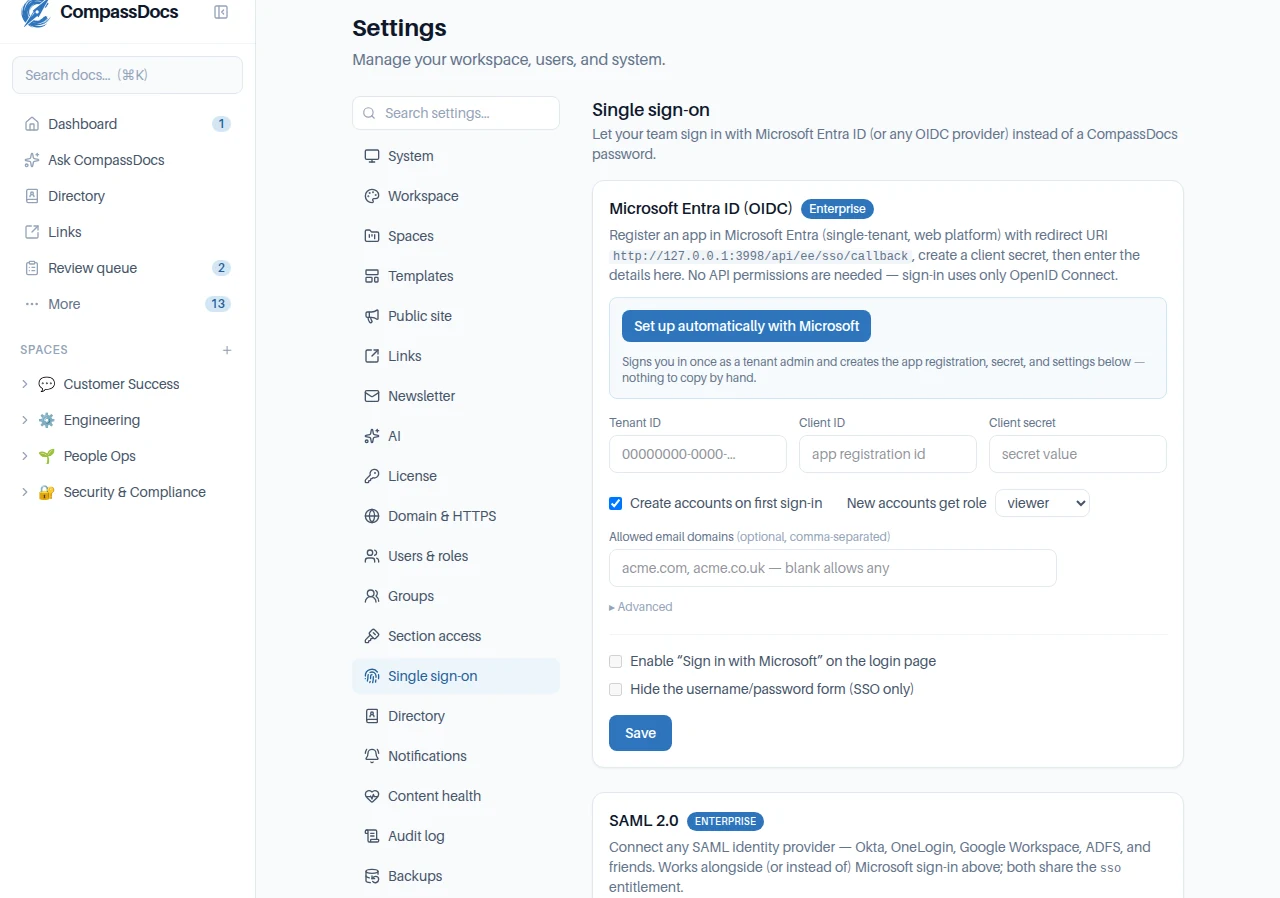
Sign staff in with the identity provider you already run: SAML 2.0, OpenID Connect, or both.
What goes in a local government knowledge base
- Service procedures for front-line and contact-centre staff: how to handle each kind of request, step by step
- HR policies and the staff handbook, from conduct and leave to expenses
- Information governance: records management, data protection and public-records request procedures
- IT runbooks, business continuity and incident plans
- Health and safety, facilities and building procedures
- Governance processes: committee reports, decision records and the templates staff fill in
A space per department
Spaces carry the permissions: internal for everyone, private for chosen people or groups, public for the world.
Public pages when you want them
Mark a space public and its published documents get a clean, read-only site with no accounts needed. Search-engine indexing stays off until you allow it.
Found in seconds
Ranked full-text search with operators like space: and tag:, plus optional AI answers that cite their sources.
Why self-hosting matters in the public sector
Where your documents live, who can reach them and what the software does with them are decisions you make, not a vendor.
You choose where data lives
Everything sits in one PostgreSQL database on infrastructure you pick: your own data centre or your own cloud tenancy. A Deploy-to-Azure wizard sets up a VM in your own subscription.
Works without calling home
The Enterprise license is an offline, signed key checked against a built-in public key. There is no license server, and nothing stops if you’re offline or air-gapped.
Open source you can inspect
CompassDocs is AGPL-3.0, with its code on GitHub, so your security team can read and audit what runs on your servers.
AI only if you want it
AI answers use your own Anthropic API key and are off until an admin adds one. Semantic search can run on a local engine such as Ollama, so document text never leaves your network.
Hardened by default
Credentials and backups encrypted at rest (AES-256-GCM), hashed session tokens, login throttling with lockout, strict security headers, and authenticator-app two-factor auth.
Backups you hold
Scheduled full-database backups with retention and one-click restore, mirrored off-site to S3, R2, MinIO or Azure. A Prometheus endpoint and readiness probes fit your monitoring.
Identity, access and the audit trail
Single sign-on, SCIM and Duo are part of Enterprise; roles, version history and the in-app audit log are in every edition.
- Single sign-on over SAML 2.0 (ADFS, Okta, Google Workspace, Entra SAML apps) or OpenID Connect for Microsoft Entra ID, with an “SSO only” mode and a break-glass path
- SCIM from Microsoft Entra: accounts are created, updated and deactivated for you, and a leaver’s sessions are revoked at once
- An optional Duo approval after every sign-in
- Custom roles built from 200+ permissions, and Explain access to see every permission someone holds and where it came from
- An append-only audit log of sign-ins, role changes, publishes and approvals, with actor, IP and time; Enterprise exports it as CSV or JSON
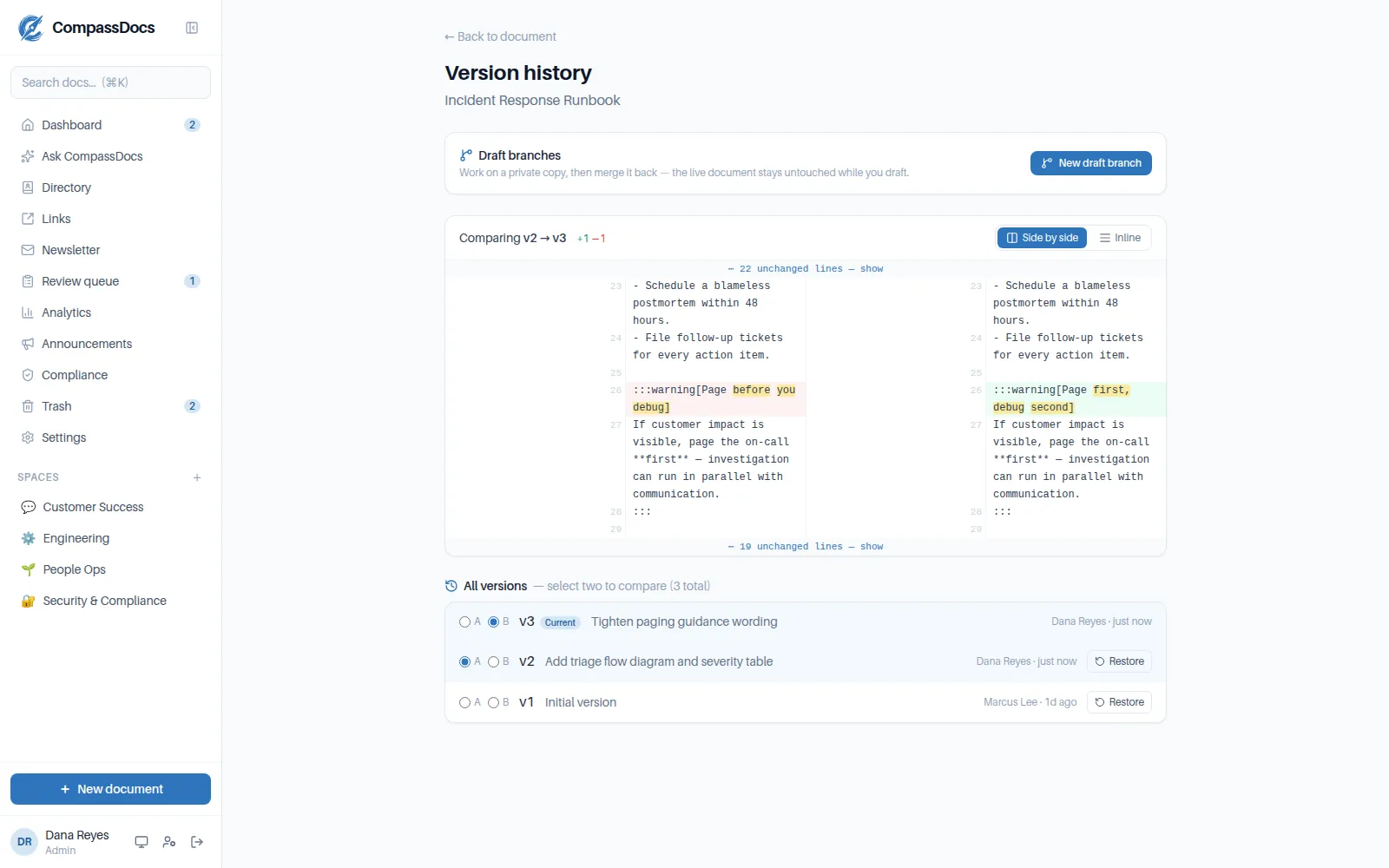
- Version history with change notes, side-by-side comparison and restore that never rewrites history
Policies staff confirm, and a helpdesk for internal services
- Read confirmations (Enterprise): ask the right people to confirm each policy, with due dates, reminders, escalation and a compliance portal you can delegate to HR without making them admins
- Training decks (Enterprise) with completion records that capture the document version each person confirmed
- An internal helpdesk (Enterprise) for IT, HR and Facilities: request types, workflows with approvals, reply targets and reports
- Retention and legal hold for tickets: anonymise or delete closed tickets after a period you set, keep chosen tickets on hold, and export a person’s data as JSON
- Major incidents: one ticket for an outage, one update to everyone affected, and a banner in Get help
Evidence an auditor can verify
Monthly snapshots with a SHA-256, an audit package with a hash manifest, and one compliance record per person.
Bought the way you buy
Enterprise is $499.99 a year per install with unlimited users. Get a formal quote to print for approval, or order by invoice with your PO number.
Software you run, not an accredited service
CompassDocs is software you install and operate. It is not an accredited or authorized cloud service, and it makes no claim to government security certifications or authorizations. Any security assessment covers your environment and your controls. What CompassDocs gives you is the record: versions, approvals, confirmations, training completions and an audit log. Meeting your legal and regulatory obligations remains your organization’s responsibility.
Features that talk to other services, such as Microsoft 365 mailboxes, Teams, Intune or Claude, need outbound access to those services. Leave them off and the core knowledge base runs entirely inside your network.
Set up faster with Claude
CompassDocs is built for MCP, so Claude can do the first draft of your rollout while your team reviews and publishes. When you start, we walk you through it.
Bring your content in
Paste or attach the procedures and policies you already have, and Claude redrafts each one in your templates, screenshots included.
Draft the handbook and training
Claude assembles a draft handbook from your policies and, with Enterprise, turns procedures into training decks with quiz questions.
Configure the helpdesk as drafts
Request types, forms, workflows, macros and recurring tickets are drafted for an admin to review and publish. Nothing goes live on its own.
See everything Claude can do through MCP and the step-by-step rollout.
Frequently asked
Can we keep our data in our own jurisdiction?
Yes. Self-hosted CompassDocs runs on infrastructure you choose and keeps everything in one PostgreSQL database you control. CompassDocs Cloud isn’t on sale yet and will be hosted in the United States at first, so self-hosting is the route when data must stay where you decide.
Does it work on an isolated network?
Yes. The Enterprise license is validated locally with no license server to call, so it keeps working offline or air-gapped. Features that talk to other services, such as Microsoft 365 mailboxes, Teams, Intune or Claude, need outbound access to them.
Which identity providers can staff sign in with?
Any SAML 2.0 identity provider, including ADFS, Okta, OneLogin, Google Workspace and Entra SAML apps, or OpenID Connect with one-click Microsoft Entra ID setup. SCIM provisioning from Entra and a Duo approval are optional. All of this is part of Enterprise.
Can our security team review the code?
Yes. CompassDocs is open source under the AGPL-3.0 and the code is on GitHub, so you can read and audit exactly what runs on your servers.
Is CompassDocs certified or accredited for government use?
No. It is software you run yourself, not an accredited service. It keeps the records your own assessments ask about, such as version history, approvals, read confirmations and an audit log, but compliance remains your responsibility.
Related: Self-hosting · Single sign-on & SCIM · Roles & audit log · Policy management · IT helpdesk software · Open-source knowledge base software
Your knowledge base, on your infrastructure
Self-host the open-source Community edition with one Docker command. Enterprise adds SSO, SCIM, read confirmations, training and the helpdesk for $499.99/year with unlimited users.
Self-host it free Get a quote