 CompassDocs
A knowledge base for CPA and accounting firms, ready before busy season
Every January the same questions come back: which version of the return assembly procedure is current, where the review checklist went, how a seasonal preparer gets into the tax software. CompassDocs is a self-hosted knowledge base for CPA and accounting firms: tax, audit and advisory procedures in one searchable place, firm policies with a record of who acknowledged them, onboarding that runs itself, and an internal IT and HR helpdesk on the same sign-in.
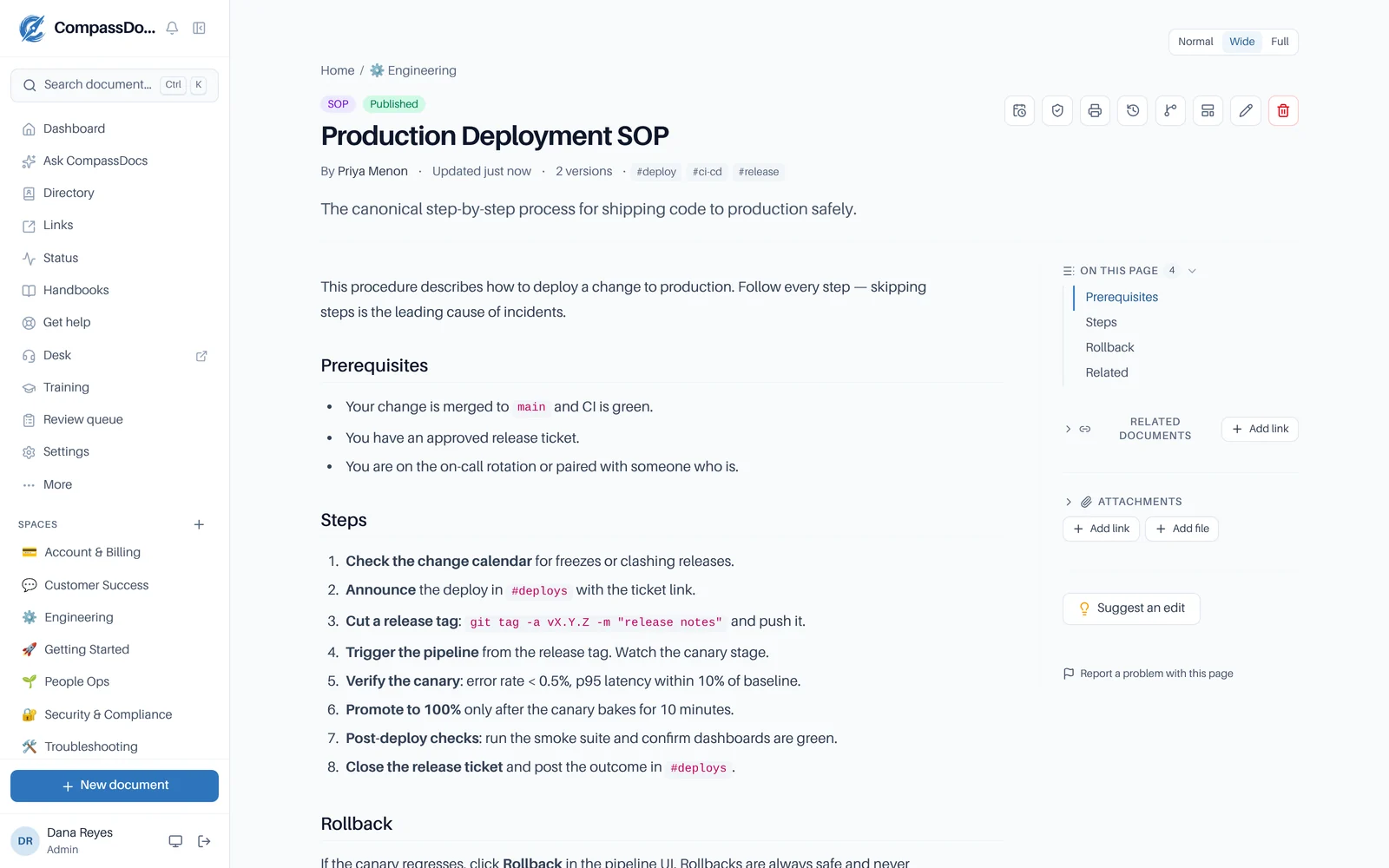
An SOP as staff read it: owner, version, prerequisites and numbered steps, with an outline alongside.
The firm’s procedures live in last year’s folder
Accounting firms run on repeatable work, and on a calendar that leaves no time to look things up between February and April.
× The tax return review checklist exists in four versions across the shared drive, and two managers each think theirs is the one.
× Procedures were updated for this year’s law changes in a Word file that half the preparers never opened.
× Seasonal staff start the week the client organizers come back, and spend their first days asking where things are.
× Partners ask who has acknowledged the confidentiality and data security policies, and the answer is a spreadsheet nobody kept up.
× “I can’t get into the portal” and “my second monitor died” reach whoever sits closest to IT.
→ One current version of every procedure, sign-off on the record, and one front door for internal requests.
What an accounting firm keeps in CompassDocs
Each document has a type, tags, an owner and a version history, in a space for each service line.
- Tax season procedures: organizer intake, return preparation, review and sign-off, assembly, e-file and extension steps
- Engagement and review checklists for audit and review engagements, compilations and tax returns, with the firm’s own sign-off points
- Client onboarding SOPs: acceptance steps, engagement letters, portal invitations, prior-year document requests
- Client accounting services: month-end close procedures, bank reconciliation steps and client-specific notes
- Firm policies: client confidentiality, data security, independence, remote work and acceptable use
- The staff handbook and a new-staff onboarding guide for each busy season
A space per service line
Tax, Audit & Assurance, Advisory and Firm Admin each get a space, with per-space edit rights so only the owners of a procedure change it.
Reviewed every year
Give each procedure a review cadence. Before the season starts, editors see what is due on their dashboard and overdue pages say so.
Answers in season
A preparer asks “what do we need before e-filing an extension?” and gets an answer from your procedures with the sources cited.
Procedures that change with the tax year
Law changes, new forms and lessons from last season all land in the same few weeks. CompassDocs lets you rewrite for next season without disturbing the procedures staff are using today.
Draft branches
Rewrite a procedure on a private draft branch while the published version keeps serving the extension season. The branch goes live only through a merge.
Partner approval
In strict mode, edits to published procedures become change requests an approver reviews as a diff, with a note saying what changed and why.
Superseded, not deleted
Mark last year’s note as superseded by this year’s. Every version stays in the history, so you can show what the procedure said for a given filing season.
A tax season handbook
Gather the season’s procedures into one numbered handbook (“SOP 3 of 11”), read in order or printed for the review room.
Templates for checklists
Start engagement procedures from the SOP template or your own, so every checklist has the same shape. Any document can become a template.
Drafts from Claude
The Claude connector can draft a procedure in your template from your notes. A person reviews and publishes it, and approvals still apply.
Firm policies with acknowledgment, and onboarding before busy season
- Read confirmations ask staff to confirm the exact version of the confidentiality, data security or independence policy, with due dates, reminders and an optional typed signature
- Policy sets bundle the new-hire pack and the annual cycle, and annual re-confirmation keeps every year’s record
- Training decks turn a procedure into slides with a graded quiz, such as how the firm reviews a return before sign-off
- Onboarding programs assign the decks to every new account, including seasonal staff and interns created by single sign-on or SCIM
- Decks reopen every 12 months, so returning seasonal staff refresh on what changed instead of starting over
- Managers who are group leads get one weekly email showing who on their team is behind
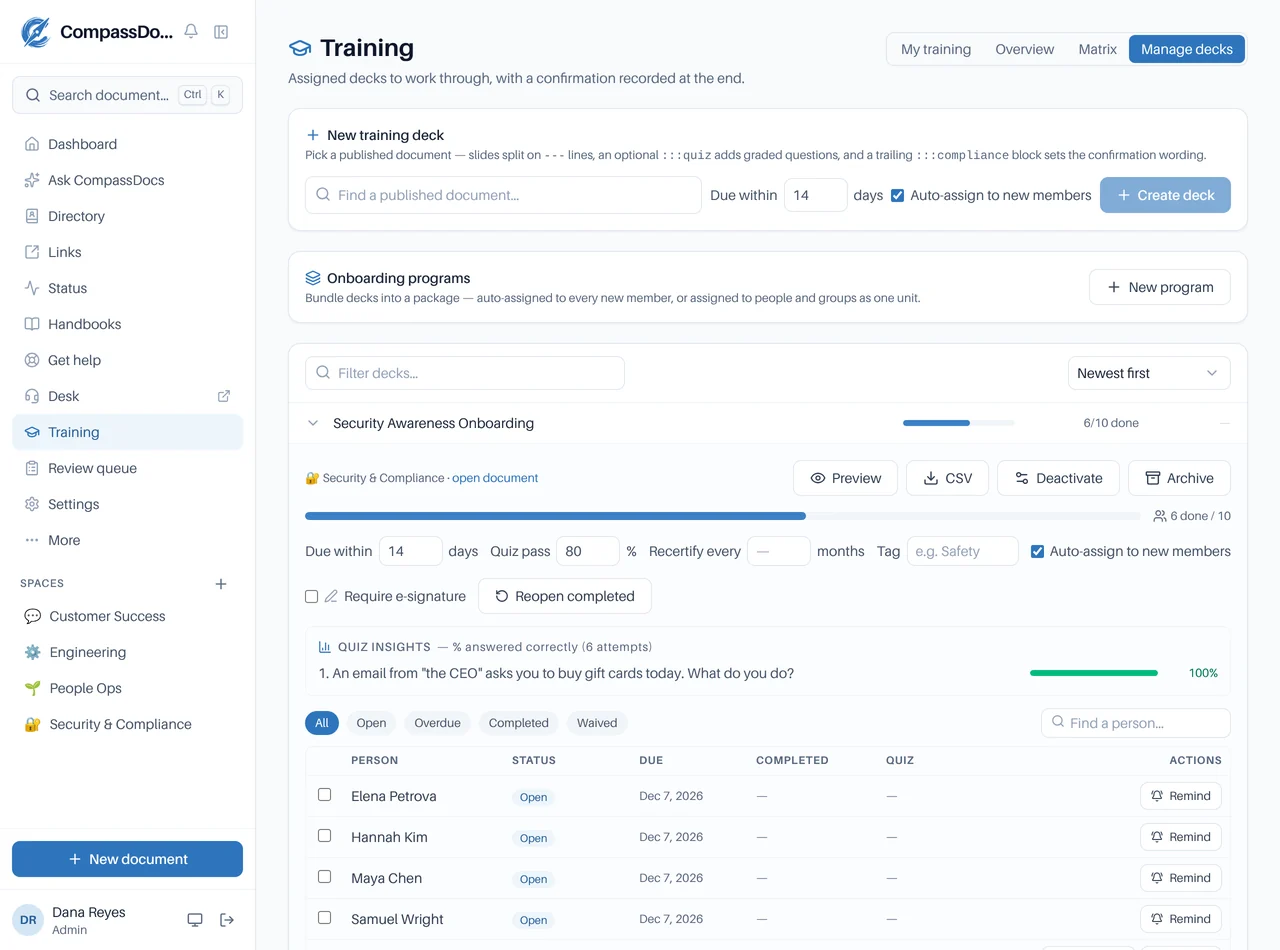
A deck auto-assigned to new staff, with completion progress and CSV export.
An internal IT and HR helpdesk for the firm
- Get help searches your guides before anyone sends a request, then offers request types such as tax software access, a new laptop or Ask HR
- HR’s queue stays private: agents see only the queues of the teams they belong to
- Checklists with required items mean a seasonal setup can’t be solved with a step skipped
- Connect Microsoft Intune or Snipe-IT and agents see the requester’s laptop, warranty and compliance on the ticket
- Recurring tickets open the pre-season software update, the post-deadline access review and the month-end close checklist on schedule
- 3 agents included, often the whole internal IT and admin team; extra agents are $125 a year each
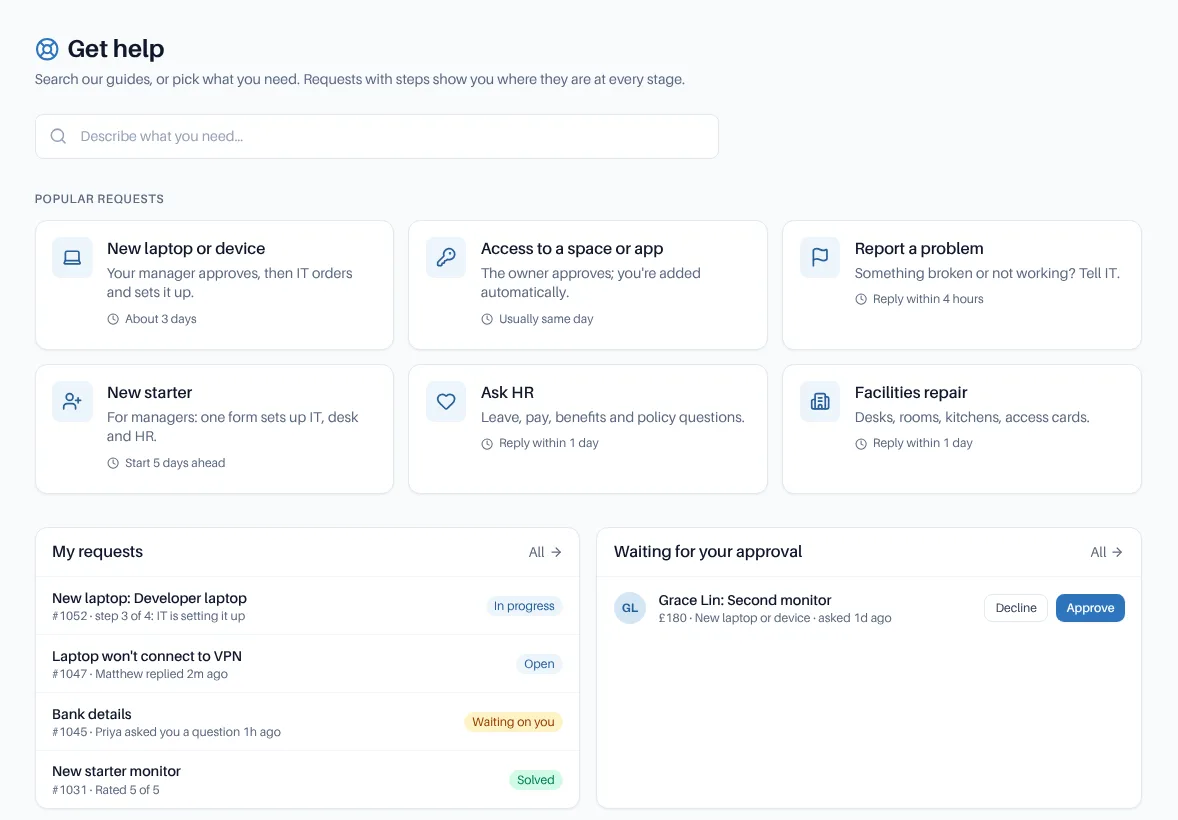
How each team uses CompassDocs
One concrete use per job. Spaces, versioning, approvals and handbooks are in the free Community edition; read confirmations, training and the helpdesk rows are Enterprise.
| Feature | Tax | Audit & assurance | Advisory | Client services & admin | IT |
|---|---|---|---|---|---|
| Spaces | Return prep and review procedures | Engagement procedures by service | Methodology and deliverable templates | Client onboarding SOPs | Staff tech guides |
| Versioning | Procedure as it stood each filing season | Checklist changes between engagements | Model revisions with change notes | Engagement letter steps over time | Security policy history |
| Approvals | Tax partner approves season changes | Engagement partner signs off a checklist | Practice lead approves a method note | Office manager approves intake steps | IT lead reviews access procedures |
| Handbooks | Tax season handbook | Engagement manual | Advisory playbook | Front-office procedures | Acceptable use and device guide |
| Read confirmations | This season’s changes, confirmed | Independence policy each year | Client data handling | Confidentiality on hire | Data security policy |
| Training | Review workflow deck with a quiz | New associate engagement basics | Onboarding for new consultants | Client intake walkthrough | Phishing awareness before the season |
| Request types | Tax software access | Workpaper software access | New client workspace setup | New client setup | New laptop or broken device |
| Recurring tickets | Pre-deadline extension sweep | Annual procedure review | Quarterly template refresh | Month-end close checklist | Post-season access review |
Getting the firm ready for busy season
A 40-person firm with two offices, between the October extension deadline and the first organizers coming back in January.
Update on draft branches
The tax manager revises the preparation, review and e-file procedures for this year’s changes on draft branches, while staff finishing extensions still read the published versions.
Tax partner approves
Each merge is a change request with a diff and a change note. The tax partner approves them in the review queue, and last year’s versions stay in the history.
Publish the season handbook
The updated procedures go into the tax season handbook, and an announcement tells every preparer and reviewer it is live.
Confirm what changed
With Enterprise, a “what changed this season” deck with five quiz questions is assigned to everyone in Tax, due before the first organizer is logged.
Six seasonal preparers start on the same Monday
They need a laptop, the tax software, the firm’s policies and a week of context, and IT is one person.
One request per hire
The office manager raises a New starter request. Its workflow sends tasks to IT and HR at the same time, then waits until a few business days before the start date.
A checklist IT can’t skip
The IT task carries a checklist: laptop imaged, tax software licence assigned, multi-factor sign-in set up. The ticket can’t be solved until the required items are ticked.
Training on day one
Their accounts arrive by SCIM, and an onboarding program assigns the staff handbook, the confidentiality policy and the review workflow deck.
Clean exit in May
When the season ends, deactivating them in Microsoft Entra deactivates them in CompassDocs and revokes their sessions; a leaver request covers the laptops.
Onboarding a new client accounting services client
A new business client signs up for monthly bookkeeping and quarterly advisory meetings.
Follow the intake SOP
Client services works through the client onboarding SOP: acceptance steps, the engagement letter, the portal invitation and the prior-year document request.
A New client setup request
The request type adds a checklist for setting up the client’s files and access, owned by the admin team, with due dates in business days.
A close on schedule
A recurring ticket opens the month-end close checklist for the client on the third of each month, moved to the next working day over a holiday, and the team’s assignment rules route it.
Accounting firm or regulated financial institution?
This page is about how a practice runs itself: procedures, checklists, seasonal staff and client onboarding. If you are a bank, credit union, insurer or advisory firm whose priority is staff attestations for examiners, see policy and procedure software for financial services. Many CPA firms use both sets of features: the procedures every day, the attestations once a year.
Keeping records, not promising compliance
CompassDocs keeps records that help when a partner, a peer reviewer, an insurer or a client asks: which version of a procedure was in force, who approved it, who acknowledged a policy and when, and who finished which training. It is a documentation tool, not a quality management system or a compliance program. We don’t claim it meets any professional standard, tax authority requirement or data protection law on your behalf. Self-hosting keeps your documents on infrastructure the firm controls; meeting your obligations remains the firm’s responsibility.
When another tool is the better fit
CompassDocs is the firm’s knowledge base and internal helpdesk. These jobs stay where they are:
Returns and workpapers
Tax preparation and audit workpaper software hold the returns, workpapers and engagement sign-offs. CompassDocs holds the procedures for using them.
Time, billing and the client list
Practice management handles time, billing, due-date tracking and client records. Link to it from quick links.
Client file exchange
Client documents and e-signatures belong in your client portal. CompassDocs is for staff, not for collecting client tax documents.
Set up faster with Claude
CompassDocs is built for MCP, so Claude can do the first draft of your rollout while your team reviews and publishes. When you start, we walk you through it.
Bring your content in
Paste or attach the procedures and policies you already have, and Claude redrafts each one in your templates, screenshots included.
Draft the handbook and training
Claude assembles a draft handbook from your policies and, with Enterprise, turns procedures into training decks with quiz questions.
Configure the helpdesk as drafts
Request types, forms, workflows, macros and recurring tickets are drafted for an admin to review and publish. Nothing goes live on its own.
See everything Claude can do through MCP and the step-by-step rollout.
Frequently asked
Can we keep tax, audit and advisory procedures separate?
Yes. Give each service line its own space, with per-space edit rights for the people who own its procedures. A private space limits reading to chosen people or groups, and search and AI answers respect that boundary.
How do we update procedures for a new tax year without confusing staff mid-season?
Rewrite them on draft branches. The published version keeps serving staff until the branch is merged, and in strict mode the merge waits for an approver. Every earlier version stays in the history.
Can seasonal staff and interns be onboarded automatically?
Yes, with Enterprise. Onboarding programs assign training decks and policies to every new account, whether created locally, by single sign-on or by SCIM, and SCIM deactivates them when they leave.
Can we record that staff acknowledged firm policies?
Yes, with Enterprise read confirmations. Each confirmation records the statement, the version and the time, with an optional typed signature, and you can export per-policy and per-person records.
Does CompassDocs replace our tax or practice management software?
No. Returns, workpapers, time, billing and client records stay in those systems. CompassDocs holds the procedures, checklists and policies around them, and the internal helpdesk.
Does using CompassDocs make our firm compliant?
No. It keeps records such as policy versions, approvals, acknowledgments and training completions, but it is not a compliance program or a quality management system, and we don’t claim it meets any standard on your behalf.
How is it priced for a firm with several offices?
One install serves every office. The Community edition is free with unlimited users. Enterprise is $499.99 a year per install with unlimited users and 3 helpdesk agents included, extra agents are $125 a year, and your first Enterprise purchase has a 30-day money-back guarantee.
Related: Financial services · SOPs · Policy management · Employee handbook · IT helpdesk software · HR helpdesk · Law firms · Professional services · Small business
Your firm’s procedures, current before the season starts
Self-host the open-source Community edition with one Docker command. Enterprise adds read confirmations, training, the helpdesk and SSO for $499.99/year per install, with unlimited users.
Self-host free See pricingBuying for a firm? Get a formal quote to print for the partners, or order by invoice with your PO number.