 CompassDocs
Knowledge management for consulting, agency and engineering firms
A services firm sells what its people know, and most of that knowledge leaves with the project team when the engagement closes. CompassDocs is self-hosted knowledge management for professional services firms: your delivery methodology, practice know-how and project templates in one searchable place, consultants onboarded against the current version, and an internal helpdesk for the IT and people questions in between.
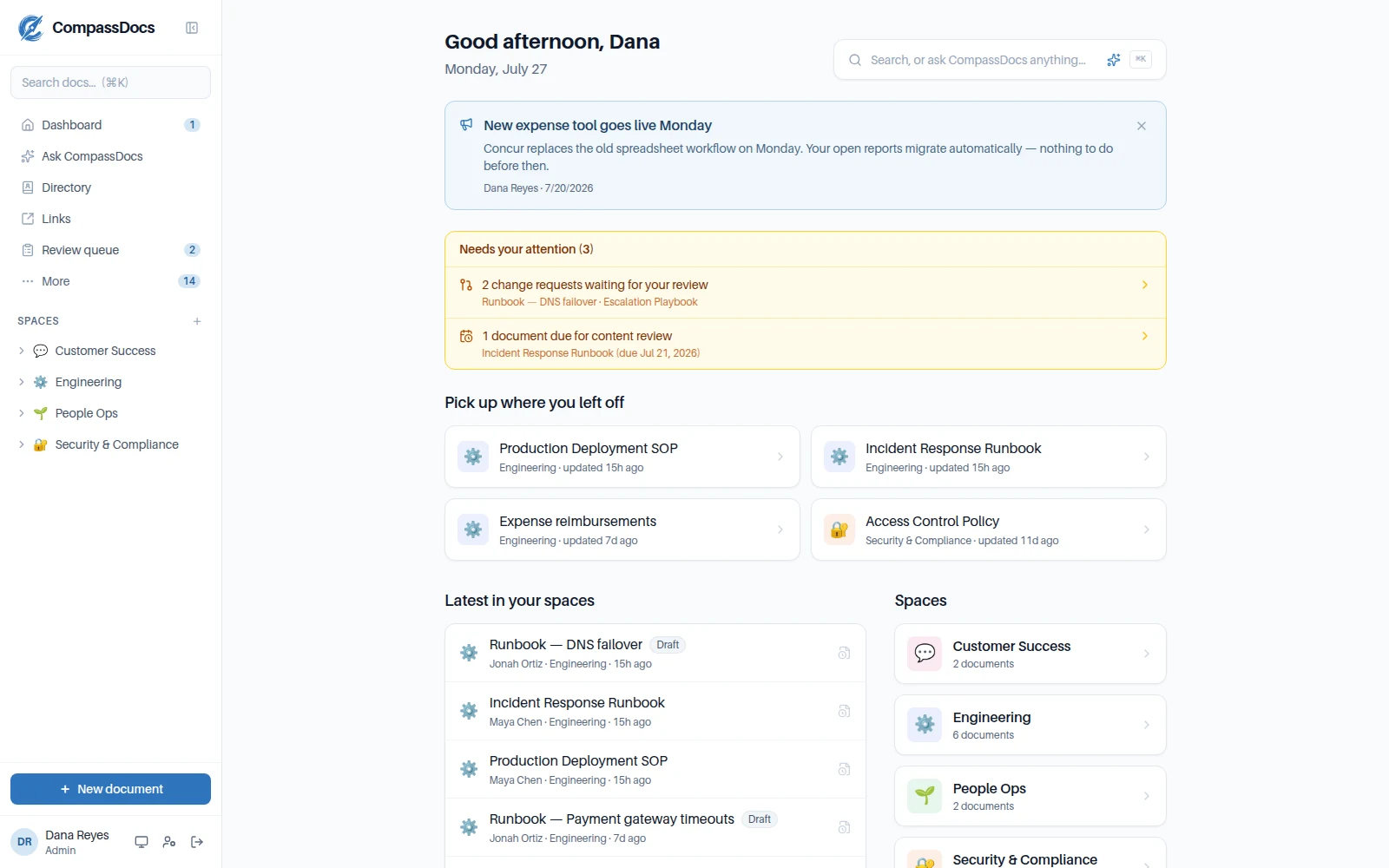
The page people open first: what changed in their spaces, documents to pick up again, and the firm’s tools one click away.
Every project team reinvents the kickoff
Consultancies, agencies and engineering and architecture practices all have a methodology. Few have one that people can find on a Tuesday afternoon.
× The delivery methodology is a slide deck from the last offsite, and each practice has quietly forked it.
× The best statement-of-work template is in one engagement manager’s drafts folder.
× Lessons learned are captured in a retrospective, filed in the project folder and never read again.
× New consultants are billable in week two and still asking how expenses, timesheets and the VPN work.
× Nobody can say which version of the QA review procedure a project team was following.
→ One methodology, current templates, know-how that outlives the project, and a record of what people were trained on.
What a services firm keeps in CompassDocs
- Delivery methodology: phases, gates, roles and the definition of done, with a diagram of the flow that stays editable as text
- Project templates: kickoff agenda, project charter, status report, risk log, decision record and closeout retrospective
- Practice know-how: approaches, worked examples and sanitized case summaries, tagged by industry and service
- Sales and pursuit material: proposal boilerplate, credentials and how the firm prices and scopes work
- Engineering and design standards: drawing and CAD standards, QA/QC review procedures and design check steps
- Firm operations: the staff handbook, travel and expenses, timesheets and IT guides
Your templates, not ours
Six built-in templates, including meeting notes, decision record and postmortem, plus your own. Any document can become a template, and a space can set its default.
A space per practice
Each practice owns its space, with categories, tags and six views. Per-space edit rights keep authoring with the people accountable for it.
Linked from the work
Link a methodology page to the templates it uses, or mark the old approach superseded. Backlinks show where each page is referenced.
Know-how that outlives the engagement
The value of a retrospective is the next team reading it. CompassDocs makes the firm’s experience something people can find without knowing who to ask.
Ask in plain English
“Have we scoped a data migration for a regional bank before?” gets an answer from the documents you can see, with the sources cited. Keyword search works without any AI key.
People as answers
Add directory fields such as practice or home office, and questions like “who leads the transport practice?” return a person, not a document.
Client-confidential spaces
Keep an account team’s notes in a private space for chosen people or groups. Search, AI answers and comments respect the boundary.
A methodology with history
Every save is a version with a change note. Revise on a draft branch, approve in strict mode, and show what the method said when a project ran.
Nothing quietly stale
Analytics shows what people searched for and didn’t find, and which pages nobody reads. Review cadences put owners’ overdue pages on their dashboard.
Share what clients should see
Mark a space public and its published documents become an anonymous, searchable site on your own domain, from the same source as the staff copy.
Onboarding consultants against the current methodology
- Turn the methodology into a training deck with a graded quiz, so new consultants learn the version in force today
- Onboarding programs assign decks to every new account, created locally, by single sign-on or by SCIM
- Read confirmations record who confirmed the code of conduct, client confidentiality and travel policies, and which version
- A material change to the methodology can ask delivery staff to confirm again; an editorial fix doesn’t
- Waive decks for experienced hires who already know the method; the record says waived, not completed
- Practice leads who are group leads get one weekly email showing who is behind
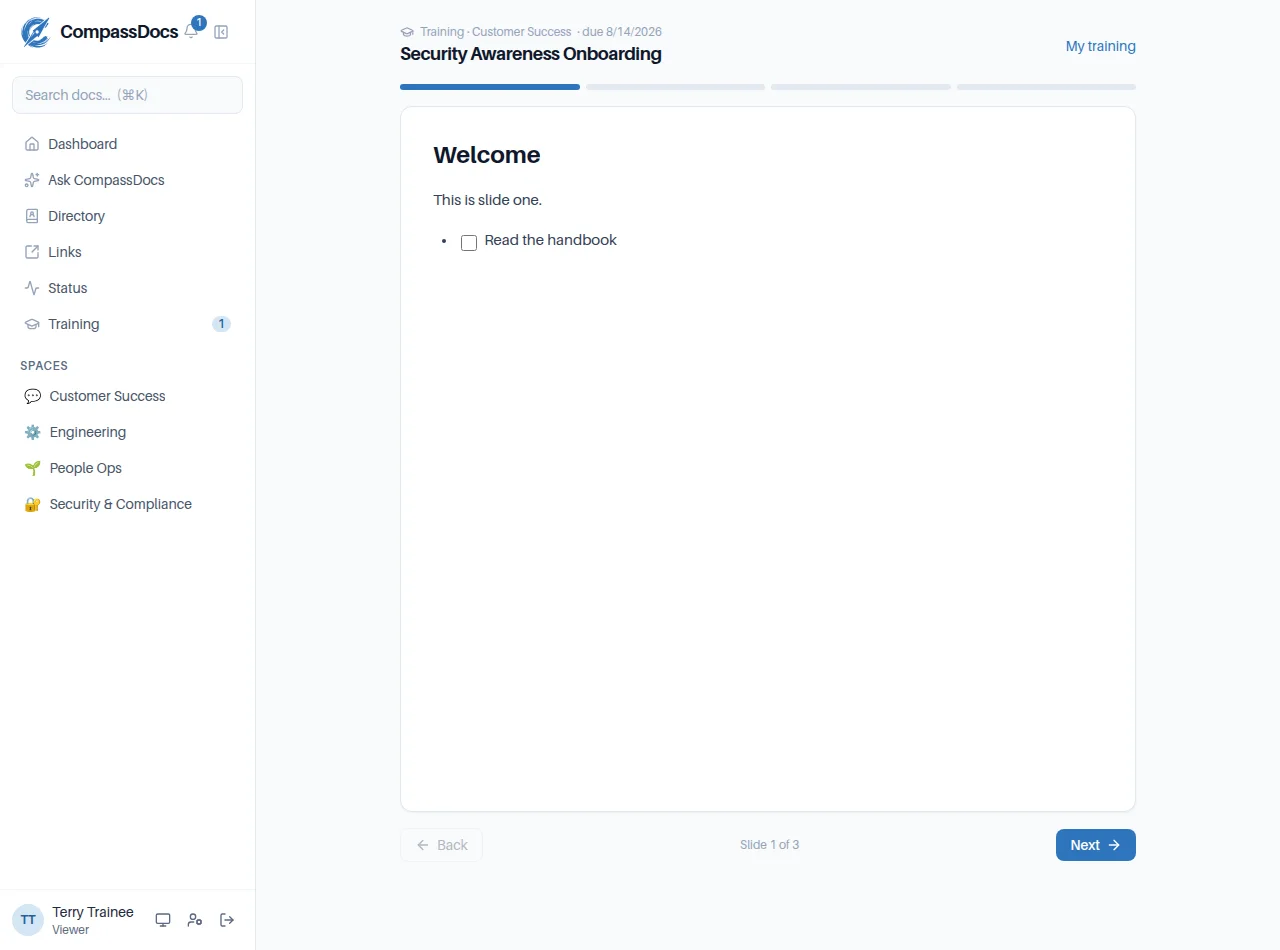
The training player: one slide at a time, a quiz, and a recorded confirmation at the end.
An internal helpdesk for a firm that’s rarely in the office
- Get help answers from your guides first, then offers request types such as a new laptop, access to a client tool or Ask HR
- Consultants raise and follow requests from Microsoft Teams or Slack, and approvers decide from a card
- A New starter workflow sends IT, HR and facilities tasks at once and routes them by the requester’s office
- Teams work to their own office hours and holidays, with reply targets counted in business time
- If you support clients after go-live, the helpdesk also offers a branded customer portal for people outside the firm
- 3 agents included; extra agents are $125 a year each, and people who only ask for help never count
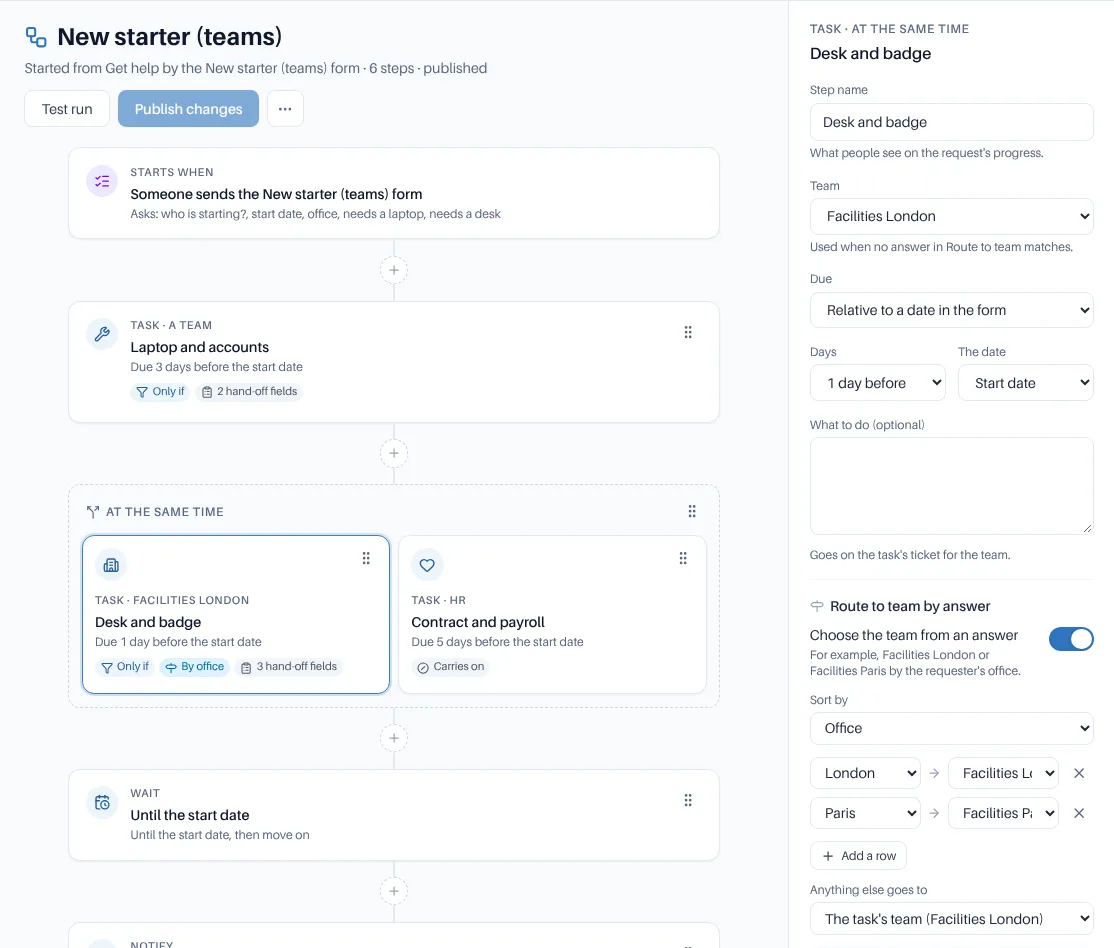
A New starter workflow: tasks for several teams at once, then a wait until the start date.
How each team uses CompassDocs
One concrete use per job. Spaces, templates, versioning, AI search and analytics are in the free Community edition; read confirmations, training and the helpdesk rows are Enterprise.
| Feature | Delivery & consultants | Practice leads | Sales & pursuits | PMO | HR & people | IT |
|---|---|---|---|---|---|---|
| Spaces | Private account team notes | The practice’s know-how | Proposal library | Methodology and governance | Private HR space | Staff tech guides |
| Templates | Kickoff agenda and status report | Case summary template | Proposal and SOW outline | Charter, risk log, closeout | Onboarding checklist | Runbook template |
| Approvals | Propose a fix to a template | Approve method changes | Approve new boilerplate | Strict mode on the methodology | Approve policy edits | Review access procedures |
| AI search | “How do we run a discovery workshop?” | Content gaps in their practice | “Have we done this for a hospital?” | “What goes in a phase gate?” | “How do I book travel?” | “How do I join the client VPN?” |
| Handbooks | Delivery playbook, read in order | Practice manual | Pursuit playbook | Project governance manual | Staff handbook | Acceptable use and device guide |
| Read confirmations | Client confidentiality | Material method changes | Pricing and approval rules | QA review procedure | Code of conduct on hire | Security policy each year |
| Training | Methodology deck with a quiz | Practice induction | Scoping and estimating basics | Running a phase gate | Onboarding program | Phishing awareness |
| Request types | Access to a client tool | Request a new template | Proposal review | New project setup | Ask HR | New laptop |
| Workflows | Equipment for a client site | Approve access to a practice space | Partner approval for a proposal | Project setup across IT and finance | New starter across teams | Leaver: accounts and kit |
From kickoff to closeout on one engagement
A consulting firm starts a six-month operating model engagement for a new client.
A private space for the account
The engagement manager creates a private space for the account team. Client-confidential notes stay there; the firm’s methodology stays in the PMO space everyone reads.
Start from the firm’s templates
The kickoff agenda, charter and risk log come from the firm’s templates. Key choices are written up as decision records as the project goes.
Retrospective at closeout
The team writes the retrospective from the postmortem template, then publishes a sanitized case summary to the practice space, tagged by industry and service.
The next pursuit finds it
Months later, a proposal writer asks whether the firm has done similar work and gets the case summary as a cited source, without seeing the private account space.
An engineering firm revises its QA/QC review procedure
After a design check missed a coordination issue, the quality lead tightens the review procedure for every project engineer.
Rewrite on a branch
The quality lead revises the procedure and its checklist on a draft branch while project teams keep working to the published version.
Approve and publish
A principal reviews the diff in strict mode and approves. The previous version stays in the history, so the firm can show which procedure a project followed.
Confirm and train
With Enterprise, the change is marked material, project engineers are asked to confirm the new version, and a short deck with a quiz walks through what changed.
A cohort of new consultants starts in September
Eight analysts join across two offices and are expected on client work within a fortnight.
One request each
HR raises a New starter request. The workflow sends laptop, accounts and desk tasks to each office’s teams, then waits until shortly before the start date.
Training assigns itself
Accounts arrive by SCIM, and an onboarding program assigns the methodology deck, the code of conduct and the client confidentiality policy.
Every tool on day one
Quick links put the timesheet, expenses and project tools on their dashboard, and Get help answers the rest.
Keeping records, not promising compliance
Clients increasingly ask suppliers to show their security policies, who has acknowledged them and how staff are trained. CompassDocs keeps those records: which version was in force, who approved it, who confirmed it and when, and who finished which training. It is a documentation tool, not a certification or a quality management system, and we don’t claim it meets any standard or client requirement on your behalf. For security programs, see SOC 2 and ISO 27001 policies.
When another tool is the better fit
CompassDocs is the firm’s knowledge base and internal helpdesk. These jobs belong elsewhere:
Projects, resourcing and time
Plans, staffing, utilization, timesheets and invoicing stay in your project management or PSA tool. CompassDocs documents how you run projects with it.
Client deliverables and drawings
Deliverables, models and drawing sets live in your file storage, document control or BIM environment. CompassDocs holds the standards for producing them.
Pipeline and client records
Opportunities and contacts stay in your CRM. The proposal library and pursuit playbook can live in CompassDocs.
Set up faster with Claude
CompassDocs is built for MCP, so Claude can do the first draft of your rollout while your team reviews and publishes. When you start, we walk you through it.
Bring your content in
Paste or attach the procedures and policies you already have, and Claude redrafts each one in your templates, screenshots included.
Draft the handbook and training
Claude assembles a draft handbook from your policies and, with Enterprise, turns procedures into training decks with quiz questions.
Configure the helpdesk as drafts
Request types, forms, workflows, macros and recurring tickets are drafted for an admin to review and publish. Nothing goes live on its own.
See everything Claude can do through MCP and the step-by-step rollout.
Frequently asked
Can we keep client-confidential material to the account team?
Yes. Put it in a private space granted to chosen people or groups. Search, AI answers and comments respect the boundary, so the rest of the firm can search the practice know-how without seeing the account notes.
Can we build our own project templates?
Yes. Six templates are built in, including meeting notes, decision record and postmortem, and admins can turn any document into a template. A space can set its default template.
Does CompassDocs replace our project management or PSA tool?
No. Plans, resourcing, timesheets and billing stay in that tool. CompassDocs holds the methodology, templates, know-how and policies around it, plus the internal helpdesk.
Can new consultants be onboarded automatically?
Yes, with Enterprise. Onboarding programs assign training decks to every new account, whether created locally, by single sign-on or by SCIM, and read confirmations record which policies each person confirmed.
Can clients see any of it?
Only what you choose. A public space publishes its documents as an anonymous site on your own domain, and the Enterprise helpdesk offers a branded customer portal. Everything else is for signed-in staff.
Do AI answers send our documents to a third party?
AI answers are optional and off until an admin adds your own Anthropic API key. They only draw on documents the person asking can see, and semantic search can run on a local engine such as Ollama.
How is it priced for a firm with several offices?
One install serves the whole firm. The Community edition is free with unlimited users. Enterprise is $499.99 a year per install with unlimited users and 3 helpdesk agents included, and each extra agent is $125 a year.
Related: Knowledge management software · Internal wiki · SOPs · IT helpdesk software · HR helpdesk · Law firms · Accounting firms · Construction · MSPs
Your firm’s methodology, where people can find it
Self-host the open-source Community edition with one Docker command. Enterprise adds training, read confirmations, the helpdesk and SSO for $499.99/year per install, with unlimited users.
Self-host free See pricingBuying for a firm? Get a formal quote to print for approval, or order by invoice with your PO number.