 CompassDocs
SOC runbooks, incident procedures and audit evidence for MSSPs
A managed security service runs on written procedure: how Tier 1 triages an alert for this client, when to wake the client’s contact, and proof afterwards that it was followed. CompassDocs is the self-hosted home for that knowledge: SOC runbooks and playbooks in a private space per client, reviewed and versioned incident procedures, policy sign-off and security awareness training tracked against the exact version, and an audit log you can export when a client’s auditor asks.
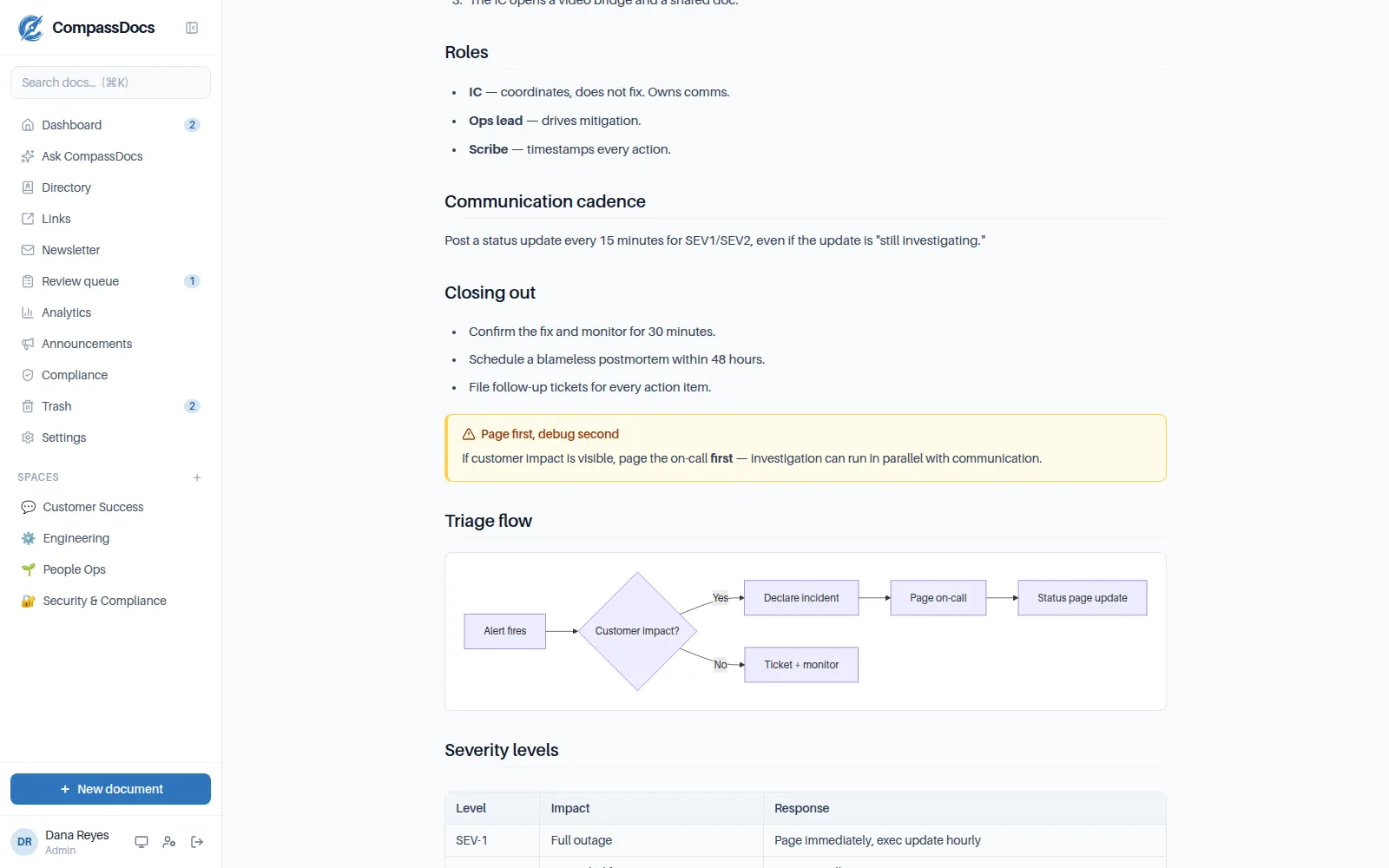
An incident runbook: a callout, a severity table, a decision-tree triage diagram and numbered steps on one page.
The SIEM tells you what fired. It doesn’t tell you what to do.
Detection content gets the attention. The procedures around it, and the proof they were followed, live wherever someone last saved them.
× Playbooks sit in a wiki nobody trusts, so the night shift asks in chat instead.
× Each client’s escalation contacts and exceptions are in an analyst’s notes, not the runbook.
× A client asks which version of the ransomware procedure was in force in March, and nobody can say.
× Policy sign-off and awareness training are tracked in a spreadsheet that’s wrong by audit week.
× A new analyst needs weeks of shadowing because the knowledge isn’t written down.
→ Reviewed, versioned procedures per client, with sign-off, training and an audit trail in one self-hosted place.
Where CompassDocs sits in a security operation
CompassDocs is not a SIEM, a SOAR or an EDR, and it doesn’t detect anything. It sits beside them as the knowledge and records layer: the runbooks analysts follow, the policies staff confirm, the training they complete, and, with the Enterprise helpdesk, the requests and alerts that need a person.
It is one install per organization, not a multi-tenant platform: one workspace for your SOC, with a private space per client restricted to the analysts and groups who work it. Search, AI answers and comments respect the boundary. Admins and anyone with workspace-wide rights still see every space, so keep that circle small; Explain access shows every permission a person holds, and which role and group granted it.
Playbooks analysts can follow at 3 a.m.
- A runbook template so every playbook has the same shape: scope, triage, containment, escalation, recovery and closing notes
- Decision-tree guides that walk a Tier 1 analyst through triage one question at a time, and Mermaid or PlantUML diagrams for escalation paths
- Checklists for containment steps, and code blocks for the queries analysts paste
- A shared playbook space for standard procedures, linked to each client’s environment notes, contacts and exceptions in their private space
- Strict mode, so a change to a published playbook becomes a change request an approver reviews before it goes live
- Review reminders that flag playbooks nobody has checked on schedule, and the postmortem template for the review after an incident
- Search with type:, tag: and space: operators, and optional AI answers that cite their runbook
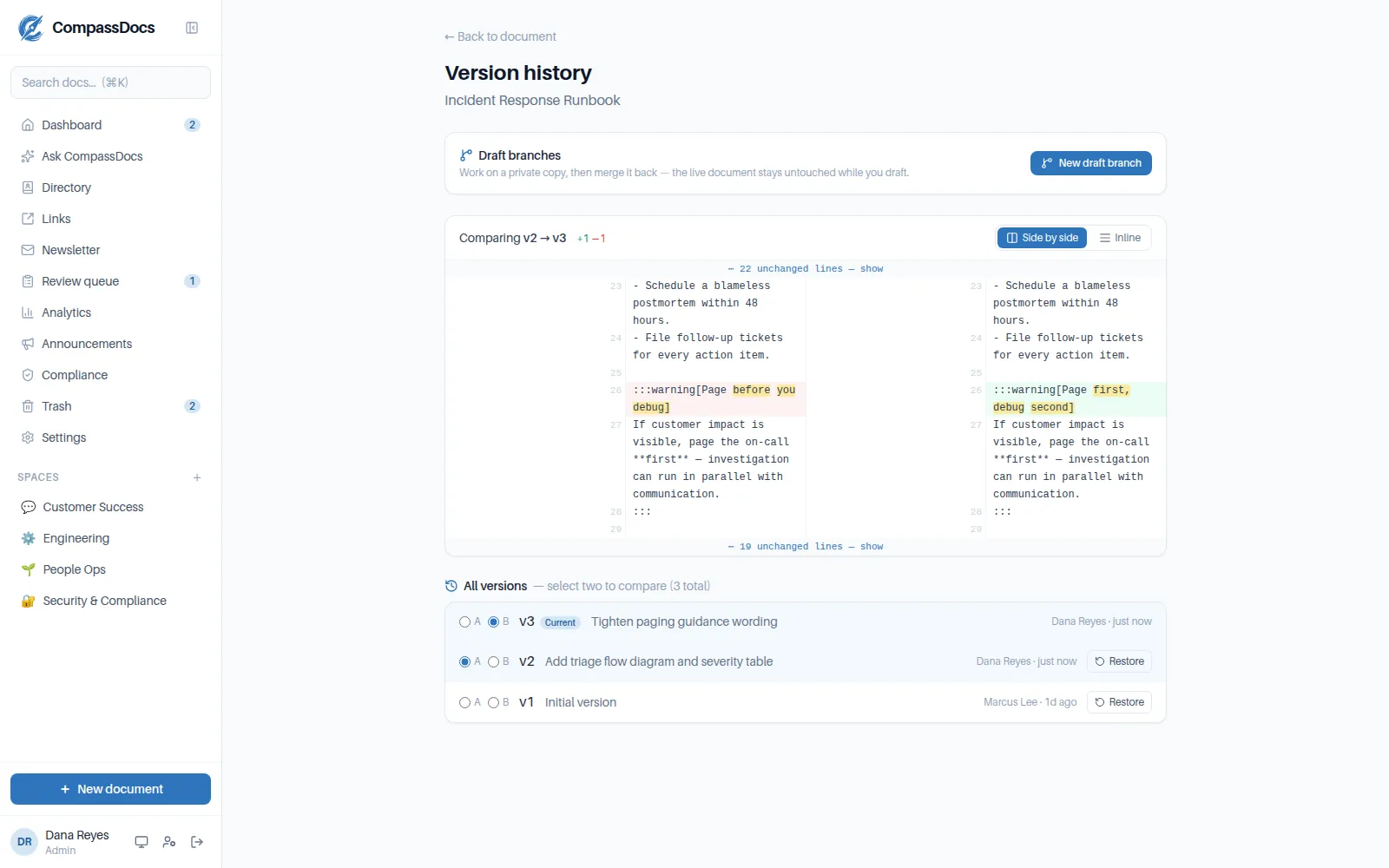
Every save is a version with its author, time and change note, compared word by word.
Incident procedures and the requests around them
Investigation happens in your security tools. The helpdesk handles the people side: reports, alerts that need an owner, and updates.
Alerts with an owner
Generic webhooks, PagerDuty-style events and API bots open tickets, each source with its own team, severity map and rate limit. Repeats add a note; a resolved alert solves the ticket unless a person replied.
Major incidents
When a phishing wave hits a client and forty people report it, gather the reports under one major incident, post one update to everyone affected, and show a banner in Get help with a Me too button.
A queue per client
Several help addresses, each starting its tickets in a chosen team. Agents and team leads work only their teams’ queues, with office hours, reply targets and on-call rotas per team.
Client reporting route
The customer portal lets client staff raise a request, such as reporting a suspicious email, with a one-time email sign-in, limited to approved domains, and see only their own requests.
Checklists on tickets
Request types can add reusable checklists, and Before you solve rules can require their items ticked, so a ticket can’t be solved with the procedure half done.
Security policy sign-off, against the exact version
Your analysts handle client data under rules your contracts depend on: acceptable use, confidentiality, evidence handling and each client’s rules of engagement. Turn on Require readers to confirm and each policy asks its audience to confirm it, with a statement, an optional typed signature, due dates, reminders and escalation.
- Audiences by space, group, person or role, with new accounts enrolled automatically
- You decide whether an edit is editorial or material; only a material change asks people again
- Annual re-confirmation, exemptions and extensions, and a compliance portal you can delegate to GRC staff without making them admins
Policy sign-off by a client’s own workforce needs those people to have accounts. In your install they would share your directory and internal spaces, so for a whole client workforce a separate install for that client, with its own licence, is usually the cleaner answer.
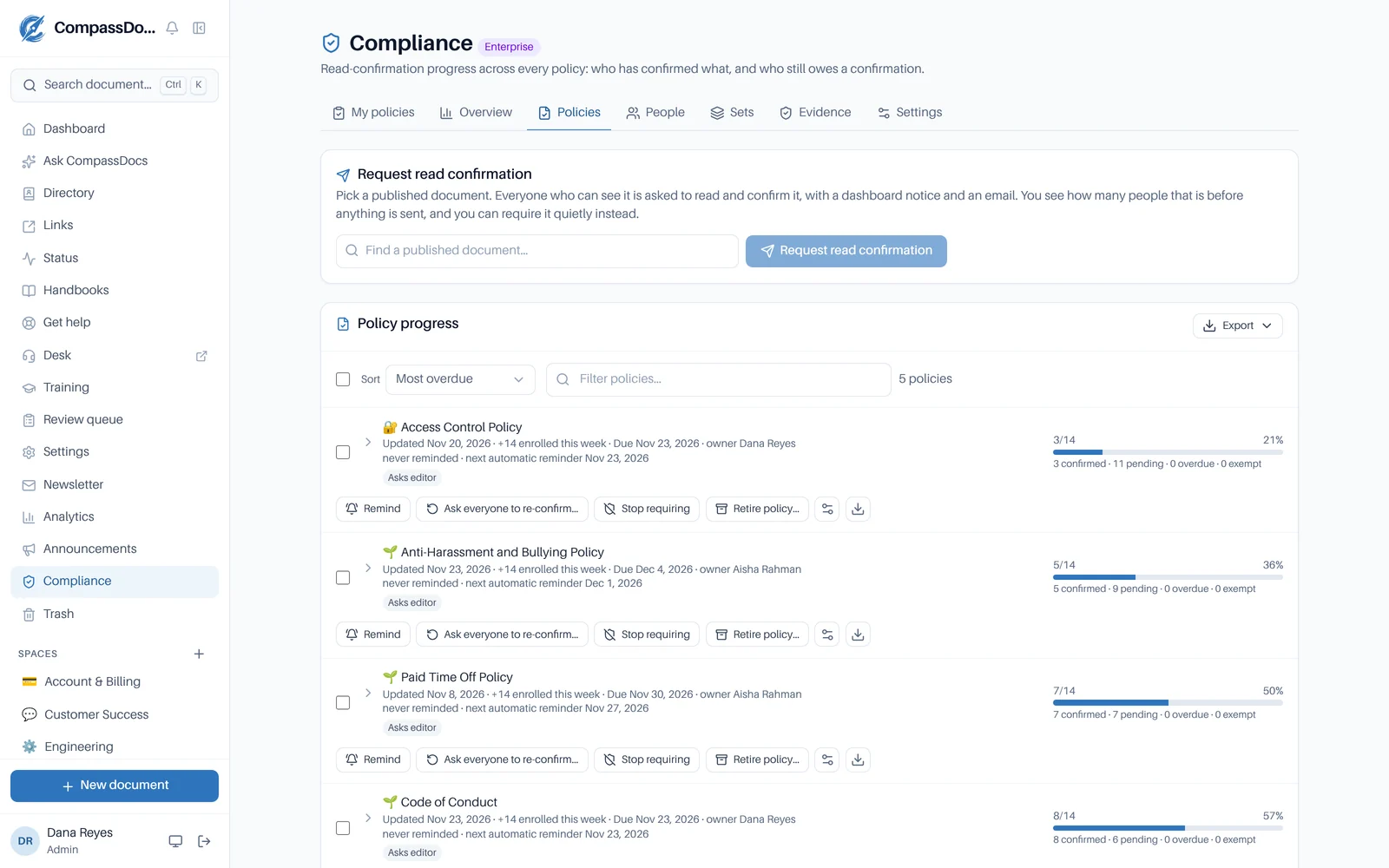
The compliance view: every policy’s due date, owner and confirmation progress.
Security awareness training and analyst onboarding
Turn any published document into a training deck: slides, multiple-choice questions graded on the server, a pass mark and a final confirmation that records the version each person saw. See security awareness training for the full picture.
- Analyst onboarding: an onboarding program assigns the SOC handbook, the evidence-handling policy and the core playbooks to every new account, whether it was created locally, by single sign-on or by SCIM
- Recertification: a deck reopens every N months, so annual awareness training comes round on its own
- Waivers for staff who trained elsewhere, recorded as waived rather than completed
- Evidence: printable certificates, per-person progress with quiz scores and CSV export
It is not a ready-made course library or a phishing simulator.
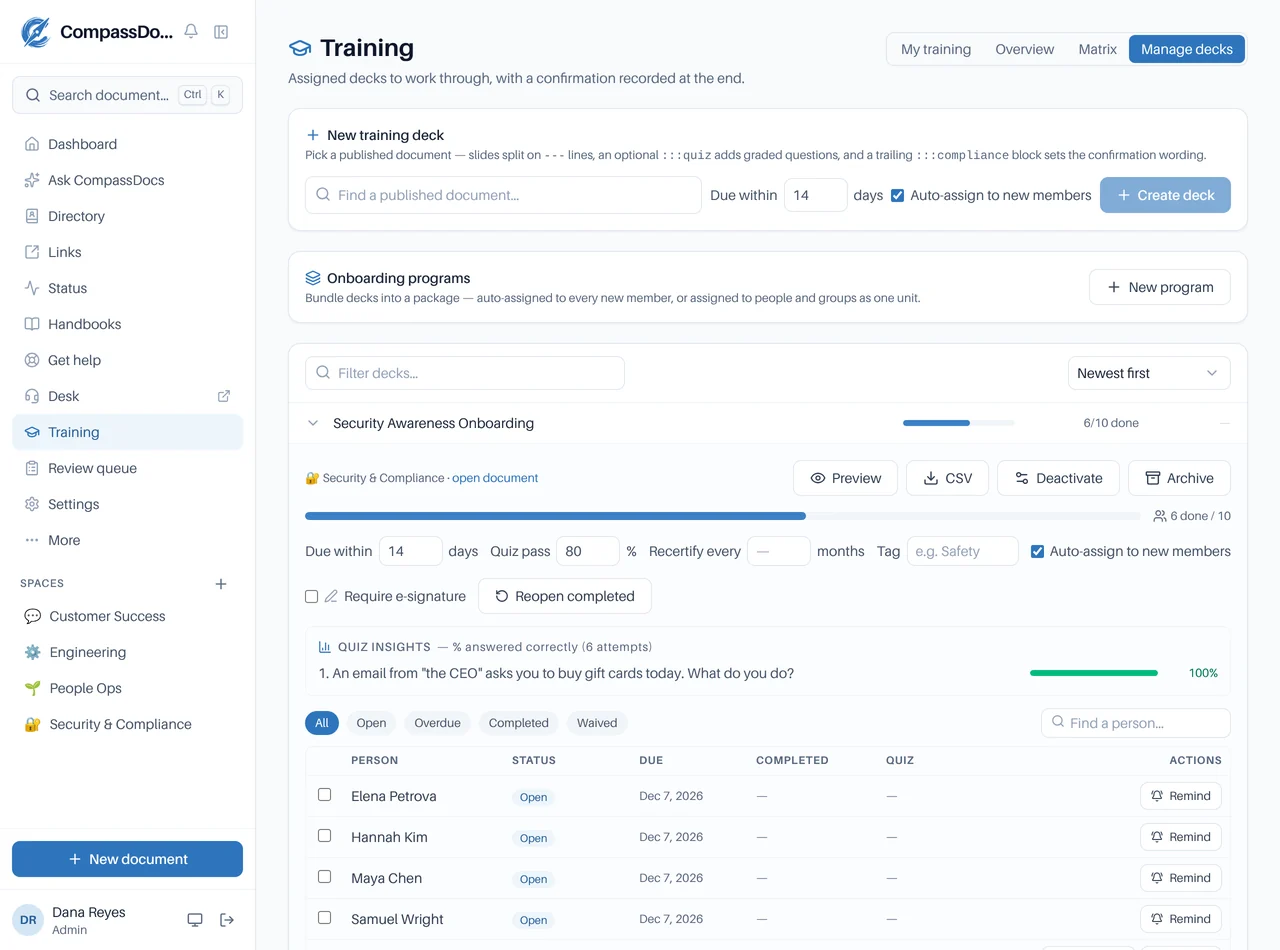
A security awareness deck that assigns itself to new members, with completion progress and CSV export.
Evidence for client audits
Clients’ auditors ask their vendors for procedures, approvals and proof. CompassDocs keeps them as a side effect of the work.
An append-only audit log
Sign-ins, role changes, publishes, approvals and every helpdesk change, with actor, IP and time. Enterprise exports it as CSV or JSON.
What was in force, when
Every version of a procedure keeps its author, time, change note and approver, so you can show what the playbook said on the day.
An audit package
Read confirmations export per-policy and per-person records, monthly snapshots with a SHA-256 and a ZIP audit package with a hash manifest.
Training records
Who completed which deck, when, the quiz score and the document version confirmed, exported as CSV.
Ticket exports
Any desk list exports as CSV, up to 10,000 tickets with a column per custom field, and each export is audited.
Legal hold
Keep a ticket from being closed, anonymised, deleted or merged, whatever the retention rules say.
One workspace, five jobs
What the same install does for each function in an MSSP.
| Job | SOC analysts | Incident response | GRC & compliance | Client onboarding | Engineering |
|---|---|---|---|---|---|
| Runbooks & playbooks | Triage decision trees per alert type | Containment and recovery checklists | Approve changes to playbooks | Client variants of standard playbooks | Detection tuning and integration notes |
| Private client spaces | Contacts, assets of note, exceptions | Who can authorize isolation at the client | Show who can read each client’s space | Create the space and grant the account team | Log sources and architecture diagrams |
| Versions & approvals | Suggest a fix after a shift | Update the playbook after the review | Prove what was in force on a date | Record the agreed scope as approved | Rewrite on a draft branch |
| Read confirmations | Confirm evidence handling and acceptable use | Confirm the client’s rules of engagement | Run the annual cycle from the portal | Add the new client’s rules to the set | Confirm change-management policy |
| Training | Onboarding program and quizzes | Annual tabletop prep deck | Awareness training records and CSV | Client-specific briefing deck | Secure-configuration standards deck |
| Helpdesk (Enterprise) | Work the client’s queue | Run a major incident for a phishing wave | Export tickets for a client audit | Add a help address and team | Point a webhook alert source at the desk |
Worked examples
How the pieces fit, using only what CompassDocs does today.
A client’s auditor asks for proof
The auditor wants the SOC’s procedure for a compromised account, who approved it, and proof the analysts on the account had read it. GRC shows the version in force for the period and its approver from version history, then exports the read confirmation records and the audit log.
Onboarding a new client
The onboarding lead creates a private space and grants the account team’s group. In go the escalation matrix, maintenance windows, log sources as a Mermaid diagram, and client variants of the standard playbooks, linked to the originals. The client’s rules of engagement go out for confirmation to the analysts on the account, and with the helpdesk a help address starts the client’s reports in its own team.
A new Tier 1 analyst’s first fortnight
SCIM creates the account, and the onboarding program assigns the SOC handbook, evidence-handling policy and core playbook decks, with quizzes and due dates. On the desk they start as a Newbie, so their client replies wait for a team lead. When they ask “how do we escalate a P1 for this client?”, the answer cites the client’s runbook, from a space they can read.
Keeping records, not promising compliance
CompassDocs keeps the evidence client audits tend to ask for: which version of a procedure was in force, who approved it, who confirmed it and when, who finished which training, and what changed in the audit log. It is a documentation tool, not a certification or a compliance program, and using it doesn’t make you or your clients compliant with any framework. Your controls, and what you and your clients’ auditors accept, remain your responsibility. For the policy side of a framework program, see SOC 2 and ISO 27001 policies.
When another tool fits better
CompassDocs holds procedures, policies, training and records. Keep these jobs elsewhere, linked from quick links:
- Detection, correlation and log search belong in your SIEM.
- Automated response actions belong in a SOAR or your EDR/XDR. CompassDocs documents the steps; it doesn’t execute them.
- Forensic case management with evidence chain of custody belongs in a case management or DFIR tool. Helpdesk tickets are not a forensic record.
- Control mapping and continuous control monitoring across frameworks belong in a GRC platform.
- Phishing simulations and ready-made course libraries come from an awareness training provider.
- Secrets and credentials belong in a vault or password manager, never in a runbook.
- A fully separate workspace per client means a separate install, each with its own licence. Ask us if you plan to run several.
Your playbooks in one place this week
Run one command
Docker starts CompassDocs and PostgreSQL on your own server, and a setup wizard creates your admin account.
Lay out the spaces
A shared playbooks space, an internal SOC space for policies and the analyst handbook, and a private space per client granted to its account team’s group.
Bring in your playbooks
Import them as front-matter Markdown, or start from the IT runbook template, then turn on strict mode and review reminders.
Set up faster with Claude
CompassDocs is built for MCP, so Claude can do the first draft of your rollout while your team reviews and publishes. When you start, we walk you through it.
Bring your content in
Paste or attach the procedures and policies you already have, and Claude redrafts each one in your templates, screenshots included.
Draft the handbook and training
Claude assembles a draft handbook from your policies and, with Enterprise, turns procedures into training decks with quiz questions.
Configure the helpdesk as drafts
Request types, forms, workflows, macros and recurring tickets are drafted for an admin to review and publish. Nothing goes live on its own.
See everything Claude can do through MCP and the step-by-step rollout.
Frequently asked
Is CompassDocs a SIEM or SOAR?
No. CompassDocs doesn’t collect logs, detect threats or run automated response. It holds the runbooks, policies, training and records around your security operation, and with Enterprise a helpdesk that can take alerts from a webhook and requests from your clients.
Can each client’s runbooks be kept separate?
Yes. Give every client a private space restricted to chosen people or groups. Search, AI answers and comments respect that boundary. Admins and anyone with workspace-wide rights can still see every space, and Explain access shows who holds which permission and why.
Is it multi-tenant?
No. One install is one workspace, with one directory, one set of admins and one sign-in setup. Clients are separated by private spaces and, in the helpdesk, by teams. A client that needs a fully separate workspace needs a separate install with its own licence.
Can our analysts confirm client security policies?
Yes, with Enterprise read confirmations. Each confirmation records the statement, the version and the time, with an optional typed signature, and you can export per-policy and per-person records or an audit package.
Can it track security awareness training?
Yes, with Enterprise training. Turn your own documents into decks with graded quizzes, assign them with due dates, recertify every N months and export completions as CSV. It is not a phishing simulator or a ready-made course library.
What evidence can we give a client’s auditor?
Version history showing which procedure was in force and who approved it, read confirmation records and an audit package with a hash manifest, training completions with the version confirmed, ticket exports, and the audit log, which Enterprise exports as CSV or JSON.
Does client data leave our servers?
Not by default. CompassDocs is self-hosted in one PostgreSQL database you control. Optional features that talk to other services, such as AI answers with your own Anthropic API key or Microsoft 365, need outbound access to them; leave them off and the knowledge base runs inside your network.
How is it priced for an MSSP?
Per install, not per user or per client. Community is free. Enterprise is $499.99 a year per install with unlimited users and 3 helpdesk agents included; each extra agent is $125 a year.
Related: MSPs & IT services · IT runbooks · Security awareness training · SOC 2 & ISO 27001 policies · Policy management · Read confirmations · Major incidents · How to write a runbook
Your SOC’s knowledge, on your own servers
One Docker command installs CompassDocs with unlimited users and documents. Enterprise adds read confirmations, training, the helpdesk, SSO and audit-log export for $499.99/year.
Self-host free See pricingBuying for a team? Get a formal quote to print for approval, or order by invoice with your PO number.