 CompassDocs
Procedures, onboarding and an internal helpdesk for insurance agencies
How to submit a small commercial package to each carrier, what to do when a client declines umbrella coverage, the renewal steps at 90, 60 and 30 days: in most agencies that lives in a senior CSR’s head and a folder of old emails. CompassDocs gives an independent insurance agency one place for carrier and product procedures, a tracked onboarding path for new producers and CSRs, a record of who confirmed each procedure, and an internal helpdesk for the questions that interrupt everyone. It runs on your own servers, beside your agency management system.
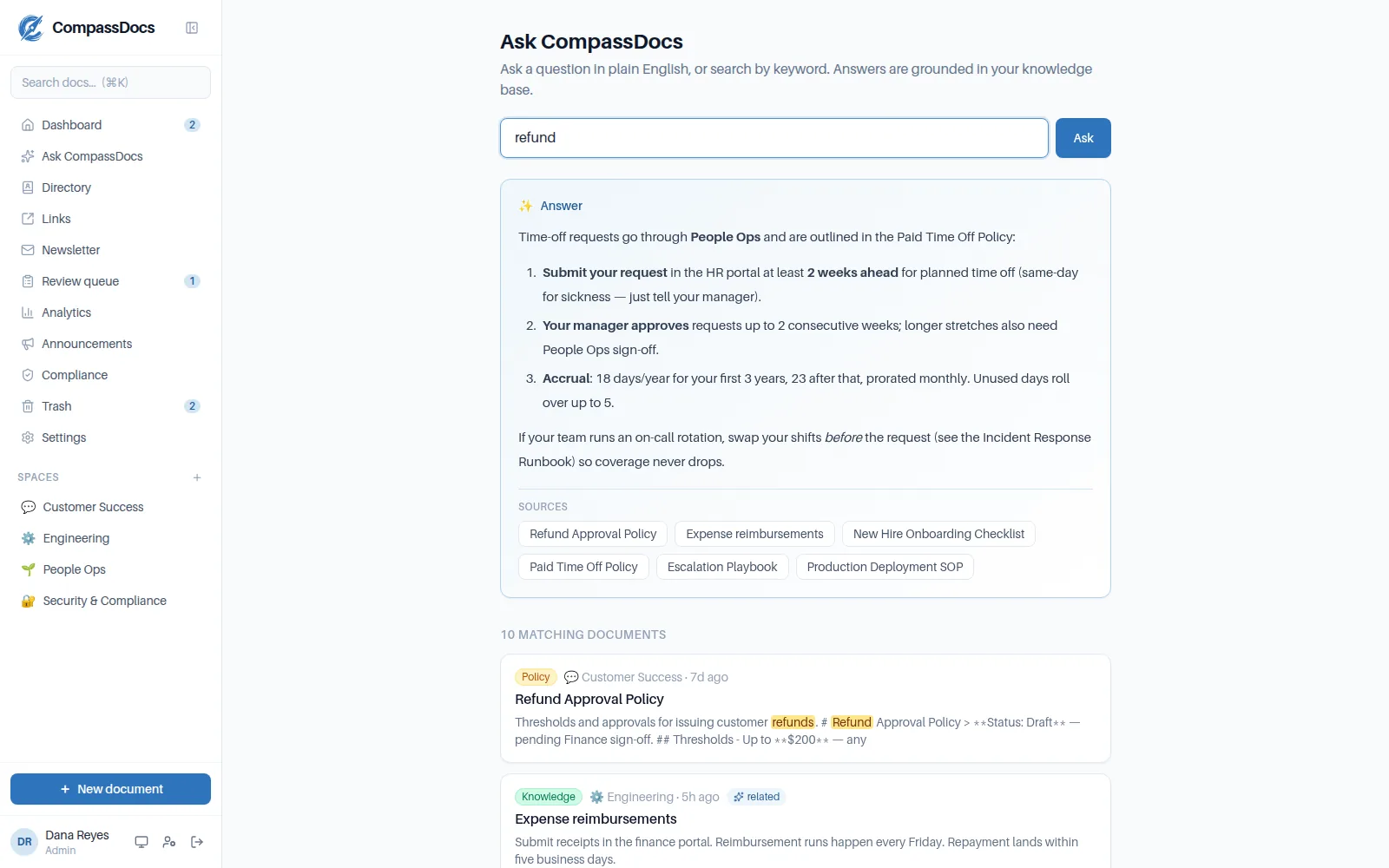
Ask a question in plain English and get an answer from your own procedures, with the sources listed.
The agency’s procedures live in its best CSR
Carriers change portals, appetites and forms all year, and an agency’s know-how changes with them.
× A new CSR asks the same three people how each carrier handles a mid-term endorsement.
× The carrier moved its submissions to a new portal, and half the office still uses the old steps.
× The procedure for documenting a declined coverage exists, but nobody can say who has read the current version.
× A producer leaves, and their renewal habits leave with them.
× IT, carrier portal access and “where’s the form for this?” all arrive as interruptions.
→ One current set of procedures, an onboarding path for every new hire, and a record of who confirmed which version.
Carrier and product procedures, current and findable
The knowledge base is in every edition, including the free Community edition.
- A private Carriers space with a page per carrier: appetite notes, new business submission steps, endorsements, cancellations and reinstatements, binding authority, portal access and who to call
- Line-of-business pages for personal lines, small commercial, and life and benefits if you write them, linked to the carrier pages they depend on
- Agency workflows from the built-in SOP template: new business intake, the renewal timeline, certificate requests, remarketing an account, and documenting coverage offered and declined
- Strict mode sends every edit to a published procedure to an approver first, with a change note; version history shows what the procedure said on the day a question arose
- Review cadences bring each carrier page due on its owner’s dashboard, so changed appetites and forms get checked
- A CSR asks “how do we add a driver mid-term with this carrier?” and gets an answer from your documents with the source cited (optional AI, your own Anthropic API key), or searches from the Outlook add-in while writing to the client
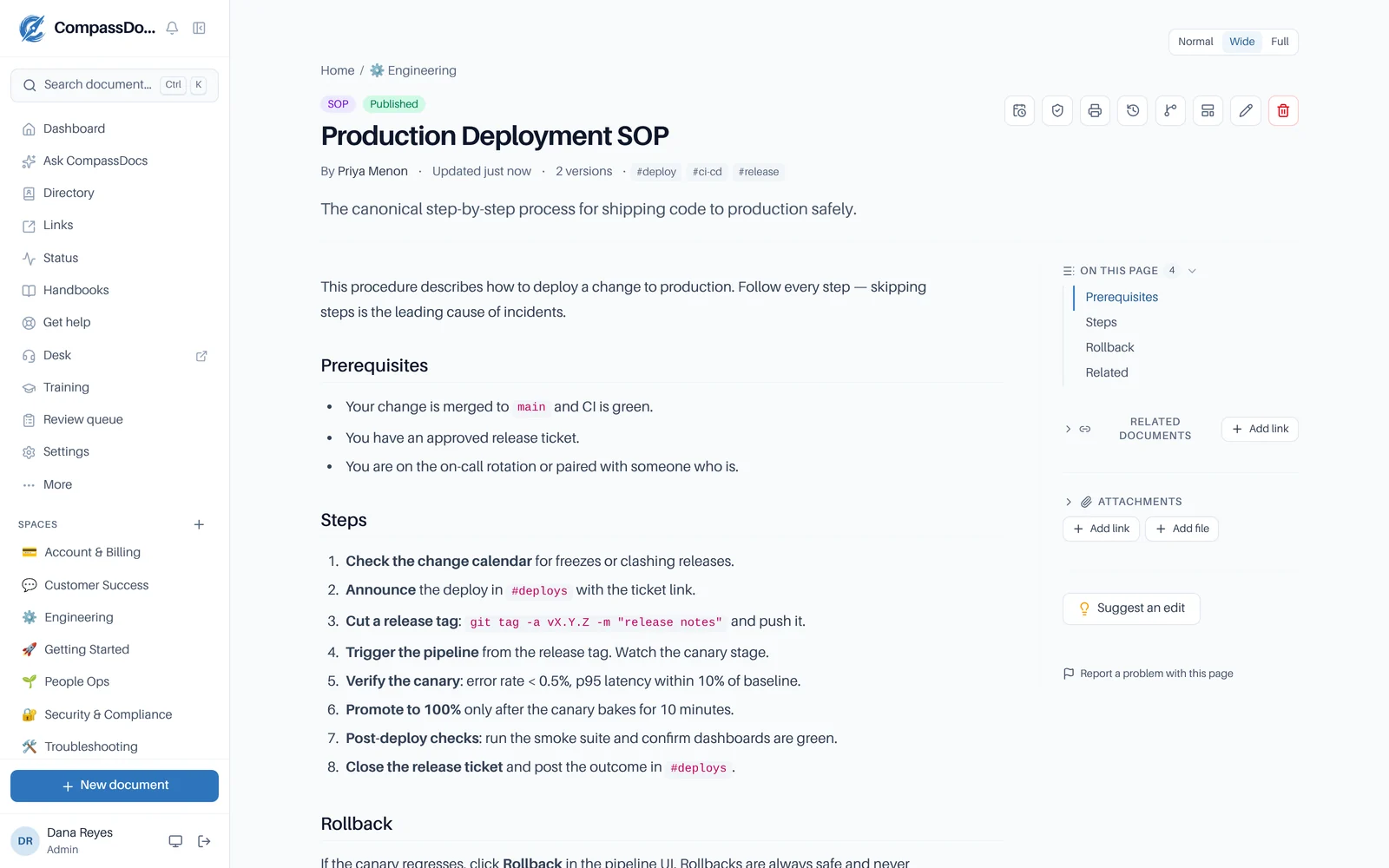
The SOP layout: owner, version, prerequisites and numbered steps. A renewal or new-business procedure uses the same shape.
Producer and CSR onboarding, with a record
Training and read confirmations are part of Enterprise. The training is the procedure, so it never falls behind it.
- An onboarding program assigns agency orientation, the agency management system basics, the renewal process and your E&O procedures to every new account automatically
- Separate paths for producers and for CSRs and account managers, with quiz questions graded on the server and a pass mark that unlocks the confirmation
- Ask everyone who handles client files to read and confirm a changed procedure by a due date, with reminders, escalation and an optional typed signature
- A material change asks people again; an editorial fix doesn’t, and you choose which it is
- The compliance portal shows who is due, who is overdue and who confirmed which version, and exports per-person records and an audit package
- Office managers and team leads get one weekly email covering their team’s training and policies
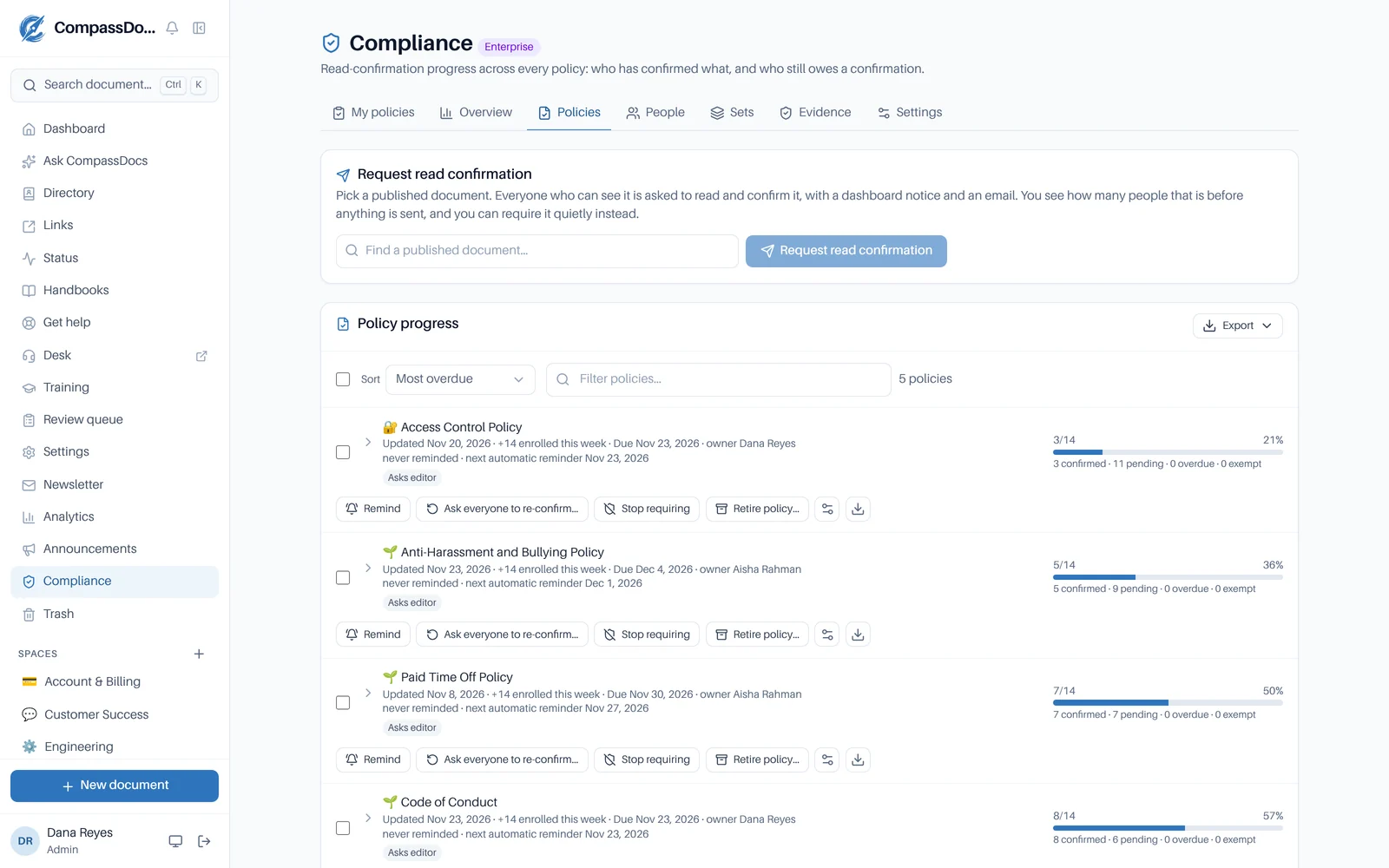
The compliance view: each policy’s due date, owner and how many people have confirmed it.
An internal helpdesk for the agency
The helpdesk is for your own staff: the questions and requests that otherwise interrupt the operations manager, the IT provider and the office manager.
- Get help suggests your procedures before anyone asks, then offers request types: carrier portal access, agency management system access, IT problem, new hire, marketing request, Ask ops
- A carrier portal access request can need the operations manager’s approval through a workflow, and the approval card works in Teams or Slack
- A New hire request runs IT, operations and HR tasks in parallel, then waits until the start date
- Email to your internal help address becomes tickets; with Microsoft 365 the desk reads the shared mailbox directly
- Recurring tickets remind ops of the monthly carrier contact review, the quarterly procedure review and the licensing coordinator’s monthly check
- If an outside IT provider works your tickets, give them a desk role scoped to the IT team only
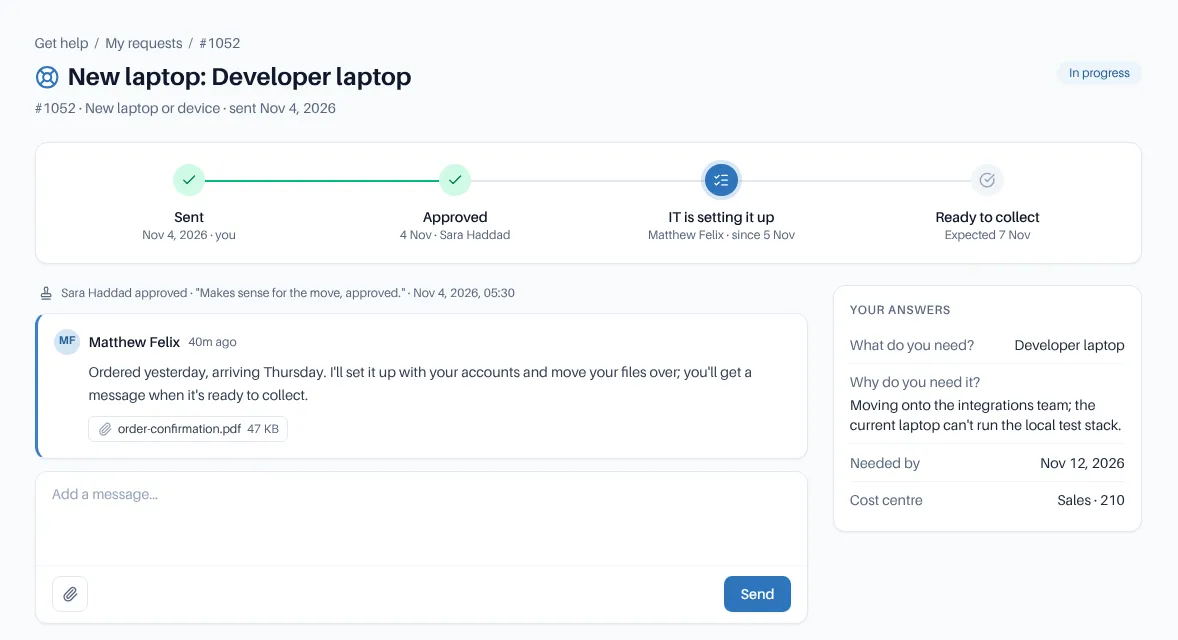
A request in Get help, with its tracker, the approval and the reply.
Producers, CSRs, claims, licensing and operations
The jobs each part of an independent agency does, and what CompassDocs does for each. One install covers every office.
| Job | Producers | CSRs & account managers | Claims | Compliance & licensing | Operations |
|---|---|---|---|---|---|
| Procedures | Carrier appetite and submission steps | Endorsements, renewals, certificates | First notice of loss steps per carrier | License renewal procedure | Owns the agency workflow |
| Approvals & versions | Always the current carrier page | Propose a fix to a procedure | Approved claim-handling wording | Version in force on a date | Approves procedure changes |
| Read confirmations | Coverage documentation procedure | Declined-coverage procedure confirmed | Claims procedure confirmed | Roster and audit package | Annual staff handbook cycle |
| Training | Producer onboarding path | CSR onboarding with quizzes | Claims advocacy deck | Recertification every 12 months | Assigns programs to new hires |
| Search & Outlook | Ask before quoting | Find and link a procedure in an email | Find the carrier’s claims steps | Find the current policy | See what people search for |
| Helpdesk | Ask ops which carrier fits | Carrier portal access request | Ask ops about a carrier contact | Monthly licensing check reminder | Works the queue, approves access |
Read confirmations, training and helpdesk rows are Enterprise. CompassDocs does not track licenses, appointments or CE credits.
A year at an agency
A new CSR starts Monday
Their account is created by single sign-on and joins the CSR onboarding program, with decks on the agency management system, the renewal timeline and the declined-coverage procedure. A New hire request has already given IT, ops and HR their tasks.
A carrier changes its submission portal
The ops manager updates that carrier’s page and marks the change material. Everyone in personal lines is asked to confirm the new steps by Friday, and the old version stays in history for anyone who asks what the process was last month.
The licensing coordinator’s monthly check
A recurring ticket opens on the first weekday of each month with a link to the licensing procedure and a checklist. The coordinator runs the check in the licensing system, notes the result and solves the ticket, so there is a record that it happened.
What it costs
The knowledge base, with procedures, approvals, version history, handbooks and search, is free in the Community edition, open source under AGPL-3.0, with unlimited users. Enterprise is $499.99 a year per install with unlimited users and adds read confirmations, training and onboarding, SSO (SAML or OIDC), SCIM, directory sync, audit-log export and the helpdesk with 3 agents included. Each extra agent is $125 a year.
Most agencies run one install for every office. If the operations manager, the office manager and an outside IT technician work tickets, that is three agents, so the whole agency is $499.99 a year at list price; producers and CSRs who only ask for help never count. Optional dedicated support is $3,000 a year, and your first Enterprise purchase has a 30-day money-back guarantee. CompassDocs Cloud is coming soon and not on sale yet, so today you self-host.
Keeping records, not promising compliance
Agencies are often asked to show their procedures: by an E&O carrier, a carrier audit, an acquiring agency or, after a claim, a lawyer. CompassDocs keeps the records that help answer: which version of a procedure was in force on a date, who approved it, who confirmed it and when, and who completed which training. Self-hosting keeps them in a PostgreSQL database on infrastructure you control, with an append-only audit log.
It is a documentation and training tool. We don’t claim it reduces E&O exposure, satisfies any state insurance department requirement or makes an agency compliant with anything. Keep client data in your agency management system, not in procedure pages. Meeting your regulatory and contractual obligations remains your agency’s responsibility.
What it isn’t, and when another tool fits better
CompassDocs is not an agency management system. It has no client or policy records, quoting or comparative rating, carrier downloads, commissions, certificates of insurance or client activity notes. Your agency management system stays the system of record for clients and policies, and CompassDocs holds the procedures, training and internal requests around it.
It also isn’t a producer licensing tool: it doesn’t track licenses, appointments, CE credits or expiry dates, so keep those in a licensing system or your agency management system. And it isn’t a client service portal for policyholders; the helpdesk here is for your own staff. For regulated financial firms with examiner attestations, see financial services.
Set up faster with Claude
CompassDocs is built for MCP, so Claude can do the first draft of your rollout while your team reviews and publishes. When you start, we walk you through it.
Bring your content in
Paste or attach the procedures and policies you already have, and Claude redrafts each one in your templates, screenshots included.
Draft the handbook and training
Claude assembles a draft handbook from your policies and, with Enterprise, turns procedures into training decks with quiz questions.
Configure the helpdesk as drafts
Request types, forms, workflows, macros and recurring tickets are drafted for an admin to review and publish. Nothing goes live on its own.
See everything Claude can do through MCP and the step-by-step rollout.
Frequently asked
Where should we keep carrier procedures?
In a private Carriers space, with a page per carrier: appetite notes, how to submit new business, endorsements and cancellations, binding authority, portal access and who to call. Strict mode sends changes to an approver, and version history shows what the procedure said on any date.
Does CompassDocs track producer licenses, appointments or CE credits?
No. It doesn't track licenses, carrier appointments, CE hours or expiry dates. You can keep the licensing procedure in the knowledge base and, with the Enterprise helpdesk, have a recurring ticket remind your licensing coordinator to run their check each month, but the license records themselves belong in your licensing or agency management system.
Will documented procedures reduce our E&O exposure?
We can't promise that. CompassDocs helps you write procedures down, keep them current and record who confirmed which version and who completed which training. Whether that helps with an E&O claim or your carrier's review depends on your procedures, how staff follow them and your policy, so ask your E&O carrier or broker.
Is CompassDocs an agency management system?
No. It has no client records, policies, quoting, rating, commissions, downloads or certificates. Client files and activity notes stay in your agency management system. CompassDocs holds the procedures, training records and internal requests around it.
Can new producers and CSRs be onboarded automatically?
Yes, with Enterprise training. An onboarding program assigns its decks to every new account automatically, whether it was created by hand, by single sign-on or by SCIM. Decks can carry quiz questions graded on the server and a confirmation at the end, and each completion records the version confirmed.
Can CSRs find a procedure while writing an email?
Yes. The Outlook add-in puts CompassDocs search, AI answers and a one-click insert document link in the Outlook ribbon. AI answers are optional and use your own Anthropic API key; keyword search works without one.
How is it priced for a multi-office agency?
One install covers every office. The Community edition is free and open source with unlimited users. Enterprise is $499.99 a year per install with unlimited users and adds read confirmations, training, SSO, SCIM and the helpdesk with 3 agents included; each extra agent is $125 a year.
Related: Policy management · SOP software · Training & onboarding · Read confirmations · Internal wiki · IT helpdesk software · Financial services · Accounting firms · Professional services
Agency procedures on your own servers
Self-host the open-source knowledge base free with one Docker command and unlimited users. Enterprise adds procedure sign-off, producer and CSR training, the internal helpdesk and SSO for $499.99/year per install.
Self-host free See pricingBuying for the agency? Get a formal quote to print for approval, or order by invoice with your PO number.