 CompassDocs
A ManageEngine ServiceDesk Plus alternative for internal teams
ManageEngine ServiceDesk Plus is an established ITSM product that you can run in the cloud or on your own servers. CompassDocs is a ServiceDesk Plus alternative for teams that want an internal helpdesk inside their knowledge base: open source, self-hosted, with unlimited users and one yearly price.
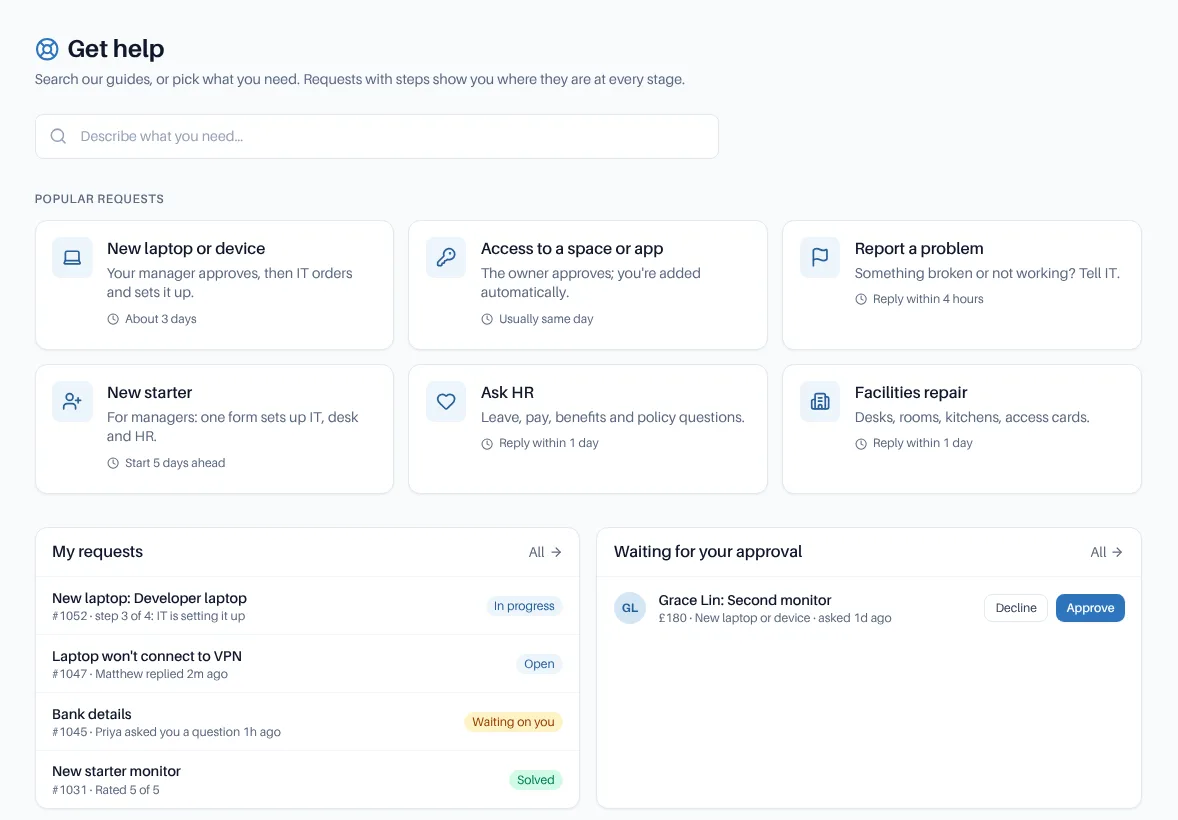
Get help: colleagues search your guides first, then pick a request type. The same sign-in they use for your docs.
Why teams look for a ManageEngine ServiceDesk Plus alternative
- The desk and your documentation in one product: Get help searches your guides before anyone raises a request
- Open source under AGPL-3.0, so you can read and audit the code behind your desk
- One yearly price per install with unlimited users; 3 agents included and extra agents at $125/year each
- Microsoft 365 throughout: mailboxes read through Microsoft Graph, Entra sign-in and SCIM, requests and approvals in Teams
- Claude in the desk drafts replies, ticks checklists and suggests macros; a person sends and applies
Assets on the ticket
Snipe-IT and Intune devices sync every 30 minutes, with warranty, compliance and earlier tickets, and requesters pick their own device when they ask.
Workflows and approvals
Approvals from the directory, parallel tasks for several teams, waits and business-day due dates, tested with sample answers before you publish.
Your servers, your data
Run the desk on infrastructure you control, with an offline-signed license that never calls home.
One product for requests and the guides behind them
Both products can run on your own infrastructure, so the choice is less about hosting and more about scope. ServiceDesk Plus is a broad ITSM suite. CompassDocs is narrower on the service desk and deeper on documentation: spaces for each team, roles and approval workflows, version history and policy handbooks, plus, with Enterprise, read confirmations and training decks with completion tracking.
For colleagues, that means one place to read the guide and, if it doesn’t help, raise the request. For agents, the runbook, the solved tickets and the requester’s devices are one search away from the ticket, and Claude can draft the reply from them for the agent to edit and send.
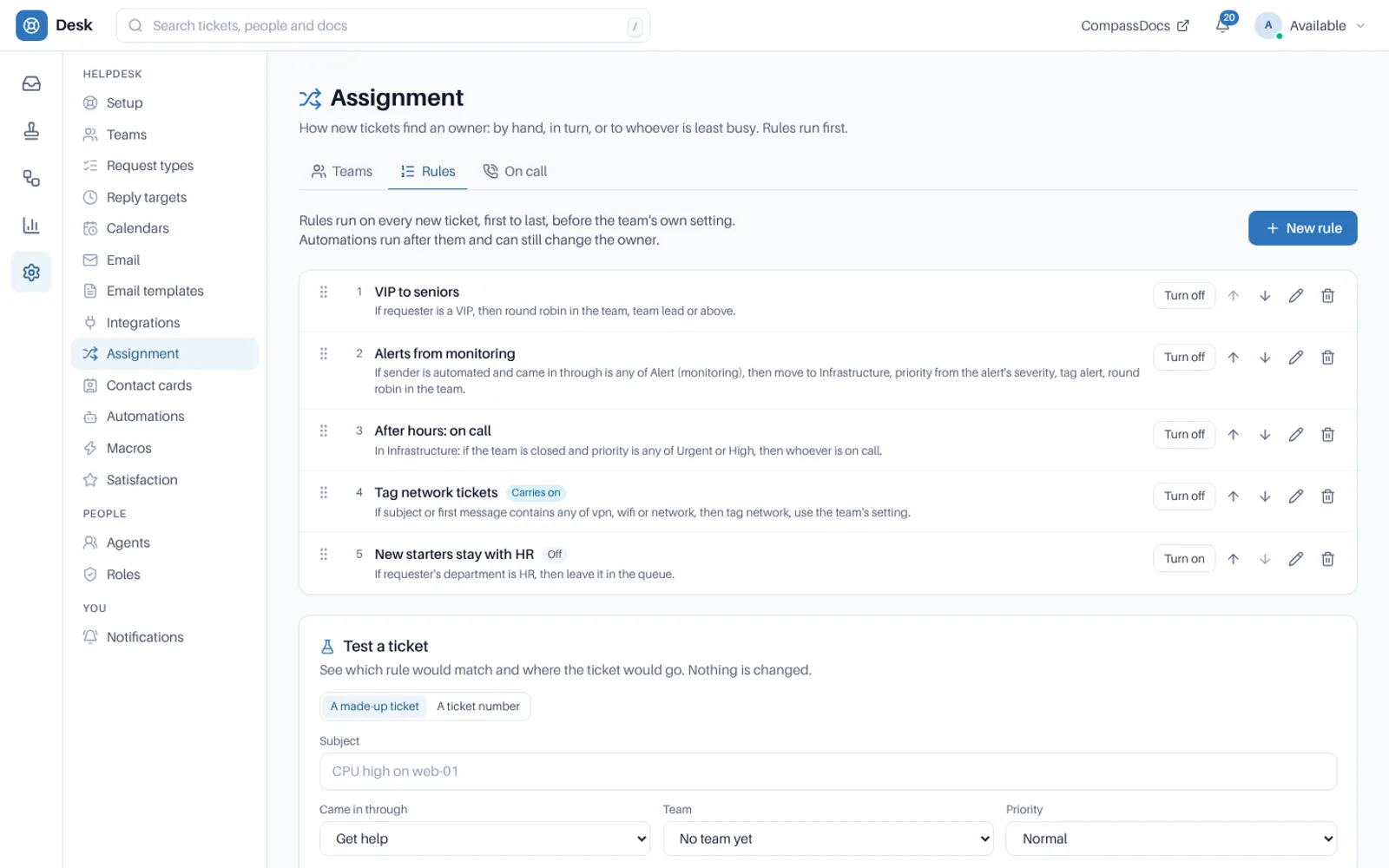
Assignment rules: VIP tickets to seniors, monitoring alerts, after-hours on call and tagging, with Test a ticket to see which rule matches.
Reply targets in business time
Office hours and holidays per team; targets pause while a ticket waits on the requester, with nearing and breach warnings.
Teams and Slack
People raise and follow requests by messaging the CompassDocs app, and approvers decide from a card in the chat.
Reports in business hours
Six built-in dashboards and your own, over 30 measures, a click from each chart to its tickets, and CSV export.
Microsoft 365 mailboxes
Shared or user mailboxes read through Microsoft Graph, with no forwarding rules, and replies that can appear in the mailbox’s Sent Items.
Knowledge base and desk together
Spaces, version history and approval workflows come in the free Community edition; the helpdesk joins them with Enterprise.
Integrations and API
A REST API with scoped tokens, signed webhooks, and alert sources such as Prometheus Alertmanager, Grafana, Datadog and Azure Monitor.
CompassDocs and ServiceDesk Plus side by side
Both can run on your own servers. The differences are in scope, licensing and price.
| Compared | CompassDocs | ServiceDesk Plus |
|---|---|---|
| Main focus | Internal help for IT, HR and Facilities, inside a full team knowledge base | IT service management (ITSM) |
| Hosting | Self-hosted on your servers, in your own PostgreSQL database | Cloud or on-premises |
| Source code | Open source, AGPL-3.0 | Proprietary |
| Pricing model | Community: free. Enterprise: $499.99/year per install, unlimited users, 3 helpdesk agents included, extra agents $125/year each | Commercial licenses or subscriptions, typically priced per technician |
| Knowledge base | Full team knowledge base: spaces, approvals, version history, templates and policy handbooks | A knowledge base within the service desk |
| Helpdesk | Enterprise: Get help, the desk, request types, workflows and approvals, SLAs, automations, assets, major incidents and reports | Broad ITSM, including change and problem management |
| Assets | Snipe-IT and Microsoft Intune devices synced onto tickets, with warranty and compliance | Asset management and a CMDB within the product |
| AI answers from your docs | Cited answers grounded only in your documents, with your own Anthropic key (keyword search is free). In the desk, Claude drafts replies and a person sends them | ManageEngine offers its own AI features |
| SSO | Enterprise: SAML 2.0 and OIDC, one-click Microsoft Entra setup, SCIM provisioning | Supported; see ManageEngine for details |
ServiceDesk Plus details describe its general model, not a specific edition. Check ManageEngine for current editions, features and pricing.
When ServiceDesk Plus is the better fit
CompassDocs isn’t the right tool for every IT team. ServiceDesk Plus is likely the better choice if:
You run a full ITIL process
If formal change and problem management are processes you run as built-in modules, ServiceDesk Plus is built around them. CompassDocs covers requests, approvals, SLAs, assets and major incidents.
You need built-in asset management and a CMDB
CompassDocs shows Snipe-IT and Intune devices on tickets, but it isn’t an asset register or CMDB.
You run other ManageEngine tools
If your endpoint or directory tools already come from ManageEngine, staying in that family may matter more than anything here.
Moving from ServiceDesk Plus
The knowledge base is free to self-host; an Enterprise license turns on the helpdesk.
Run one command
The installer starts CompassDocs and PostgreSQL with Docker, and a setup wizard creates your admin account in the browser.
Bring your articles
Import guides and runbooks as front-matter Markdown into spaces for each team, or start from the built-in runbook and SOP templates.
Turn on the helpdesk
Add an Enterprise license (or a trial license), set up teams, request types and office hours, and connect help addresses or Microsoft 365 mailboxes.
Import ticket history
From a CSV file: map statuses, priorities and agents, check the dry run, then import in the background.
$ curl -fsSL https://raw.githubusercontent.com/Felix-AZ-Solutions-LLC/CompassDocs/main/install.sh | bash
  ✓ Fetched docker-compose.yml
  ✓ Generated .env with fresh secrets
  ▲ CompassDocs running at http://localhost:3000
  → open the URL to create your admin account
Requirements, platforms and the Node.js install path are on the self-hosting page →
Set up faster with Claude
CompassDocs is built for MCP, so Claude can do the first draft of your rollout while your team reviews and publishes. When you start, we walk you through it.
Bring your content in
Paste or attach the procedures and policies you already have, and Claude redrafts each one in your templates, screenshots included.
Draft the handbook and training
Claude assembles a draft handbook from your policies and, with Enterprise, turns procedures into training decks with quiz questions.
Configure the helpdesk as drafts
Request types, forms, workflows, macros and recurring tickets are drafted for an admin to review and publish. Nothing goes live on its own.
See everything Claude can do through MCP and the step-by-step rollout.
Frequently asked
Is CompassDocs a full ITSM suite?
No. It covers the day-to-day of an internal service desk: request types and forms, workflows with approvals and tasks across teams, SLAs with office hours, assignment rules and on-call rotas, automations, assets, major incidents and reports. It isn’t a full ITIL suite, so if you run formal change and problem management in ServiceDesk Plus, compare those needs carefully.
Both can be self-hosted. What’s the practical difference?
Scope and price. ServiceDesk Plus is a broad ITSM suite. CompassDocs is an internal helpdesk inside a full team knowledge base, open source under AGPL-3.0, and priced per install with unlimited users and 3 agents included.
How is the helpdesk priced?
The knowledge base (Community) is free and open source. The helpdesk is part of Enterprise: $499.99 a year per install with unlimited users and 3 agents included; each extra agent is $125 a year. Anyone can ask for help in Get help; only the people on the desk’s Agents list count as agents.
Can we bring our tickets and articles across?
Articles come in as front-matter Markdown. Ticket history can be imported from a CSV file, with statuses, priorities and agents mapped and a dry run before anything is written; the importer also reads Zoho Desk. There is no built-in ServiceDesk Plus importer.
Can it run without internet access?
Yes. The Enterprise license is a signed key checked locally on your server, with no license server to call. Features that talk to other services, such as Microsoft 365 mailboxes, Teams, Intune or Claude, need outbound access to those services.
Related: Helpdesk · SLAs & assignment · Freshservice alternative · SysAid alternative · Pricing
An IT service desk you host yourself
Self-host the open-source knowledge base with one Docker command. An Enterprise license adds the helpdesk, SSO and Microsoft 365 sync for $499.99/year with unlimited users and 3 agents included.
Self-host free Get a quoteWant to try the helpdesk with your own teams first? Request a trial license · See pricing
Need sign-off first? Build a business case deck with your own costs, free and with no sign-up.